Claude SEO: keyword research, audits and content
A workflow guide to Claude SEO: what Claude does well, why it needs live search data, and four step-by-step workflows for keyword research, SERP briefs, technical audits and Search Console quick wins, with prompts to copy.

Claude is capable of sophisticated SEO analysis once you connect it to live search data. Without that connection, volume and difficulty numbers are guesses. With it, Claude can cluster keywords by intent, review SERPs, write content briefs, audit pages and find Search Console quick wins. The setup is fast, and the workflows below work in Claude, Claude Code, ChatGPT and Cursor.
How to use Claude for SEO
- Turn on web search. In Claude on the web or in the desktop app, switch on web search in the search and tools menu in the message box so Claude can read current pages. Claude Code can search and fetch pages on its own.
- Add a skill for jobs you repeat. A skill is a folder with a
SKILL.mdfile of instructions that Claude loads when a task matches. In Claude Code, put it in~/.claude/skills/or install it from a plugin. In Claude on the web, turn skills on in your settings. - Connect a live data source. Add an SEO MCP server, such as Manifold, so Claude can pull real keyword volume and difficulty, live SERPs and your own Search Console data.
- Ask a specific question. Name the site, market, date range and output you want, for example "find queries for oursite.com in the US where we rank 8 to 20, last 28 days, as a table".
- Check the numbers, then act. Ask Claude which tool and date each number came from, then make the changes, or let Claude Code edit the pages for you.
The rest of this guide covers each part in more detail, with four workflows and prompts to copy.
What Claude does well in SEO, and where it needs help
Claude's strengths in SEO align with the analysis and synthesis work that takes time when done by hand:
- Clustering keywords by intent and topic, so you can see which keywords one page could rank for
- Reviewing SERPs and extracting the patterns across the top results
- Writing content briefs that state what ranks now and what gaps to fill
- Drafting schema and on-page elements like title tags and meta descriptions
- Reading technical audits and explaining which issues matter most
- Editing code in Claude Code to fix technical issues in templates, sitemaps and redirects
Its limits are the same as every LLM's: it can't see current facts about search unless you give it the tools to fetch them. On its own, Claude does not know search volume, keyword difficulty, who ranks for a query today, or your Search Console data. Ask "what's the volume for X?" without a data connection and you will get a plausible estimate with no basis.
Connect live search data first
The fastest setup is a hosted MCP server. Manifold is one option: hosted, with no API keys of your own, and pay per call. Every workspace starts with 500 free credits, and Pro starts at $20/mo. It covers keyword research, SERP analysis, technical crawls, backlink checks, AI answer tracking, Search Console and Bing.
In Claude Desktop or claude.ai: open Settings → Connectors → + → Add custom connector, paste https://mcp.manifoldmcp.com/mcp, connect and sign in.
In Claude Code:
claude mcp add --transport http manifold https://mcp.manifoldmcp.com/mcpThen run /mcp and sign in.
For Search Console and Bing: open Connections in the Manifold app and sign in to Google Search Console, Bing Webmaster Tools or both. These tools cost 0 credits because the data comes from your own accounts. The Search Console MCP page explains the setup.
If you already pay for Ahrefs or Semrush, their MCP servers are alternatives. The best SEO MCP servers guide compares the options. Manifold's advantage is one connection and one credit balance across SEO, Search Console, AI answer tracking, social, Reddit, ads and leads.
Workflow 1: keyword research and clustering
The goal here is a shortlist of keywords grouped into pages, with real volume and difficulty.
Step 1. Generate ideas from a seed keyword:
Use Manifold to find keyword ideas for "project management software" in the US.
Return keyword, volume, KD, intent and CPC. Drop anything with no volume data.
Sort by volume descending and show the top 50.
Claude calls seo_search_keywords, which returns monthly volume, keyword difficulty (0 to 100), intent, CPC and a 12-month trend for each idea.
Step 2. Check metrics for a list you already have:
Get volume, KD and intent for these keywords: [paste list].This uses seo_get_keyword_metrics. It is useful when you have a list from customer interviews or from scraping a competitor's ranked keywords.
Step 3. Cluster and prioritise:
Group these keywords into clusters where one page could rank for the whole group.
For each cluster: primary keyword, secondary keywords, combined volume, average KD and intent.
Rank clusters by opportunity for a site with modest authority, favouring low KD and high combined volume.
This is where Claude excels. It groups keywords by semantic similarity and intent, then explains its reasoning. Challenge any cluster that mixes intents, and ask for sub-clusters if one group is too broad.
Step 4. Find gaps against a competitor (optional):
Show keywords competitor.com ranks for that oursite.com doesn't, sorted by volume descending, with KD.
Filter to keywords with at least 100 volume and KD under 30.
This uses seo_get_keyword_gap. It surfaces the competitor's low-hanging wins you could target.
Workflow 2: SERP review to content brief
The goal is a brief based on what actually ranks today, not on what Claude assumes ranks.
Step 1. Pull the live results page:
Get the top 10 Google results for "best crm for small business" in the US, including the AI Overview and its cited sources.Claude calls seo_get_serp with the AI Overview option. You get each ranking URL, its title and snippet, SERP features like People Also Ask boxes, and the AI Overview text with its source links.
Step 2. Analyse the top pages:
For the top 5 organic results, fetch each page's headings, word count and schema.
Tell me: the content format that ranks (guide, listicle, comparison, tool page), the subtopics every page covers, what no page covers well, and what the AI Overview says.
Claude uses seo_get_page, which returns the title, meta description, H1 to H6 headings, word count, schema markup and basic technical signals for any URL.
Step 3. Write the brief:
Write a content brief for a page targeting [primary keyword] and [secondary keywords].
Include: search intent, recommended format and length, a direct 2 to 3 sentence answer to open with, H2 and H3 outline with the subtopics to cover, the gaps we will fill that competitors miss, internal links to suggest, and schema markup to add.
If the SERP shows an AI Overview, ask for a short, direct answer at the top of your page. It helps readers scan quickly and gives Google a clean passage to cite.
Workflow 3: technical and on-page audit
The goal is a prioritised list of issues to fix, ideally fixed in the same session when you work in Claude Code.
Step 1. Run a technical crawl:
Run a technical crawl of oursite.com, up to 500 pages.
Summarise broken links, non-indexable pages, duplicate titles and descriptions, pages with thin content, and the issues affecting the most pages.
Group issues by severity: blocking (prevents indexing), high (hurts rankings), medium (nice to fix).
This uses seo_run_technical_crawl, which runs in the background and returns results when done. Start with a smaller crawl if you only want a sample.
Step 2. Check AI readiness:
Check whether AI crawlers can read oursite.com and list any failing checks.aeo_get_site_readiness checks robots rules for AI crawlers, whether the page renders, and related signals.
Step 3. Fix issues in Claude Code:
If your site lives in a repository, open Claude Code in that folder and ask it to fix the issues the audit found. For example: missing canonical tags in a template, duplicate title tags generated by a CMS, a broken sitemap, or missing alt text on images. Review each diff before you commit.
If you run the same audit every month, turn it into a skill so Claude follows the same steps each time. Manifold's free marketing skills library on GitHub has SEO skills you can install as they are or adapt.
Workflow 4: Search Console quick wins
The goal is to find pages already close to page one and push them over. These are often the fastest wins available.
Step 1. Pull your queries:
List my Search Console properties, then pull queries and pages for sc-domain:manifoldmcp.com for the last 28 days.
Filter to queries with an average position between 8 and 20 and at least 50 impressions.
Claude calls console_list_properties, then console_get_search_analytics. Both cost 0 credits.
Step 2. Prioritise by page:
Group these by page. For each page, list its near-miss queries, total impressions and average position.
Rank pages by the clicks they could gain if they reached the top 5 for their queries.
Real example from manifoldmcp.com (8 September to 5 October 2026, pulled on 8 October 2026):
The site is young: Search Console shows its first impressions on 23 September 2026. Google returned 121 query and page rows for the 28 days, and every one had 0 clicks. The few clicks the site did get, mostly to the home page and /about, came from queries Google keeps private. The top rows:
- "seo mcp" for /mcp/seo: 41 impressions, position 85.1
- "mcp server seo" for /mcp/seo: 30 impressions, position 85.0
- "best seo mcp servers" for /blog/best-seo-mcp-servers: 27 impressions, position 66.7
Most of the site's SEO queries sit between positions 60 and 90, on pages 6 to 9 of Google. The positions 8 to 20 filter with at least 50 impressions returned nothing: the only rows in that range had 6 impressions or fewer. The useful signals were elsewhere:
- Keyword cannibalisation. Seven "best SEO MCP" queries showed both /blog/best-seo-mcp-servers and /mcp/seo. The guide ranked higher for six of them, so the product page was competing with it rather than helping.
- Question queries do better. "Is there a way to see how my competitors are being recommended by claude and chatgpt instead of us?" averaged position 27.4 for /blog/chatgpt-brand-recommendations, far above the short head terms.
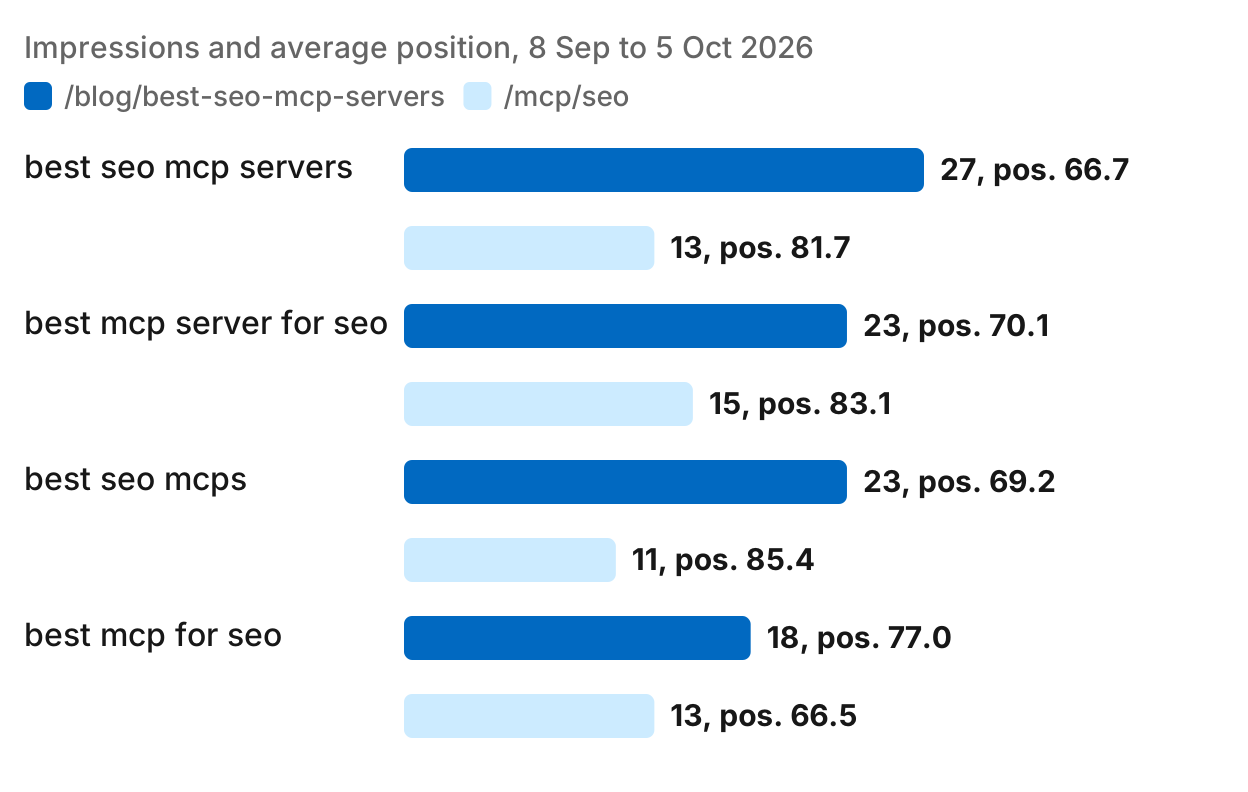
The honest lesson is that the standard "positions 8 to 20" filter returns very little on a young site. The real quick wins are (a) fixing cannibalisation, so one page owns each query, and (b) question queries where you already rank and could rank higher with a more direct answer.
Step 3. Plan the updates:
For the top 3 pages by opportunity, fetch the current page and the top 5 results for its main query.
Tell me exactly what to add or change: missing subtopics, title tag wording, internal links to add, and where the query terms are weak or missing.
This combines your own data with the live SERP. For a young site, focus on the pages that already have some visibility.
Prompts to keep handy
Here are more prompts that work well with live search data:
- "Which of our pages lost the most impressions this month compared with last month, and for which queries?"
- "What does the AI Overview say for [query], and is our site cited? If not, which sites are cited and why?"
- "Compare backlinks for oursite.com and competitor.com: referring domains, dofollow share and average domain rank."
- "Write title tags under 60 characters and meta descriptions between 150 and 160 characters for these five pages. Use the primary keyword naturally in each title."
- "Show the keyword difficulty trend for [keyword] over the last 12 months and explain whether now is a good time to target it."
Claude versus ChatGPT for SEO
Both Claude and ChatGPT work well once connected to search data, and the same Manifold server works in both. The practical difference is that Claude Code works inside your repository, so it suits fixing technical issues in templates, sitemaps or redirects in the same session as the audit. If you use ChatGPT, the ChatGPT setup guide shows how to connect the same server.
Limits and tips
- Verify volume and KD numbers. Different data sources give different numbers because they run separate indexes. Pick one source and stick with it when you track trends.
- Watch cost on large requests. Bigger crawls and longer keyword lists use more credits and take longer. Start with 100 pages if you just want a sample.
- Claude still hallucinates. If a claim about a ranking page or a backlink sounds too convenient, check it manually.
- Check dates. When Claude cites a SERP or an AI Overview, ask when it was fetched. AI answers change from day to day.
- Keep related questions in one chat. Claude can reuse data it already fetched, which saves credits and time.
Run this in your agent
Connect Manifold to Claude, ChatGPT or Cursor, then paste this prompt.
Get 100 keyword ideas for [topic] in the US with volume and KD. Cluster them by intent and topic. For the top 3 clusters, pull the top 10 results for the primary keyword and write a content brief.