Local rank tracker in Claude: Maps rank grids and weekly rankings
Connect Claude to Manifold MCP, run a Google Maps rank grid, create a weekly Google rank monitor, and have Claude say what to fix.


How do I set up a local rank tracker?
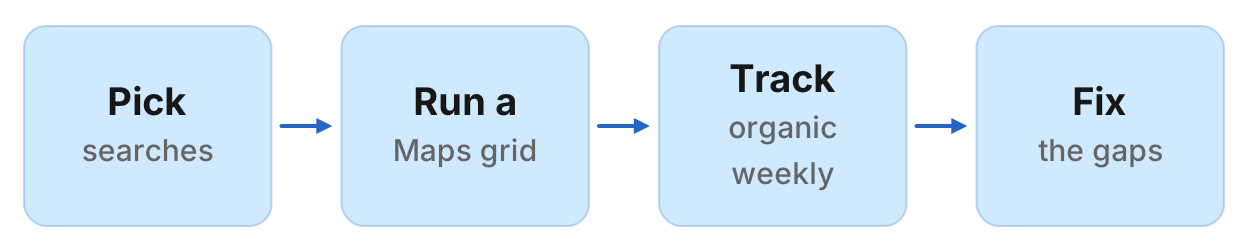
A local rank tracker is a check of where a business ranks on Google Maps and in local results for its money searches, measured from points across its service area and tracked over time. You can run that job in Claude: connect Manifold MCP, pick the searches and the exact Maps name, run maps_search_places at each point of a grid, create a weekly Google rank tracking monitor on the "service + town" keywords, then have Claude turn both into a local SEO action list.
- Connect Manifold MCP to Claude (claude.ai, Claude Desktop or Claude Code), or to ChatGPT.
- Pick 3 to 5 money searches and the business's exact Maps name, then find the listing and its coordinates.
- Build a grid (3x3 or 5x5, about 1 to 2 km apart), call
maps_search_placesonce per point, and tabulate the business's rank, or "not in the top 20". - Create a weekly Google rank tracking monitor on "service + town" keywords (up to 3 on Free).
- Ask Claude what to fix, and rerun the same Maps grid when you want a new snapshot.
This is local rank tracking from inside the chat, not a geo-grid dashboard. A one-off lookup with no history is a local rank checker. National organic tracking, without a Maps grid, is the free rank tracker. New reviews on the listing itself are review monitoring. Prospect lists (unclaimed, few reviews, no website) use a different Maps tool: find local businesses. Keep this page on ranks.
How to set up a local rank tracker in Claude
Monitors come with every plan, including Free, and their checks cost no credits. The free plan keeps 1 monitor. A Keyword or Google rank tracking monitor on Free watches up to 3 keywords. Monitors a workspace can keep, by plan: 1 on Free, 5 on Pro, 25 on Growth, 100 on Agency. For types and cadences, see how monitors work. There is no monitor that tracks Google Maps ranks on a schedule. The Maps grid is on demand: Claude reruns it when you ask.
Maps rank vs local organic rank
A Google Maps ranking is not the same number as the organic rank for "plumber austin". Maps orders places around a point. Google's local pack is the three (or so) businesses in the search results. Organic rows are the blue links. A Google Maps rank checker has to search from more than one point, because the order changes as you move. A Google local rank tracker that only watches organic "service + town" keywords does not see that Maps grid.
maps_search_places returns the places Google Maps shows for a search in an area, in Maps' order: rank (1-based), place_id, cid, name, category, address, phone, website, domain, rating, reviews, is_claimed, status, maps_url. Give latitude and longitude together to search around a point; location is ignored when those are set. Zoom defaults to 14 (a neighbourhood; 11 is a city). Depth defaults to 20, max 100. Rankings differ by point: for a rank grid, call once per point. Results are cached 24 hours. Call prices are on credits. A 3x3 grid is 9 calls; a 5x5 is 25.
seo_get_position scans Google's top 100 for one site and one keyword. Location does not localise the organic rank of a bare service search ("dentist"). Put the town in the keyword ("dentist columbus ohio"), or use maps_search_places for the Maps rank. seo_get_serp is the same split: location localises the local pack, not the organic rows of a bare service search. The Google rank tracking monitor calls seo_get_position once per keyword, desktop, one location. It does not call Maps.
maps_search_businesses is a filtered list (category, rating, reviews, claimed). It is not ranked. Do not use it for ranks.
| What | Tool | How it localises | On demand or monitor | Limits |
|---|---|---|---|---|
| Maps rank at a point | maps_search_places with latitude, longitude, zoom | The point you pass. Order changes street to street. | On demand. No Maps-rank monitor. | One call per point per keyword. Default top 20. |
| Local pack on Google search | seo_get_serp | Location localises the pack. | On demand | Not a scheduled check |
| Organic rank for "service + town" | Google rank tracking monitor (seo_get_position) | Town in the keyword; location is the search location | Weekly by default; daily is the fastest | Desktop. One location. 3 keywords on Free, 50 on paid |
| Filtered business list | maps_search_businesses | Radius around a point | On demand | Not a rank. Prospect lists only |
Step 1: connect Manifold MCP to Claude
Manifold is a hosted MCP server. It is listed in the official MCP registry as com.manifoldmcp/manifold. Every account gets 250 credits a month on the free plan. You do not bring API keys of your own. You pay per call. Full client steps are in the docs. Credit formulas for Maps calls are on the credits page. Creating a monitor and every check it runs cost 0 credits on every plan.
Claude.ai and Claude Desktop. From the Claude setup guide:
- Open Settings, then Connectors.
- Choose Add custom connector. Name it Manifold and paste the server URL from the setup guide.
- Choose Connect, sign in to Manifold, and approve Claude.
- Start a chat, check that Manifold is on in the chat's tools menu, and ask a question.
A connector you add on the web is also there in the desktop app and on your phone. The first time you sign in, Manifold creates your account on the free plan.
Claude Code. From the Claude Code setup guide: add the server with the URL from that guide. Start Claude Code, run /mcp, choose manifold, and finish sign-in in the browser. Add --scope user to have it in every project.
ChatGPT. Manifold MCP is an official ChatGPT app. From the ChatGPT setup guide: open Apps, search for Manifold, click Connect, sign in and click Allow. Then type @Manifold or pick it from the + menu under More. There is no URL to paste and no developer mode to turn on. On Business, Enterprise and Edu, an admin decides which apps the workspace can use. The rest of this guide uses Claude because the title is a Claude how-to. The same tools and the same Google rank monitor work in ChatGPT.
Paste this to check the connection:
Which Manifold tools search Google Maps, look up one place, check a site's Google rank, and create a rank monitor? Say that maps_search_places is ranked and maps_search_businesses is not, that there is no scheduled Maps rank monitor, and that Google rank tracking monitor checks cost 0 credits.
Claude should name maps_search_places, maps_get_place, seo_get_position and monitoring_create_monitor. Monitor tools cost 0 credits to call, and so do the checks they schedule. Maps and SEO parameters are on the Maps tools and SEO tools pages. Every monitor parameter is on the monitoring tools page.
You can also create the Google rank monitor in the dashboard. The rest of this guide uses Claude, because the same agent runs the grid, creates the monitor, and later reads the feed.
Step 2: find the business and its rivals
Start with one town and one keyword, not the whole service area. You need the listing Maps actually shows (the name string can differ from the shopfront), its place_id, and its coordinates.
Paste:
Search Google Maps for "[keyword]" in [Town,Region,Country] with maps_search_places. Find [exact Maps name] in the rows. Give me rank, place_id, cid, name, category, address, rating, reviews, is_claimed, website. Then call maps_get_place on that place_id and give latitude, longitude, category, additional categories, hours, rating, reviews, rating_counts and topics. List the other names in the top 10. Do not invent a listing. If two rows could be us, stop and ask.
maps_search_places with a location name (such as "Austin,Texas,United States") is the right first call. Latitude and longitude override that location when both are set, which is how the grid works in the next step. maps_get_place is one business: hours, primary category, extra categories, rating breakdown and the topics its reviews mention. Use it later to compare the listing with the rival that wins the most pins.
Keep the place_id, the coordinates, and the top names. You will paste them into the grid prompt.
Step 3: run the Maps grid
This is the Google Maps rank tracker part: a geo grid rank tracker you run by asking. Claude builds an N by N set of points around the business, calls maps_search_places once per point, and writes a table. Zoom 14 is a neighbourhood view, which matches a 1 to 2 km gap between pins. Depth 20 is enough to see whether you are on the first Maps screen. Start with 3x3 and one keyword. Each point is one call, priced on credits. A 3x3 grid is 9 calls. A 5x5 is 25. If you add a second keyword, that is another full set of calls.
Paste, then let it run:
Build a 3x3 grid around latitude [lat], longitude [lng], about 1.5 km between points. For each of the 9 points, call maps_search_places with keyword "[keyword]", that latitude and longitude, zoom 14, depth 20. For each point record: our rank for place_id [id] (or "not in the top 20"), the number 1 name, its rating and review count. Return a 3x3 grid table, then average rank (treat missing as 21), and the share of points where we are in the top 3. Save the table in this chat so I can paste it back next week. Do not invent ranks.
Why the rank moves. Google Maps orders results from the searcher's point. A pin two kilometres south can put a rival closer than you, even when you sit in the town centre. That is why a local search rank checker that only uses one location is not a grid. Rerun the same points, same keyword, same zoom. A cached repeat this account already paid for within 24 hours comes back at no extra cost; a week later is a new call.
If 3x3 is tight on the service area, go to 5x5 on the same keyword before you add a second search. Do not jump to five keywords on a 5x5 on day one.
Step 4: track the organic side weekly
The Maps grid is a snapshot. The organic side can sit on a schedule. Create a Google rank tracking monitor (preset google_rankings) for the site, with "service + town" keywords, location set to the city. Default cadence is weekly. Daily is the fastest it runs. Alerts start off. Device is desktop. One location per monitor. Each check calls seo_get_position per keyword with that location. Creating it and its checks cost 0 credits.
Put the town in the keyword. Location does not localise a bare "emergency plumber" into Austin organic results. "emergency plumber austin" (or "emergency plumber austin tx") does. That is the same rule as seo_get_serp: location localises the local pack, not the organic rows of a bare service search. The monitor is the scheduled version of seo_get_position, so the town has to live in the string.
On Free, list up to 3 keywords. On a paid plan the preset holds 1 to 50, with no extra keyword cap. The product page for the monitor is monitors.
Paste, then let it preview:
Create a weekly Google rank monitor named "[town] local rankings" for [site] on these keywords, location [Town,Region,Country]: [service town 1], [service town 2], [service town 3]. Description: "When a service plus town keyword moves 3 places or more, or leaves the top 10, refresh that page and rerun the Maps grid for that search. Compare the new grid with last week's table." Preview it first, then create it once I agree.
Your agent calls monitoring_create_monitor with preview true first, shows the site, keywords, location and cadence, and creates it once you agree. Write the description as the job for a later agent: refresh the suburb page, rerun the grid, check a cannibalising URL. If you leave it out, one is written from the fields ("Where {site} ranks in Google ({location}, desktop) for N keywords").
The first check runs within five minutes. It records where each keyword sits and reports nothing. That starting point stops last month's positions arriving as news. Changes appear from the second check on.
Step 5: read the feed and turn it into an action list
After the second weekly check, ask Claude for organic moves, rerun the grid on the same points, and compare the business with the rival that wins the most pins.
A move is news when:
- The position changes by 3 places or more
- The keyword crosses into or out of the top 3 or the top 10
- The keyword enters or leaves the top 100
- A different page now ranks for that keyword (
rank.new_page)
A wobble of one or two places inside the same band is not reported. Rank up and rank down are marked urgent. A URL change is not. The headline number the monitor charts is average position across the keywords that rank.
Paste:
What did my Google rank monitor find since last week? For each keyword that moved, give old position, new position, the URL, and what to do. Then rerun the same 3x3 Maps grid for [keyword] at these points: [paste last week's points]. Compare with this saved table: [paste last week's grid]. Call maps_get_place on us and on the rival that is number 1 at the most points. Return a table: action, why, evidence (Maps pin, organic keyword, or profile field). Cover primary category, review count and rating, claimed profile, website, and whether we need a service page for a suburb we lose. Do not invent reviews or ranks.
Run this in your agent
Connect Manifold to Claude, ChatGPT or Cursor, then paste this prompt.
Set up a local rank tracker for [business Maps name] in [town]. Call maps_search_places for "[keyword]" with location [Town,Region,Country] and find our listing. Then call maps_get_place on its place_id. Build a 3x3 grid of points about 1.5 km apart around its coordinates. Call maps_search_places once per point with keyword "[keyword]", that latitude and longitude, zoom 14, depth 20. Return a table: point, our rank or "not in the top 20", the number 1 place. Then average rank and share of points in the top 3. Preview a weekly Google rank tracking monitor named "[town] rankings" for [site] on these keywords, location [Town,Region,Country]: [service town], [service town], [service town]. Description: "When a service plus town keyword moves 3 places or more, or leaves the top 10, refresh that suburb page and compare the Maps grid with last week." Create it once I agree. After the second check, read monitoring_get_changes. There is no scheduled Maps rank monitor: rerun the same grid when I ask and compare with the saved table.
Claude reads organic moves with monitoring_get_changes. Use monitoring_get_history for the trend. Use monitoring_update_monitor to pause, change keywords, change location, or run a check now. The Maps half is not in that feed. You rerun the grid and paste last week's table so Claude can diff it.
Typical actions that hold up:
Category and claimed. If the rival's primary category matches the search and yours does not, that is a profile job, not a new landing page.
Reviews. A gap in count or stars at the pins you lose is a review request job. New Google Maps reviews are review monitoring. Those reviews feed Maps rank; they are not the rank itself.
Service pages. If you vanish from the south-east pins and "plumber south austin" is not a page you have, that is a page to write. The organic monitor is what tells you whether that page starts to rank.
NAP and website. A missing website, a closed status, or an unclaimed profile on your row is a listing job. Claude can see website, is_claimed and status on each Maps row.
Do not treat a one-week Maps snapshot as a trend. Save the table. Rerun the same points. Two grids and one organic move are enough to pick a job.
Worked example (illustrative)
The names, coordinates, ranks and digest below are an example, not measurements of a real shop.
Acme Plumbing is a made-up emergency plumber in Austin. After connecting Claude, Acme searches maps_search_places for "emergency plumber" with location Austin,Texas,United States. A row named "Acme Plumbing" comes back with a place_id, coordinates about 30.27, -97.74, rating 4.6, 80 reviews, claimed. Rival Plumbing is rank 1. Other Drain Co. is rank 3.
Acme then pastes the 3x3 grid prompt for "emergency plumber", zoom 14, depth 20. Nine calls. Example grid (illustrative):
| West | Centre | East | |
|---|---|---|---|
| North | 4 (Rival Plumbing) | 2 (Rival Plumbing) | 6 (Other Drain Co.) |
| Centre | 3 (Rival Plumbing) | 1 (Acme Plumbing) | 5 (Rival Plumbing) |
| South | 8 (Other Drain Co.) | 4 (Rival Plumbing) | not in the top 20 (Other Drain Co.) |
Average rank, treating missing as 21: about 6. Share of points in the top 3: 2 of 9. Rival Plumbing is number 1 on five pins. Other Drain Co. wins the south-east.
Acme creates a weekly Google rank monitor for acmeplumbing.example, location Austin,Texas,United States, keywords emergency plumber austin, plumber austin tx, water heater repair austin. Three keywords fit Free. The first check is quiet. From the second check on, Acme asks for the digest and reruns the same nine points.
Example Claude table (illustrative):
| Action | Why | Evidence |
|---|---|---|
| Keep the primary category as plumber, not contractor | Rival matches the search at most pins | maps_get_place category on Rival vs Acme |
| Ask recent customers for Google reviews this month | Rival has more reviews at the pins Acme loses | Rating and review count on the number 1 rows |
| Write a south Austin emergency page | South-east pin is not in the top 20; organic "emergency plumber austin" is the keyword to watch | Grid cell; monitor will flag a first ranking |
| Claim nothing new on the listing | Acme is already claimed, with a website | is_claimed, website on Acme's row |
| Do not chase the north-east pin this week | Rank 6 with no organic move | Grid vs monitoring_get_changes empty for that term |
None of those rows are live measurements. They show the shape of a digest Claude can write from a grid table plus monitoring_get_changes: a profile gap, a review gap, a suburb page, and a pin to ignore.
Local rank tracker software vs this setup
Local Falcon, BrightLocal, Whitespark and SE Ranking are local seo rank tracker tools in the usual sense: scheduled geo-grid scans, heatmaps, share of local voice, history, often white-label reports, and in some cases Bing and mobile. Localo and similar checkers cover a lighter google maps rank checker job. That is the right software when you need a 7x7 or 13x13 heatmap every week, a PDF for a client, or mobile ranks next to desktop.
This setup is a different job. You already work in Claude or ChatGPT. You run an on-demand Maps grid (one call per point), keep a weekly Google rank tracking monitor on a handful of "service + town" keywords, and the same agent explains the gap. There is no scheduled Maps rank monitor, no heatmap, no share-of-voice chart, no mobile device on the organic monitor, and no Bing rank. History on Maps is the table you saved. Organic history is the monitor's feed.
Use this when you have one or a few locations, a handful of keywords, and you want the AI to say what to fix. Use it for agency spot checks: run a 3x3, paste last month's table, leave with an action list. Use a dedicated suite when you need scheduled grids, heatmaps, white-label reports, mobile and Bing, or hundreds of keywords across many postcodes.
The honest answer to "what is the best google local rank tracker" is that it depends on that split. A local rank tracker for three keywords and a 3x3 you rerun when you ask is this guide. A 13x13 heatmap for forty locations is not.
Create a Google rank monitor and run a Maps grid
Create a Google rank tracking monitor on your "service + town" keywords, then run your first Maps grid. Monitor checks use no credits. Every account gets 250 credits a month on the free plan for those grid calls. Free keeps 1 monitor of up to 3 keywords.
Open monitors and start from the dashboard form, or connect Claude and paste the prompt above. Then open the Google Maps MCP tools and run the 3x3. The preview shows what the monitor will watch before anything is created.