Claude plugins vs skills vs MCP
What a Claude plugin, skill, connector and MCP each add, how those words work in ChatGPT, and one marketing job with Manifold MCP.

Plugin, skill or MCP: which one do I need?
You pick the layer the agent is missing: a method, live data, or a package that installs both. Below is the map, including ChatGPT's names for the same layers, then one job with Manifold MCP.
The four terms
| Term | What it is | What it contains | Where you add it in Claude | ChatGPT equivalent | Example |
|---|---|---|---|---|---|
| Skill | Instructions the agent loads when a task matches | A folder with a SKILL.md file, and sometimes scripts | Customize, then Skills; or inside a plugin | Skill | Manifold's SEO skill |
| MCP server | Access to outside tools and data | Tools, resources and prompts | You add it as a connector | App, or a custom MCP server added as a plugin | Manifold MCP |
| Connector | Claude's name for an MCP server you add | The MCP server | Customize, then Connectors | App | Manifold as a custom connector |
| Plugin | An installable package | Skills plus connectors; Claude Code also adds commands, agents, hooks and MCP servers | Customize, then Plugins; in Claude Code, /plugin | Plugin | manifold@manifold |
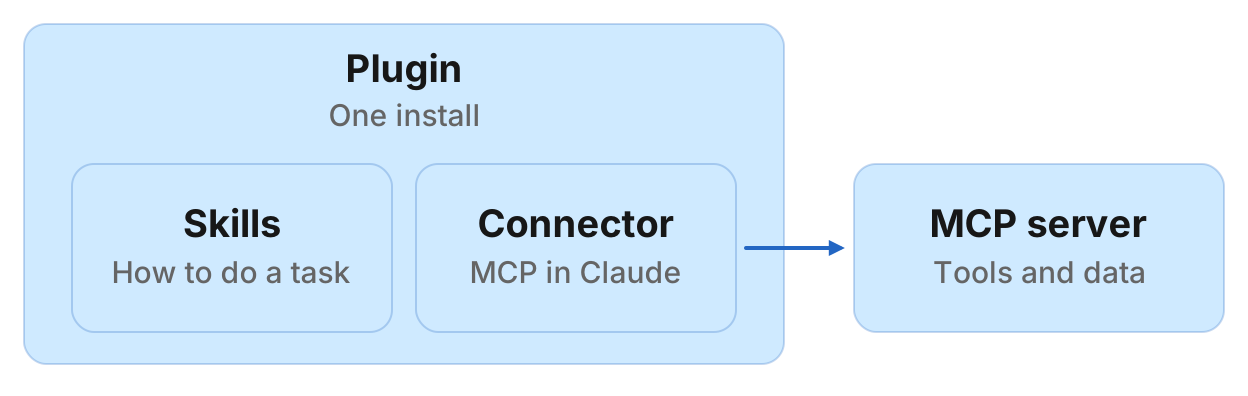
Skills
A skill is a folder of instructions, with a SKILL.md file, that Claude loads when a task matches, so a repeated job follows the same steps. That folder shape is in Anthropic's Claude Code skills docs. Claude loads skills on demand, per Anthropic's help article on skills. Manifold's marketing skills still answer without the connector; they ask you to connect when the work needs a measurement.
When to use a skill: you have a method you want the agent to repeat, and you do not want to re-explain it in every chat.
MCP and connectors
An MCP server gives the agent tools and data from outside the chat.
In Claude on the web, desktop and mobile, that server is a connector. You add one under Customize, then Connectors, from Anthropic's connectors directory or as a custom connector. Directory connectors and custom connectors run on the same infrastructure. Anthropic's skills and MCP article puts the split as: if you are explaining how to do something, that is a skill; if the agent needs to access something, that is MCP.
When to use MCP: the agent must look something up that is not in the chat, such as keyword volume or Reddit threads.
Plugins
A plugin is the package. On Anthropic's plugins overview it installs skills, MCP connectors, commands and agents as one unit, from Customize, then Plugins. In Claude Code it is a directory of skills, agents, hooks and MCP servers, installed from a marketplace with /plugin. Anthropic's help article on plugins is the same model in the product: skills and connectors in one add.
ChatGPT uses the same three words with different packaging. A plugin is the installable unit and can include skills and apps; an app connects ChatGPT to a service. ChatGPT and Codex share one plugin directory. A custom MCP server is created as a plugin.
When to use a plugin: you want one install a teammate can add, instead of a skill folder plus a connector each.
How they fit together: a marketing example with Manifold MCP
Manifold MCP is a hosted MCP server for marketing data: you add it once and you pay per call. Every account gets 250 credits a month on the free plan.
In Claude on the web or desktop, add it as a custom connector: open Customize, then Connectors, add a custom connector named Manifold, and paste the server URL from the Claude setup guide.
In Claude Code, the marketing skills plugin installs the skills and the connector together. Run /plugin marketplace add manifoldmcp/marketing-skills, then /plugin install manifold@manifold, then /mcp to sign in, as the Claude Code setup guide describes.
In ChatGPT, Manifold MCP is an app in ChatGPT's directory that you connect: open Apps, search for Manifold, click Connect and sign in, as the ChatGPT setup guide describes. That makes it an app inside a plugin, in OpenAI's current wording.
Then one job. You ask for a keyword gap. The agent follows the skill for the method: pull missing keywords and cluster them into pages. It gets the live data through the connector, calling seo_get_keyword_gap. That tool returns the keywords one competitor ranks for in the top 100 that the target does not rank for at all, with volume, keyword difficulty, CPC, intent, the competitor's rank and URL, sorted by volume. The SEO MCP server is that data, and the step-by-step is in keyword gap analysis. For SEO workflows in Claude after the plugin is in, see Claude SEO. For the same data in ChatGPT, see ChatGPT for SEO.
Run this in your agent
Connect Manifold to Claude, ChatGPT or Cursor, then paste this prompt.
Find keywords competitor.com ranks for in the top 100 that oursite.com does not rank for at all. Sort by volume. Cluster them into pages we could write.
Which one do you need?
- If you want the agent to follow the same method every time: add a skill.
- If you want live tools and data: add a connector in Claude, or an app in ChatGPT.
- If you want the method and the data in one install: add a plugin.
- If you use Claude on the web and only need the data: add a custom connector.
- If you use Claude Code and want marketing skills plus the data: install the plugin.