Discovered or crawled, currently not indexed: how to fix it
Two Search Console statuses keep pages out of Google for different reasons. This guide shows how to tell them apart, rule out noindex and canonical problems, fix each one, and resubmit, by hand or with your agent.

Why are my new pages not on Google?
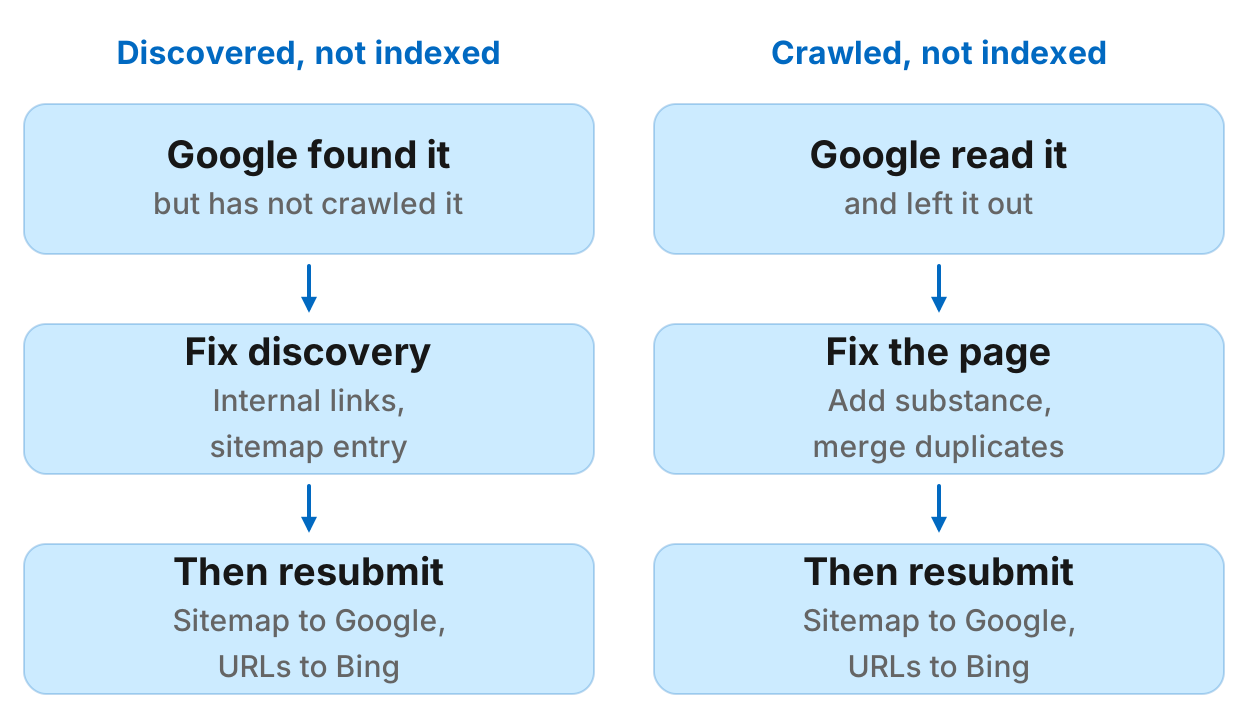
"Discovered - currently not indexed" means Google knows the URL but has not crawled it yet. "Crawled - currently not indexed" means Google crawled the page and chose to leave it out. The first is usually a discovery problem: link to the page from pages Google crawls often, and list it in your sitemap. The second is usually a quality problem: the page is thin, or too close to another page, and asking Google to crawl it again changes nothing until the page changes. Fix the cause, then resubmit your sitemap. Google has no API to request indexing of one ordinary page, and Request indexing in Search Console is a manual button with a daily limit.
This guide covers what each status means, how to rule out the causes that look like them, the fix for each, what requesting indexing does and does not do, and how to have your agent check and resubmit your pages for you.
What the two statuses mean
Both appear in Search Console's Page indexing report under "Why pages aren't indexed", and in the URL Inspection tool for a single page.
| Status | What Google did | Usual cause | Fix |
|---|---|---|---|
| Discovered - currently not indexed | Found the URL, did not crawl it | Weak internal links, a large site, a slow server | Link to it from crawled pages, list it in the sitemap |
| Crawled - currently not indexed | Crawled the page, left it out | Thin or near-duplicate content | Make the page worth indexing, then resubmit |
Google's own help page says a discovered page was usually rescheduled because crawling it then was expected to overload the site, and that a crawled page may or may not be indexed later, with no need to resubmit it.
Rule out the other causes first
A page left out for a clear technical reason gets its own status in the report, but check the page itself before you work on either status above. Run URL Inspection, then Test live URL, and look for:
- Noindex. A
noindexrobots meta tag orX-Robots-Tagheader. A staging setting left on is the classic cause. - A canonical elsewhere. The page's canonical points at another URL, or Google chose a different canonical than yours. Near duplicates end up here.
- An error status. A 4xx or 5xx, or a redirect, where you expected a 200.
- Blocked by robots.txt. A
Disallowrule that matches the path. Do not add noindex as well: Google cannot read it on a blocked page.
If none of these apply, the status is the real diagnosis.
How to fix "Discovered - currently not indexed"
Google knows the URL and has not spent a crawl on it. Make the page easier to reach and look more worth the crawl:
- Link to it from pages Google crawls often: the homepage, a hub or category page, your newest posts. An orphan page with no internal links is the most common case.
- List it in your XML sitemap, with an accurate
lastmod, and make sure the sitemap is submitted in Search Console. - Check crawl capacity on a large site. Search Console's Crawl stats report shows server response times and errors; a slow or failing server makes Google crawl less.
- Cut the URLs that waste crawls: faceted filters, endless parameters and tag pages that compete with the pages you want crawled.
Then resubmit the sitemap. A small site with a few new pages usually clears this within days to a few weeks.
How to fix "Crawled - currently not indexed"
Google read the page and judged it not worth a place in the index yet. Recrawling it does not change that; the page has to change.
- Filter to the pages you care about. In the report, switch from all known pages to your submitted pages. Feeds, pagination and parameter URLs in this bucket are normal and need no fix.
- Compare the page with what is indexed on the same topic. If it says the same thing in fewer words, add what the indexed pages lack: first-hand detail, data, examples, answers to the follow-up questions.
- Merge near duplicates. Two pages on one topic split Google's interest. Combine them, or make each one clearly distinct, and point canonicals at the page you keep.
- Link to it from relevant pages so Google sees it as part of the site, not a stray.
- Resubmit once the change is live, then wait. Requesting indexing again and again for an unchanged page does nothing.
Requesting indexing: what it does and does not do
Request indexing in Search Console. Open URL Inspection on the page, then click Request indexing. Google's recrawl guide says there is a quota on individual URL requests and that a request does not guarantee the page will be indexed, quickly or at all. It is a button in Search Console, not an API: no tool or agent can press it for you.
Resubmit your sitemap. For more than a few URLs, Google's recrawl guide points to the sitemap. Submitting it again in Search Console, or through the Search Console API, tells Google the list changed.
The Google Indexing API is for job postings and livestreams. Google's Indexing API documentation limits it to pages with JobPosting structured data or a BroadcastEvent embedded in a VideoObject. "Instant indexing" plugins and services that send other pages through it are outside what Google supports.
Bing takes URLs directly. Bing Webmaster Tools has a URL Submission API with a daily quota per site, and Bing also accepts IndexNow pings. Google does not use IndexNow.
Have your agent check and resubmit your pages
Checking a handful of URLs one by one in Search Console is slow, and the fixes depend on reading several fields per page. An agent with your Search Console and Bing Webmaster Tools connected can do it in one pass:
- Inspect each URL in Google and read its coverage state, canonical, robots status and last crawl.
- Fetch the live page to confirm its status code, robots meta and canonical as served today, since the inspection can be days old.
- Match each URL against Bing's crawl issues.
- Sort every URL into one cause with its fix, as a table for your developer or writer.
- Once the fixes are live, resubmit the sitemap to Google and submit the URLs to Bing within its daily quota.
Run this in your agent
Connect Manifold to Claude, ChatGPT or Cursor, then paste this prompt.
These pages are not on Google yet: [URLs]. Inspect each one in Search Console, check the live page, and tell me why each is not indexed and what to fix. Once I confirm the fixes are live, resubmit the sitemap to Google and submit the URLs to Bing.
Manifold's Google Search Console MCP and Bing Webmaster Tools MCP tools do this from your own accounts, so they cost no credits. Manifold cannot request indexing of a single page in Google, because Google offers no API for it; it resubmits your sitemap to Google and submits URLs to Bing. The console tools reference lists every call.
How long indexing takes
Google does not promise a time. A new page on a small site with internal links and a sitemap entry is often indexed within days, and can take a few weeks. Check again with URL Inspection about a week after the fix, and look at the sitemap's last read date in Search Console a day after you resubmit it. If a page stays in "Crawled - currently not indexed" after a real improvement, the page still is not different enough from what Google already has.