The best Google Search Console MCP servers
Google has no official Search Console MCP server. Community-built servers are free but need a Google Cloud project; hosted options skip that setup. Here are eleven compared on price, sign-in, and what they can read or change.

Which Search Console MCP server is best?
Is there an official Google Search Console MCP server?
Google has no official Search Console MCP server (checked October 2026). The most used free option is mcp-gsc, a local Python server that needs a Google Cloud project. Hosted servers such as OpenSEO, GSC Wizard and Manifold skip that setup: you paste a URL and sign in with Google. Here is how they compare on price, setup, and what they can read or change.
Want it working in Claude or ChatGPT without a Cloud project? Set up the Google Search Console MCP server in two minutes.
The servers, compared
Prices and features checked October 2026 on each project's own page.
| Server | Runs | How you sign in | Price | Can change your property | Also covers |
|---|---|---|---|---|---|
| mcp-gsc | Local, Python via uvx | OAuth client or service account from your Google Cloud project | Free, MIT | Only with GSC_ALLOW_DESTRUCTIVE on | Nothing else |
| FlorianBruniaux/google-search-console-mcp | Local, Python via uvx | Service account key or OAuth desktop credentials | Free, MIT | Submits URLs and sitemaps after you confirm | Bing, GA4, CrUX, IndexNow |
| crunchtools/mcp-google-search-console | Local, Python via uvx, or a container | Browser OAuth, or a refresh token | Free, AGPL-3.0 | Adds and deletes sites and sitemaps | Nothing else |
| ncosentino/google-search-console-mcp | Local, Go or .NET binary | Service account key | Free, MIT | No | Nothing else |
| OpenSEO | Hosted | OAuth or API key | $10/mo, Search Console data free | Not in its docs | Keywords, SERPs, rank tracking, AI visibility |
| GSC Wizard | Hosted | API key or one-click sign-in | From €17/mo, 7-day trial | No | Bing, Core Web Vitals; GA4 in a separate MCP |
| Coupler.io | Hosted, through a Coupler data flow | Personal access token | Professional plan or higher | Not in its docs | Discover and News performance |
| ContextBolt | Hosted | Email sign-in | $35/mo SEO plan, Search Console calls use no credits | No | Keywords, SERPs, backlinks |
| Composio | Hosted, through its CLI or MCP Gateway | Composio-managed OAuth | Free to start | Not in its docs | Other apps on the same gateway |
| Pipedream | Hosted, for apps you build | Pipedream Connect token per user | See Pipedream | Submits and deletes sitemaps | Other apps on the same server |
| Manifold | Hosted | Sign in, then connect Google | 0 credits per Search Console call | Submits sitemaps (and URLs to Bing) | Bing, Google Analytics, SEO data, AI answers |
What you can ask a Search Console MCP server
Once one is connected, you ask the questions people open Search Console for, such as which queries lost clicks this week or why a URL is not indexed. Any of these servers answers them; the questions to ask are listed on our Search Console MCP page. If the answer is "Crawled, currently not indexed", our guide to fixing currently not indexed pages covers what to change.
How to set up mcp-gsc (OAuth or service account)
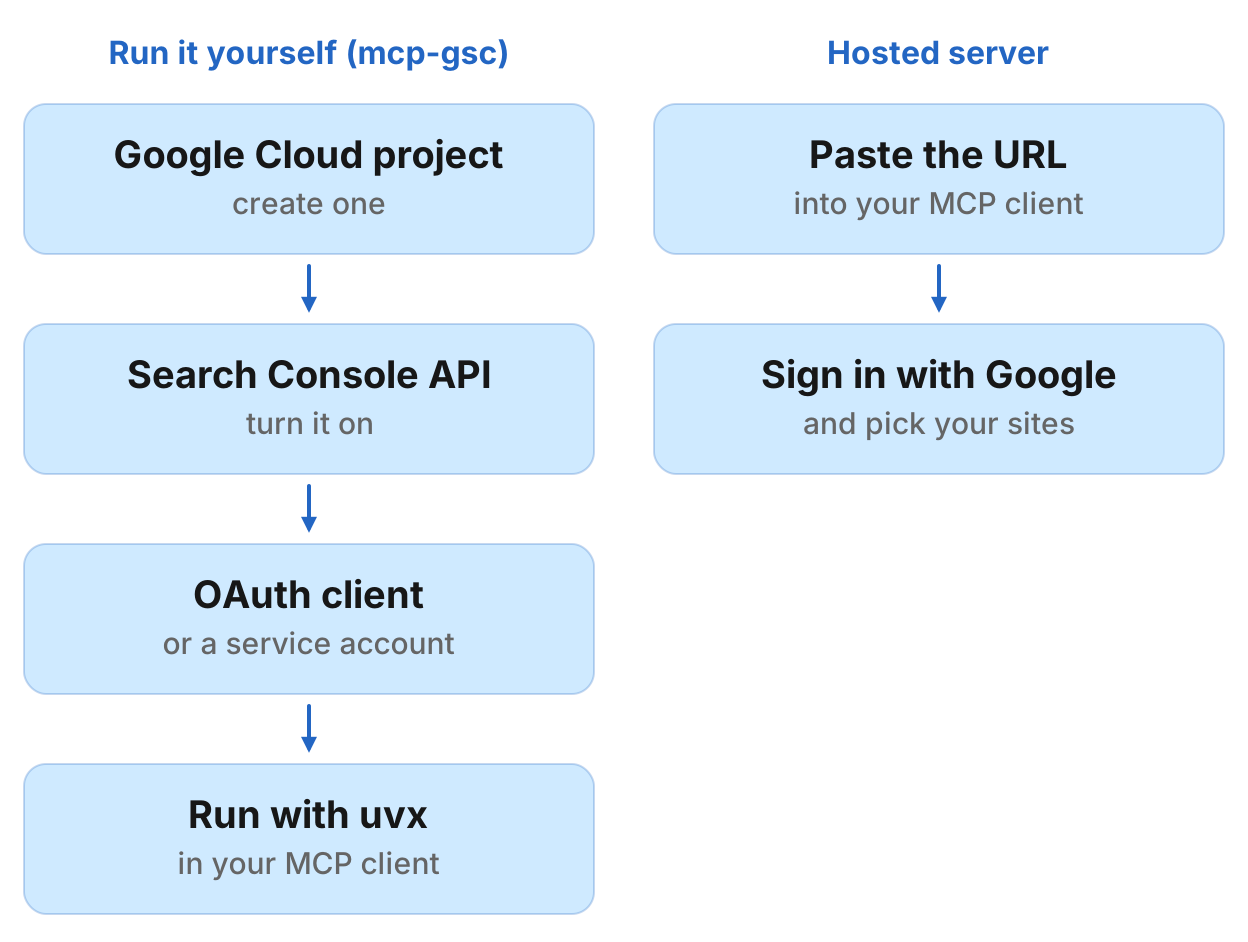
Create a Google Cloud project and turn on the Search Console API.
Pick how to sign in. For personal use, create an OAuth client of the Desktop app type, download its JSON file and set
GSC_OAUTH_CLIENT_SECRETS_FILEto its full path. For automation or a team, create a service account key, add the service account's email as a user on your Search Console property, setGSC_CREDENTIALS_PATHto the key's full path andGSC_SKIP_OAUTHto"true".Add it to your client. In Claude Code:
claude mcp add gsc --env GSC_OAUTH_CLIENT_SECRETS_FILE=/full/path/to/client_secrets.json -- uvx mcp-search-consoleIn Claude Desktop, Cursor and other JSON configs, run
uvxwith the argumentmcp-search-consoleand the same environment variable. Desktop apps often need the full path touvx.Sign in once. With OAuth, the first call opens a browser window. The token is cached after that.
To skip the Cloud project, a hosted server signs you in with Google instead: see the two-minute setup for Claude and ChatGPT.
AminForou/mcp-gsc: the leading community server
mcp-gsc is a local Python server you run via uvx. It is free and MIT licensed, and works in Claude Desktop, Cursor, Codex CLI, Gemini CLI and other MCP clients, Claude Code included. Its tools list your properties, pull search analytics, compare two periods, inspect URLs one at a time or in batches, check indexing issues and manage sitemaps. The tools that add or delete a site or delete a sitemap stay off until you set GSC_ALLOW_DESTRUCTIVE to "true".
Best for: Full control over credentials and data, if you do not mind setting up a Google Cloud project.
FlorianBruniaux/google-search-console-mcp: Search Console plus Bing and GA4
FlorianBruniaux/google-search-console-mcp is a local Python server (3.11 or later) you run with uvx gsc-mcp-tools. Sign in with a service account key or OAuth desktop credentials. Beyond Search Console, it reads Bing Webmaster Tools, GA4 and Chrome UX Report data, and it ships ready-made analyses such as traffic drops, striking-distance queries, cannibalization and sitemap audits. Its write tools, which submit URLs and sitemaps, ask for explicit confirmation first. MIT licensed.
Best for: A free local server that pairs Search Console with Bing and GA4 in one install.
crunchtools/mcp-google-search-console: sites and sitemaps
crunchtools/mcp-google-search-console runs with uvx mcp-google-search-console-crunchtools or as a container image. Browser-based OAuth handles sign-in, with a refresh token as the fallback. It queries search analytics, inspects URLs, and manages sitemaps and site properties, including adding and deleting them. AGPL-3.0 licensed.
Best for: Managing sitemaps and properties from your agent, or running the server in a container.
ncosentino/google-search-console-mcp: a single binary
ncosentino/google-search-console-mcp ships as a prebuilt Go or .NET binary, so it needs no Node.js or Python. It signs in with a service account that you add as a Full user on the property. Its four tools query search analytics, list sites, list sitemaps and inspect a URL; none of them change your property. MIT licensed.
Best for: A small server with no runtime to install, and no way to change your property by accident.
OpenSEO: hosted from $10/mo
OpenSEO is a hosted server at https://app.openseo.so/mcp. Sign in with OAuth or an API key. It reads your Search Console performance and URL inspection, alongside keyword research, SERPs, rank tracking and AI visibility. The Base plan is $10/mo with $10 of usage included, Search Console data does not use that allowance, and a free trial includes $0.50 of credits.
Best for: Skipping the Google Cloud setup on a low-cost hosted plan that also covers keyword research.
GSC Wizard: hosted Search Console analysis
GSC Wizard runs a hosted MCP server at mcp.gscwizard.com that reads the properties connected to your GSC Wizard account. Sign in with an API key or one click. Its tools go beyond raw rows: cannibalization, content decay, striking-distance queries, bulk URL inspection, IndexNow submissions, Bing Webmaster Tools and Core Web Vitals. MCP access is on every plan, from €17/mo, with a 7-day trial.
Best for: Agencies and site owners who want ready-made Search Console analyses rather than raw queries.
Coupler.io: Search Console through a data flow
Coupler.io connects Search Console as a data flow in your Coupler account, then exposes it to Claude, ChatGPT, Gemini or a custom MCP client with a personal access token. It covers search performance, search appearance, Discover and Google News performance, URL inspection and index coverage. Its MCP page says you need the Professional plan or higher.
Best for: Teams already using Coupler.io for other data connectors.
ContextBolt: Search Console included free
ContextBolt includes Search Console in its SEO plan. The plan costs $35/mo for 1,000 credits, and Search Console calls use no credits. You paste ContextBolt's MCP link into your agent and sign in with your email.
Best for: Teams already using ContextBolt for other SEO tools who want Search Console in the same account.
Composio and Pipedream: for developers
Composio offers a Search Console toolkit (search analytics, URL inspection, sitemaps, site list) through its CLI or its MCP Gateway, with Composio handling OAuth. It works in Claude Code, Cursor, Codex and other coding agents, and is free to start. Pipedream exposes Search Console actions on its remote MCP server through Pipedream Connect, which is built for products that connect their own users' accounts.
Best for: Developers wiring Search Console into an agent alongside many other apps.
Manifold: hosted, Search Console calls cost 0 credits
Manifold's Google Search Console MCP is hosted. Your agent reads clicks, impressions, CTR and position by query, page, country, device or date, plus sitemaps and URL inspection, and can resubmit a sitemap when you publish. Bing Webmaster Tools, where it can also submit URLs for crawling, and Google Analytics connect the same way, also at 0 credits per call. The same server adds keyword research, SERPs, backlinks and AI answers when you need data beyond your own site. The setup steps for Claude and ChatGPT are on its page.
Best for: A two-minute hosted setup that works in Claude, ChatGPT and Cursor, with Bing and Analytics beside Search Console.
Limits every Search Console server shares
- History: Search Console keeps 16 months of performance data, so no server can read further back.
- Freshness: Google's performance data lags about two days.
- Row caps: The Search Console API returns at most 25,000 rows per request and the top rows rather than every row, so long-tail totals rarely match the dashboard.
Which Google Search Console MCP server should you use?
Pick by whether you want to manage credentials yourself and whether you need other data in the same server.
You want full control and free access. Use mcp-gsc. Set up a Google Cloud project, enable the Search Console API, and run the server locally.
You want Bing and GA4 in the same free install. Use FlorianBruniaux/google-search-console-mcp.
You want hosted setup on a low budget. Use OpenSEO ($10/mo), or GSC Wizard for ready-made analyses.
You already use ContextBolt or Coupler.io. Add Search Console to the account you have.
You want hosted Search Console, Bing and Analytics at 0 credits, plus SEO data and AI answers in one server. Use Manifold's Search Console MCP server.
Run this in your agent
Connect Manifold to Claude, ChatGPT or Cursor, then paste this prompt.
Pull my Search Console queries for the last 28 days where we rank 5 to 15 with at least 50 impressions, grouped by page.