Screaming Frog MCP: setup guide and alternatives
Screaming Frog SEO Spider v24 added a built-in MCP server for crawling and analyzing sites from Claude, Cursor and other MCP clients. Here is how to set it up, the community headless option, and when a hosted alternative fits better.

Screaming Frog SEO Spider v24 added a built-in MCP server that lets Claude, Cursor and other MCP clients run crawls, query crawl data and export results in plain language. You need a paid Screaming Frog licence ($279/year) and the SEO Spider installed on the same machine as your agent. For unattended audits or when you want the GUI closed, the community bzsasson/screaming-frog-mcp server runs headless via the CLI. For teams that want hosted crawl tools with no local app or licence needed, Manifold offers seo_run_technical_crawl and seo_get_page alongside Search Console and Bing at 0 credits.
This guide covers which Screaming Frog version added MCP, how to enable and connect it in Claude Desktop, Claude Code and Cursor, why ChatGPT is harder, the community headless option, example prompts for technical audits, and when a hosted alternative like Manifold fits better.
What is Screaming Frog MCP?
Screaming Frog MCP is the bridge between your AI agent and the Screaming Frog SEO Spider app. You ask a question in plain language, and the agent picks the Screaming Frog tools to call. Screaming Frog announced in their v24 release post (May 19, 2026) that the MCP server lets you "run crawls, analyse, export and manipulate data using the SEO Spider and node.js within Claude, LM Studio and other AI chat assistants."
The built-in server offers around 29 tools across crawl control (start, pause, resume, progress tracking), reports and bulk exports with field selection, URL-level inspection, screenshots, embeddings exports, and optionally a Node.js script runner with npm and filesystem read/write tools for post-processing.
Who Screaming Frog MCP is for
Screaming Frog MCP fits when:
- You already pay for Screaming Frog and want to use that data in conversation with your agent
- You want full control over crawl configuration, JavaScript rendering and custom extraction
- You are comfortable leaving the desktop app running while you work
- You need interactive session features like visualizations, screenshots and crawl comparison
It may not fit when:
- You want to run scheduled audits with the GUI closed
- You want a hosted server with no local app or licence needed
- You want Search Console and Bing data in the same server
- You want to use it from ChatGPT or claude.ai on the web (the local server only works from clients on the same machine)
Step 1: check your version and licence
Screaming Frog MCP requires SEO Spider v24 or later. Download the latest version from screamingfrog.co.uk/seo-spider if you are running an earlier version.
The MCP server is a paid licence feature: Screaming Frog's docs say it will not work in the free version. At the time of writing, a paid licence is listed at $279 per year. It also needs database storage mode (File → Settings → Storage Mode), which is the default.
If you do not have a paid licence and do not want to start one just for MCP, skip to the hosted alternative section below.
Step 2: enable the MCP server
In Screaming Frog:
- Open File → Settings → MCP Server
- Accept and enable the Node.js runtime environment
- Click Start MCP Server. A "MCP Server Active" message appears in the bottom left of the app, and the server listens at
http://localhost:11435/mcp
That is the Streamable HTTP mode, and it only runs while the SEO Spider is open. Close the app and the server stops. There is also a STDIO mode, where Claude Desktop launches the Spider headless itself (see Step 3).
Step 3: connect in Claude Desktop
In Claude Desktop:
Screaming Frog ships Claude Desktop extensions (.mcpb files) on its MCP Server guide: a STDIO one, where Claude launches the Spider headless, and a Streamable one, which connects to the server you started in Step 2 and needs Node.js installed.
- Download the extension you want from that guide
- In Claude Desktop, open Settings → Extensions, click Advanced settings, then Install Extension
- Select the downloaded
.mcpbfile and click Install - Quit Claude fully (from the tray icon on Windows) and reopen it. The extension shows as running under Settings → Developer
The extension assumes the SEO Spider is in its default install location. If it is not, edit the file to point at your path.
Step 4: connect in Claude Code
Add the server from your terminal:
claude mcp add --transport http screaming-frog http://localhost:11435/mcpThen run /mcp in Claude Code and enable the Screaming Frog server.
Step 5: ChatGPT
Screaming Frog does not document a ChatGPT setup. ChatGPT adds custom MCP servers in developer mode (Settings → Apps → Advanced settings), but it connects to them from OpenAI's side over a public HTTPS URL, so it cannot reach http://localhost:11435/mcp on your machine. Getting there means putting a tunnel in front of the local server, and Screaming Frog's licence terms make you responsible for making sure nobody but the licensed user can reach it. For most people, Claude Desktop, Claude Code or Cursor on the same machine is the simpler route.
Step 6: connect in Cursor
In Settings → Cursor Settings → Tools & MCP, add the server URL:
{
  "mcpServers": {
    "screaming-frog": {
      "url": "http://localhost:11435/mcp"
    }
  }
}
Screaming Frog's own docs cover Claude Desktop and LM Studio, which uses the same http://localhost:11435/mcp URL. Any client on the same machine that supports Streamable HTTP servers can point at it.
Common problems and fixes
The desktop app must be running
Symptom: connection fails or tools report errors.
Cause: in Streamable HTTP mode, the built-in MCP server only runs while the SEO Spider is open and the server is started.
Fix: open the SEO Spider, click Start MCP Server in File → Settings → MCP Server, and keep the app open while you work with your agent.
Cannot use from ChatGPT or claude.ai web
Symptom: connection times out or refuses.
Cause: the built-in server runs locally at http://localhost:11435/mcp, so it only works from clients on the same machine.
Fix: for a server that works from ChatGPT or Claude on the web, use a hosted option such as Manifold (see the hosted alternative section below).
No paid licence
Symptom: the MCP server is not available.
Cause: the MCP server is a paid licence feature and does not work in the free version.
Fix: buy a licence from screamingfrog.co.uk/seo-spider/pricing at $279/year.
The community headless option: bzsasson/screaming-frog-mcp
The bzsasson/screaming-frog-mcp server is a community-built Python wrapper around the Screaming Frog CLI. It works with the GUI closed for scheduled audits, CI pipelines and unattended agents.
How it differs from the official server
The official server has around 29 tools, runs as the SEO Spider itself for the whole session, and offers visualizations, screenshots and optional Node.js scripting. The bzsasson server has 9 read-and-export tools, works with the GUI closed, and is built for runs where nobody is watching.
| Feature | Official built-in MCP | bzsasson headless server |
|---|---|---|
| Tool count | Around 29 | 9 |
| GUI requirement | App open in HTTP mode; STDIO mode launches it headless | GUI must be closed (database lock) |
| Setup | Start in File → Settings → MCP Server, or STDIO mode via Claude Desktop extension | Python package via pip or uv (Python 3.10+) |
| Node.js scripting | Yes (optional, with filesystem access) | No |
| Screenshots | Yes | No |
| Best for | Interactive sessions with visualizations | Scheduled audits, CI, unattended agents |
Install the bzsasson server via pip or uv:
uv tool install screaming-frog-mcpThen add it to your MCP client config with the path to the installed executable. See the repository README for full setup instructions.
Both need a licensed Screaming Frog install on the same machine: the official server is paid only, and the community server's README says most features need a paid licence. The split is: crawl interactively in the GUI with your full config, close it, and let the headless server handle the unattended side.
Example prompts
Here are prompts you can try once Screaming Frog MCP is connected.
Broken links audit
"Crawl example.com and list all broken links with their source pages and anchor text."
Redirect chains
"Find all redirect chains longer than 2 hops and show the full path for each."
Missing meta descriptions
"List all pages with no meta description, grouped by URL folder."
Duplicate titles
"Find pages with duplicate title tags and show the URLs and title text."
Non-indexable pages
"Show me all pages blocked by robots.txt, noindex meta tags or X-Robots-Tag headers."
Orphan pages
"Identify orphan pages (pages with no internal links pointing to them) and export the list with their URLs and titles."
On-page score breakdown
"Run a crawl and show me the distribution of on-page scores: how many pages scored 90+, 70-89, 50-69, and below 50."
Run this in your agent
Connect Manifold to Claude, ChatGPT or Cursor, then paste this prompt.
Crawl example.com and list broken links, missing meta descriptions, pages with no h1, and pages returning 404, with source pages where relevant.
Limits of the local approach
The built-in Screaming Frog MCP and the community headless server both run locally on your machine. This means:
- The desktop app and your machine must be on. If you close your laptop or quit the app, the server stops. For the bzsasson server, the GUI must be closed, but the machine must stay on.
- Crawl size limited by your machine and licence. The free version caps crawls at 500 URLs. Paid licences allow unlimited crawls, but the maximum depends on your allocated memory and storage.
- Harder to share across a team. Each team member needs their own Screaming Frog licence and local setup. Crawl results live on individual machines unless manually exported and shared.
- Cannot use from ChatGPT or claude.ai web. The local server only works from clients on the same machine.
For teams that want hosted crawl tools with no local app or licence needed, Manifold offers an alternative.
Hosted alternative: Manifold
Manifold is a hosted MCP server that puts SEO tools alongside Search Console, Bing, AI answers, social, Reddit, ads and leads. For technical crawls, Manifold offers two tools:
- seo_run_technical_crawl: runs a full-site crawl with optional JavaScript rendering, returning on-page score, broken links, duplicate titles, missing meta descriptions, non-indexable pages, redirects, render-blocking resources and low content rate, with up to 10 sample URLs per issue. It runs as a task: the tool returns a task id and you read the result with get_task.
- seo_get_page: a single-URL on-page snapshot with title, meta description, canonical, robots directives, headings, word count, schema types, link counts and images without alt.
Real example
On October 5, 2026, we ran seo_run_technical_crawl on www.manifoldmcp.com with a 200-page cap and no JavaScript rendering. It crawled 71 pages in about 4 to 5 minutes. All returned 200, on-page score 97.92, 0 broken links, 0 duplicate titles or descriptions, 0 non-indexable pages. The remaining flagged checks were render-blocking resources (71 pages) and low content rate (55 pages).
Where Screaming Frog wins
Screaming Frog has far deeper configuration, custom extraction and exports. Manifold's crawl returns at most 10 sample URLs per issue, has no custom extraction or schema validation, and does not run Lighthouse. If you need those, Screaming Frog is the better fit.
Where Manifold fits better
Manifold fits when:
- You want a hosted server with no local app or licence needed
- You want Search Console and Bing Webmaster Tools data next to SEO data, at 0 credits per call
- You want to see what ChatGPT, Claude, Gemini and Perplexity say about your category
- You want Reddit, ad library and lead data in the same server
- You want to start on 500 free credits and pay per call, with Pro from $20/mo when you need more
Pair the crawl with Manifold's Search Console tools for indexing data, or the AI answer tools to see what engines say about your category.
Which to choose
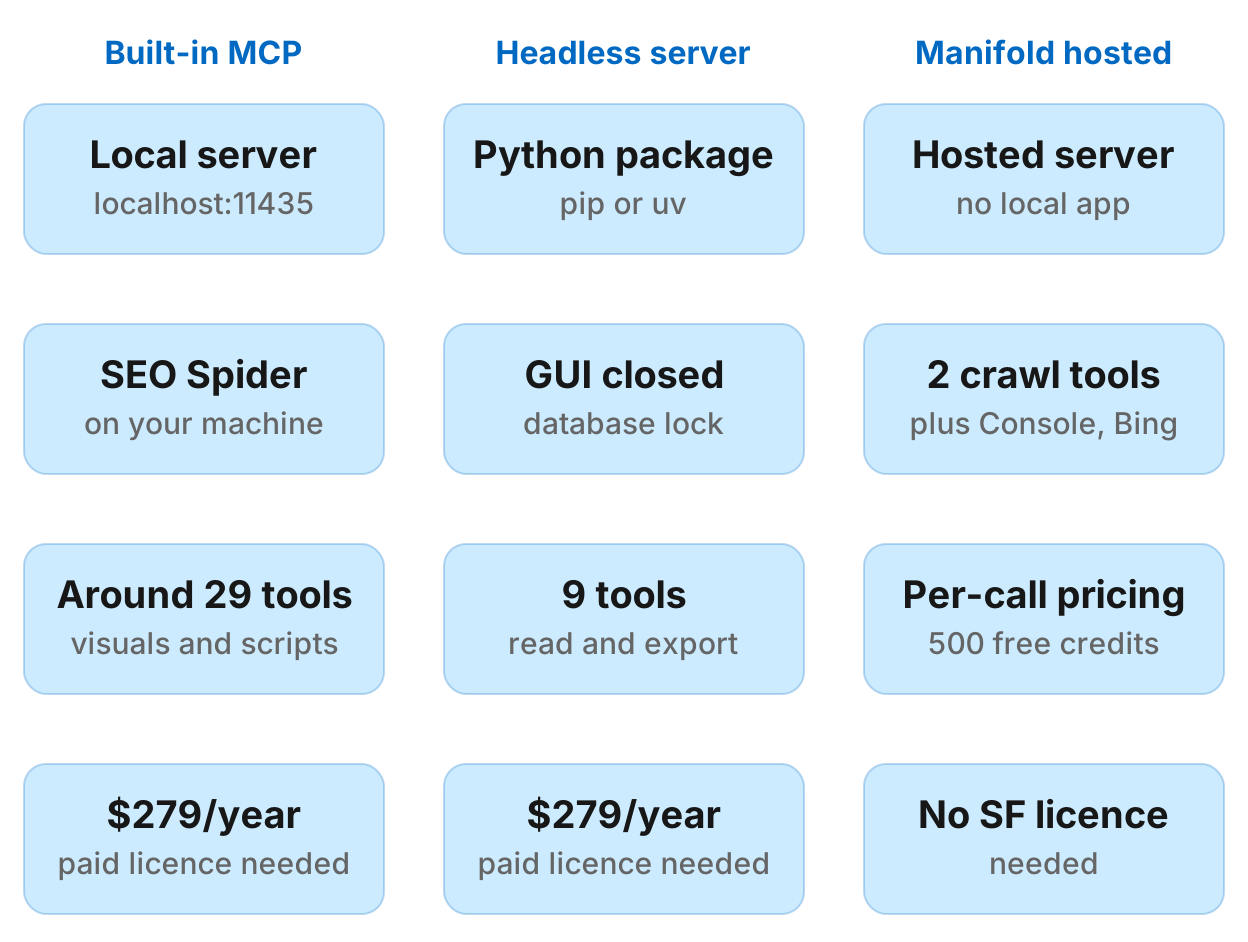
| Screaming Frog built-in MCP | bzsasson headless server | Manifold | |
|---|---|---|---|
| Where it runs | Local server at http://localhost:11435/mcp | Local Python package | Hosted by Manifold |
| What you need | v24+ with the app open (HTTP) or the Claude Desktop extension (STDIO) | Python 3.10+ and the GUI closed | No local app or licence |
| Licence | Paid licence required | Free version capped at 500 URLs, paid needed for most features | No Screaming Frog licence |
| Cost | $279/year for paid licence | $279/year for paid licence | Pay per call; 500 free credits, then Pro from $20/mo |
| Tool count | Around 29 | 9 | 2 for technical crawl |
| Search Console | No | No | Yes, 0 credits per call |
| Bing Webmaster Tools | No | No | Yes, 0 credits per call |
| ChatGPT/claude.ai web | No (local only) | No (local only) | Yes |
| Best for | Interactive sessions with full Screaming Frog config and visualizations | Scheduled audits, CI, unattended agents with GUI closed | One hosted server across SEO, AI answers, social, ads and leads; per-call pricing |
Pick by what you already pay for and how you want to manage local apps.
You already have Screaming Frog and want to use it in conversation. Use the built-in MCP. Start it in File → Settings → MCP Server, connect via http://localhost:11435/mcp or the Claude Desktop extension, and keep the app open while you work.
You want scheduled audits or CI with Screaming Frog and the GUI closed. Use the bzsasson headless server. Install it via pip or uv, crawl in the GUI with your full config, close the GUI, and let the headless server handle exports and analysis.
You want hosted crawl tools with no local app or licence needed. Use Manifold. It includes Search Console and Bing at 0 credits, and SEO data alongside AI answers, social, Reddit, ads and leads. Pay per call with credits, starting with 500 free.