OAI-SearchBot: what it is and how to allow it
OAI-SearchBot is the crawler that lets ChatGPT search show and link your pages. Here is what each OpenAI bot does, the robots.txt rules to allow search and block training, and how eight large sites set theirs today.

Can ChatGPT search read our site?
OAI-SearchBot is OpenAI's search crawler: it reads web pages so ChatGPT search can show and link them. OpenAI's crawler documentation says sites that block it are not shown in ChatGPT's search answers. It is a separate setting from GPTBot, the crawler that collects training data, so you can allow one and block the other. Below is what each OpenAI bot does, the robots.txt rules to use, how eight large sites set them today, and how to check that the bot can reach you.
What OAI-SearchBot does
OpenAI documents four bots, and each has its own job and its own line in robots.txt.
| Bot | What it is for | Follows robots.txt |
|---|---|---|
| OAI-SearchBot | Finds pages to show and link in ChatGPT search | Yes |
| GPTBot | Collects pages that may be used to train OpenAI's models | Yes |
| ChatGPT-User | Visits a page when a ChatGPT user or a custom GPT asks for it | Not always |
| OAI-AdsBot | Checks landing pages submitted as ChatGPT ads | Not stated |
Four details from the documentation matter for most sites:
- Blocking OAI-SearchBot removes you from ChatGPT search answers. A blocked site can still show as a plain navigational link.
- Each setting is independent. Allowing OAI-SearchBot says nothing about GPTBot. If you allow both, OpenAI may use one crawl for both jobs.
- ChatGPT-User is not a search crawler. OpenAI says it does not crawl the web on its own and is not used to decide what appears in search. Because a person starts each visit, robots.txt rules may not apply to it.
- OAI-AdsBot only visits pages submitted as ads, and OpenAI says its data is not used to train models.
The user agent string ends in compatible; OAI-SearchBot/1.4; +https://openai.com/searchbot. OpenAI says the version number may change, so match on OAI-SearchBot, not the full string.
How to allow OAI-SearchBot in robots.txt
Most sites already allow it: a robots.txt with no rule for OAI-SearchBot, and no blanket Disallow: /, lets it in. Add your own group for it when your file blocks bots by default, or when you want to keep ChatGPT search and opt out of training.
To appear in ChatGPT search and keep your pages out of OpenAI's training data:
User-agent: OAI-SearchBot
Allow: /

User-agent: GPTBot
Disallow: /
A crawler obeys the most specific group that names it and ignores the * group, under the robots.txt standard. So a named group for OAI-SearchBot still works in a file that starts with User-agent: * and Disallow: /.
To leave ChatGPT search, put Disallow: / under User-agent: OAI-SearchBot instead. OpenAI says a robots.txt change takes about 24 hours to reach its search systems.
How eight large sites set their AI crawlers
On 17 October 2026 we read the robots.txt of eight large news, review and software sites, and checked the rule for six AI crawlers on each.
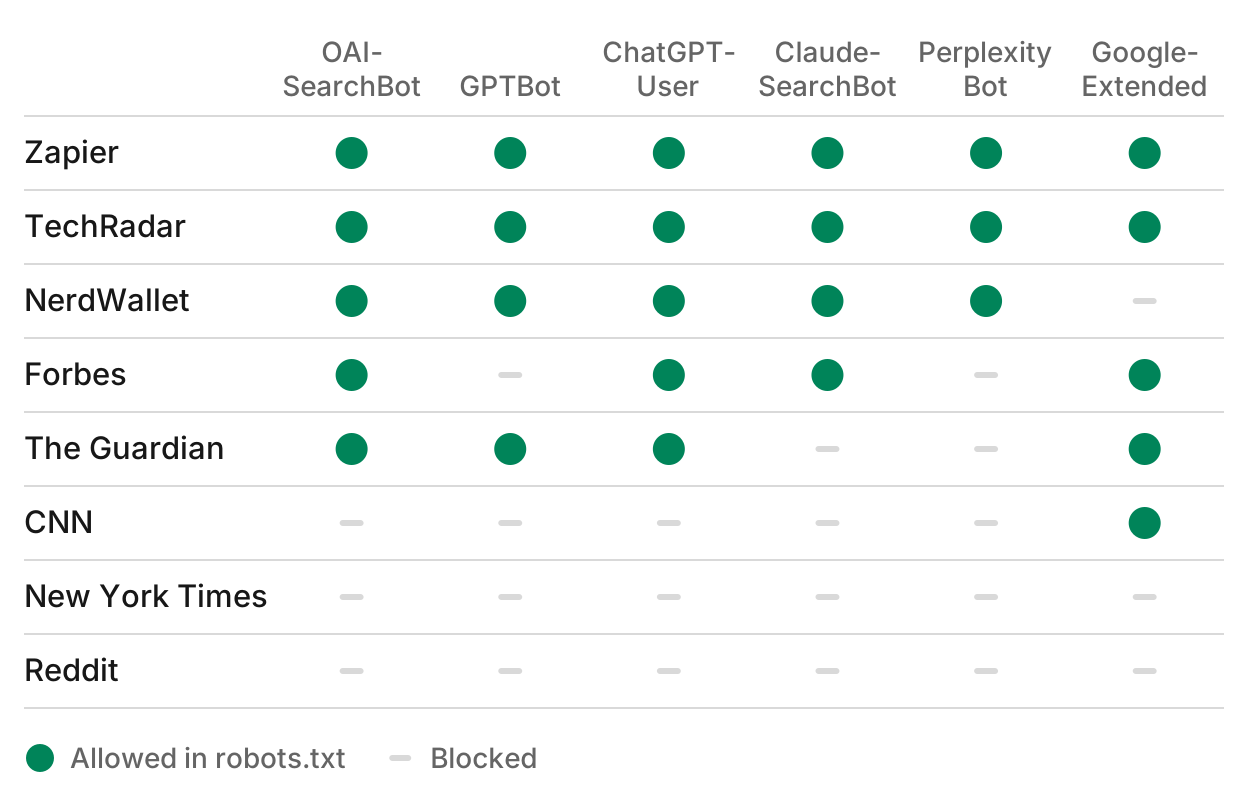
- Five of the eight allow OAI-SearchBot, and four allow GPTBot. Forbes is the difference: it blocks GPTBot and allows OAI-SearchBot, so it can be cited in ChatGPT search while it opts out of training.
- Sites treat each AI company differently. The Guardian allows all three OpenAI bots and blocks Claude-SearchBot and PerplexityBot. NerdWallet allows every answer crawler and blocks only Google-Extended.
- CNN blocks every OpenAI, Anthropic and Perplexity bot in the table and allows Google-Extended. The New York Times blocks all six.
- Reddit blocks every crawler with one rule for all user agents.
- The firewall can block too. The Guardian's server sent a 403 error to the Claude-SearchBot and PerplexityBot user agents while a browser got the page, so a rule ran before robots.txt was read.
Eight sites is a small sample, and each site changes its rules over time. It shows that a blanket choice is not the only one: a site can pick search crawlers and training crawlers one by one.
The other AI crawlers to know
The same split between search, user visits and training holds at the other AI companies. These are the user agents from each vendor's own documentation:
| Company | Search | User visits | Training |
|---|---|---|---|
| OpenAI | OAI-SearchBot | ChatGPT-User | GPTBot |
| Anthropic | Claude-SearchBot | Claude-User | ClaudeBot |
| Perplexity | PerplexityBot | Perplexity-User | None listed |
| Googlebot | Not covered here | Google-Extended |
- PerplexityBot surfaces and links sites in Perplexity's search results, and Perplexity says it is not used to collect training data. Perplexity-User generally ignores robots.txt, because a user asked for the page.
- Claude-SearchBot indexes pages for Claude's search, and Anthropic says blocking it may reduce your visibility in search results for Claude users. ClaudeBot collects training data.
- Google-Extended is not a crawler with its own user agent. It is a robots.txt token that controls whether Google uses your pages to train Gemini models, and Google says it does not affect inclusion or ranking in Google Search.
How to check that OAI-SearchBot can reach your site
A robots.txt rule is only one of the gates. Check all three:
- robots.txt. Open
yoursite.com/robots.txtand find the group that matches OAI-SearchBot: its own group if there is one, otherwise the*group. Make sure noDisallowcovers the pages you want cited. - The CDN or firewall. A bot protection rule can send OAI-SearchBot an error before it reads robots.txt. Request a page with the OAI-SearchBot user agent and compare the status with what a browser gets. To confirm that a visit in your logs is the real bot, check its IP address against the list OpenAI publishes at
openai.com/searchbot.json. - The page itself. Keep the main content in the HTML your server sends. A page that only fills in with JavaScript can look empty to a crawler.
An agent with an AI visibility MCP server can run all three checks for every answer crawler in one pass, and tell you which rules block which engines.
Run this in your agent
Connect Manifold to Claude, ChatGPT or Cursor, then paste this prompt.
Check whether ChatGPT, Claude, Perplexity and Google's AI answers can read [our site]. For each AI crawler, tell me if robots.txt allows it, whether our CDN or firewall turns its user agent away, and whether our pages have their content in the raw HTML. Then give me the robots.txt lines to allow the search crawlers and block the training crawlers.
Manifold's AI visibility MCP server reads robots.txt for each AI crawler, sends requests with the answer crawlers' user agents to find firewall blocks, and checks the raw HTML, and the site readiness check costs no credits. Allowing the crawler is the first step. To get your pages picked once it can read them, see how to get cited by ChatGPT, and to see whether ChatGPT names you, see how to track your brand in ChatGPT.