Find keyword cannibalization with Claude
Connect Search Console, group query and page rows by query, check the live SERP and both pages, pick one owner per query, then track with a weekly rank monitor that reports when a different page ranks.


How do I find keyword cannibalization?
Here is how to find and fix keyword cannibalization with Claude: your own Search Console data, grouped by query, checked against the live SERP and both pages, with a rank tracking monitor that tells you when a different page starts ranking. For the same job on app searches, see app store keyword research. For Google organic gaps where a rival ranks and you do not, see keyword gap analysis.
Find keyword cannibalization in eight steps
- Connect Manifold MCP to Claude (claude.ai, Claude Desktop or Claude Code), or to ChatGPT.
- Pull your Search Console query and page rows, 28 to 90 days, dimensions query and page, limit up to 1,000.
- Group by query and flag queries where 2 or more of your pages each get real impressions.
- Check the live SERP and intent for the top split queries. Same intent and both pages weak is real cannibalization. Both on page one, or different intents, can be healthy.
- Compare the two pages on page: title, H1, headings, links.
- Decide per query: keep one owner and differentiate, merge and 301, retarget, or point internal links and anchors at the owner. Canonicals only where appropriate.
- Confirm with an on-demand position check.
- Keep it fixed with a weekly Google rank tracking monitor: its checks call the same position tool per keyword and report rank moves and when a different page ranks.
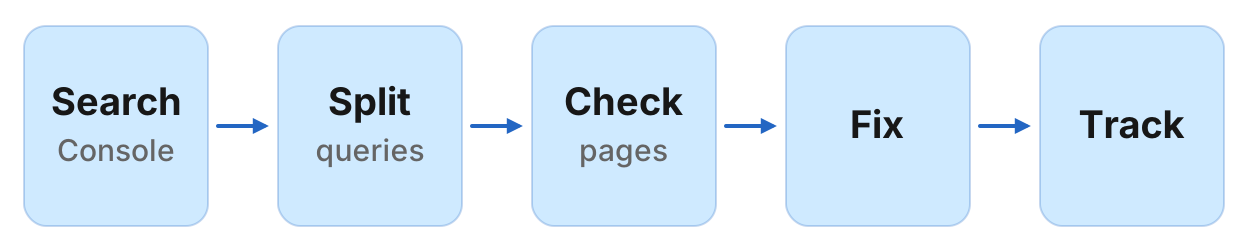
That is keyword cannibalization found with Claude: Search Console splits, the live SERP, both pages side by side, and a monitor for the page switch. The starting data is your own Search Console account, which costs no credits to read, and the AI judges intent, compares pages and writes the fix.
Is keyword cannibalization always bad?
Short answer: two results on page one or different intents can be fine. It hurts when both sit low and split impressions.
Healthy contrast: Manifold's homepage ranks first for "manifold mcp" (145 clicks and 225 impressions, position 1.1, 22 October to 18 November 2026), and /docs ranks fourth (1 click and 13 impressions, position 4.1). That is a brand query, two listings is fine, and the docs are a different intent (learning, not connecting).
Real cannibalization: "best seo mcp servers" impressions split between /mcp/seo (210 impressions at position 70.2) and /blog/best-seo-mcp-servers (209 impressions at position 83.3), both beyond page six. Same intent, both weak, 0 clicks on either. That split is a problem, and the fix is picking one owner.
Which signals show cannibalization
| Signal | What it means | Manifold tool |
|---|---|---|
| Shared query | 2 or more pages for one query | console_get_search_analytics with dimensions query and page, then group |
| Impression split | Real impressions for each page | Same rows, impressions column |
| Position gap | One page ahead, one behind, often 15 to 30 places apart | Same rows, position column |
| URL flipping | The ranking page changes from check to check | console_get_search_analytics over time, or a Google rank tracking monitor |
| Same intent | Titles, H1s and content overlap | seo_get_page per URL |
| Title overlap | Both titles use the same phrase | seo_get_page per URL, title field |
Step 1: connect Manifold MCP to Claude
Manifold is a hosted MCP server, listed in the official MCP registry as com.manifoldmcp/manifold. Search Console tools cost 0 credits because the data comes from your own account. Full client steps are in the docs.
Claude.ai and Claude Desktop. From the Claude setup guide:
- Open Settings, then Connectors.
- Choose Add custom connector. Name it Manifold and paste the server URL from the setup guide.
- Choose Connect, sign in to Manifold, and approve Claude.
- Start a chat, check that Manifold is on in the chat's tools menu, and ask a question.
A connector you add on the web is also there in the desktop app and on your phone. The first time you sign in, Manifold creates your account on the free plan.
Claude Code. From the Claude Code setup guide: add the server with the URL from that guide. Start Claude Code, run /mcp, choose manifold, and finish sign-in in the browser. Add --scope user to have it in every project.
ChatGPT. Manifold MCP is an official ChatGPT app. From the ChatGPT setup guide: open Apps, search for Manifold, click Connect, sign in and click Allow. Then type @Manifold or pick it from the + menu under More. There is no URL to paste and no developer mode to turn on.
On Business, Enterprise and Edu, an admin decides which apps the workspace can use. The rest of this guide uses Claude, and the same console tools work in ChatGPT.
Paste this to check the connection:
Which Manifold tools let me connect Search Console, list my properties, and pull query and page rows? Say that console tools cost 0 credits per call.
Claude should name console_list_properties and console_get_search_analytics.
Step 2: pull query and page rows
Call console_list_properties first to get your property. A Google domain property looks like sc-domain:example.com. A URL-prefix property or a Bing site looks like https://www.example.com/.
Then pull query and page rows with console_get_search_analytics, dimensions ["query", "page"], 28 to 90 days, limit up to 1,000. Longer ranges smooth out noise. Page with cursor to reach beyond 1,000 rows.
Paste:
Call console_list_properties, then console_get_search_analytics for property sc-domain:example.com, dimensions query and page, last 90 days, limit 1000. Return a table: query, page, clicks, impressions, position. Do not invent numbers.
Claude calls the tools and shows the rows. If your site is new or small, 28 days may be enough. If it is large, ask Claude to keep paging with the cursor until it has every row.
Step 3: flag the splits
A split is a query where 2 or more pages each get real impressions. What counts as real depends on your site's size. For a young site, 3 impressions can matter. For a large site, ignore splits under 50 impressions per page.
Paste:
Group these rows by query. Flag queries where 2 or more pages each have at least 3 impressions. For each flagged query: query, how many pages, their URLs, impressions per page, positions. Sort by total impressions descending. Leave out queries with only 1 page above the threshold.
If your site is larger, change at least 3 impressions to at least 10 impressions or at least 50 impressions.
Claude returns a table of the splits. These are candidates: the next step checks whether each split is real cannibalization or healthy double listings.
Step 4: check the SERP and intent
For each top split query, check the live SERP with seo_get_serp. Look at:
- Are both pages on page one? If yes, that can be fine. Two listings double your real estate.
- Same intent or different? If the pages answer different questions, it is not cannibalization.
- Both pages weak? If both sit beyond page three with the same intent, it is real cannibalization.
Paste for each top query:
Call seo_get_serp for "[query]" in the United States, desktop, include the AI Overview. Where do our pages rank? Are they both on page one? Do the top results show one intent or several? Do our two pages answer the same question or different ones?
Claude calls the tool and explains. Use this to separate real cannibalization from healthy double listings.
Step 5: compare the pages
For the queries that are real cannibalization, fetch each page with seo_get_page. Claude compares titles, H1s, headings and links.
Paste:
Call seo_get_page on [page1] and [page2]. Compare their titles, H1s, H2 headings and internal links. Do they target the same query? Which page is a better fit for "[query]"?
Claude shows the page structures side by side and recommends which should own the query.
Step 6: choose the fix
For each query, pick one of these:
| Fix | When to use it |
|---|---|
| Keep one owner, differentiate the other | Both pages are valuable but target the same query. Change the weaker page's title and H1 to target a different query. Point internal links and anchors at the owner. |
| Merge and 301 | One page is weak and the other covers it. Merge the content and 301 redirect the old URL. |
| Retarget | The weaker page is off-topic. Rewrite it for a different query or delete it. |
| Internal links and anchors | The pages are distinct but Google sees them as the same. Add internal links from related pages to the owner, with the query as the anchor. |
| Canonical only | Duplicate or near-duplicate content. Use a canonical tag pointing at the owner. Do not canonical when the pages answer different questions. |
Paste:
For each cannibalized query, recommend one fix: keep one owner and differentiate, merge and 301, retarget, or internal links and anchors. Explain why for each. If canonical is needed, say so, but only for near-duplicates. Do not canonical when pages answer different questions.
Claude writes a fix plan. Review it, then implement the changes yourself or ask Claude Code to make them in the repo.
Worked example: Manifold's own splits
console_get_search_analytics for sc-domain:manifoldmcp.com, dimensions query and page, 22 October to 18 November 2026, first 1,000 rows, pulled 22 November 2026: 922 distinct queries; 34 had two or more pages with at least 3 impressions each. All 0 clicks. Biggest splits:
- "best seo mcp servers": /mcp/seo 210 impressions position 70.2, /blog/best-seo-mcp-servers 209 impressions position 83.3, /blog/best-mcp-servers-for-content-marketing 36 impressions position 56.1.
- "best seo mcp server": /mcp/seo 192 position 69.3, /blog/best-seo-mcp-servers 155 position 79.3, content-marketing post 20 position 58.1, /blog/topics/seo 5 position 76.2.
- "best mcp server for seo": /blog/best-seo-mcp-servers 142 position 83.4, /mcp/seo 116 position 78.7, content-marketing post 22 position 62.7.
- "ai visibility mcp": /blog/best-ai-visibility-mcp-servers 110 position 19.8, /mcp/ai-visibility 91 position 46.1, /use-cases/ai-visibility-baseline 51 position 61.4, /blog/how-to-track-ai-visibility-with-ai 4 position 59.5.
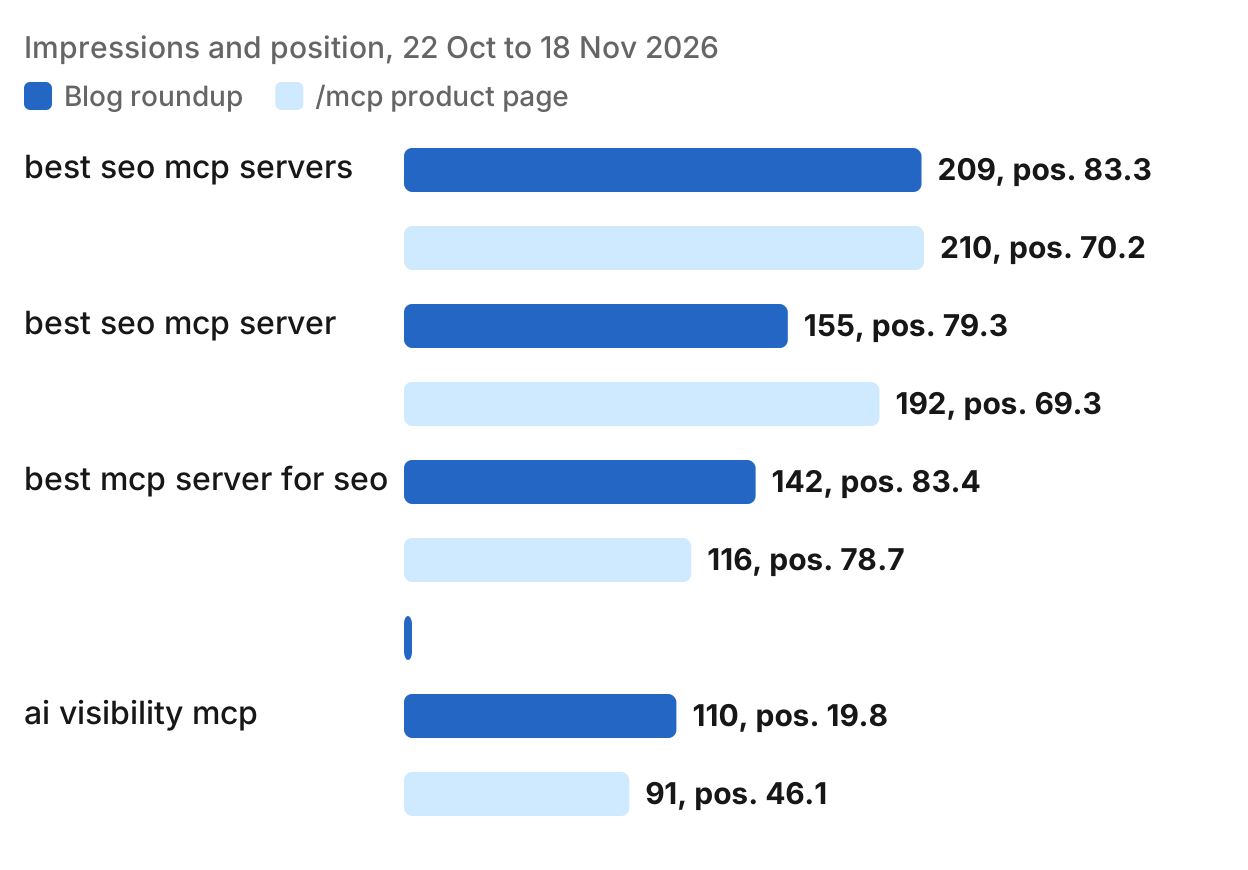
Context: on 9 October 2026 we tried to fix the SEO MCP split (our Claude SEO guide describes it), and on 13 November PR #384 pointed "ai visibility mcp" at /mcp/ai-visibility, yet the blog roundup still gets more impressions at a better position.
What we would do next: pick one owner per query. For "best seo mcp servers" and variations, the blog guide is the natural owner, so the /mcp/seo page should link to it with the anchor "best SEO MCP servers" and avoid repeating the comparison. For "ai visibility mcp", the /mcp/ai-visibility page should own it, so the guide should open with a link to that page using the anchor "AI visibility MCP server" and move the definition there. If the guide still ranks higher after two weeks, consider whether it is the better owner.
We have no outcome to report yet; these are the numbers as they stand. The honest lesson is that fixing cannibalization takes time, and sometimes Google prefers the page you did not pick.
Step 7: confirm and keep it fixed
After you make the changes, confirm them with an on-demand position check per keyword:
Call seo_get_position for "best seo mcp servers" on example.com, United States, desktop. Which page ranks and at what position?
Then create a weekly Google rank tracking monitor for the contested keywords. It checks the same position tool per keyword and reports rank moves and when a different page ranks.
A Google rank tracking monitor holds 1 to 50 keywords for one site, in one location (default United States), on desktop. Weekly is the default because positions move a place or two from day to day on noise. Daily is allowed; hourly is not.
A move is news when:
- The position changes by 3 places or more
- The keyword crosses into or out of the top 3 or the top 10
- The keyword enters or leaves the top 100
- A different page now ranks for that keyword
That last change is the cannibalization signal. If the monitor reports that a different page now ranks, you check which page and decide whether to adjust the fix.
Paste, then let Claude preview:
Create a weekly Google rank tracking monitor for example.com on these keywords: [list the contested keywords]. Description: "Track contested keywords so we see when a different page ranks and can adjust the fix." Preview it first, then create it once I agree.
Claude calls monitoring_create_monitor as a preview first, shows what the monitor will watch, and creates it once you agree.
Free plan limits. The free plan keeps 1 monitor of up to 3 keywords; on a paid plan a rank tracking monitor holds up to 50. Creating the monitor and its scheduled checks cost 0 credits. A check you ask for outside the schedule (Run now) spends credits, as the lookups would if you ran them yourself.
The first check runs within five minutes and records a starting point. Changes appear from the second check on. After the second weekly check, ask:
Read my Google rank tracking monitor. For each keyword, say the old position, the new position, the URL that ranks, and whether a different page now ranks. If a different page ranks, that is a cannibalization signal.
The full monitor guide, including alerts and history, is free rank tracker. The product page is monitors, and every parameter is on the monitoring tools page.
Checkers vs this setup
A dedicated keyword cannibalization checker is software that reads your Search Console data, groups by query, flags splits and shows them in a dashboard. Some suite add-ons do this. They give you a UI, history and CSV exports, priced per seat.
This setup is different. You already work in Claude or ChatGPT. You pass your property, the agent calls the console tools on demand, and the same agent checks the live SERP, compares pages and writes the fix plan. You pay per call, with no suite seat. Console tools cost 0 credits, so the Search Console pull is free. The SERP and page checks are priced per call, as listed on the SEO tools page.
The tradeoff: a checker gives you a dashboard and a month of history. This setup gives you the AI reading your own data, judging intent, comparing pages and writing the fix, in the same chat where you do the rest of your SEO work.
For sites without Search Console access, such as a client site, seo_get_ranked_keywords is the third-party fallback: it returns the keywords a domain ranks for in the top 100. That call costs credits, and the data comes from DataForSEO, not from your own Console account.
Related reading
For Claude doing the rest of your SEO work, see Claude for SEO: workflows and setup. For tracking whether pages you write close a gap, see keyword gap analysis. For the full rank monitor guide, see free rank tracker. For quick wins from Search Console where you rank 8 to 20, see find SEO quick wins.
Run this in your agent
Connect Manifold to Claude, ChatGPT or Cursor, then paste this prompt.
Find keyword cannibalization for example.com in Search Console. Call console_list_properties, then console_get_search_analytics for property sc-domain:example.com, dimensions ["query","page"], last 90 days, limit 1000. Group by query and flag queries where 2 or more pages each have at least 3 impressions (adjust the threshold for your site size: 10 or 50 for larger sites). For each flagged query: query, how many pages, their URLs, impressions per page, positions. Sort by total impressions descending. Do not include queries with only 1 page above the threshold. Then for the top 5 split queries, call seo_get_serp in the United States, desktop, include the AI Overview. Where do our pages rank? Are they both on page one? Do the top results show one intent or several? Do our two pages answer the same question or different ones? For the queries that are real cannibalization (same intent, both weak), call seo_get_page on each page. Compare their titles, H1s, H2 headings and internal links. Which page is a better fit for the query? For each cannibalized query, recommend one fix: keep one owner and differentiate, merge and 301, retarget, or internal links and anchors. Explain why for each. If canonical is needed, say so, but only for near-duplicates. Do not canonical when pages answer different questions. After I fix them, preview a weekly Google rank tracking monitor for the contested keywords. Description: "Track contested keywords so we see when a different page ranks and can adjust the fix." Preview it first, then create it once I agree.
Run your first cannibalization check
Connect the Search Console MCP tools, pull query and page rows, and have Claude flag the splits. For the full SEO workflow, see the SEO skill. For quick wins and tracking, create a monitor. Every account gets 250 credits a month on the free plan.