Keyword gap analysis with Claude: find the keywords competitors rank for
Connect Claude to Manifold MCP, run an AI competitor gap analysis: find the sites that share your SERPs, pull the keywords they rank for that you do not, then track the ones you write for.


How do I do a keyword gap analysis?
A keyword gap analysis is the list of search queries competitors rank for that you do not, turned into pages to write and pages to refresh. You can run the whole job in Claude as an AI competitor gap analysis: connect Manifold MCP, let it pick the sites that actually share your search results, pull the gap, cluster it, and track the keywords you choose.
A short real run of the gap call is find competitor keyword gaps. This page is the deep how-to, including SERP competitors, missing vs weak keywords, a pasteable template, and a Google rank monitor so you see whether the new pages close the gap.
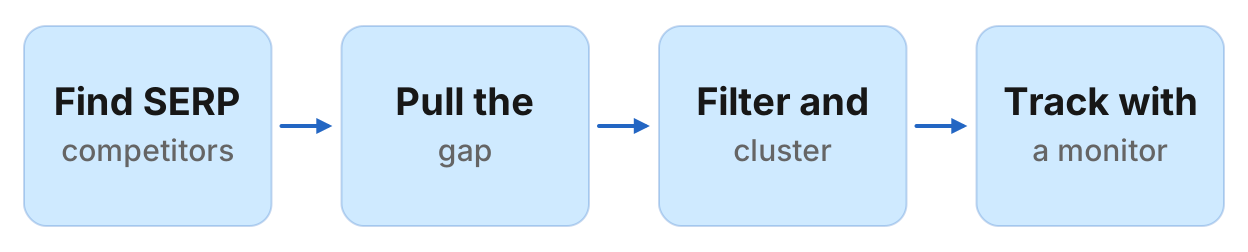
How to run a keyword gap analysis in six steps
- Connect Manifold MCP to Claude (claude.ai, Claude Desktop or Claude Code).
- Find your real SERP competitors: domains that share search results with you, not the businesses you already have in mind.
- Pull the keyword gap for each competitor: queries they rank in the top 100 for that you do not rank for at all.
- Filter by intent, difficulty and volume, then cluster. One query, one page.
- Split missing (new page) from weak (you already rank about 11 to 30: refresh instead).
- Track the keywords you write for with a weekly Google rank monitor.
Monitors are on every plan, including Free, and their checks cost no credits. The free plan keeps 1 monitor, and a Google rank monitor on Free watches 3 keywords. Monitors a workspace can keep, by plan: 1 on Free, 5 on Pro, 25 on Growth, 100 on Agency. For types and cadences, see how monitors work.
Missing, weak, shared and unique
Suite UIs split the overlap into four buckets. Manifold gives you the same facts as separate calls. Be precise about which tool does which job.
| Kind | Meaning | Manifold tool |
|---|---|---|
| Missing | They rank in the top 100. You do not rank at all. | seo_get_keyword_gap. One competitor per call. Sorted by volume. |
| Weak | You rank, but lower, often around 11 to 30. | Not the gap tool. Use seo_get_ranked_keywords on your own domain, or seo_get_position for one keyword (6 credits). |
| Shared | You both rank. | No dedicated tool. seo_get_serp_competitors returns shared_keywords. For the queries themselves, compare ranked keyword lists. |
| Unique | You rank, they do not. | Reverse the gap: target is the competitor, competitor is you. |
seo_get_keyword_gap is missing only. If you treat its rows as "we are close", you will commission new pages for queries you already rank for, and you will miss the refreshes that would have been cheaper. Weak keywords are the overlap with SEO quick wins: queries you already appear for, where a better title or a new section can move you without a new URL.
A content gap is a topic or format you have not covered. A keyword gap is specific queries. Cluster the queries and you get the content gaps: one cluster, one page. This guide targets keyword gap analysis. Content gap analysis is that cluster step, not a second product.
What it costs
Data comes from DataForSEO. You do not register an SEO subscription of your own. You pay per call with credits. Default rows are 100.
Worked from the credit formulas:
seo_get_serp_competitors: 5 credits, then 5 per 100 rows. Default 100 rows = 10 credits. Cached 7 days.seo_get_keyword_gap: the same formula. One competitor, default 100 rows = 10 credits. Three competitors = 30. Cached 7 days.seo_get_keyword_metrics: 5, then 5 per 100 keywords (Labs). Default 100 = 10 credits. Cached 7 days. Optional AI prompt volume adds 4, then 4 per 100.seo_get_ranked_keywords: 5, then 5 per 100 rows. Default 100 = 10 credits. Cached 7 days. Use this for weak keywords.seo_get_serp: 1 credit per 10 results, plus 1 when you include the AI Overview. Default top 10 = 1 credit. Cached 24 hours. Use this before you write, to see what actually ranks.
A full analysis, competitors (10) plus three gap calls (30) plus metrics (10), is about 50 credits. Add a 100-row ranked keyword list for weak terms and you are around 60. That fits the free plan's 250 credits a month, with room left for a few SERP checks. The rank monitor after it costs no credits.
A suite seat is a monthly subscription for a UI: Venn diagrams, multi-competitor exports, team logins. Skip those prices here. If you already pay for a suite and want its own MCP, see Semrush MCP. This guide is the how-to without that seat.
Step 1: connect Manifold MCP to Claude
Manifold is a hosted MCP server. It is listed in the official MCP registry as com.manifoldmcp/manifold. Full client steps are in the docs.
Claude.ai and Claude Desktop. From the Claude setup guide:
- Open Settings, then Connectors.
- Choose Add custom connector. Name it Manifold and paste the server URL from the setup guide.
- Choose Connect, sign in to Manifold, and approve Claude.
- Start a chat, check that Manifold is on in the chat's tools menu, and ask a question.
A connector you add on the web is also there in the desktop app and on your phone. The first time you sign in, Manifold creates your account on the free plan.
Claude Code. From the Claude Code setup guide: add the server with the URL from that guide. Start Claude Code, run /mcp, choose manifold, and finish sign-in in the browser. Add --scope user to have it in every project.
Paste this to check the connection:
Which Manifold tools find SERP competitors, keyword gaps, ranked keywords and keyword metrics? Tell me the default cost of each at 100 rows, and that gap is missing-only.
Claude should name seo_get_serp_competitors, seo_get_keyword_gap, seo_get_ranked_keywords, seo_get_keyword_metrics, seo_get_serp and seo_get_position. Those are on the SEO tools page. Monitor tools (monitoring_create_monitor and the rest) cost 0 credits to call, and so do the checks they schedule. Every parameter is on the monitoring tools page.
The wider Claude setup, plugins and four SEO workflows, is Claude SEO. Keep this page on the gap.
Step 2: find SERP competitors
The competitors in a sales meeting are often not the domains on page one. seo_get_serp_competitors takes your domain as target (not a keyword) and returns domains that share search results with it: domain, shared_keywords, avg_position, organic_traffic. Sorted by shared keywords. The target itself is excluded. These are SERP competitors, not business competitors.
Paste:
Find SERP competitors for [site]. List domain, shared keywords, average position and organic traffic. Drop wikipedia.org, reddit.com, youtube.com, linkedin.com, facebook.com and amazon.com unless they are actually who we lose rankings to. Keep the next three domains. Say why each stayed.
Drop the giants unless they are the real overlap. Wikipedia, Reddit and YouTube win informational queries in most categories. Leaving them in fills the gap list with glossary terms you are unlikely to rank for. Keep a forum or a publisher if they are who Google actually puts next to you.
Two or three remaining domains is enough. A fourth repeats the same head terms and spends another 10 credits. If the list looks nothing like the rivals you sell against, that is the point: you are competing with whoever ranks, not whoever you pitch against.
Step 3: pull the gap per competitor
seo_get_keyword_gap takes target (you) and competitor (one domain). It returns keywords that competitor ranks in the top 100 for that you do not rank for at all: keyword, competitor_rank, competitor_url, volume, kd, cpc, intent. Sorted by volume. Default 100 rows = 10 credits. Cap is 1,000 rows.
One competitor per call. Run it three times, once per domain from step 2, then merge.
Paste:
For each of these three domains, pull the keyword gap against [site]: keywords they rank in the top 100 for that we do not rank for at all. 100 rows each. Then merge the three lists. Keep a column for which competitors have each keyword. A keyword two or three of them share is a stronger signal than a keyword only one has. Drop brand names, look-alike names, and queries that are clearly another product's name.
Brand names will be in the list. The gap is every keyword they rank for where you do not, and that includes searches for their own name. Drop those. The use case did this on a real run: 7 of 39 rows were brand or look-alike names, not gaps worth a page.
A keyword two competitors rank for, on similar URLs, is a cluster you can plan around. A keyword only the smallest rival ranks for at position 91 is usually noise.
Step 4: filter and cluster
You now have a merged list with volume, difficulty, intent and at least one competitor URL. Do not write a page per row.
Intent. Informational "what is" queries want a definition. Commercial "best X" and "X alternative" queries want a comparison. Transactional queries want a product or pricing page. Mixing them on one URL is how two of your pages end up competing later.
Difficulty vs your domain. High kd on a young site is a long game. Favour lower difficulty unless the query is so close to a sale that volume of 20 beats 2,000 browsers. There is no universal cutoff. Use kd as a relative sort, not a law.
Volume floor. Skip tiny head-terms unless the intent is high (a competitor's name with alternative, vs or pricing). A phrasing under about 50 searches a month is often a variant of a bigger query, not its own page.
Relevance. If you would not want to rank for it, drop it. Gap tools do not know your positioning.
Then cluster: group queries where one page could rank for the whole group. Primary keyword, secondary keywords, combined volume, the best competitor URL, action (new page or refresh), priority.
Paste:
Cluster these gap keywords so one page could rank for each group. For each cluster: primary keyword, secondary keywords, combined volume, average KD, intent, the strongest competitor URL, and whether this is a new page or a refresh of a URL we already have. Rank clusters by opportunity for a site with modest authority: lower KD, several competitors sharing the queries, commercial intent. One query, one page. Do not mix intents in a cluster.
If a cluster still looks like two jobs, split it. "Keyword gap analysis" and "content gap analysis" are related and still want their own URLs, which is why this page is not trying to rank for both as the H1.
Before you write the first draft, check the live results:
Get the top 10 Google results for [primary keyword], United States, including the AI Overview. Summarise what ranks, what the overview says, and the gaps we should fill.
That is seo_get_serp, 1 credit, or 2 with the overview. Cached 24 hours. Write to the SERP you just saw, not to a memory of it.
Step 5: weak keywords, refresh instead of a new page
Missing is the gap tool. Weak is you already ranking, usually around 11 to 30, where a new URL would cannibalise the one Google already gives you.
Paste:
From our own ranked keywords on [site], list queries where we rank about 11 to 30, with the URL, volume and KD. Drop brand. Group by URL. Those are refreshes, not new pages. If Search Console is connected, cross-check with queries that already have impressions.
seo_get_ranked_keywords costs 10 credits for 100 rows, 7-day cache. Rank here counts every element on the page, ads and features included, so an organic result in the top 100 can read as rank 104. For a handful of money terms, seo_get_position (6 credits, scans the top 100, cached 24 hours) is the cleaner number.
If Search Console is connected, those calls cost 0 credits and show average position for queries Google already showed you for. Use both: Console for queries with impressions, ranked keywords and position checks for a fixed list, including terms Console has not seen yet.
A URL that already ranks 11 to 30 for a cluster you just found is a refresh: title, a section that answers the query, internal links. That is the quick wins job. Do not ship a second page for the same intent.
The keyword gap analysis template
Paste this as one prompt after Manifold is connected. It should return a table you can sort, not a narrative.
Run a keyword gap analysis for [site] in the United States.

1. Find SERP competitors with seo_get_serp_competitors. Drop wikipedia.org,
   reddit.com, youtube.com, linkedin.com, facebook.com and amazon.com unless
   they are actually who we lose rankings to. Keep three domains.
2. For each of those three, pull seo_get_keyword_gap against [site], 100 rows.
   Merge. A keyword two or three competitors share is a stronger signal.
   Drop brand names and look-alike names.
3. From seo_get_ranked_keywords on [site], mark queries we already rank
   about 11 to 30 for. Those are refreshes, not new pages.
4. Cluster the rest so one page could rank for each group. Do not mix intents.
5. Return a table with columns: cluster, keywords, total volume, average KD,
   intent, best competitor URL, action (new or refresh), priority (1 to 5).
   Sort by priority. Limit to 15 rows. Do not invent volumes; only use the
   tool output. Then preview a weekly Google rank monitor on [site] for the
   three highest priority primary keywords, location United States. Show what
   it will watch, and wait for me before creating it.
Worked example (illustrative)
The names, volumes and ranks below are an example, not measurements of a real site.
Acme sells B2B software at acme.example. After connecting Claude, Acme pastes the template with [site] as acme.example. Claude keeps three SERP competitors, say rival.example, tools.example and agency.example, and drops youtube.com.
Example table (illustrative):
| Cluster | Keywords | Total volume | Best competitor URL | Action | Priority |
|---|---|---|---|---|---|
| Alternative page | acme alternative, rival alternative | 210 | rival.example/alternatives | refresh | 1 |
| Pricing comparison | project tool pricing, software pricing | 160 | tools.example/pricing | new | 2 |
| For agencies | project tool for agencies | 90 | agency.example/agencies | new | 3 |
| What is a gantt | what is a gantt chart | 480 | rival.example/blog/gantt | skip | 5 |
None of those rows are live measurements. They show the shape: a refresh where Acme already has a URL in the 11 to 30 band, two new pages with commercial intent, and an informational query skipped because the difficulty or the SERP (a pile of encyclopaedia results) is a poor fit.
Priority 1 goes on the rank monitor next.
Step 6: track the keywords you write for
A gap list without a follow-up is a spreadsheet. After you pick the clusters, put the primary keywords on a Google rank tracking monitor so the same agent that found the gap can say whether the new page moved.
The setup in depth, including which moves count and a Monday digest, is the free rank tracker guide. The short version:
- One site, one location (default United States), desktop. 1 to 50 keywords on the preset. On Free, the plan cap is 3 keywords per rank monitor.
- Default cadence is weekly. Daily is the fastest it runs. Creating the monitor and its checks cost 0 credits, and checks skip the cache.
- The first check runs within five minutes and records a starting point. It reports nothing. Changes arrive from the second check.
- Alerts start off. When you turn them on, you get at most one email a day per monitor.
Paste, after the table:
Create a weekly Google rank monitor named "Gap keywords" for [site] on these keywords, location United States: [k1], [k2], [k3]. Description: "Keywords from the gap analysis we are writing or refreshing, so we ship the page that is still missing and refresh the one that hits 11." Preview it first, then create it once I agree.
You can also start from the dashboard form. The form shows what the monitor will watch before it starts. The product page is monitors. Watching a rival's ranks on the same keywords is a second monitor; that setup is how to track competitors, and the product page is competitor monitoring.
On Free you keep 1 monitor, so this is the one you keep. Pro keeps 5 and lifts the per-monitor keyword cap to the preset's 50.
Limits, and when a suite is still better
This workflow is a few live calls, a cluster, and a short list you actually write for. It is the right job for a founder or an SEO who wants the next ten pages, not a dump of 50,000 rows.
You will still want a suite when you need:
- Huge historical exports, and a Venn UI across many competitors at once
- Team seats on that UI, with saved projects and scheduled PDF reports
- Hundreds of keywords on a rank tracker, or mobile ranks, or a city grid
The sibling job on the same competitors, sites that link to them and not to you, is backlink gap analysis.
Gap data is a model of rankings from DataForSEO, not Search Console truth. Positions lag, and a keyword in the index snapshot can disagree with a live seo_get_position check. Cross-check the clusters you will spend a week writing with Search Console (0 credits) and with a SERP check the day you outline the page.
Do not rerun the whole gap every morning. Competitor and gap calls are cached 7 days, so a second run that week often hits the cache. Let the monitor watch the chosen keywords weekly instead.
Run this in your agent
Connect Manifold to Claude, ChatGPT or Cursor, then paste this prompt.
Run a keyword gap analysis for [site] in the United States. Find SERP competitors, drop Wikipedia, Reddit, YouTube and other giants, and keep three domains. For each, pull the keyword gap against [site] (keywords they rank top 100 for that we do not rank for at all). Merge the lists. A keyword two or three competitors share is a stronger signal. Drop brand names. From our ranked keywords, mark queries we already rank 11 to 30 for as refreshes. Cluster the rest so one page could rank for each group. Return a table: cluster, keywords, total volume, average KD, intent, best competitor URL, action (new or refresh), priority. Then preview a weekly Google rank monitor on [site] for the three highest priority primary keywords, location United States, and wait for me before creating it.
Run the workflow, then create the monitor
Run the keyword gap analysis, then create the Google rank monitor for the keywords you will write for. The free plan includes 250 credits a month. A typical analysis is about 50 credits. Creating a monitor and its checks cost 0 credits. On Free a rank monitor watches 3 keywords.
Open the competitor keyword gaps use case for a real gap call, or monitors and the dashboard form to start the tracker. Connect Claude and paste the prompt above. The preview shows what the monitor will watch before anything is created.