Review monitoring with Claude: alerts for new Google and app reviews
Connect Claude to Manifold MCP, create a reviews monitor for Google Maps, App Store, Play or Shopping listings, then have Claude cluster new reviews and draft replies.


How do I set up review monitoring?
Review monitoring is tracking, gathering and analysing customer reviews across the listings people already use, then acting on what is new: a 1 star Google Maps review, a Play Store complaint, a Shopping rating that just landed. You can run the whole job in Claude as online review monitoring: connect Manifold MCP, find the listing ids, create a reviews monitor with a star filter, add competitors to the same monitor, then have Claude read the new reviews, group complaints into themes and draft replies you post yourself.
A one-off look at an app's newest reviews is read a competitor's app reviews. This page is the scheduled how-to: alerts for new Google Maps, App Store, Google Play and Google Shopping reviews, yours and competitors', from inside Claude or ChatGPT.
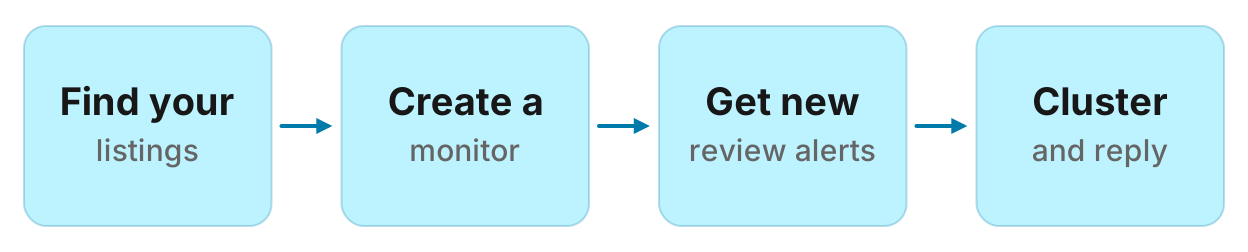
How to set up review monitoring in six steps
- Connect Manifold MCP to Claude (claude.ai, Claude Desktop or Claude Code), or to ChatGPT.
- Find the listing ids: a Google Maps
place_idorcid, an App Store or Google Playapp_id, a Google Shoppingproduct_idandgid. - Ask Claude to create a reviews monitor with a star filter (for example 1 to 3 stars) and a description of what to do with a change. Preview first.
- Add competitors' listings to the same monitor (up to 5 items). The free plan keeps 1 monitor, so put yours and theirs in one.
- After the second check, ask Claude to read
monitoring_get_changes, cluster complaints into themes and draft replies in your brand voice. - Once, mine older reviews with
apps_get_reviews,shopping_get_reviewsormaps_get_placetopics for a baseline report.
Monitors are on every plan, including Free, and their checks cost no credits. The free plan keeps 1 monitor. Monitors a workspace can keep, by plan: 1 on Free, 5 on Pro, 25 on Growth, 100 on Agency. For types and cadences, see how monitors work. The wider competitor setup (pages, ads, social, rankings, AI answers) is how to track competitors. Reviews on a Maps listing feed its Google Maps ranking. Checking that ranking across a service area is local rank tracking in Claude. Keep this page on reviews.
What review monitoring covers
A reviews monitor watches 1 to 5 listings. Each item is one source. The dashboard does not offer this type: ask Claude or ChatGPT to create it. Monitors that already exist keep running.
| Source | What you need | How to find it | What a check reports |
|---|---|---|---|
| Google Maps | place_id or cid | maps_search_places, then maps_get_place. A Maps link's cid= works. | How many new reviews arrived, and where the average rating went. Not each review's text. |
| App Store | app_id (the number in the store URL) | apps_search_apps | Each new review that matches the star filter, newest first. |
| Google Play | app_id (the package name, as the store URL uses it) | apps_search_apps | Each new review that matches the star filter, newest first. |
| Google Shopping | product_id, and gid when you have it | shopping_search_products (every row has both) | Each new review that matches the star filter, newest first. |
Stars. stars is the filter for which ratings show in the feed. Default is 1 to 5. Set [1, 2, 3] to keep low-star app and product reviews and drop 4 and 5 star ones. The filter applies to App Store, Google Play and Google Shopping, where each review arrives one by one. Google Maps is a count and an average on the place, so a new Maps review still shows as a count change even when you filtered stars.
What is not covered. There is no Yelp, Trustpilot, Amazon or Facebook review source. Amazon product calls do not return reviews. Individual Google Maps review text is not a tool; maps_get_place returns the count, the average, the star histogram and topics (words Google pulls from the reviews). A Website tracking monitor fetches HTML and does not run JavaScript, so a public Maps or store reviews page is a poor pick. Those listings belong on a reviews monitor.
For a one-off read of an app, the App Store reviews and Google Play reviews tools on the site show the same public listings.
Step 1: connect Manifold MCP to Claude
Manifold is a hosted MCP server. It is listed in the official MCP registry as com.manifoldmcp/manifold. Every account gets 250 credits a month on the free plan. You do not bring API keys of your own. You pay per call. Full client steps are in the docs. Credit formulas for one-off reads are on the credits page. Creating a monitor and every check it runs cost 0 credits on every plan.
Claude.ai and Claude Desktop. From the Claude setup guide:
- Open Settings, then Connectors.
- Choose Add custom connector. Name it Manifold and paste the server URL from the setup guide.
- Choose Connect, sign in to Manifold, and approve Claude.
- Start a chat, check that Manifold is on in the chat's tools menu, and ask a question.
A connector you add on the web is also there in the desktop app and on your phone. The first time you sign in, Manifold creates your account on the free plan.
Claude Code. From the Claude Code setup guide: add the server with the URL from that guide. Start Claude Code, run /mcp, choose manifold, and finish sign-in in the browser. Add --scope user to have it in every project.
ChatGPT. From the ChatGPT setup guide: add Manifold as a connector and sign in. The rest of this guide uses Claude because the title is a Claude how-to. The same tools and the same reviews monitor work in ChatGPT.
Paste this to check the connection:
Which Manifold tools create a reviews monitor, read what it found, search Google Maps, look up a place, search apps, search Google Shopping products, and read app or Shopping reviews? Say that reviews monitors are created by the agent, not the dashboard form, and that monitor checks cost 0 credits.
Claude should name monitoring_create_monitor, monitoring_get_changes, maps_search_places, maps_get_place, apps_search_apps, apps_get_reviews, shopping_search_products and shopping_get_reviews. Monitor tools cost 0 credits to call, and so do the checks they schedule. Every parameter is on the monitoring tools page. App, Maps and Shopping tools are on the apps, maps and shopping pages.
Step 2: find your listing IDs
The monitor needs an id per listing, not a brand name. Paste:
Find listing ids for [our Google Maps name and town], our iOS app [name], our Android app [name], and our Google Shopping product [name]. For Maps, call maps_search_places then maps_get_place and give me place_id and cid. For apps, call apps_search_apps on app_store and google_play and give me each app_id (the App Store number, the Play package name). For Shopping, call shopping_search_products and give me product_id and gid. Do not invent ids. If a search is ambiguous, list the top matches and wait.
Keep the ids. You will paste them into the create prompt next. A Google Maps share link often carries cid= already; that is enough for the monitor. An App Store URL's number (618783545) is the app_id. A Play URL's package (com.Slack) is the app_id, with the case the store uses.
Step 3: create the reviews monitor
Ask Claude. The dashboard form does not list Reviews. Agents still make one through monitoring_create_monitor.
Default cadence is daily. Hourly and weekly are allowed. Alerts start on: a 1 or 2 star app or product review is marked urgent, and a Maps average that dropped is marked urgent. Email is at most one a day per monitor, with the rest waiting in the feed. Email alerts are on every plan. Slack and webhook alerts are on Growth and Agency, not Free or Pro.
Paste, then let it preview:
Create a reviews monitor named "Acme reviews", daily, stars 1, 2 and 3, for these items: App Store app_id [id], Google Play app_id [id], Google Maps place_id [id]. Description: "New 1 to 3 star reviews of our listings, so we reply while the reviewer still reads replies. Cluster complaints and draft a reply in our brand voice. I will post it on the platform." Preview it first, then create it once I agree.
Your agent calls monitoring_create_monitor with preview true first, shows the items, the star filter and the cadence, and creates it once you agree. Creating it and its checks cost 0 credits.
The description is what a later agent reads with each change. Write the job: reply, cluster, ignore 5 star "great app" lines. If you leave it out, one is written from the fields ("New reviews of …").
The first check runs within five minutes. It records what is there and reports nothing. That starting point stops last month's reviews arriving as news. Changes appear from the second check on.
For 4 and 5 star reviews too, omit stars or set 1 to 5. For only 1 and 2 star alerts, set stars to 1 and 2.
Step 4: watch competitors' reviews too
The same monitor holds up to 5 items. On Free you keep 1 monitor, so put your listings and the competitors' in that one rather than opening a second slot. Pro keeps 5.
Paste:
Same monitor, add Rival's App Store app_id [id] and Google Play app_id [id]. Still stars 1 to 3, daily. Preview the update first.
Five slots fill fast: one Maps place, two of your store listings, two competitor store listings is already five. Pick the listings buyers actually read. A second monitor for more listings needs a plan that keeps more than one.
This is not brand monitoring of Reddit and social mentions. Mentions are a different preset. Reviews watches the store and Maps listings.
Step 5: read what changed and reply
After the second daily check, ask:
What did my reviews monitor find since yesterday? Group by listing. For each new app or product review, give stars, a short quote, a theme, and a draft reply in our brand voice. For Google Maps, say how many new reviews arrived and whether the average moved. I will post each reply on the platform myself. Skip 5 star one-liners.
Claude reads the feed with monitoring_get_changes. Use monitoring_get_history for the count of new reviews over time. Use monitoring_update_monitor to pause, change items or stars, or run a check now.
You paste the draft into App Store Connect, Play Console, Google Business Profile or the Shopping merchant tools. The agent drafts. You post.
A change keeps its summary while the monitor exists. Quote text and extra details are cleared after 30 days. Whole review bodies are not stored. Claude can still write the digest from what is in the feed.
Step 6: mine older reviews once
The monitor reports what is new after the starting point. For a baseline (what people already complain about), run the one-off tools once. Those calls cost credits; the formulas are on credits. Cached repeats this account already paid for come back at no cost.
Paste:
Read the newest 100 App Store reviews and 100 Google Play reviews of [app_id / app_id], and the Google Shopping reviews for product_id [id] gid [id]. Group 3 star and below into themes with a representative quote. For our Google Maps place [place_id], call maps_get_place and report rating, review count, rating_counts and topics. Do not invent quotes. Then keep watching new ones with the reviews monitor we already created.
apps_get_reviews returns each review's stars, text, app version, helpful votes and the developer's reply, newest or most relevant first. shopping_get_reviews returns Shopping reviews pooled across stores. maps_get_place returns topics (words Google already pulled from Maps reviews) and rating_counts, not each Maps review's text. A short real app run of this shape is read app store reviews.
Do not rerun the 100-row pull every morning. Let the monitor watch what is new. Spend the monthly credits on a baseline, a competitor pull, or a reply you still need to write.
A full prompt, then a table
Run this in your agent
Connect Manifold to Claude, ChatGPT or Cursor, then paste this prompt.
Set up review monitoring for [brand]. Find listing ids: maps_search_places then maps_get_place for [Maps name and town] (place_id or cid); apps_search_apps for our iOS and Android apps (app_id); shopping_search_products for [product] (product_id and gid). Do not invent ids. Then preview a daily reviews monitor named "[brand] reviews" with stars 1, 2 and 3, items for our listings plus up to two competitor apps or places, description: "New 1 to 3 star reviews, so we reply while the reviewer still reads them. Cluster complaints and draft a reply in our brand voice. I will post it on the platform." Create it once I agree. After the second check, read monitoring_get_changes and return a table: source, stars, date, theme, suggested reply. For Google Maps rows, report new review count and average, not invented quotes. Once, pull apps_get_reviews and shopping_get_reviews (newest 100) and maps_get_place topics for a baseline. Skip 5 star one-liners.
Worked example (illustrative)
The names, stars and quotes below are an example, not measurements of a real app or place.
A local coffee roasting app, Acme, sells bags on Google Shopping, has an iOS app, an Android app, and a Maps listing for its tasting room. After connecting Claude, Acme pastes the create prompt with four items (both store listings, Maps, one competitor app) and stars 1 to 3. Creating the monitor costs 0 credits. The first check is quiet. From the second check on, Acme asks for the table.
Example Claude table (illustrative):
| Source | Stars | Date | Theme | Suggested reply |
|---|---|---|---|---|
| Google Play, Acme | 2 | 12 Nov | Checkout failed on Pay | Sorry you hit a failed Pay checkout. We shipped a retry in 2.4. If it still fails, reply here with the last four of the order and we will sort it. |
| App Store, Rival | 1 | 12 Nov | Shipping took two weeks | (Competitor. No reply. Note: slow shipping is the complaint we can answer on our listing.) |
| Google Maps, Acme tasting room | (count) | 13 Nov | 2 new reviews; average 4.6 to 4.5 | Open Maps, read the two new reviews, draft from the live text. The monitor reports the count, not each Maps quote. |
| Google Shopping, Acme bags | 3 | 13 Nov | Bag arrived without the tasting card | Sorry the tasting card was missing. Email [support] with the order and we will send one. |
Acme posts the Play and Shopping drafts on those platforms the same day. The Rival row is research: a theme to watch, not a reply on someone else's listing. The Maps row is a prompt to open the live reviews, because this monitor does not return Maps review text.
Review monitoring vs review management software
Review monitoring software in the usual sense is a dashboard that pulls many review sites into one inbox, sends review-request emails after a purchase, and lets a team reply from that inbox. BrightLocal's guide starts with sign up, choose sources, set alerts, spot trends. That is a fit when you run dozens of locations, need Yelp and Trustpilot in the same queue, or want the platform to send the "please review us" mail.
This setup is a different job. You already work in Claude or ChatGPT. The monitor watches four sources (Maps, App Store, Google Play, Google Shopping), filters by stars, emails you when a low-star app or product review lands, and the same agent reads the feed, clusters complaints and drafts the reply. It does not send review requests, it does not post the reply, and it does not cover Yelp, Trustpilot, Amazon or Facebook. Google review monitoring on Maps is a count and an average, plus topics when you look the place up, not a Maps inbox.
Use this when one person (or a small team) wants to know the moment a new low-star review lands, including on a competitor's listing, and wants help writing the answer. Use a dedicated suite when you need requests, a shared inbox, multi-location reporting, or sites Manifold does not watch.
Create a reviews monitor
Create a reviews monitor on the free plan. Monitor checks cost 0 credits. Every account gets 250 credits a month for one-off reads such as a baseline pull. Ask Claude to create it (the dashboard form does not list Reviews). Then open monitors to see it running.
A one-off app review read, without a monitor, is read app store reviews. For mentions on Reddit and social rather than store listings, that is a Google Alerts alternative. For pages, ads, social, rankings and AI answers together, that is how to track competitors.