Amazon competitor analysis with Claude: keywords, prices and listings
Connect Claude to Manifold MCP, build a competitor set from your ASIN, reverse the keywords, compare listings and Buy Box, then have Claude write the action list.


How do I do Amazon competitor analysis?
Amazon competitor analysis is researching competing ASINs and sellers to evaluate strengths, weaknesses and market share: the keyword footprint via a reverse ASIN lookup, pricing and who holds the Buy Box, the listing (title, About this item, specs, images, variations), and rating plus ratings count. You can run the whole job in Claude: connect Manifold MCP, give your ASIN, build the competitor set, reverse the keywords on the top rivals, tear down listings, prices and the Buy Box, size the keyword gaps, then have Claude write the listing and keyword action list.
- Connect Manifold MCP to Claude (claude.ai, Claude Desktop or Claude Code), or to ChatGPT.
- Give Claude your ASIN (the ten characters after
/dp/in the product URL). - Build the competitor set with
amazon_get_competitors, and catch sponsored-only rivals withamazon_search_productson your main search. - Run a reverse ASIN lookup (
amazon_get_keywords) on the top 3 rivals, then on yours, and table the gaps with Amazon volume. - Tear down each listing, price and discount with
amazon_get_product, and see who holds the Buy Box withamazon_get_sellers. - Ask Claude for the action list: title, About this item bullets, keyword and PPC suggestions from those tables.
A one-off look at who ranks and how many were bought last month is research Amazon and Google Shopping. Scheduled price alerts on HTML pricing pages, plus on-demand Amazon seller checks, are competitor price monitoring. Ads, social, Google rankings and AI answers together are how to track competitors. Keep this page on Amazon listings, keywords and the Buy Box.
How to run Amazon competitor analysis in Claude
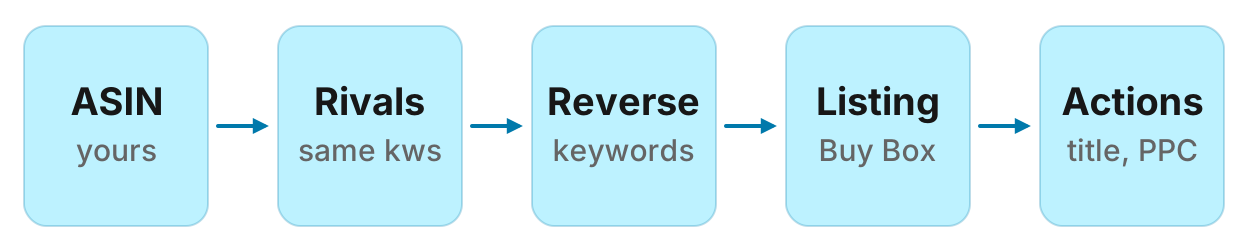
There is no Amazon-specific monitor preset. Rerun the analysis when you ask, weekly is enough for most listings, and keep last week's table in the chat so Claude can diff it. For scheduled price strings on a competitor's own HTML product page, that is competitor price monitoring. A Website tracking monitor does not watch Amazon result pages. Credit formulas are on credits and each tool's cost is on the Amazon tools page.
What to compare
Amazon competitor research is not one number. Compare the same fields on you and on each rival, and know which tool answers each.
| What | Tool | What you get |
|---|---|---|
| Competitor set | amazon_get_competitors | ASINs that share searches with yours: shared_keywords, avg_position, organic_keywords, organic_volume, sponsored_keywords. Your own ASIN is left out. Titles need a second call. |
| Sponsored placements | amazon_search_products | The live results page, organic and sponsored in order: price, rating, ratings_count, bought_past_month, Amazon's Choice, Best Seller, related_searches. |
| Keyword footprint (reverse ASIN lookup) | amazon_get_keywords | Searches one ASIN ranks for: monthly Amazon volume, rank (organic and sponsored rows counted together), type organic or sponsored, results_count. Sorted by volume. |
| Listing, price, rating, variations | amazon_get_product | Title, price, regular_price, discount_percent, rating, ratings_count, Amazon's Choice, availability, categories, About this item (description), spec table, variation_asins, images. Customer review text is not available for Amazon. |
| Buy Box and undercutting | amazon_get_sellers | Every seller: price, condition, ships_from, delivery. Rank 1 holds the Buy Box. has_featured_offer is false when nobody holds it, and rows then start at rank 2. |
| Keyword ideas and volume | amazon_search_keywords, amazon_get_keyword_metrics | Related Amazon searches around a seed, and monthly volume for keywords you already have (volume is null when the provider has no data). |
Location defaults to the United States (amazon.com). Pass United Kingdom to read amazon.co.uk. Do not assume other marketplaces.
Step 1: connect Manifold MCP to Claude
Manifold is a hosted MCP server. It is listed in the official MCP registry as com.manifoldmcp/manifold. Every account gets 250 credits a month on the free plan. You do not bring API keys of your own. You pay per call. Full client steps are in the docs. Credit formulas are on the credits page.
Claude.ai and Claude Desktop. From the Claude setup guide:
- Open Settings, then Connectors.
- Choose Add custom connector. Name it Manifold and paste the server URL from the setup guide.
- Choose Connect, sign in to Manifold, and approve Claude.
- Start a chat, check that Manifold is on in the chat's tools menu, and ask a question.
A connector you add on the web is also there in the desktop app and on your phone. The first time you sign in, Manifold creates your account on the free plan.
Claude Code. From the Claude Code setup guide: add the server with the URL from that guide. Start Claude Code, run /mcp, choose manifold, and finish sign-in in the browser. Add --scope user to have it in every project.
ChatGPT. From the ChatGPT setup guide: add Manifold as a connector and sign in. The rest of this guide uses Claude because the title is a Claude how-to. The same Amazon tools work in ChatGPT.
Paste this to check the connection:
Which Manifold tools find Amazon competitors for an ASIN, list the searches an ASIN ranks for, tear down a listing, list sellers and the Buy Box, search the Amazon results page, and return Amazon search volume? Say that amazon_get_keywords is the reverse ASIN lookup, that customer reviews are not available for Amazon, that there is no Amazon monitor preset, and that location defaults to the United States.
Claude should name amazon_get_competitors, amazon_get_keywords, amazon_get_product, amazon_get_sellers, amazon_search_products, amazon_search_keywords and amazon_get_keyword_metrics. Every parameter is on the Amazon tools page.
Step 2: build the competitor set from your ASIN
Start with one ASIN, not the whole catalogue. amazon_get_competitors returns products that compete for the same searches. Rows are ASINs only: shared_keywords, avg_position, organic_keywords, organic_volume, sponsored_keywords. Your product is left out. Call amazon_get_product for each title you want to read.
That set misses a rival that only buys the sponsored row and does not share organic keywords. amazon_search_products is the live results page for one search, organic and sponsored in order, with bought_past_month and badges. Use it on your main search so those paid placements land in the set.
Default limit is 100 (10 credits for the competitor call, cached 7 days). Default search depth is 100 (2 credits, cached 1 day). Ask for fewer rows on the first pass.
Paste:
Call amazon_get_competitors on ASIN [your ASIN], limit 20, location United States. Then call amazon_get_product on the top 10 ASINs by shared_keywords so we have titles. Then call amazon_search_products for "[main search]", depth 30. Return a table: ASIN, title, shared_keywords, avg_position, organic_keywords, organic_volume, sponsored_keywords, and whether that ASIN also appears as sponsored on the results page. Flag any sponsored ASIN that was not in the competitor set. Do not invent ASINs or titles. Save the table in this chat.
Keep the top 3 rivals (and any sponsored-only ASIN that is actually in your way). You will reverse those next.
Step 3: reverse ASIN lookup for each rival
This is how to do competitor analysis on Amazon for keywords. amazon_get_keywords is the reverse ASIN lookup: the Amazon searches one product ranks for, with monthly Amazon search volume, its position, and whether that row is organic or sponsored. Rank counts organic and sponsored rows together. Sorted by volume, biggest first. Default 100 rows is 10 credits, cached 7 days.
Run it on each of the top 3 rivals and on yours. Then ask Claude for the gap: keywords they rank for that you do not, with Amazon volume, and whether they hold that row organic or sponsored.
Paste:
Call amazon_get_keywords on these ASINs, limit 50 each: [your ASIN], [rival 1], [rival 2], [rival 3]. Return a gap table: keyword, Amazon volume, who ranks (ASIN and title), their rank, type organic or sponsored, results_count. Include only keywords a rival ranks for that we do not. Sort by volume. Then a short list of keywords we both rank for, with their rank versus ours. Do not invent volume. If volume is null, say so.
To size ideas that are not yet on anyone's list, call amazon_search_keywords with a seed (related searches plus volume) and amazon_get_keyword_metrics on a list you already have. That is Amazon keyword research for the listing, not Google volume. Those calls are 5 plus 5 per 100 rows, cached 7 days. Ten keywords of metrics cost 6 credits.
Step 4: listing teardown
amazon_get_product is one listing: title, price and discount, rating, ratings count, Amazon's Choice, availability, category path, the About this item text, the spec table, variation ASINs and images. Cost: 2 credits. Cached 1 day. Customer reviews are not available for Amazon. Do not ask Claude to mine Amazon review text. Rating and ratings_count are on the listing. If you also sell the same product on Google Shopping, shopping_get_reviews can pull Shopping reviews pooled across stores; that is a different shelf, on the Google Shopping MCP.
Paste:
Call amazon_get_product on [your ASIN] and on [rival 1], [rival 2], [rival 3]. Return a comparison table: title, byline, price, regular_price, discount_percent, rating, ratings_count, is_amazon_choice, is_available, first three categories, variation_asins count, image count. Then quote each title and the About this item text. Note title formulas (brand, product type, size, use). Do not invent bullets or prices. Do not claim to have read customer reviews.
What to look at, not a score:
Title. Who leads with the search, who leads with the brand, who packs size and use into the first 80 characters.
About this item. Which benefits they claim that you do not. The field is description, the bullets as text.
Specs and variations. A size or colour they offer (variation_asins) that you do not is a catalogue gap, not a copy gap.
Price and discount. regular_price is the struck-through list price; it is null when there is no discount. discount_percent is the cut from that list price.
Amazon's Choice. A badge, not proof they win the category. Combine it with rank and bought_past_month from the results page.
Step 5: price and Buy Box
amazon_get_sellers returns every seller offering that ASIN: price, condition, where it ships from, delivery. Rank 1 holds the Buy Box. seller_url is null when the seller is Amazon itself. has_featured_offer is false when no seller holds the Buy Box; rows then start at rank 2. Cost: 2 credits. Cached 6 hours.
Paste:
Call amazon_get_sellers on [your ASIN] and on [rival 1], [rival 2]. For each ASIN return: who holds the Buy Box (rank 1), price, condition, ships_from, delivery, and every other seller that undercuts that price, with condition. Say when has_featured_offer is false. Do not invent sellers.
A used or reseller offer that undercuts the new-condition Buy Box is not always a reason to drop your price. Note the condition. Amazon itself as rank 1 is a different competitor than a 3P seller.
This call is a snapshot. There is no scheduled Amazon price or Buy Box monitor. For ongoing alerts on a competitor's own HTML pricing page (not the Amazon listing), create a Website tracking monitor as competitor price monitoring describes. To compare the same product on Google Shopping stores, that is the Google Shopping MCP. Wider competitor channels (pages, ads, social, rankings) sit on competitor monitoring.
Step 6: the action list
You now have three tables: the competitor set, the keyword gap, the listing and Buy Box teardown. Ask Claude to write what to change. It should cite the rows, not invent a sales estimate.
Paste:
From the competitor table, the keyword gap table and the listing comparison, write an action list for ASIN [yours]. Cover: (1) a title suggestion that uses our product type and the highest-volume gap keywords we can honestly claim; (2) five About this item bullets, each tied to a spec we have or a gap we can close; (3) keywords to add to the backend terms, with Amazon volume; (4) PPC keyword suggestions: high-volume gaps a rival holds as sponsored, and high-volume gaps nobody holds as organic; (5) price and Buy Box notes, not an automatic reprice. For each action, cite the ASIN, keyword, volume or seller row it came from. Do not invent volume, ranks or reviews. Do not claim Amazon review themes.
Run this in your agent
Connect Manifold to Claude, ChatGPT or Cursor, then paste this prompt.
Run Amazon competitor analysis for ASIN [yours], main search "[keyword]", location United States. Call amazon_get_competitors with limit 20. Call amazon_get_product on the top 10 ASINs by shared_keywords for titles. Call amazon_search_products for "[keyword]" with depth 30 and flag sponsored ASINs missing from the competitor set. Then call amazon_get_keywords, limit 50, on us and the top 3 rivals. Return a gap table: keyword, Amazon volume, who ranks, rank, type organic or sponsored, only keywords they rank for that we do not, sorted by volume. Optionally call amazon_search_keywords on the seed and amazon_get_keyword_metrics on the gap keywords. Call amazon_get_product on us and those rivals: compare title, price, regular_price, discount_percent, rating, ratings_count, is_amazon_choice, About this item, specs, variation_asins. Call amazon_get_sellers on us and rival 1: who holds the Buy Box, who undercuts, condition. Then write an action list: title suggestion, five About this item bullets, backend keywords with volume, PPC suggestions from sponsored gaps, price and Buy Box notes. Cite the row each action came from. Do not invent volume, ranks, prices or reviews. Customer reviews are not available for Amazon. There is no Amazon monitor: save the tables so we can rerun next week.
That is the amazon competitor analysis tool in this setup: the same agent reads across the calls and writes the plan. It does not push the listing live. You (or your listing tool) make the edit.
Worked example (illustrative)
The names, ASINs, prices, ranks and volumes below are an example, not measurements of a real product.
Acme sells a standing desk on Amazon, ASIN B0EXAMPLE1, under the search "standing desk". After connecting Claude, Acme pastes the competitor-set prompt. amazon_get_competitors returns 20 ASINs. The top three by shared_keywords (after amazon_get_product for titles) are Rival Desk (B0EXAMPLE2, 140 shared keywords, avg position 8, 90 organic keywords, 12 sponsored), Other Frame (B0EXAMPLE3, 95 shared, avg 11) and Third Top (B0EXAMPLE4, 70 shared, avg 14, 40 sponsored keywords). amazon_search_products for "standing desk" adds one sponsored-only ASIN, Promo Riser (B0EXAMPLE5), that was not in the competitor set. Acme keeps the three plus Promo Riser.
Acme then pastes the reverse ASIN prompt, limit 50. Example gap table (illustrative):
| Keyword | Amazon volume | Who ranks | Rank | Type |
|---|---|---|---|---|
| standing desk with drawers | 12,000 | Rival Desk | 4 | organic |
| electric standing desk 48 inch | 8,100 | Rival Desk | 6 | organic |
| standing desk converter | 6,400 | Other Frame | 3 | sponsored |
| standing desk dual motor | 4,200 | Third Top | 9 | organic |
| standing desk for gaming | 3,500 | Promo Riser | 2 | sponsored |
Acme does not rank for those five. Both Acme and Rival rank for "standing desk" (Acme 18 organic, Rival 5 organic). amazon_get_product shows Rival's title leads with "Electric Standing Desk with Drawers", price $249 against a $299 list (17% off), rating 4.6, 3,200 ratings, Amazon's Choice, four variation ASINs. Acme's title leads with the brand, price $279 with no discount, rating 4.5, 410 ratings, two variations. amazon_get_sellers on Rival: rank 1 is Rival's own seller at $249 new, two resellers at $239 used. Acme holds its own Buy Box at $279; nobody undercuts new.
Example Claude table (illustrative):
| Action | Why | Evidence |
|---|---|---|
| Rewrite the title to lead with electric standing desk and drawers, then size | Rival holds the drawers search at rank 4 organic, 12,000 volume | Gap table; Rival title |
| Add an About this item bullet on drawer storage if the spec is true | Rival claims it; Acme's spec table already lists a drawer | amazon_get_product specs vs description |
| Add "standing desk dual motor" to backend terms | Third Top ranks 9 organic, 4,200 volume; Acme's spec lists dual motors | Gap table; specs |
| Test PPC on "standing desk converter" and "standing desk for gaming" | Those rows are sponsored for Other Frame and Promo Riser | Gap type column; results page |
| Hold the $279 list; do not match Rival's $239 used offers | Acme holds the new Buy Box; used offers are a different condition | amazon_get_sellers |
| Do not write a review-theme bullet | Amazon review text is not available | Product tool returns rating and count only |
None of those rows are live measurements. They show the shape of a digest Claude can write from the three tables: a title change, a bullet, a backend term, a PPC test, a price hold, and a claim to skip.
Keep it current: rerun weekly
Save the competitor table, the gap table and the listing comparison. A week later, paste them back and ask Claude to run the same calls and diff.
Rerun Amazon competitor analysis for ASIN [yours]. Call amazon_get_competitors limit 20, amazon_search_products for "[main search]" depth 30, amazon_get_keywords on us and the same three rivals limit 50, amazon_get_product on those ASINs, amazon_get_sellers on us and rival 1. Compare with last week's tables, pasted below: [paste]. Return only what moved: new rival ASINs, keywords a rival gained or lost, price or Buy Box changes, rating_count jumps. Then an updated action list. Do not invent a trend from one snapshot. There is no Amazon monitor; this rerun is on demand.
Cached repeats this account already paid for come back at no extra cost until they expire (7 days on competitor and keyword calls, 1 day on the product and the results page, 6 hours on sellers). A week later is a new call. Spend the monthly credits on that weekly pass, not on daily refreshes of the same ASIN.
Amazon competitor analysis tools vs this setup
Helium 10 Market Tracker 360 and Feedvisor are Amazon competitor analysis tools in the usual sense: dashboards that estimate sales and revenue, keep BSR history, score listings, and in Helium 10's case reverse an ASIN inside a seller suite (Cerebro) with Chrome extensions on the results page. That is the right software when you need a market-share chart, two years of history, or review-text analysis.
This setup is a different job. You already work in Claude or ChatGPT. You pass an ASIN, the agent calls the Amazon tools on demand, and the same agent writes the title, bullets, keyword and PPC list from the tables. You pay per call. There is no seat in a seller suite. There is no Amazon monitor, no sales estimate, no BSR history, no Amazon review text, and no Chrome extension. History is the table you saved.
Use this when you want the AI to read across competitor set, reverse ASIN, listing and Buy Box and write the plan, without a seller-suite login. Use a dedicated suite when you need estimated units, revenue, BSR over time, review mining, or a browser overlay on every search.
The honest answer to "what is the best competitor analysis tool for Amazon" is that it depends on that split. An amazon product research tool for launch ideas with sales estimates is a suite. Amazon competitor analysis for one ASIN, from inside Claude, with a pasteable action list, is this guide.
Run your first Amazon competitor analysis
Run your first Amazon competitor analysis on the free plan. Every account gets 250 credits a month. Open the Amazon MCP tools, connect Claude, and paste the prompt above with your ASIN.
A one-off results page, without the reverse ASIN work, is research Amazon and Google Shopping. For scheduled price alerts on HTML pages, that is competitor price monitoring. For ads, social and rankings around those rivals, that is how to track competitors.