Competitor price monitoring with Claude: alerts when rivals change prices
Connect Claude to Manifold MCP, create a Website tracking monitor on competitor pricing pages, then have Claude compare stores and recommend an action.


How do I set up competitor price monitoring?
Competitor price monitoring is tracking, analysing and acting on rivals' prices across the pages and marketplaces buyers already use: a SaaS pricing page, a product URL, a Google Shopping listing, an Amazon offer. You can run the whole job in Claude: connect Manifold MCP, list the competitor pages, check the prices are in the HTML, create a Website tracking monitor in new_items mode, compare Google Shopping and Amazon sellers on demand, then have Claude read the changes and recommend match, hold, bundle, or a battlecard update.
- Connect Manifold MCP to Claude (claude.ai, Claude Desktop or Claude Code), or to ChatGPT.
- List the competitor pricing pages and product URLs you actually lose deals to.
- Check with
seo_get_pagethat those prices appear in the HTML, not only after scripts run. - Create a Website tracking monitor in
new_itemsmode for those URLs (up to 10). - When you need a shelf comparison, call
shopping_search_productsandshopping_get_sellers, oramazon_get_productandamazon_get_sellers. - After the second check, ask Claude to read
monitoring_get_changesand recommend an action.
A one-off look at Amazon and Google Shopping is research Amazon and Google Shopping. A listing, keyword and Buy Box teardown from your ASIN is Amazon competitor analysis with Claude. This page is the scheduled how-to: competitor price tracking on their own pages, plus those store comparisons when you ask. Modes, blogs and careers pages are how to monitor website changes. The wider competitor setup is how to track competitors.
How to set up competitor price monitoring in six steps
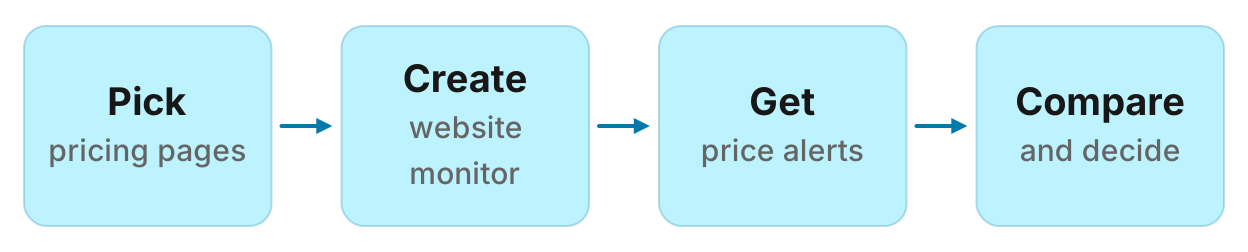
Monitors are on every plan, including Free, and their checks cost no credits. The free plan keeps 1 monitor. Monitors a workspace can keep, by plan: 1 on Free, 5 on Pro, 25 on Growth, 100 on Agency. For types and cadences, see how monitors work. Keep this page on prices.
What you can watch, and how
A Website tracking monitor holds 1 to 10 URLs. new_items mode records up to 20 distinct price strings per page ($, €, £, or a number followed by USD, EUR or GBP). When that set moves it reports "Prices changed on {page}" with before and after lists, and marks the change urgent. any_change mode does not track prices. There is no scheduled Google Shopping or Amazon price monitor; those are one-off calls. This is not SKU matching or automated repricing.
| What | How | What you get | Limits |
|---|---|---|---|
| SaaS pricing page | Website tracking monitor, new_items | Price strings that moved, before and after | HTML only; up to 20 strings; up to 10 URLs |
| Ecommerce product page | Website tracking monitor, new_items | The same, on that URL | Best with one product per URL |
| Google Shopping listing | On demand: shopping_search_products, then shopping_get_sellers | Store, price, previous price, shipping, total, rating | No scheduled Shopping price monitor |
| Amazon listing | On demand: amazon_get_product, amazon_get_sellers | Listing price, discount, sellers, who holds the Buy Box | No scheduled Amazon price monitor |
A reviews monitor's Google Shopping source tracks reviews, not prices. New reviews on Maps, the App Store, Play and Shopping are review monitoring.
Step 1: connect Manifold MCP to Claude
Manifold is a hosted MCP server. It is listed in the official MCP registry as com.manifoldmcp/manifold. Every account gets 250 credits a month on the free plan. You do not bring API keys of your own. You pay per call. Full client steps are in the docs. Credit formulas for one-off comparisons are on the credits page. Creating a monitor and every check it runs cost 0 credits on every plan.
Claude.ai and Claude Desktop. From the Claude setup guide:
- Open Settings, then Connectors.
- Choose Add custom connector. Name it Manifold and paste the server URL from the setup guide.
- Choose Connect, sign in to Manifold, and approve Claude.
- Start a chat, check that Manifold is on in the chat's tools menu, and ask a question.
A connector you add on the web is also there in the desktop app and on your phone. The first time you sign in, Manifold creates your account on the free plan.
Claude Code. From the Claude Code setup guide: add the server with the URL from that guide. Start Claude Code, run /mcp, choose manifold, and finish sign-in in the browser. Add --scope user to have it in every project.
ChatGPT. From the ChatGPT setup guide: add Manifold as a connector and sign in. The rest of this guide uses Claude because the title is a Claude how-to. The same tools and the same website monitor work in ChatGPT.
Paste this to check the connection:
Which Manifold tools create a website monitor, read what it found, fetch a page, search Google Shopping, list Shopping sellers, look up an Amazon product, and list Amazon sellers? Say that website_changes in new_items mode records prices, that monitor checks cost 0 credits, and that there is no scheduled Shopping or Amazon price monitor.
Claude should name monitoring_create_monitor, monitoring_get_changes, seo_get_page, shopping_search_products, shopping_get_sellers, amazon_get_product and amazon_get_sellers. Monitor tools cost 0 credits to call, and so do the checks they schedule. Every parameter is on the monitoring tools page. Page, Shopping and Amazon tools are on the SEO, shopping and Amazon pages.
You can also create the monitor in the dashboard. Website tracking is in the new monitor picker. The rest of this guide uses Claude, because the same agent creates the monitor, checks the HTML, and later reads the feed.
Step 2: pick the URLs
Put the pages that change a deal this month, not the whole sitemap. A competitor pricing tool that tries to cover every SKU is a different job; here you pick the handful of URLs sales already compares.
SaaS pricing. /pricing (or /plans) is the usual pick. A new plan name or a moved number is a conversation you are not in yet.
Ecommerce product. One product per URL. The monitor compares the page's price strings as a set, not a SKU in a catalogue, so a category grid with twenty products will jumble them.
Skip for the monitor. Google Shopping and Amazon listings: there is no preset that watches those prices on a schedule. Compare them on demand in step 5. A homepage that lists the whole site is noisy in new_items mode; use the pricing or product URL.
Keep the list in the chat. You will paste it into the HTML check next. The free plan keeps 1 monitor, so put every URL in that one (up to 10) rather than opening a second slot.
Step 3: check the prices are in the HTML
The check fetches HTML. It does not run JavaScript. A price that exists only after the page's scripts run will not show up. A page that returns status 400 or above is skipped. Paste this before you create anything:
Call seo_get_page on these URLs, with include text: [url1], [url2], [url3]. Quote every price string in the HTML: a
$,€or£followed by a number, or a number followed by USD, EUR or GBP. If a page shows prices in the browser but none appear in the text, say so and leave it off the monitor.
If the HTML already contains $59 or 49 USD, the monitor can see it move. If the quote comes back empty on a page that looks full in Chrome, that URL is a poor pick for this monitor. Take it off the list, or watch a different page where the price is in the source.
seo_get_page is free and cached an hour. A monitor skips that cache, because an hours-old snapshot would find nothing new.
Step 4: create the website monitor
Default cadence is daily. Hourly and weekly are allowed. Alerts start off. Price changes are marked urgent, so they can go in an email once you turn alerts on. Email is at most one a day per monitor, with the rest waiting in the feed. Email alerts are on every plan. Slack and webhook alerts are on Growth and Agency, not Free or Pro.
Paste, then let it preview:
Create a website monitor named "Competitor prices" for [url1], [url2] and [url3]. Use new_items mode, daily. Description: "When a competitor's price strings move, tell us the before and after and recommend match, hold, bundle, or a battlecard update. This is not SKU matching or automated repricing." Preview it first, then create it once I agree.
Your agent calls monitoring_create_monitor with preview true first, shows the pages, the mode and the cadence, and creates it once you agree. Creating it and its checks cost 0 credits.
The description is what a later agent reads with each change. Write the job: match, hold, update the comparison page. If you leave it out, one is written from the fields ("New items, such as jobs, posts and prices, on …").
An optional words filter (up to 10) keeps only new links and sentences that mention those strings. It does not apply to prices. Leave it off for this monitor.
The first check runs within five minutes. It records what is there and reports nothing. That starting point stops today's prices arriving as news. Changes appear from the second check on.
Step 5: compare stores on demand
When a page moves, or once a week even if it does not, ask Claude to compare the same product on Google Shopping and Amazon. Those calls cost credits as priced on credits. Cached repeats this account already paid for come back at no cost. There is no monitor preset that tracks Google Shopping or Amazon prices on a schedule. Claude reruns the comparison when you ask.
Paste:
Search Google Shopping for [product]. Then call shopping_get_sellers on the closest match; pass product_id, gid and data_docid from that search row. For Amazon, call amazon_get_product and amazon_get_sellers on ASIN [asin]. Return a table: store or seller, base price, shipping, total, rating. Do not invent prices. If a search is ambiguous, list the top matches and wait.
shopping_search_products returns Google Shopping results with store, price, previous price, rating, delivery, and the ids the other shopping tools take. shopping_get_sellers returns the stores Google lists for one product, with base price, shipping, total and store rating (up to 20 stores, often 5 to 10). shopping_get_product adds specs and offers if you need the listing itself. amazon_get_product returns the Amazon listing by ASIN: title, price, discount, availability. amazon_get_sellers returns every seller offering that ASIN, with who holds the Buy Box. Amazon product calls do not return reviews.
Do not rerun the full Shopping and Amazon pull every morning. Let the website monitor watch the pages. Spend the monthly credits when a price actually moved, or when you are writing the weekly digest.
Step 6: read changes and act
After the second daily check, ask:
What did my website monitor find since yesterday? For each "Prices changed on {page}" row, give competitor, page, before, after, the change, and a suggested action: match, hold, bundle, or update the comparison page or battlecard. Skip new blog posts and jobs.
Claude reads the feed with monitoring_get_changes. Use monitoring_get_history for the count of changes over time. Use monitoring_update_monitor to pause, change URLs, or run a check now.
Decision rules that hold up in a sales chat:
Match when the competitor dropped to a number you already planned to offer, or when the gap is the only objection on the call.
Hold when your page still explains the difference (seats, support, shipping, a bundle they do not have).
Bundle when you do not want to move the list price, but you can add a month, a setup call, or free shipping.
Update the comparison page or battlecard when they added a plan, crossed out a price, or moved a number you quote in sales snippets. Do that the same day.
A change keeps its summary while the monitor exists. Quote text and extra details are cleared after 30 days. Whole page text is not stored. Claude can still write the digest from what is in the feed.
Run this in your agent
Connect Manifold to Claude, ChatGPT or Cursor, then paste this prompt.
Set up competitor price monitoring for [brand]. Call seo_get_page with include text on these competitor URLs: [pricing or product URLs]. Quote every price string ($, €, £, USD, EUR or GBP). Leave off any URL whose HTML has no prices. Then preview a daily Website tracking monitor named "[brand] prices", new_items mode, those URLs, description: "When a competitor's price strings move, tell us the before and after and recommend match, hold, bundle, or a battlecard update. Not SKU matching or automated repricing." Create it once I agree. After the second check, read monitoring_get_changes and return a table: competitor, page, before, after, change, suggested action. On request, search Google Shopping for [product] (shopping_search_products then shopping_get_sellers with product_id, gid and data_docid) and look up Amazon ASIN [asin] (amazon_get_product, amazon_get_sellers). Do not invent prices. There is no scheduled Shopping or Amazon price monitor.
Worked example (illustrative)
The names and prices below are an example, not measurements of a real shop or listing.
Acme sells standing desks direct. Buyers compare it with Rival's /pricing (a three-tier table) and Other's product page for a similar desk. After connecting Claude, Acme pastes the HTML check. Rival's HTML contains $249 and $399. Other's contains $279. Both stay on the list. A third URL, a JS-only widget, quotes no prices in seo_get_page; Acme leaves it off.
Acme then pastes the create prompt with those two URLs, new_items, daily. Creating the monitor costs 0 credits. The first check is quiet. From the second check on, Acme asks for the table, then for a Shopping and Amazon comparison of "standing desk".
Example Claude table (illustrative):
| Competitor | Page | Before | After | Change | Suggested action |
|---|---|---|---|---|---|
| Rival | rival.example/pricing | $249, $399 | $229, $399 | Starter dropped $20 | Hold on Pro; update the battlecard line that quoted $249. Do not match Starter unless sales is already losing that tier. |
| Other | other.example/desk | $279 | $279, $249 | A sale price appeared next to the old one | Hold the list price; mention the sale on the comparison page so reps are not surprised. |
| Google Shopping, "standing desk" | (on demand) | Rival's desk at Store A $219 + $15 shipping ($234 total); Acme at own store $249, free shipping | Hold. Lowest shelf price is not the lowest total. | ||
| Amazon, ASIN B0EXAMPLE1 | (on demand) | Buy Box $239, two resellers at $229 used | Note the used offers; do not reprice the new desk against them. |
Acme updates the battlecard the same day. The Shopping and Amazon rows are a one-off; they will rerun next time a page moves. This is ecommerce price monitoring for a handful of URLs, not a catalogue-wide price tracking tool.
Price monitoring software vs this setup
Prisync, Price2Spy and Pricefy are competitor price monitoring software in the usual sense: dashboards that match thousands of SKUs across stores, keep history charts, enforce MAP, and in some cases push repricing rules. That is the right job when you run a large catalogue, need JavaScript-rendered marketplaces in the same feed, or want the platform to change your price.
This setup is a different job. You already work in Claude or ChatGPT. The monitor watches up to 10 HTML pages, reports when the price strings on those pages move, and the same agent compares Google Shopping and Amazon sellers when you ask, then recommends match, hold, bundle, or a battlecard update. It does not match SKUs, it does not reprice your store, and it does not see prices that exist only after scripts run.
Use this when one person (or a small team) wants to monitor competitor prices on a handful of pricing pages or hero products, including a SaaS table, and wants help deciding what to do. Use a dedicated suite when you need SKU matching across thousands of products, repricing rules, MAP enforcement, JS-rendered sites, or a history dashboard.
The honest answer to "what is the best price monitoring app" is that it depends on that split. A competitor price tracker for 8 competitor URLs and a weekly Shopping pull is this guide. A catalogue with 5,000 SKUs is not.
Create a website monitor for competitor prices
Create a Website tracking monitor on competitors' pricing pages. The free plan includes it. Monitor checks use no credits. Every account gets 250 credits a month for one-off Google Shopping and Amazon comparisons. Open competitor monitoring and start from the form, or connect Claude and paste the prompt above.
A one-off Amazon and Shopping read, without a monitor, is research Amazon and Google Shopping. For pages beyond prices (blog, careers, changelog), that is how to monitor website changes. For ads, social, rankings and AI answers together, that is how to track competitors. The product page for all of that is monitors.