Google Alerts alternative: track Reddit, social posts and reviews in Claude
Connect Claude to Manifold MCP, create a keyword monitor for the terms you already alert on, and have Claude write a digest of new mentions.

What is a Google Alerts alternative?
Google Alerts emails you when new results for a topic show up in Google Search. That covers web pages and news Google has crawled. It is weak on Reddit threads, LinkedIn, Instagram, TikTok and YouTube posts, and reviews. It sends links, not a summary of what to do. A Manifold keyword monitor searches those platforms on a schedule, keeps what is new, and Claude reads the feed.
Google Alerts still wins on open web and news, for free. Keep it for that. Use a monitor for the places Google Search misses.
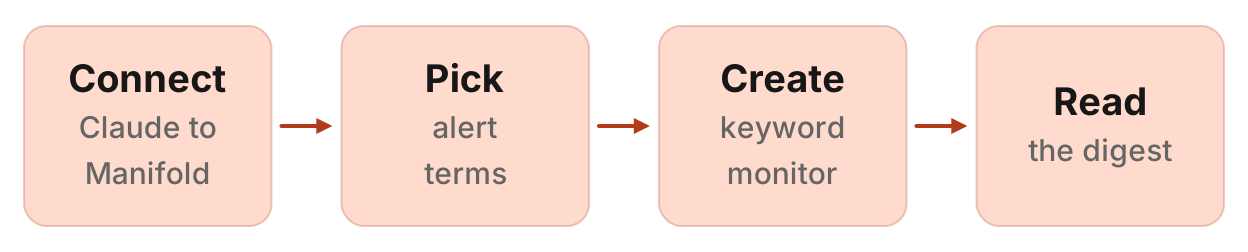
How to replace Google Alerts in four steps
- Connect Manifold MCP to Claude (claude.ai, Claude Desktop or Claude Code) with OAuth 2.1, or an API key.
- Create a Keyword tracking monitor for the terms you already alert on. Preview what it will watch first. Creating it and its checks cost 0 credits.
- On a plan that keeps more than one monitor, ask Claude to add a reviews monitor, or a website monitor for a pricing or press page.
- Let the first check record a starting point, then ask Claude for a digest after the second check.
Monitors come with every plan, including Free, and their checks cost no credits. Default cadence for keyword tracking is hourly. Alerts start on. The free plan keeps 1 monitor of up to 3 keywords, so start with the keyword monitor. Monitors a workspace can keep, by plan: 1 on Free, 5 on Pro, 25 on Growth, 100 on Agency. For types and cadences, see how monitors work.
A folder of unread Google Alerts is not a briefing.
Google Alerts vs a monitor your agent reads
Google Alerts tells you a page exists. A monitor tells you what changed. Your agent tells you what to do about it.
| Job | Google Alerts | A Manifold monitor Claude reads |
|---|---|---|
| Web and news pages Google crawls | Yes, free, from Google Search | No. Keyword tracking does not search the open web or news. |
| Reddit posts | Only if Google indexed the thread | Searches Reddit, or reads new posts in named subreddits and filters them by keyword. |
| LinkedIn, Instagram, TikTok, YouTube posts | No | Keyword tracking, up to five platforms |
| App, Maps and Shopping reviews | No | A reviews monitor, created by the agent |
| A specific page (pricing, changelog, press) | No | Website tracking |
| Summary and next steps | An email of links | Claude groups the feed and drafts replies for a person to post |
| Price | Free | Checks are free. Free plan: 1 monitor of up to 3 keywords |
Keep Google Alerts for web and news. A free web, blog, forum and X alert such as Talkwalker Alerts is the same job with X added. RSS readers collect feeds. Listening suites score sentiment across many sources. None of those put the finds in Claude as a feed the same agent created.
This page is the setup across jobs. For Reddit only, including alert services and a comparison table, see how to monitor Reddit for brand mentions. For named rival accounts rather than keywords, see how to monitor competitor social media. Listening platforms with their own MCP servers are in the best social listening MCP servers.
Keyword tracking does not cover Facebook or X search. It does not search the open web.
What it costs
Creating, reading and changing monitors costs 0 credits, and so do the checks. Checks skip the cache, so they read live data. The limit is the plan: how many monitors you keep, and on Free, up to 3 keywords per monitor.
Default cadence for keyword tracking is hourly. That is the right default when a Reddit thread is answered in its first day. Daily or weekly suits terms that move slowly.
The free plan keeps 1 monitor. A full Google Alerts replacement across jobs (keywords, reviews, a competitor page) needs more than one monitor, so on Free start with the keyword monitor. Slack and webhook alerts are on Growth and Agency. They are not on Free or Pro. Email alerts are on every plan: at most one a day per monitor, with the rest waiting in the feed Claude reads.
Step 1: connect Manifold MCP to Claude
Manifold is a hosted MCP server. You do not register a Reddit API app, a LinkedIn login or a social API key of your own for these checks. One-off calls cost credits; monitor checks do not. Sign in with OAuth 2.1, or send an API key. It is listed in the official MCP registry as com.manifoldmcp/manifold. Full client steps are in the docs.
Claude.ai and Claude Desktop. From the Claude client docs:
- Open Settings, then Connectors.
- Choose Add custom connector. Name it Manifold and paste
https://mcp.manifoldmcp.com/mcp. - Choose Connect, sign in to Manifold, and approve Claude.
- Start a chat, check that Manifold is on in the chat's tools menu, and ask a question.
A connector you add on the web is also there in the desktop app and on your phone. The first time you sign in, Manifold creates your account on the free plan.
Claude Code. From the Claude Code client docs:
claude mcp add --transport http manifold https://mcp.manifoldmcp.com/mcpStart Claude Code, run /mcp, choose manifold, and finish sign-in in the browser. Add --scope user to have it in every project. On a machine with no browser, send an API key as a bearer token instead.
Paste this to check the connection:
What Manifold monitor tools do you have? Then tell me how many monitors this workspace can keep and how many keywords each can hold.
Claude should name monitoring_create_monitor, monitoring_get_monitors, monitoring_get_changes, monitoring_get_history, monitoring_update_monitor and monitoring_delete_monitor. Those tools are free. The calls each check makes are not. Every parameter is on the monitoring tools page.
You can also create a monitor in the dashboard. The rest of this guide uses Claude, because the point is that the same agent creates the monitor and later reads it.
Step 2: choose your alert terms
Start with the queries already in Google Alerts: brand, product, founder, competitors. Then add the terms people actually type on Reddit and social, which Google Search often misses.
Brand and product names. The strings you already alert on.
Misspellings. If people get it wrong in threads, include those too.
Founder name. Founders get named in posts their companies do not.
Competitor names. Where buyers compare you, and where they ask for an alternative.
Category phrases. "alternative to [competitor]", "best [category] for [segment]", the problem you solve in plain words.
A Keyword tracking monitor holds 1 to 10 keywords, each 2 to 60 characters. You need a keyword, or Reddit communities to read in full. Platforms are Reddit, LinkedIn, Instagram, TikTok and YouTube, up to five, Reddit by default.
Instagram searches each keyword as one hashtag. "acme crm" reads #acmecrm, so pick a tag people actually use.
Reddit search is ranked and can miss posts. Pick subreddits when you know where buyers ask: add up to 10 as communities and Manifold reads new posts in those subreddits (1 to 3 pages each) and your keywords filter them, instead of searching all of Reddit. Searches on other platforms still run. A real run of finding those threads is find Reddit threads.
Exclusions are not a monitor field. Claude drops namesakes, own posts and noise when it triages the feed. Write that into the monitor's description, so the agent that reads the changes later knows what to ignore.
Paste this to have Claude propose terms from how you already search:
Suggest up to seven keyword tracking terms for [brand] at [site]: the brand, product names, two common misspellings, the founder, one competitor, and one "alternative to [competitor]" phrase. Keep each term 2 to 60 characters. Do not invent volumes.
Step 3: create the keyword tracking monitor
Two paths, both real.
Dashboard. Open monitors and start from the dashboard form, or from Reddit monitoring and social media monitoring. The form shows what the monitor will watch before it starts.
Claude. Ask, then let it preview. Default cadence is hourly; this example asks for daily:
Create a keyword tracking monitor named "Brand mentions", daily, for these keywords on Reddit, LinkedIn and YouTube: [brand], [product], alternative to [competitor]. Description: "New mentions we should answer or learn from, so we reply while the thread is fresh." Preview it first.
Your agent calls monitoring_create_monitor with preview true first, shows what the monitor will watch, and creates it once you agree. Creating it and its checks cost 0 credits. On Free, keep to 3 keywords.
A description such as "New mentions we should answer or learn from, so we reply while the thread is fresh" is worth writing. Claude uses it later to decide what to do with a change. If you leave it out, one is written from the fields.
Optional, on the same monitor: add subreddits when you know where buyers ask. Manifold then reads new posts in those subreddits and your keywords filter them, instead of searching all of Reddit.
Same monitor, also read every new post in r/SaaS, r/startups and r/entrepreneur. Preview first.
On Free, this is the one monitor you keep. Repeat for a second set of terms only if you are on a plan that keeps more than one.
Paste this when you want a quieter check:
Same keywords, weekly, not daily. Preview first.
Step 4: add reviews or a page watch
A keyword monitor does not read reviews, and it does not watch a URL. Those are separate monitors. On Free you keep 1 monitor, so this step is either instead of step 3, or it waits for a plan that keeps more. Pro keeps 5.
Reviews. Ask your agent to create a reviews monitor. The dashboard no longer offers it. Monitors that exist keep running. Sources, up to five: the App Store, Google Play, Google Maps, Google Shopping. An optional star filter keeps only those ratings in the feed (default is 1 to 5). Default cadence is daily. Alerts start on. A 1 or 2 star app or product review is marked urgent. Google Maps reports how many new reviews arrived and where the average rating went, not each review's text. App Store, Google Play and Google Shopping report each new review.
Its checks cost no credits, like every monitor's. A one-off look at an app's reviews, before you decide to watch, is read app store reviews.
Create a reviews monitor named "Acme reviews" for our App Store app id [id] and Google Play app id [id], daily, stars 1 and 2. Description: "New 1 and 2 star reviews to answer while the reviewer still reads replies." Preview it first, then create it once I agree.
Website tracking watches a specific page: pricing, changelog, careers, a press page. Its checks are free, like every monitor's; the limit is the monitor slot. Default cadence is daily. Alerts start off. Default mode new_items reports new child links and price changes. Switch to any_change for new body text. The setup is how to monitor website changes with Claude.
Create a website monitor named "Rival press" for https://[competitor]/press and https://[competitor]/pricing, new_items, daily. Preview first.
Do not look for /monitors/reviews or /monitors/website-changes. Those pages are not on the site. Reviews go through the agent. Website tracking lives on competitor monitoring.
Step 5: read the digest
The first check runs within five minutes. It records what is there and reports nothing. That starting point stops last week's posts arriving as news. Changes appear from the second check on.
A post is news once, when it is first seen (mention.new), by platform id. Reddit search and social search overlap windows so nothing falls between checks; repeats are dropped. The headline metric is "New mentions".
A spike (mention.spike) is at least 5 new mentions and at least three times the average of earlier checks, after 3 earlier checks.
Alerts start on for mentions. A mention posted in the last two days is marked urgent, so it can go in the email. You get at most one email a day per monitor, with the rest waiting in the feed. Each person in the workspace turns a monitor's alerts on or off for themselves.
Keyword tracking reads posts, not comments. To read a Reddit thread's comments, ask Claude: it calls the Reddit tools on the same server, at their usual price.
After the second daily check, ask:
What did my keyword tracking monitors find since yesterday? Group by source (Reddit, LinkedIn, Instagram, TikTok, YouTube). For each new mention, say the keyword, a short quote, the link, why it matters and what we should do. Flag questions to answer, complaints, and competitor mentions. Skip noise. Use each monitor's description to decide what matters.
Or a weekly digest you can paste every Monday:
Read my keyword tracking monitors since last Monday. Group by source. Give me: (1) questions to answer, with a draft reply for a person to post; (2) complaints and bug reports, with who should handle them; (3) competitor mentions worth a note; (4) anything that spiked. Skip namesakes and our own posts.
Claude reads the feed with monitoring_get_changes. Use monitoring_get_history when you want the count of new mentions over time rather than each item. Use monitoring_update_monitor to pause, change fields, or run a check now. Deleting is monitoring_delete_monitor.
A change keeps its summary while the monitor exists. Quotes and extra details (author, likes, views) are cleared after 30 days. Manifold keeps only the post details it needs to compare checks, not whole posts. Claude can still write the digest from what is in the feed.
Worked example: three Reddit keywords, daily (illustrative)
The names and the digest below are an example, not measurements of a real brand.
Acme sells B2B software at acme.example. It already has Google Alerts for "acme" and "acme crm". Those emails catch news posts. They miss r/SaaS threads and LinkedIn posts. After connecting Claude, Acme pastes:
Create a keyword tracking monitor named "Acme mentions", daily, for these keywords on Reddit, LinkedIn and YouTube: acme, acme crm, acme alternative. Description: "New mentions we should answer or learn from. Ignore our own account and people talking about the city named Acme." Preview it first, then create it once I agree.
Free takes up to 3 keywords a monitor, so three fit, and the checks cost no credits. The free plan keeps 1 monitor, so this is the one Acme keeps. Google Alerts stays on for news.
From the second check on, Acme asks for the weekly digest above.
Example Claude digest (illustrative):
- Reddit / question. A new post in r/SaaS mentions "acme crm": "Anyone using Acme CRM for a five person team?" Action: draft a short reply that answers the setup question, for a person to post.
- Reddit / complaint. A new post in r/startups mentions "acme": "Acme export has been broken since Tuesday." Action: send to support today.
- Reddit / competitor. A new post mentions "acme alternative" next to a rival. Action: a line on the battlecard, no public reply.
- Quiet sources. LinkedIn and YouTube were not on this monitor. Action: add them when Acme has a second monitor slot.
None of those rows are live measurements. They show the shape of a digest Claude can write from monitoring_get_changes: a question to answer, a complaint to route, a competitor note, and a reminder of what the one Free monitor does not cover.
When Google Alerts or a listening suite is still the better choice
Keep Google Alerts, or add a web-and-news alert, when you need:
- Open web and news coverage, which keyword tracking does not do. Google Alerts is free for that job. Talkwalker Alerts adds blogs, forums, websites and X.
- More queries than your plan's monitors hold. Google Alerts has no such cap.
You will want a listening suite when you need:
- Sentiment scoring and share of voice, already labelled, across many sources. Brand24, Mention and Brandwatch are built for that.
- Facebook or X keyword search. Keyword tracking does not cover those two. Named X accounts can be watched on a Social account tracking monitor if you ask the agent. Search for a keyword on X is not covered.
- Comments as well as posts, on Reddit and elsewhere, as a first-class feed. Keyword tracking reads posts. Claude can fetch comments for a thread you care about, as a one-off.
- Many brands, many seats, client reporting. Listening suites sell that workflow. Manifold monitors come with the plan, with seats included, and Claude writes the summary from the feed.
Manifold does not replace Google Alerts for news, and it does not replace a listening suite's sentiment reports. It watches the keywords you name on Reddit, LinkedIn, Instagram, TikTok and YouTube, on a schedule you pick, and your agent reads the changes.
Run this in your agent
Connect Manifold to Claude, ChatGPT or Cursor, then paste this prompt.
Create a keyword tracking monitor named Brand mentions, daily, for these keywords on Reddit, LinkedIn and YouTube: [brand], [product], alternative to [competitor]. Description: New mentions we should answer or learn from, so we reply while the thread is fresh. Preview it first, then create it once I agree. After the second check, group new mentions by source, flag questions to answer, complaints and competitor mentions, and draft replies for a person to post.
Create your keyword tracking monitor
Create your keyword tracking monitor. Monitors are on every plan, including Free, and their checks cost no credits. Free keeps 1 monitor of up to 3 keywords.
Open monitors and start from the dashboard form, or connect Claude and paste the prompt above. The preview shows what the monitor will watch before anything is created.