How to track competitors with Claude: a setup guide
Connect Claude to Manifold MCP, create one monitor per competitor channel, and have Claude summarise website, ads, social, ranking and AI changes.


How do I track competitors in Claude?
Google's AI Overview for "competitor monitoring tool" still points people at listicles and at pairing a traffic tool with a page-change watcher. That mix sees some of the picture. It does not set up one place that watches every competitor channel and has Claude read the changes.
This is the setup. It uses competitor monitoring on Manifold MCP: scheduled checks for pages, ads, social posts, Google rankings and AI answers, plus keyword mentions and reviews if you need them. You connect Claude, create one monitor per channel, and ask Claude to summarise what moved.
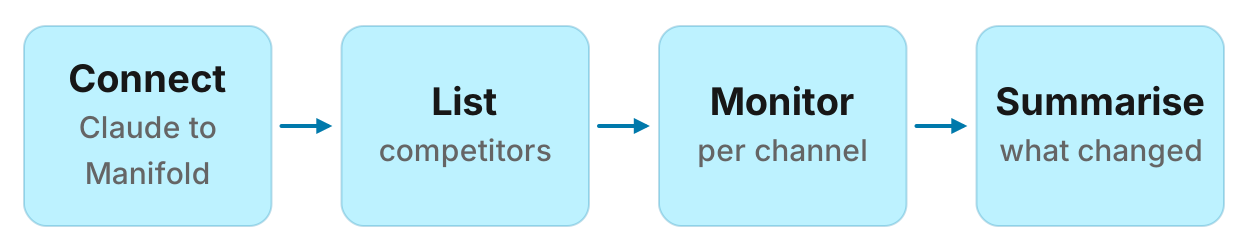
How to track competitors in four steps
- Connect Manifold MCP to Claude (claude.ai, Claude Desktop or Claude Code) with OAuth 2.1, or an API key.
- List the three to five competitors buyers already compare you with.
- Create one monitor per channel you care about: pages, ads, social accounts, Google rankings, AI answers, and optionally keyword mentions or reviews.
- Let the first check record a starting point, then ask Claude to summarise what changed.
Creating a monitor costs 0 credits. Each check pays for the tool calls it makes, at the same credit prices as a one-off call. Page checks are free. Monitors are on every plan, including Free with 250 credits a month. A workspace can keep 25 monitors. For types, cadences and the estimate the form shows, see how monitors work.
What to track about competitors
Not every channel is worth a monitor. Track the places a competitor can take a deal from you this month.
Pricing page. A new plan name, a crossed-out price or a free tier is a sales conversation you are not in yet.
Product, changelog, blog and job posts. A new feature page, a launch post or a hiring burst on a team you compete with tells you what they are building next.
Ads. The ads they start and stop on Meta, Google, LinkedIn and TikTok show the offer they are willing to pay to keep running. Official ads MCPs work on your own accounts. Competitor ads come from the public libraries.
Social accounts. New posts, and the ones that take off against that account's usual, on LinkedIn, Instagram, TikTok, YouTube, Facebook and X.
Google rankings on money keywords. Where their site sits for the queries that already bring you (or them) buyers: category, comparison, "alternative to" and pricing searches.
Reviews. New App Store, Google Play, Google Maps or Google Shopping reviews of their product, if that is where your buyers read.
AI answers that mention them. How often ChatGPT, Gemini and Google's AI Overviews name them, and you, for the questions buyers ask before they search.
A one-off look at keywords, ads and social is a different job. That comparison lives in the best MCP servers for competitor research. This guide is the scheduled watch that comes after.
Step 1: connect Manifold MCP to Claude
Manifold is a hosted MCP server. You do not register a Reddit app, a LinkedIn login or an SEO subscription for these checks. You pay per call with credits. Sign in with OAuth 2.1, or send an API key. It is listed in the official MCP registry as com.manifoldmcp/manifold. Full client steps are in the docs.
Claude.ai and Claude Desktop. From the Claude client docs:
- Open Settings, then Connectors.
- Choose Add custom connector. Name it Manifold and paste
https://mcp.manifoldmcp.com/mcp. - Choose Connect, sign in to Manifold, and approve Claude.
- Start a chat, check that Manifold is on in the chat's tools menu, and ask a question.
A connector you add on the web is also there in the desktop app and on your phone. The first time you sign in, Manifold creates your account on the free plan.
Claude Code. From the Claude Code client docs:
claude mcp add --transport http manifold https://mcp.manifoldmcp.com/mcpStart Claude Code, run /mcp, choose manifold, and finish sign-in in the browser. Add --scope user to have it in every project. On a machine with no browser, send an API key as a bearer token instead.
Paste this to check the connection:
What Manifold monitor tools do you have? Then tell me how many monitors this workspace can keep, and that creating one is free.
Claude should name monitoring_create_monitor, monitoring_get_monitors, monitoring_get_changes, monitoring_get_history, monitoring_update_monitor and monitoring_delete_monitor. Those tools are free. The calls each check makes are not.
You can also create a monitor in the dashboard. The rest of this guide uses Claude, because the point is that the same agent creates the monitors and later reads them.
Step 2: list the competitors you will watch
Three to five is enough. Take the brands that already come up on sales calls and in "alternative to" threads, plus one you would like to catch. You do not need a perfect list: an AI visibility monitor later reports brands that start appearing in ChatGPT's answers, which is how you notice a fourth rival.
For each competitor, collect:
- The website, and the pricing, blog and careers URLs if they exist
- The company LinkedIn URL, and handles on Instagram, TikTok, YouTube, Facebook or X
- The domain as it should appear in Google (example.com, not a campaign subdomain)
- The brand name as ads libraries and AI answers use it. A website works on every ads platform. Google needs one.
Keep that list in the chat. Claude will reuse it when it creates each monitor.
Step 3: watch their pages
A Website tracking monitor calls seo_get_page on 1 to 10 URLs. By default it reports new links under each page (a blog post, a job, a new plan URL) and price changes. Switch the mode to any_change if you want new text on the page itself. You can keep only changes that mention certain words. There are no screenshots.
Default cadence is daily. Email alerts start off. Page checks cost 0 credits, so three pages checked every day is free.
Paste:
Create a website monitor named "Rival pages" for https://rival.example/pricing, https://rival.example/blog and https://rival.example/careers. Use new_items mode, daily. Preview the monthly cost first.
Repeat for each competitor, or put up to 10 URLs in one monitor. A description such as "Pricing, launches and hiring at Rival, so we update the battlecard" is worth writing: Claude uses it later to decide what to do with a change.
Step 4: watch the ads they start and stop
An Ad tracking monitor calls ads_get_advertiser_ads for 1 to 5 brands on Meta (the facebook platform), Google, LinkedIn and TikTok. It reports ads that start and stop, and the first ads from a brand that had none. A website works best as the brand. Google needs a website.
Default cadence is daily. Alerts start off. Each brand and platform is one call, at 1 credit a call.
The same estimate the form shows: ads of 3 competitors on Meta and Google, daily, is 183 credits a month, which fits the free plan on its own. Weekly for the same setup is 27 credits a month.
Paste:
Create an ads monitor for rival.example, other.example and third.example on facebook and google, weekly. Preview the monthly cost, then create it once I agree.
Add LinkedIn or TikTok only if those libraries are where they actually spend. Four platforms for five brands is 20 calls a check.
Step 5: watch their social accounts
A Social account tracking monitor reads 1 to 10 public accounts. Platforms are LinkedIn, Instagram, TikTok, YouTube, Facebook and X (twitter in the fields). Use a handle, or a URL for Facebook and LinkedIn. It reports new posts, and flags the ones that do far better than that account usually does.
Default cadence is hourly. For competitor accounts, daily or weekly is enough unless they post in bursts you need the same day. Alerts start on. Each account is 1 credit a check.
The form's example: 5 accounts, daily, is 153 credits a month.
Paste:
Create a social account monitor for these six accounts, weekly: LinkedIn company URLs for Rival, Other and Third, and their X handles. Preview the monthly cost first.
For mentions of their names across LinkedIn, Instagram, TikTok, YouTube and Reddit, that is a different type (keyword tracking) and the social media monitoring page. Instagram searches each keyword as one hashtag, so use a keyword people tag. X has no search tool, so keyword tracking does not include X. Account tracking does.
Step 6: watch Google rankings
A Google rank tracking monitor checks 1 to 50 keywords for one site, in one location (default United States), on desktop. You need one monitor per domain: yours, or a competitor's. It reports where that site ranks, and how the average position moved.
Default cadence is weekly. Alerts start off, and when on they wait for a move that holds. Each keyword is 6 credits a check.
The form's example: 20 keywords, weekly, is 522 credits a month, which wants Pro. Five money keywords, weekly, is 131 credits a month.
Paste:
Create a Google rank monitor for our site [ours.example] on these five keywords, weekly, location United States: [category], [category] software, [category] pricing, [competitor] alternative, best [category] for [segment]. Preview the monthly cost first. Then make the same monitor for rival.example.
Keep the list short and fixed. A rank that jumps around on 50 informational queries is not a decision.
Step 7: watch AI answers that name them
An AI visibility tracking monitor asks 1 to 25 questions on the engines you choose (ChatGPT, Gemini and Google's AI Overviews by default; Claude, Perplexity and AI Mode are optional). It records how often your brand is named against up to nine competitors, which pages each engine cites, and brands that start appearing in ChatGPT's answers. Give aliases if answers use another name, and a domain if you want citation share as well as mentions.
Default cadence is weekly. Alerts start off, and wait for a move that holds, because one answer varies from the next. Cost is the AI answer price: 2 credits per prompt on ChatGPT, Gemini or AI Overviews, 15 on Claude, 6 on Perplexity, times the number of questions and samples (1 to 3).
The form's example: 10 questions on 3 engines, weekly, is 261 credits a month. Three questions on those engines, weekly, is 79 credits a month.
Paste:
Create an AI visibility monitor for brand Acme, competitors Rival, Other and Third, domain acme.example, on these questions, weekly, engines chatgpt, gemini and ai_overview, one sample: "best [category] for [segment]", "[category] tools compared", "Acme vs Rival". Preview the monthly cost first.
The dedicated AI visibility tracker page is the place for share-of-answers work. Use it here so a competitor that starts winning ChatGPT recommendations shows up in the same weekly digest as their pricing change.
Keyword mentions and reviews
Two more types apply when the competitor shows up in conversations, not only on their own properties.
Keyword tracking watches new posts that mention your keywords on Reddit, LinkedIn, Instagram, TikTok and YouTube. Up to 10 keywords, up to 10 Reddit communities read in full. Default cadence is hourly, alerts on, because a Reddit thread is answered in its first day or two. For competitor names, daily is usually enough. Three Reddit keywords, daily, is 92 credits a month. Hourly for the same setup is 2,192 credits a month. For the Reddit-only version of this check, see how to monitor Reddit for brand mentions.
Paste:
Create a keyword monitor for "Rival", "Other" and "Third" on Reddit, daily. Preview the monthly cost first.
Reviews watches new reviews of 1 to 5 apps, Google Maps places or Google Shopping products. Agents can create this type. The dashboard does not offer it. Default cadence is daily, alerts on. An App Store or Play app is 1 credit per 100 newest reviews each check. A Maps place is 2 credits. A Shopping product is 5 credits per 100 reviews.
Paste:
Create a reviews monitor for Rival's App Store listing [app_id], daily, all star ratings. Preview the monthly cost first.
A worked example: three SaaS competitors
The names and the digest below are an example, not measurements of real companies.
Acme sells B2B software. Buyers compare it with Rival, Other and Third. After connecting Claude, Acme pastes one prompt rather than creating each monitor by hand:
We compete with Rival, Other and Third. Preview, then create: (1) a daily website monitor for each competitor's /pricing, /blog and /careers pages, new_items mode; (2) a weekly ads monitor for rival.example, other.example and third.example on facebook and google; (3) a weekly social monitor for their LinkedIn company pages and X handles; (4) a daily Reddit keyword monitor for those three names; (5) a weekly Google rank monitor for acme.example on our five money keywords. Show the monthly credit total before you create anything.
On the same estimates the form uses, that package is 0 (pages) + 27 (ads, weekly) + 27 (six accounts, weekly) + 92 (three Reddit keywords, daily) + 131 (five keywords, weekly) = 277 credits a month. That is just over the 250 free credits. Drop the Reddit monitor, or run it weekly, and the rest fits Free. Add an AI visibility monitor of three questions, weekly, for 79 more credits when a plan renews.
The first check of each monitor runs within five minutes and reports nothing. It is the starting point, so last month's blog posts do not arrive as news. From the second check on, Acme asks:
What did my competitor monitors find this week? Group by competitor and channel. For each change, say why it matters and what we should do. Skip noise.
An example digest, labelled as such:
Example Claude digest (illustrative):
- Rival / pages. New link under /careers: "Enterprise AE, London". New hiring on the team you compete with. Action: note for sales, no public reply.
- Other / ads. Two new Meta ads with a "first three months free" headline, running since this week. Action: check whether your trial offer still compares, update the battlecard.
- Third / social. LinkedIn post about a changelog item, engagement above that page's usual. Action: read the changelog, decide if a comparison paragraph is due.
- Reddit. A thread in r/SaaS asking for an alternative to Rival. Action: draft a reply for a person to post, per the subreddit's rules.
- Rankings. acme.example moved from 8 to 5 on "[category] pricing". Rival unchanged. Action: none this week; watch the next check.
Quote text and extra details (author, likes, views) are cleared after 30 days. The summary of a change is kept while the monitor exists. Whole posts and AI answer text are not stored. Claude can still write the digest from what is in the feed.
Turning changes into action
A monitor that only emails you becomes a folder you do not open. Put a weekly review on the calendar and paste:
Read my competitor monitors since last Monday. Give me: (1) a table of changes worth a response, with competitor, channel, what changed, the URL and the action; (2) a quiet-week line for everyone else; (3) one battlecard update, if a price, offer or ranking moved. Use each monitor's description to decide what matters.
When a specific kind of change lands, the response is different:
They change pricing. Update the comparison page and the talk track the same day. If they dropped a price, check your own page still explains the difference. If they added a plan, decide whether it is a segment you want.
They launch ads. Read the headline, the destination URL and how long similar ads have run. One new ad is a test. Several on one offer is a push. Do not copy the ad. Answer the offer on your pricing page and in sales snippets.
They gain rankings. Open the page that now ranks. If it is a comparison or "best of" you are missing, that is a brief. If it is a new feature page, that is product input, not a blog post.
They show up in AI answers and you do not. See which pages the answer cited, then fix the gap the way how to get cited by ChatGPT describes. The monitor tells you it happened. It does not write the page.
They hire, or they go quiet. A careers burst is a signal, not a task. A week with no changes is a line in the digest, not a reason to add more monitors.
Use monitoring_get_history when you want the tracked number over time (average position, share of AI answers, running ads) rather than each change. Use monitoring_update_monitor to pause, change fields, or run a check now. Deleting is monitoring_delete_monitor. Every parameter is on the monitoring tools page.
How this compares with dedicated tools
This is context, not a ranking of other products.
Visualping watches pages for visual or text changes and can screenshot the diff. That is the right tool if you need a picture of a page. Manifold's website monitors compare links, prices and text. They do not take screenshots.
Crayon is a competitive intelligence platform: many sources, battlecards for sales, a yearly contract. It is built for a team that lives in that app. Manifold is built for the agent you already use. Claude writes the summary from the feed. You do not get Crayon's sales workflow.
Semrush and similar SEO suites track rankings, ads in their own databases, and a lot else, on a monthly plan. If you already pay for one, use its MCP server for the SEO slice, as the competitor research servers guide says. Manifold's rank monitor is a scheduled seo_get_position on the keywords you choose, paid per check, with no SEO subscription of your own.
A traffic tool plus a page watcher, which is what many listicles still recommend, covers visits you do not actually see (those numbers are estimates) and pages. It does not watch ads starting, social posts taking off, Google rankings and AI answers in the same feed, and it does not hand that feed to Claude.
Manifold also does not replace a CI platform's battlecard UI, and it does not replace a screenshot tool. It watches the channels above, on a schedule you pick, and your agent reads the changes.
Run this in your agent
Connect Manifold to Claude, ChatGPT or Cursor, then paste this prompt.
Set up competitor monitors for [Rival], [Other] and [Third]. Watch each competitor's pricing page, blog and careers page every day. Track their Meta and Google ads every week. Track their LinkedIn and X accounts every week. Track Reddit daily for posts that mention those names. Preview the monthly credit cost for each monitor first, then create them once I agree. After the second check, summarise what changed and what I should do.
Create your first competitor monitor
Create your first competitor monitor free. The free plan includes 250 credits a month. Open competitor monitoring and start from the form, or connect Claude and paste the prompt above.
Website checks stay free after that. Spend the rest of the month's credits on the ads, social, ranking or AI monitors that match how you actually lose deals. When a check would go over, the preview says so before anything is created.