Keyword clustering with Claude: group keywords by SERP overlap
Connect Manifold MCP, have your agent pull volumes and the top 10 for each keyword, measure overlap, name clusters, map to existing pages, then track head terms with a rank monitor.

How do I cluster keywords by SERP overlap?
Group keywords by SERP overlap with Claude: have your agent pull search volumes and the top 10 results for each keyword, measure how many results each pair shares, name clusters with their head terms and page types, map them to existing pages to avoid cannibalization, then track the head terms with a weekly Google rank tracking monitor that reports when a different page ranks. This setup uses Manifold MCP in Claude or ChatGPT.
For clustering before you write, keyword cannibalization shows what happens when two pages compete for one cluster. For finding the keywords competitors rank for that you do not, see keyword gap analysis.
Group keywords by SERP overlap in seven steps
- Connect Manifold MCP to Claude (claude.ai, Claude Desktop or Claude Code), or to ChatGPT.
- Build the keyword list: search for terms around a seed with seo_search_keywords, or get metrics for a list you already have with seo_get_keyword_metrics.
- First pass by meaning and intent: Claude drops off-topic terms and splits by informational, commercial and navigational intent.
- SERP overlap: pull the top 10 results for each keyword with seo_get_serp, then count how many results each pair shares. Pairs with 3 or more of 10 shared belong on one page.
- Name each cluster: head term, secondaries, combined volume, average keyword difficulty, dominant intent and page type (guide, tool page, listicle).
- Map clusters to existing pages with seo_get_position or Search Console data, so a cluster maps to an existing URL rather than a new one.
- Track head terms with a weekly Google rank tracking monitor: it checks the same position tool per keyword and reports rank moves and when a different page ranks.
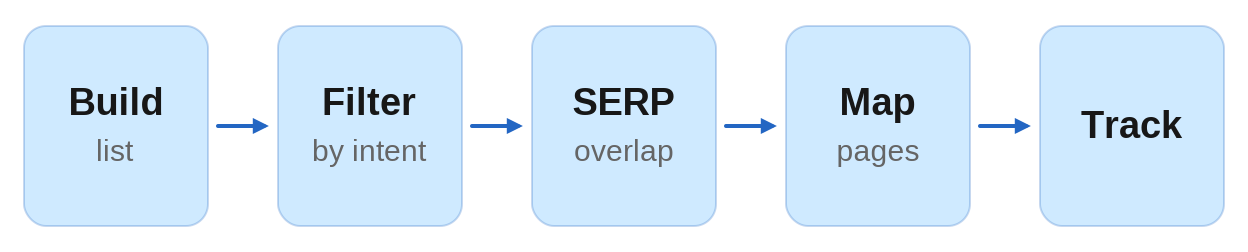
That is keyword clustering with Claude: live volumes and live SERPs, pairwise overlap measured by the agent, clusters named with their intent and page type, existing pages found, and a monitor for the head terms.
SERP clustering vs semantic clustering
Semantic clustering groups keywords by meaning: "best email tool", "top email software" and "email platform comparison" are semantically similar, so they go on one page. It is fast, free and works in any LLM without data tools.
SERP clustering groups keywords by what Google actually ranks: if "best email tool" and "email platform reviews" share 7 of their top 10 results, they want the same page, even if the words look different. It uses live data and shows what Google thinks the clusters are.
Use semantic clustering as a quick first pass to drop off-topic terms and split by intent. Then use SERP overlap to form the final clusters, because meaning is a guess and rankings are the answer. Some keywords that read informational turn out to want a tool page, and some pairs that look unrelated share most of their top results.
Step 1: connect Manifold MCP
Manifold is a hosted MCP server, listed in the official MCP registry as com.manifoldmcp/manifold. Full client steps are in the docs.
Claude.ai and Claude Desktop. From the Claude setup guide:
- Open Settings, then Connectors.
- Choose Add custom connector. Name it Manifold and paste the server URL from the setup guide.
- Choose Connect, sign in to Manifold, and approve Claude.
- Start a chat, check that Manifold is on in the chat's tools menu, and ask a question.
A connector you add on the web is also there in the desktop app and on your phone. The first time you sign in, Manifold creates your account on the free plan.
Claude Code. From the Claude Code setup guide: add the server with the URL from that guide. Start Claude Code, run /mcp, choose manifold, and finish sign-in in the browser. Add --scope user to have it in every project.
ChatGPT. Manifold MCP is an official ChatGPT app. From the ChatGPT setup guide: open Apps, search for Manifold, click Connect, sign in and click Allow. Then type @Manifold or pick it from the + menu under More. There is no URL to paste and no developer mode to turn on.
Paste this to check the connection:
Which Manifold tools search for keywords, get metrics for a list, pull the top 10 SERP results, and get the position of a domain on one keyword? Say that volumes come with the search, so there is no second metrics call.
Claude should name seo_search_keywords, seo_get_keyword_metrics, seo_get_serp and seo_get_position.
Step 2: build the keyword list
Start with one of these:
- seo_search_keywords around a seed: returns keywords related to a seed term, with volume, keyword difficulty, intent, CPC and 12-month trend. Do not call seo_get_keyword_metrics afterwards; the description says so.
- seo_get_keyword_metrics for a list you already have, such as a CSV export from another tool.
- seo_get_keyword_gap for keywords a competitor ranks for that you do not (see keyword gap analysis).
- console_get_search_analytics for queries you already get impressions for in Search Console. Console tools cost 0 credits.
Paste for a seed search:
Call seo_search_keywords for "keyword clustering", United States, limit 50. Return a table: keyword, volume, keyword difficulty, intent. Do not call seo_get_keyword_metrics; the search already includes metrics.
Or, if you have a list:
Here is my keyword list, one per line: [paste the list]. Call seo_get_keyword_metrics on all of them, United States. Return a table: keyword, volume, keyword difficulty, intent.
Claude calls the tool and shows the rows.
Step 3: first pass by intent
Before pulling SERPs, have Claude filter by meaning and intent to drop off-topic terms and split informational from commercial from navigational. This is a cheap pre-filter that cuts the SERP calls.
Paste:
Group these keywords by intent: informational (how-to, what is), commercial (best, top, reviews), navigational (brand or product names). Drop any off-topic terms. For each intent group, return a table of keywords sorted by volume descending.
Claude groups them. Keep the intents you need. If you are writing guides, keep informational. If you are building comparison pages, keep commercial. Navigational terms are usually someone else's brand.
Step 4: pull SERPs and measure overlap
For each keyword, pull the top 10 results with seo_get_serp, then compare every pair of keywords to count how many results they share. The common threshold is 3 of 10: pairs sharing 3 or more results belong on one page.
A practical note: some SERP rows come back with domain set to null because the URL is still a google.com/goto redirect, and those redirect links differ from one call to the next. So have Claude match on the result URL when the row has a domain, and on the result title when it does not. The seo_get_serp tool description notes the null domain.
Paste:
For each keyword in the informational group, call seo_get_serp, United States, desktop, top 10, include the AI Overview. Match results on url when the row has a domain, and on title when domain is null (those urls are Google redirect links). Compare the top 10 results between every pair of keywords. Count how many results each pair shares. Pairs sharing 3 or more of 10 belong on one page. Return a matrix: rows are keywords, columns are keywords, cells show the count of shared results for that pair.
Claude calls the tool for each keyword, then builds the overlap matrix. This is the step that spends the most credits, since it is one SERP call per keyword, so trim the list in step 3 first. Prices per call are on the SEO tools page.
Step 5: name clusters and page types
For each cluster, have Claude name:
- Head term: the highest volume keyword, or the term the SERP is "about"
- Secondaries: the other keywords in the cluster
- Combined volume: add up the monthly volume
- Average keyword difficulty: mean of the KD scores
- Dominant intent: what most of the cluster wants (informational, commercial, navigational)
- Page type: what ranks (guide, tool page, listicle, comparison, definition)
Read the page type off the SERP titles Claude already pulled. For example, if the top results are "5 Best Keyword Clustering Tools", "7 Keyword Grouping Tools Tested" and "Top Keyword Clustering Tools 2026", the cluster wants a tools roundup.
Paste:
For each cluster (keywords sharing 3+ results), name: head term (highest volume), secondaries (the rest), combined volume, average KD, dominant intent, page type (read off the SERP titles: guide, tool page, listicle, comparison, definition). Return a table: cluster name, head term, secondaries, combined volume, average KD, intent, page type.
Claude returns a table of clusters. This is your keyword map.
Worked example: clustering keywords around this post
We clustered seven keywords around this very topic with seo_get_keyword_metrics and seo_get_serp (United States desktop, top 10, 23 November 2026). These are the real numbers from our own run.
Shared top-10 results, matched on URL or title where the row had no domain:
- "keyword grouping tool" and "free keyword clustering tool": 4 of 10 shared (Free Keyword Grouping + Clustering Tool; Keyword Cluster Tool: Free (AI) Grouped Keywords for SEO; FREE Keyword Grouping Tool; Free Keyword Cluster Tool). One tool-page cluster.
- "keyword grouping" and "keyword grouping tool": 3 shared (seoscout Free Keyword Grouping + Clustering Tool; Keyword Grouping Tool - Semantic Grouping; FREE Keyword Grouping Tool). "keyword grouping" and "free keyword clustering tool": 2 shared. So "keyword grouping" leans to the tool cluster even though it reads informational (Labs intent informational, keyword difficulty 0): a good example of why SERP overlap beats reading the words.
- "keyword clustering tool" and "keyword grouping tool": 1 shared ("7 keyword grouping tools tested for speed and accuracy"); its SERP is mostly "best tools" roundups, so it wants a roundup or comparison page, not a single tool page.
- "keyword clustering" shared 0 of 10 with every other keyword: its own guide page (this post).
- "keyword mapping" (how-to-build-a-keyword-map guides) and "topic clusters seo" (topical authority guides) shared 0 with anything and 0 with each other: separate pages.
- "semantic keyword clustering" shared 1 with "keyword grouping" (a page titled "Keyword clustering"): weak, fold into the keyword clustering guide as a section.
Resulting map:
| Cluster | Head term | Secondaries | Volume | Avg KD | Intent | Page type |
|---|---|---|---|---|---|---|
| Guide | keyword clustering | semantic keyword clustering | 420 | 16 | Informational | How-to guide |
| Tool page | free keyword clustering tool | keyword grouping tool, keyword grouping | 310 | 11 | Commercial | Free tool page |
| Tools roundup | keyword clustering tool | - | 590 | 19 | Commercial | Comparison / listicle |
| Keyword mapping | keyword mapping | - | 170 | 25 | Informational | How-to guide |
| Topic clusters | topic clusters seo | - | 70 | 35 | Informational | Topical authority guide |
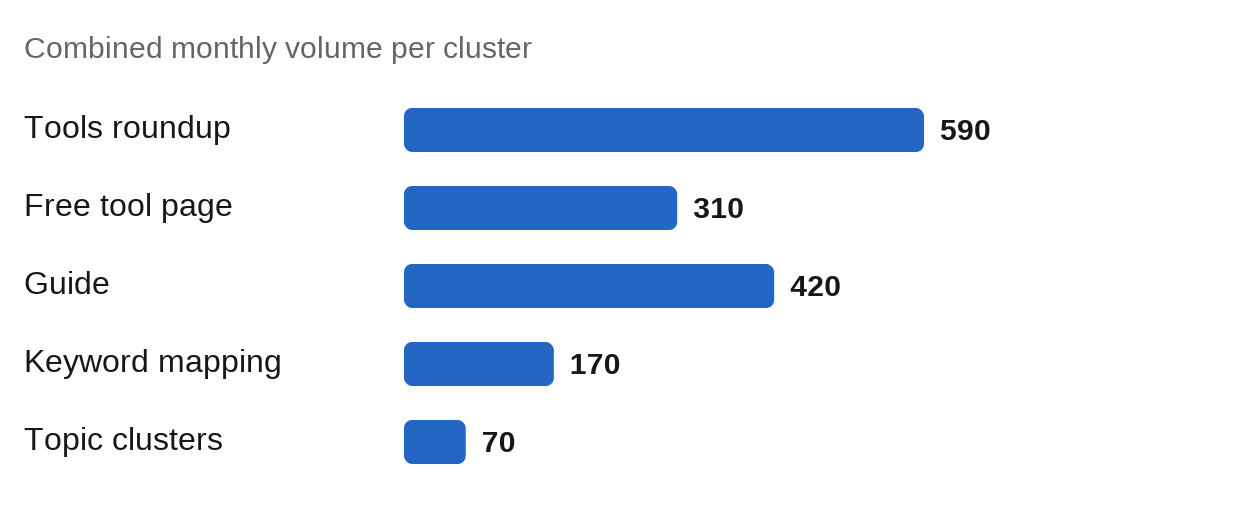
Each cluster is one page. Some pairs that read similar ("keyword clustering" and "keyword clustering tool") split because their SERPs are different (guides vs tool roundups). Some that read different ("keyword grouping" informational, "keyword grouping tool" commercial) merge because Google shows them the same results.
Step 6: map clusters to existing pages
Before writing new pages, check whether you already rank for the head term of each cluster. Use seo_get_position for a quick check, or console_get_search_analytics for your own Search Console data.
If you already rank, that is the page to strengthen. If you do not rank, it is a new page. If two pages rank for one cluster, that is keyword cannibalization: pick one owner and differentiate the other, merge and 301, or point internal links at the owner.
Paste:
For each cluster's head term, call seo_get_position for example.com, United States, desktop. If we rank, return the URL and position. If we do not rank, say "new page". Add a column to the keyword map: target URL (the ranking page, or "new page").
Claude calls the tool for each head term and updates the map. This step tells you which clusters need new pages and which are refreshes.
Step 7: track head terms with a rank monitor
Once pages are live, create a weekly Google rank tracking monitor for each cluster's head term. It checks the same position tool per keyword and reports rank moves and when a different page ranks.
A Google rank tracking monitor holds 1 to 50 keywords for one site, in one location (default United States), on desktop. Weekly is the default because positions move a place or two from day to day on noise. Daily is allowed; hourly is not.
A move is news when:
- The position changes by 3 places or more
- The keyword crosses into or out of the top 3 or the top 10
- The keyword enters or leaves the top 100
- A different page now ranks for that keyword
That last change is the cannibalization signal. If the monitor reports that a different page now ranks, you check which page and decide whether to adjust.
Paste for each cluster, or combine into one monitor if the keywords share a site:
Create a weekly Google rank tracking monitor for example.com on these head terms: [list the head terms from your keyword map]. Description: "Track head terms from keyword clustering so we see rank moves and when a different page ranks." Preview it first, then create it once I agree.
Claude calls monitoring_create_monitor as a preview first, shows what the monitor will watch, and creates it once you agree.
Free plan limits. The free plan keeps 1 monitor of up to 3 keywords; on a paid plan a rank tracking monitor holds up to 50. Creating the monitor and its scheduled checks cost 0 credits. A check you ask for outside the schedule (Run now) spends credits, as the lookups would if you ran them yourself.
The first check runs within five minutes and records a starting point. Changes appear from the second check on. After the second weekly check, ask:
Read my Google rank tracking monitor. For each keyword, say the old position, the new position, the URL that ranks, and whether a different page now ranks. If a different page ranks, that is a cannibalization signal.
The full monitor guide, including alerts and history, is free rank tracker. The product page is monitors, and every parameter is on the monitoring tools page.
Clustering tools vs this setup
A dedicated keyword clustering tool is software with a UI that clusters hundreds or thousands of keywords in one go, with saved projects, team seats and CSV exports. They are priced per seat or per month.
This setup is different. You already work in Claude or ChatGPT. You pass a keyword list, the agent pulls live volumes and live SERPs, measures overlap itself, names clusters with reasoning about intent and page type, maps them to existing pages to avoid cannibalization, and writes a keyword map. You pay per call, with no seat. The SERP checks are priced per call, as listed on the SEO tools page.
The tradeoff: a clustering tool gives you a UI, bulk processing and saved projects. This setup gives you the AI reading live data, explaining each cluster, mapping to existing URLs, and writing the keyword map, in the same chat where you do the rest of your SEO work. It suits tens to a few hundred keywords per run.
Without volumes and SERPs, semantic clustering is the fallback: Claude groups by meaning alone, using its own understanding of language. That needs no tool calls, but it is a guess. SERP overlap uses what Google actually ranks.
Related reading
For Claude doing the rest of your SEO work, see Claude for SEO: workflows and setup. For ChatGPT setup and workflows, see ChatGPT for SEO. For tracking whether pages you write close a gap, see keyword gap analysis. For fixing when two pages compete for one cluster, see keyword cannibalization. For the full rank monitor guide, see free rank tracker. For quick wins from Search Console where you rank 8 to 20, see find SEO quick wins.
Run this in your agent
Connect Manifold to Claude, ChatGPT or Cursor, then paste this prompt.
Cluster keywords by SERP overlap for [topic]. Call seo_search_keywords for "[seed]", United States, limit 50. Do not call seo_get_keyword_metrics afterwards; volumes are included. Group by intent: informational (how-to, what is), commercial (best, top, reviews), navigational (brands). Drop off-topic terms. For each keyword in the informational group, call seo_get_serp, United States, desktop, top 10, include the AI Overview. Match results on url when the row has a domain, and on title when domain is null. Compare top 10 results between every pair of keywords. Count shared results. Pairs sharing 3 or more of 10 belong on one page. Return an overlap matrix: rows and columns are keywords, cells show count of shared results. For each cluster (keywords sharing 3+ results), name: head term (highest volume), secondaries (the rest), combined volume, average KD, dominant intent, page type (read off SERP titles: guide, tool page, listicle, comparison, definition). Return a keyword map table: cluster name, head term, secondaries, combined volume, average KD, intent, page type. For each cluster's head term, call seo_get_position for example.com, United States, desktop. If we rank, return URL and position. If not, say "new page". Add a column: target URL (ranking page or "new page"). Then preview a weekly Google rank tracking monitor for the head terms. Description: "Track head terms from keyword clustering so we see rank moves and when a different page ranks." Preview it first, then create once I agree.
Run your first keyword clustering
Connect the SEO MCP tools, build a keyword list, and have Claude measure SERP overlap and name clusters. For the full SEO workflow, see the SEO skill. For keyword research and tracking, see do keyword research and create a rank monitor. Every account gets 250 credits a month on the free plan.