Free rank tracker: track Google rankings in Claude
Connect Claude to Manifold MCP, create a weekly Google rank monitor on your keywords, and have Claude read which ones moved.

How do I track Google rankings?
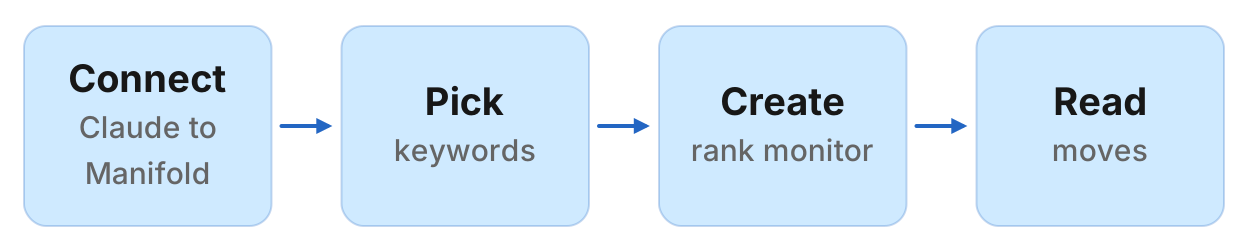
A free rank tracker is a scheduled check of where your site sits in Google for a fixed list of keywords, with a history you can read later. A one-keyword lookup with no history is a rank checker, not a tracker. The setup in this guide lives inside Claude: you connect Manifold MCP, pick 5 to 9 keywords, create a weekly Google rank tracking monitor after a credit preview, and ask Claude which keywords moved.
How to track Google rankings in four steps
- Connect Manifold MCP to Claude (claude.ai, Claude Desktop or Claude Code) with OAuth 2.1, or an API key.
- Pick 5 to 9 keywords worth a weekly watch: money terms, comparison and "alternative" searches, and a few you do not rank for yet. One location, desktop, list kept fixed.
- Create a Google rank tracking monitor. Preview the monthly credit cost first. Creating it costs 0 credits.
- Let the first check record a starting point, then ask Claude what moved after the second check.
Creating a monitor costs 0 credits. Each check calls seo_get_position once per keyword, which costs 6 credits, at the same credit prices as a one-off call. Monitors are on every plan, including Free with 250 credits a month. Nine keywords checked weekly is 235 credits a month, which fits. Ten weekly is 261, which does not. A workspace can keep 25 monitors. For types, cadences and the estimate the form shows, see how monitors work. The product page for monitors, rank tracking included, is monitors.
Free rank checkers, trials, and Search Console
People searching "free rank tracker" still land on three jobs that are not this one.
A one-off checker. Paste a keyword, see where one URL sits today. Chrome extensions and "no signup" tools do this. There is no schedule and no history. Useful when you want a single number now. That one-off in Manifold is seo_get_position on the SEO MCP tools, 6 credits, cached 24 hours. For the full page one list, that is seo_get_serp. For every keyword a domain already ranks for, that is seo_get_ranked_keywords. A keyword position checker is this job, not a tracker.
A trial on a listicle. "Best free rank tracker" posts often mean a 10 to 30 day trial of a paid suite. When the trial ends, so does the history.
Google Search Console. Free, and the right first source for queries that already earn impressions. Average position there is averaged across locations and devices, with a lag, and only for queries Google already showed you for. It will not tell you where you sit for a keyword you do not rank for yet. Connect it through the Search Console MCP (those calls cost 0 credits) and keep it. A rank monitor does a different job: a fixed list, one location, desktop, including keywords still outside the top 100.
A Google rank tracking monitor is the scheduled version of seo_get_position. Claude creates it, the server repeats it, and Claude reads the moves. Rank tracking does not show AI Overview citations. That is a different monitor, covered in the AI Overview tracker.
What it costs, plainly
Each check scans Google's top 100 for every keyword on the list. Not in the top 100 shows as "not in the top 100". Cost is 6 credits per keyword per check, including when the site is not ranked. Checks skip the cache, so they pay the live price.
Default cadence is weekly. You can set hourly or daily. Alerts start off. When you turn them on, you get at most one email a day per monitor, and they wait for a move that holds rather than one noisy check.
The monthly estimate the form and the agent's preview show is ceil(credits per check × checks per month). Weekly uses 30.44 / 7 checks a month. Daily uses 30.44. Worked from that formula:
- 5 keywords, weekly: 131 credits a month
- 9 keywords, weekly: 235 credits a month (fits the 250 free credits)
- 10 keywords, weekly: 261 credits a month (over the free plan)
- 1 keyword, daily: 183 credits a month
The preview shows the exact number before you create anything. Creating, reading and changing monitors is free. A failed check is not retried, so it is not charged twice. If the workspace hits its spend cap or runs out of credits, checks pause until you add credits or the plan renews.
To stay inside 250 credits a month: fewer keywords, weekly, one site. Nine money terms on a weekly cadence is the free-plan fit. A second site (a competitor) is a second monitor and the credits add.
Step 1: connect Manifold MCP to Claude
Manifold is a hosted MCP server. You do not register an SEO subscription of your own for these checks. You pay per call with credits. Sign in with OAuth 2.1, or send an API key. It is listed in the official MCP registry as com.manifoldmcp/manifold. Full client steps are in the docs.
Claude.ai and Claude Desktop. From the Claude client docs:
- Open Settings, then Connectors.
- Choose Add custom connector. Name it Manifold and paste
https://mcp.manifoldmcp.com/mcp. - Choose Connect, sign in to Manifold, and approve Claude.
- Start a chat, check that Manifold is on in the chat's tools menu, and ask a question.
A connector you add on the web is also there in the desktop app and on your phone. The first time you sign in, Manifold creates your account on the free plan.
Claude Code. From the Claude Code client docs:
claude mcp add --transport http manifold https://mcp.manifoldmcp.com/mcpStart Claude Code, run /mcp, choose manifold, and finish sign-in in the browser. Add --scope user to have it in every project. On a machine with no browser, send an API key as a bearer token instead.
Paste this to check the connection:
What Manifold monitor tools do you have? Then tell me how many monitors this workspace can keep, that creating one is free, and that a Google rank check costs 6 credits per keyword.
Claude should name monitoring_create_monitor, monitoring_get_monitors, monitoring_get_changes, monitoring_get_history, monitoring_update_monitor and monitoring_delete_monitor. Those tools are free. The calls each check makes are not. Every parameter is on the monitoring tools page.
You can also create a monitor in the dashboard. The rest of this guide uses Claude, because the point is that the same agent creates the monitor and later reads it.
Step 2: choose the keywords
A Google rank tracking monitor holds 1 to 50 keywords for one site, in one location (default United States), on desktop. Device is desktop. You cannot mix mobile into the same monitor. One monitor per domain: yours now, a competitor as a second monitor later.
Put keywords that change a decision this quarter, not every query in Search Console.
Money keywords. Category and "[category] software" terms buyers already search when they are close to picking a tool.
Comparison and "alternative" searches. "[competitor] alternative", "best [category] for [segment]", "[category] pricing". These are the queries where a three-place move is a sales conversation.
A few you do not rank for yet. Search Console will not show these. The monitor will, as "not in the top 100", until a page enters.
Keep the list fixed. A rank that jumps around on 50 informational queries is not a decision. Start with 5 to 9 so the weekly estimate stays inside 250 credits. You can add keywords later with monitoring_update_monitor.
Location is the Google search location, not a Maps pin. Default is United States. If you sell in one country, set that country and leave it. For a local service search such as "dentist", putting the town in the keyword ("dentist columbus ohio") is how the organic rank localises. A Maps geo-grid is a different tool.
Paste this to have Claude pick seven from Search Console (those calls cost 0 credits):
From our Search Console property, suggest seven keywords for a weekly Google rank monitor on [site]. Prefer queries with impressions that look like money, comparison or "alternative" searches. Keep the list short. Do not invent volumes.
Then propose two you do not rank for yet, and verify (each check is 6 credits):
Propose two extra money, comparison or "alternative" keywords we might not rank for yet. Then check each with seo_get_position on [site] and keep only those that come back not in the top 100.
If Search Console is not connected, Claude can call seo_get_ranked_keywords on your domain for the seven you already rank for. That call costs credits. Prefer Search Console when you have it. Ranked keywords will not show terms outside the top 100: propose those separately and verify with seo_get_position.
Step 3: create the Google rank monitor
Two paths, both real.
Dashboard. Open monitors and start from the dashboard form. The form shows the monthly estimate before it starts.
Claude. Ask, then let it preview:
Create a weekly Google rank monitor named "Our rankings" for [site] on these keywords, location United States: [k1], [k2], [k3], [k4], [k5], [k6], [k7], [k8], [k9]. Preview the monthly cost first.
Your agent calls monitoring_create_monitor with preview true first, shows the monthly estimate, and creates the monitor once you agree. Creating it costs 0 credits. Nine keywords weekly should preview at 235 credits a month. If the list is ten, the preview will say 261, which is over the free plan.
A description such as "Weekly ranks for our money keywords, so we refresh the page that drops and internally link the one that hits 11" is worth writing. Claude uses it later to decide what to do with a move. If you leave it out, one is written from the fields.
Weekly is the default because a position moves a place or two from day to day on its own. Daily is the right call when you are shipping a page this week and want the next day's reading, and you have the credits: one keyword daily is 183 a month. Hourly is not worth it for rankings.
Paste this when the site is not United States:
Same monitor, location United Kingdom.
Step 4: read moves after the second check
The first check runs within five minutes. It records where each keyword sits and reports nothing. That starting point stops last month's positions arriving as news. Changes appear from the second check on.
A move is news when:
- The position changes by 3 places or more
- The keyword crosses into or out of the top 3 or the top 10
- The keyword enters or leaves the top 100
- A different page now ranks for that keyword (
rank.new_page)
A wobble of one or two places inside the same band is not reported. The headline number the monitor charts is average position across the keywords that rank. History per keyword is in monitoring_get_history.
After the second weekly check, ask:
What did my Google rank monitor find since last week? For each keyword that moved, say the old position, the new position, the URL that ranks, why it matters and what we should do. Skip one or two place wobbles. Use the monitor's description to decide what matters.
Or a digest you can paste every Monday:
Read my Google rank monitors since last Monday. Give me a table of keywords that moved 3 places or more, or crossed the top 3, top 10 or top 100, with the URL and the action. Flag any keyword where a different page now ranks.
Claude reads the feed with monitoring_get_changes. Use monitoring_get_history when you want the trend (average position, how many in the top 10) rather than each item. Use monitoring_update_monitor to pause, change keywords, change location, or run a check now. Deleting is monitoring_delete_monitor.
Alerts start off for rankings. When you turn them on, they wait for a move that holds, and you get at most one email a day per monitor, with the rest waiting in the feed. Each person in the workspace turns a monitor's alerts on or off for themselves.
A change keeps its summary while the monitor exists. Quote text and extra details are cleared after 30 days. Claude can still write the digest from what is in the feed.
Worked example: nine keywords, weekly
The names and the digest below are an example, not measurements of a real site.
Acme sells B2B software at acme.example. After connecting Claude, Acme pastes:
Create a weekly Google rank monitor named "Acme money keywords" for acme.example on these nine keywords, location United States: project management software, best project management tool, asana alternative, monday.com alternative, project management pricing, project management for agencies, resource planning software, gantt chart software, project management vs spreadsheet. Description: "Refresh a page that drops, internally link one that hits 11, and check cannibalising URLs when a different page ranks." Preview the monthly cost, then create it once I agree.
Nine keywords, weekly: 235 credits a month on the same estimate the form uses. That fits the free plan with 15 credits left. A workspace can keep 25 monitors, so one rank monitor barely shows up.
From the second check on, Acme asks for the digest above.
Example Claude digest (illustrative):
From monitoring_get_changes:
- "asana alternative" moved up from 14 to 9. The URL is acme.example/asana-alternative. Action: it crossed into the top 10. Add an internal link from the category page and from the comparison table.
- "project management pricing" moved down from 6 to 11. The URL is acme.example/pricing. Action: it left the top 10. Refresh the pricing page's title and the comparison block before next week's check.
- "gantt chart software": a different page now ranks. Before: acme.example/blog/gantt-guide. After: acme.example/features/gantt. Action: check cannibalisation. Keep one URL, redirect or consolidate the other.
Keywords that did not move are not in that feed. From monitoring_get_history:
- "project management vs spreadsheet" is still not in the top 100. Action: none this week. It is on the list so a first ranking is news when it happens.
None of those rows are live measurements. The first three show the shape of a digest Claude can write from monitoring_get_changes: a band cross, a drop to act on, a URL change. The fourth is the current position from monitoring_get_history, which is how you see a keyword that did not move.
Track a competitor's rankings too
The monitor is one site. To watch a rival, create a second Google rank tracking monitor for their domain, on the same keywords or on the ones they actually rank for. Credits double: two sites, nine keywords each, weekly, is 470 credits a month, which wants more than the free plan.
The wider setup (their pages, ads, social, rankings and AI answers in one feed) is how to track competitors with Claude. Step 6 of that guide is the short version of this monitor for a rival. Keep this page on your own site's ranks. The product page for rival rankings is competitor monitoring.
When you need a paid rank tracker instead
This monitor is a fixed list, one location, desktop, up to 50 keywords, checked weekly by default. It is the right job for a small list you actually act on.
You will want a dedicated rank tracker, or a second tool next to this, when you need:
- Hundreds of keywords, or a new list every month, rather than a fixed nine
- Mobile ranks, which this monitor does not track (device is desktop)
- Many locations at once (cities, postcodes, a Maps geo-grid)
- Daily reporting for clients, across more keywords than 250 credits cover
Manifold still helps as the one-off check (seo_get_position, seo_get_serp) and as Search Console next to that other tracker. Do not force 50 keywords daily through the free plan. The preview will say so.
Run this in your agent
Connect Manifold to Claude, ChatGPT or Cursor, then paste this prompt.
Create a weekly Google rank monitor named Our rankings for [site] on these keywords: [keywords]. Location United States. Preview the monthly credit cost first, then create it once I agree. After the second check, tell me which keywords moved 3 places or more, which crossed the top 3 or top 10, and which now rank a different page, and what I should do.
Create your Google rank monitor
Create your Google rank monitor. The free plan includes 250 credits a month. Creating a monitor costs 0 credits. Each check pays for its tool calls (seo_get_position, 6 credits per keyword per check). Monitors are on every plan, including Free.
Open monitors and start from the dashboard form, or connect Claude and paste the prompt above. Nine keywords weekly is 235 credits a month on the estimate the preview shows. When a check would go over, the preview says so before anything is created.