App store keyword research with Claude: rival keywords and listing copy
Connect Claude to Manifold MCP, find rival apps, pull the store searches they rank for, compare gaps and reviews, then have Claude draft title, subtitle and keywords.

How do I do app store keyword research?
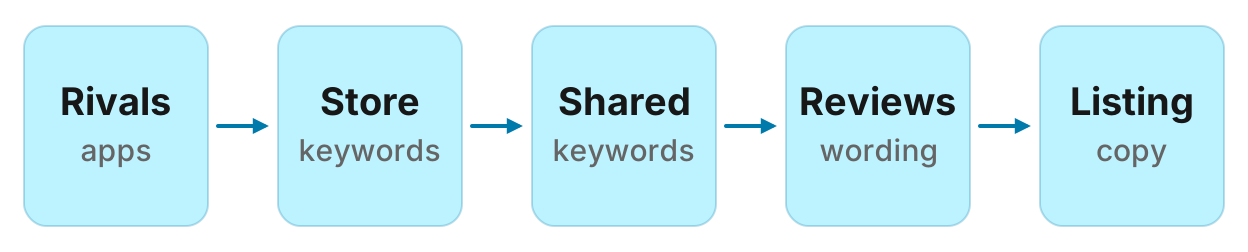
Here is the whole app store keyword research job in Claude, from rival apps to listing copy, run on Manifold MCP and Google Play:
- Connect Manifold MCP to Claude (claude.ai, Claude Desktop or Claude Code), or to ChatGPT.
- List 3 to 5 rival apps: ones you already lose to, plus apps from
apps_get_competitors, the category chart, and a title search. - Pull the store searches each rival ranks for, with monthly store volume and position.
- Compare shared keywords for the overlap, then diff keyword lists for gaps where a rival ranks and you do not.
- Mine reviews for the phrases users actually type, and the features they ask for.
- Score a shortlist (relevance, volume, how strongly rivals rank) and write title, subtitle and keyword field options that fit each store's limits.
- Recheck monthly. A reviews monitor on rival apps catches new complaints in between.
This page is ASO keyword research done from inside Claude: App Store and Google Play searches worth targeting, read off what competitor apps already rank for. For the same gap job on Google web results, see keyword gap analysis. For a one-off look at what users write on a listing, see read app store reviews. For scheduled alerts on new store reviews, see review monitoring. For pages, ads, social and rankings around those rivals, see how to track competitors.
How to run app store keyword research in Claude
Each tool's parameters are on the apps tools page. Call costs are on the credits page. Pass store as google_play or app_store on every call. Google Play ids are package names, with the case the store URL uses (com.Slack). App Store ids are the number in the URL (618783545). Keyword tools cover the United States in English only. Listings, reviews and charts are read live from the store and can take up to a minute.
There is no app keyword rank monitor. Save the tables and rerun the same calls when you ship a metadata change. A reviews monitor can watch rival listings for new complaints in between; that setup is at the end of this guide (how monitors work).
What to look at
App competitor analysis is not one chart rank. Compare the same things on you and on each rival, and know which tool answers each. Store autocomplete, Apple Ads Search Popularity, conversion by search term and a keyword rank history are not returned, so do not ask Claude to invent them.
| What | Tool | What you get |
|---|---|---|
| Store search volume and rival position | apps_get_keywords | Store searches one app ranks for. Each row is keyword, volume (monthly searches in the store), rank (the app's position), and results_count (App Store counts at most about 250 apps, and is empty on Google Play). Best rank first, then volume. United States and English only. |
| Shared keywords | apps_get_shared_keywords | Store searches that 2 to 20 apps all rank for, with each app's rank side by side, sorted by volume. Your app first in app_ids so you can read your row against theirs. |
| Keyword gaps | apps_get_keywords on you and on each rival | Terms in a rival's list that are missing from yours. Shared keywords is the overlap, not the gap. |
| Review wording | apps_get_reviews | Stars, text, app version, title (App Store only), helpful_count and developer_reply (Google Play only). Sort newest or most_relevant. |
| Listing metadata | apps_get_app | Title, subtitle (App Store only; empty when the app has none), description (on the App Store this starts with promotional text when there is one), category, rating, ratings_count, installs (Google Play only), update_notes, similar apps. |
| Category chart position | apps_get_top_charts | A store's top_free, top_paid, top_grossing, new_free or new_paid chart, overall or in one category, in chart order. App Store charts go to 100 rows, Google Play to 200. Play rows name the developer and skip ratings_count; App Store rows do the reverse. |
apps_search_apps and apps_get_top_charts find ids you do not have. apps_get_competitors returns rival ids that share store searches with one app, with shared_keywords, avg_position, keywords, top_3 and keywords_volume. Ids only: call apps_get_app for a name. The app itself is left out.
Step 1: connect Manifold MCP to Claude
Manifold is a hosted MCP server, listed in the official MCP registry as com.manifoldmcp/manifold. There is no App Store Connect or Play Console account of your own to set up. You pay per call, and every account gets 250 credits a month on the free plan. Full client steps are in the docs.
Claude.ai and Claude Desktop. From the Claude setup guide:
- Open Settings, then Connectors.
- Choose Add custom connector. Name it Manifold and paste the server URL from the setup guide.
- Choose Connect, sign in to Manifold, and approve Claude.
- Start a chat, check that Manifold is on in the chat's tools menu, and ask a question.
A connector you add on the web is also there in the desktop app and on your phone. The first time you sign in, Manifold creates your account on the free plan.
Claude Code. From the Claude Code setup guide: add the server with the URL from that guide. Start Claude Code, run /mcp, choose manifold, and finish sign-in in the browser. Add --scope user to have it in every project.
ChatGPT. Manifold MCP is an official ChatGPT app. From the ChatGPT setup guide: open Apps, search for Manifold, click Connect, sign in and click Allow. Then type @Manifold or pick it from the + menu under More. There is no URL to paste and no developer mode to turn on.
On Business, Enterprise and Edu, an admin decides which apps the workspace can use. The rest of this guide uses Claude, and the same apps tools work in ChatGPT.
Paste this to check the connection:
Which Manifold tools search apps, get a top chart, find competing apps, get a listing, get an app's store keywords, compare keywords several apps share, and get reviews? Say that every call needs store google_play or app_store, that Google Play ids are package names and App Store ids are the number in the URL, that keyword tools are United States and English only, that apps_get_shared_keywords returns terms all the apps rank for (gaps come from comparing apps_get_keywords lists), that listings, reviews and charts can take up to a minute, that a Reviews monitor is created by the agent (the dashboard form does not list it), and that there is no app keyword rank monitor.
Claude should name apps_search_apps, apps_get_top_charts, apps_get_competitors, apps_get_app, apps_get_keywords, apps_get_shared_keywords and apps_get_reviews.
Step 2: find rival apps
Start with apps you already lose installs to. Then add apps that share store searches with you, apps that sit on the category chart, and apps whose titles match a distinctive word.
apps_get_competitors ranks apps by how many store searches they share with one app. It answers who takes your search traffic, not who buyers compare you with in a review. Large general apps share generic terms with everything. Keep apps with a high share of overlap, and drop a giant that ranks for everything.
apps_get_top_charts is the store's own chart in one category. Pass chart as top_free (the default), top_paid, top_grossing, new_free or new_paid. Pass category as the store's id in lower case with underscores (productivity, health_and_fitness); a name such as "Health & Fitness" is turned into one. Omit category for the overall chart. Top free is recent download velocity; top grossing is revenue. Neither is quality. An app rising in new_free is one to watch. Charts move daily: date the snapshot.
apps_search_apps matches any one word of the query in app titles, across a whole store, and returns the biggest apps first (most installs on Google Play, most ratings on the App Store). It is not the store's own search ranking. A query such as "habit tracker" also brings back flight trackers. Search one distinctive word, with category, and filter the rows.
Paste:
Find 3 to 5 rival apps for [our app] on [app_store or google_play]. Our app_id is [id]. Call apps_get_competitors on that id, limit 20. Call apps_get_top_charts for chart top_free and category [category]. Call apps_search_apps for "[distinctive word]", category [category], limit 20. Then call apps_get_app on the keepers so we have titles. Return a table: app_id, title, developer, rating, ratings_count, installs (Play only), shared_keywords, avg_position, and whether it appeared on the chart or in search. Keep 3 to 5 close apps. Drop giants that share only generic terms. Do not invent ids or titles. Save the table in this chat.
Keep those ids. You will pull keywords next. If you only have a name, apps_search_apps is how you get the id; then switch to the cheaper listing and keyword calls.
That is also how to start app competitor analysis when you do not yet know who ranks for your category: chart plus competitors, then names.
Step 3: rivals' store keywords
This is Google Play keyword research and App Store keyword research from the apps that already win. apps_get_keywords returns the store searches one app ranks for, with monthly store volume and the app's position. Rows come best rank first, then volume, so the first rows are often the app's own name and the terms it owns. Page with cursor to reach the terms it ranks 10 to 50 for, where the opportunities sit.
United States and English only. Google Play covers fewer apps than the App Store; NoData means the store has no keyword data for that app. results_count on the App Store sits at about 250 for most terms, so only a figure well under 250 marks a thin search. Play sends none. Volume is a model of monthly store searches, not a count from Apple or Google: rank terms against each other inside one store, and do not compare an App Store volume with a Play volume or with a Google web volume.
Default 100 rows. Ask for fewer on a first pass. A very large app can fill pages with first places; take a few hundred rows and sort them by volume yourself.
Paste:
Call apps_get_keywords on these app_ids, store [app_store or google_play], limit 50 each: [yours], [rival1], [rival2], [rival3]. Return one table per app: keyword, volume, rank, results_count. Then a combined table of the 20 highest-volume terms, with who ranks and at what rank. If volume is empty, say so. If a call returns NoData, say which app. Do not invent volume or ranks.
Look at:
Terms two or more rivals rank in the top ten for. Those are proven relevant to the category.
Head terms vs two- and three-word phrases. A new app rarely ranks for a one-word head term. Modest-volume phrases where the top apps are weaker are where early installs come from.
Noise. Store lists mix in terms that only share a word with the app, misspellings, and rival brand names. A competitor's brand name is off limits in Apple metadata (App Store Review Guideline 2.3.7) and risky on Play under the metadata policy. Reach it with Apple Ads instead.
Manifold has no store autocomplete tool. For seed expansion the way an AI Overview describes it (features, actions, categories), read each rival's title, subtitle, description and update_notes from apps_get_app, then check those phrases against the keyword tables. For autocomplete itself, type the seed into the store on a device set to the United States, or use Apple Ads Search Match as a complementary source (see step 7).
Step 4: shared keywords and gaps
apps_get_shared_keywords takes 2 to 20 apps in one store and returns the terms every app in that set ranks for, with each rank in the order you gave the ids, sorted by volume. Put your app first. That is ASO competitor analysis on the overlap: where you already show up, and where a rival sits above you.
It does not return terms a rival ranks for that you do not. Those gaps come from comparing each rival's apps_get_keywords list with yours.
Paste:
Call apps_get_shared_keywords on store [app_store or google_play] with app_ids [yours, rival1, rival2, rival3], limit 50. Return a table: keyword, volume, then each app's rank. Flag rows where a rival ranks in the top 5 and we rank 6 or worse, or where our rank is empty. Then, from the apps_get_keywords tables in this chat, list keywords a rival ranks for that we do not, with volume and the rival's rank, highest volume first. Do not treat the shared list as the gap. Do not invent ranks.
What to keep:
Near wins. You rank, they rank higher, volume is real. A subtitle or keyword-field change is cheaper than a new feature.
True gaps. They rank, you do not. Check relevance before you chase volume: if your screenshots would not answer the search, drop it.
Shared junk. Generic words every app in the category ranks for. They fill the table and do not decide the listing.
Step 5: mine reviews for user wording
Store keyword lists miss the functional phrases people type ("split bills", "offline maps", "pomodoro with music"). apps_get_reviews returns those words in the users' own sentences.
Sort newest (the default) for what broke after a release, or most_relevant for the themes the store already surfaces. Default 100 reviews. The App Store returns at most 500 in one call; Google Play goes to the row cap of 1,000. ratings_count on the listing is every star rating, most without text: it is not the number of reviews you can fetch. title comes back on the App Store only; helpful_count and developer_reply on Google Play only. Reviewer names are personal data: leave them out of the table you keep.
The same call, without rivals, is read app store reviews. The App Store reviews and Google Play reviews tools on the site show one public listing.
Paste:
Call apps_get_reviews on [yours] and on [rival1], [rival2], [rival3], store [app_store or google_play], sort newest, limit 100. Drop spam, one-word praise and emoji-only rows. Return a phrases table: phrase (2 to 5 words as the reviewer wrote it), how many reviews, which apps, two verbatim quotes. Then a features-asked-for list, and a complaints list for 1 to 3 star rows. Do not invent quotes. Do not include reviewer names.
Use the phrases that also appear, or nearly appear, in the keyword tables. A complaint that repeats across rivals is positioning. A feature request nobody ships is a subtitle candidate, if the app actually does it.
Step 6: score and shortlist
You now have four tables: rival apps, each app's keywords, shared keywords plus gaps, and review phrases. Ask Claude to score candidates. This is a heuristic, not a Manifold metric and not a store difficulty score.
Score each term on three things, in this order:
- Relevance. Would a person who typed this be happy with your screenshots? If not, drop it. Relevance is a gate, not a weight. Installs and conversion feed ranking on both stores.
- Volume. Higher is better inside one store. Treat two volumes within a factor of two as a tie. Empty volume is still usable if two rivals rank for it.
- Rival strength. How strongly the closest rival ranks, and how strong that listing looks (rating,
ratings_count, chart place). A term whose top five all have tens of thousands of ratings, when you have hundreds, is a later goal. A term where a rival at your size ranks 4 to 12 is a better first target.
Multiply them only as a way to sort, then read the top of the list. Do not trust a third-party difficulty number. results_count is not difficulty.
Paste:
From the keyword tables, the shared and gap tables, and the review phrases, score each candidate: relevance (drop if our screenshots would not answer it), volume, rival strength (closest rival's rank and listing size). Return a shortlist of 15: keyword, volume, our rank or gap, best rival rank, review-phrase match, score note, and whether it belongs in title, subtitle, keyword field, or Play short description. Cite the row each came from. Do not invent volume. Do not keep rival brand names.
That shortlist is what you write metadata from.
Step 7: write title, subtitle and keyword field
Apple and Google publish hard limits. Claude should count characters, not guess.
App Store (app information, product page, App Store search):
- Name: 30 characters. Brand plus the single most valuable term.
- Subtitle: 30 characters. The next most valuable phrase, written to convert. It shows under the name in search.
- Keyword field: 100 characters total, comma-separated, no spaces between terms (spaces are allowed inside a phrase:
Property,House,Real Estate). Do not repeat words from the name, subtitle or category. Skip plurals of words already used, the word "app", and filler words. - Search results are based on text relevance (title, subtitle, keywords, primary category) and on user behaviour (downloads, ratings and reviews). Promotional text does not affect search ranking, so do not park keywords there. The description (4,000 characters) is for the product page, and App Store Connect says it is used for web engine search results, not as an App Store keyword field.
Changing name, subtitle or the keyword field needs a new app version. Change in batches, wait two to four weeks, then rerun apps_get_keywords on your own id.
Google Play (create your app, get discovered, metadata policy):
- Title: 30 characters. Brand plus the main term.
- Short description: 80 characters. A sentence of value, with the next term in it naturally.
- Full description: 4,000 characters. Play has no keyword field. The store listing text (title, short description, full description) is what Google tells you to write for discovery, plus ratings, reviews, downloads and other behavioural factors. Use the main term in plain sentences. Keyword lists and repetition can violate the metadata policy.
- Play text can change without a new build, which makes it faster to test a term. Do not change it weekly: each change resets what Play has learned.
Paste:
From the shortlist, draft listing options for [our app]. App Store: 3 name options (max 30 characters), 3 subtitle options (max 30), and 2 keyword-field strings (max 100 characters, comma-separated, no spaces between terms, no repeats of name or subtitle words, no "app", no rival brands). Google Play: 3 title options (max 30) and 3 short descriptions (max 80). For each option, show the character count and which shortlist terms it uses. Then 5 full-description sentences for Play that cover the remaining themes without a keyword list. Cite the shortlist row. Do not exceed the limits. Do not invent a rank those words will win.
Apple Ads Search Match is a complementary source Manifold does not read. With Search Match on, Apple Ads can match your search-results ad to App Store queries from your listing metadata, similar apps and other search data, without you adding every keyword (Apple Ads: Search Match). Use it to discover queries your metadata already attracts. It is not a substitute for the keyword field, and this guide does not pull Ads reports.
Run this in your agent
Connect Manifold to Claude, ChatGPT or Cursor, then paste this prompt.
Run app store keyword research for [our app] on [app_store or google_play], app_id [id], category [category]. Find 3 to 5 rivals: apps_get_competitors limit 20, apps_get_top_charts chart top_free category [category], apps_search_apps for "[distinctive word]" with category, limit 20. Call apps_get_app on keepers for titles. Drop giants that share only generic terms. Then apps_get_keywords on us and each rival, limit 50 (United States and English only; NoData means no keyword data). Call apps_get_shared_keywords with our id first then the rivals (2 to 20 apps): that is the overlap, terms all rank for. Gaps are terms in a rival's keyword list that are missing from ours; do not treat the shared list as the gap. Call apps_get_reviews on each, sort newest, limit 100; drop spam; table phrases, features asked for, and 1 to 3 star complaints with quotes, no reviewer names. Score candidates: relevance (drop if our screenshots would not answer it), volume, rival strength. Return a shortlist of 15 and draft App Store name (max 30), subtitle (max 30), keyword field (max 100, comma-separated, no spaces between terms, no repeats of name or subtitle words, no "app", no rival brands) and Play title (max 30) and short description (max 80), with character counts. Cite the rows. Do not invent volume, ranks or quotes. Then preview a daily reviews monitor on the rival app_ids, stars 1 to 3; the dashboard does not list Reviews; there is no app keyword rank monitor. Wait before creating it.
That is ASO keyword research in this setup: the same agent reads across rival listings, store keywords, shared keywords and reviews, then writes the metadata. You paste it into App Store Connect and Play Console yourself.
Worked example (illustrative)
The names, ids, volumes, ranks and quotes below are an example, not measurements of a real app.
Acme Focus is a focus timer. After connecting Claude, Acme pastes the rival prompt for the App Store, category productivity, distinctive word "focus". The competitor call, the top free chart and the title search keep three apps besides Acme: Rival Timer, Other Block and Third Quiet. Acme's id is 111111111; the others are made-up numbers in this example.
Acme then pastes the keywords prompt, limit 50. Example keyword table (illustrative):
| Keyword | Volume | Rival Timer | Other Block | Third Quiet | Acme |
|---|---|---|---|---|---|
| focus timer | 880 | 2 | 6 | 11 | 18 |
| pomodoro | 640 | 1 | 8 | 22 | |
| deep work timer | 210 | 4 | 7 | ||
| block apps | 190 | 3 | 9 | ||
| study timer | 150 | 9 | 12 | 5 | 14 |
| focus music | 90 | 7 |
Shared keywords (apps_get_shared_keywords on all four) keep "focus timer" and "study timer": every app ranks. The gap list from comparing apps_get_keywords rows is "deep work timer" and "block apps", which Acme does not rank for. "pomodoro" is a near win (Acme 22, Rival 1).
Newest 100 reviews of Rival Timer ask for a timer that works with headphones already playing, complain that the paywall sits in front of a simple 25-minute session, and use the phrase "deep work" more than "pomodoro". Acme's own reviews ask for "block apps on iOS" and already ship a Screen Time integration that the subtitle does not mention.
Example Claude shortlist (illustrative):
| Keyword | Volume | Us | Best rival | Where it goes |
|---|---|---|---|---|
| focus timer | 880 | 18 | 2 | Name |
| pomodoro | 640 | 22 | 1 | Keyword field |
| deep work timer | 210 | gap | 4 | Subtitle |
| block apps | 190 | gap | 3 | Keyword field; Play short description |
| study timer | 150 | 14 | 5 | Keyword field |
Draft metadata from that table (still illustrative, character counts checked):
- Name:
Acme Focus Timer(16) - Subtitle:
Deep work and study(20) - Keyword field:
pomodoro,block apps,study,concentration,work,silence(53) - Play title:
Acme Focus Timer(16) - Play short description:
A focus timer that can block apps while you work.(50)
None of those rows are live measurements. They show the shape of a digest Claude can write from the four tables: a shortlist, a field each term belongs in, and copy that fits the published limits.
Keep it current: a reviews monitor
The keyword snapshot is on demand. There is no app keyword rank monitor, so rerun apps_get_keywords on your id about monthly, or two to four weeks after you ship a metadata change. Keyword calls are cached 7 days, so a second run that week often hits the cache. Date each pull by the data_as_of it reports.
To catch new complaints and feature requests on rival apps in between, create a Reviews monitor on those listings. Product page: monitors. The full setup, star filter and drafted replies are in review monitoring.
A reviews monitor watches 1 to 5 listings. For this job the items are App Store or Google Play: source app_store or google_play, plus app_id. You can mix in a Maps place or a Shopping product on the same monitor; this guide only needs the rival apps. The star filter (1 to 5 by default) decides which ratings show in the feed. Set it to 1, 2 and 3 to keep complaints and feature requests.
The dashboard form does not list Reviews. Ask Claude or ChatGPT to create this type. The form offers keyword mentions, social accounts, website changes, ads, AI visibility and Google rank tracking. Default cadence is daily, with email alerts on. Hourly and weekly are allowed. Creating the monitor and its checks cost 0 credits on every plan, including Free. The free plan keeps 1 monitor. Monitors a workspace can keep, by plan: 1 on Free, 5 on Pro, 25 on Growth, 100 on Agency.
The first check runs within five minutes and only records a starting point, so last month's reviews do not arrive as news. Changes appear from the second check on. Checks skip the cache, so they read live data. Alerts: email on every plan (at most one a day per monitor), Slack and webhooks on Growth and Agency.
Paste, then let it preview:
Create a reviews monitor named "[niche] rival apps" for these items, daily, stars 1, 2 and 3: App Store app_id [rival1], App Store app_id [rival2], Google Play app_id [rival3]. Description: "New 1 to 3 star reviews of rival apps, so we add new complaint phrases to the keyword shortlist and refresh listing copy." Preview it first, then create it once I agree.
On Free, put the rival apps (and your own listing, if you want both) in the one monitor you keep, up to 5 items. After the second check, ask Claude to read monitoring_get_changes and to add any new phrases to the shortlist. Rerun the keyword calls when you next ship copy; do not expect the monitor to track store ranks.
ASO tools vs this setup
An ASO suite is an app store optimization tool in the usual sense: dashboards, historical rank charts, store autocomplete, multi-country volumes, and often Apple Ads and custom product page workflows, priced per seat. That is the right software when you need a year of rank history, five storefronts, or a report you send to a client.
This setup is a different job. You already work in Claude or ChatGPT. You pass app ids, the agent calls the apps tools on demand, and the same agent writes name, subtitle, keyword field and Play short description from the tables. You pay per call, with no seat in an ASO suite. Manifold keyword data is United States and English only. There is no store autocomplete, no keyword rank monitor, no conversion-by-query from App Analytics or Play Console, and no Apple Ads report. History is the table you saved, plus new reviews from the monitor.
Use this setup when you want the AI to read across rivals, reviews and listings and write the metadata, without a suite login. Use Apple's and Google's own consoles when you want impressions, product page views and conversion on your listing. Use a dedicated suite when you need historical charts, autocomplete or countries beyond US English.
So the honest answer to "what is the best ASO keyword research workflow" depends on that split. For a year of ranks in five countries, the suite is the tool. For three rivals, review phrasing and pasteable listing copy from inside Claude, it is this guide.
Related reading
For the Google web version of the gap, see keyword gap analysis. For alerts when a rival listing gets a new review, see review monitoring. For pages, ads, social, rankings and AI answers around those same companies, see how to track competitors.
Run your first app store keyword research
Run your first pass from inside Claude. Connect the App Store MCP tools, read a competitor's reviews, and keep watching new ones on monitors. Every account gets 250 credits a month on the free plan.