How to find Facebook post ideas with Claude
Have your agent read the Facebook pages your buyers follow, score what already works, and hand you an evidence-linked list you post yourself.


How do I find Facebook post ideas?
Your buyers already follow pages that post in your category. Your agent reads those pages, keeps the posts that beat each page's usual response, and turns the patterns into post ideas for your Facebook page. It runs on Manifold MCP.
How to find Facebook post ideas in eight steps
- Connect Manifold MCP to Claude (claude.ai, Claude Desktop or Claude Code), or to ChatGPT.
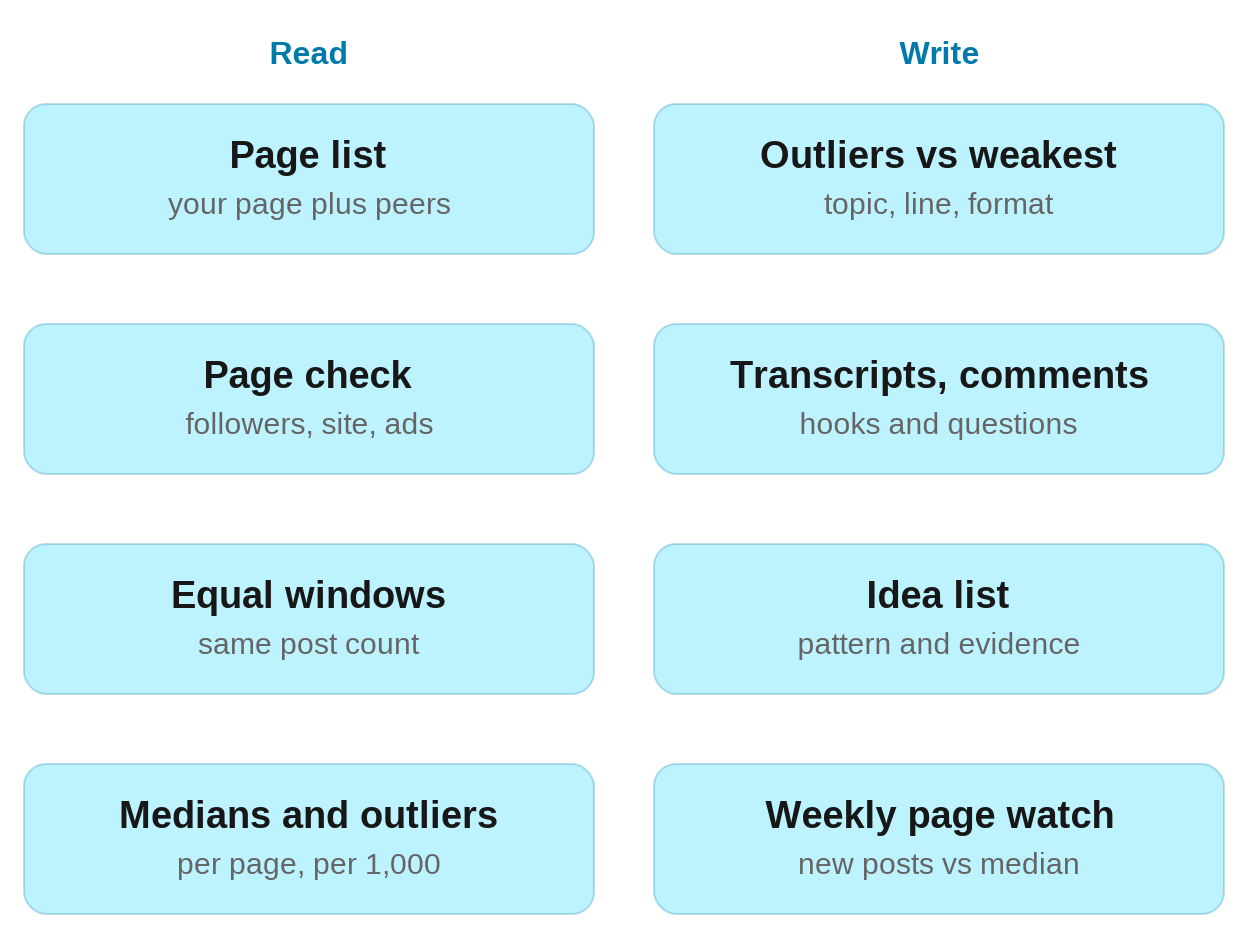
- List your page plus five to eight pages your buyers follow.
- Check each page and drop fan, regional or abandoned ones.
- Read about 30 recent posts from each page and report the dates each window covers.
- Score on medians and flag outliers at three times that page's own median.
- Compare outliers with the weakest posts, read the top videos, and read the comments.
- Turn the patterns into an idea list written for your page.
- Keep the pages on a weekly Social account tracking monitor.
The job here is ideas for your own page, drawn from pages in your niche:
- One competitor's page and ads, as a one-off: research a Facebook page with an AI agent.
- Other networks: how to find LinkedIn post ideas, how to find Instagram Reels ideas and how to find TikTok video ideas.
- Named rival accounts across platforms: how to monitor competitor social media.
What AI engines suggest, and the shorter path
Ask Claude or ChatGPT how to get ideas that earn a response on a business page, by looking at similar pages in the niche (checked November 2026). The shared loop is: pick similar pages, collect public posts, compare each post with its own page's typical engagement rather than raw likes, size that by followers, look at top and bottom posts, code topic and format, keep giveaways and paid promotion apart, and turn the patterns into original ideas with a draft caption. Several answers note that reach and impressions of other pages are not public.
The tools they name are a stack you put together: competitor analytics suites, page comparison sites, a browser extension that exports a page's posts, community servers that only read pages you manage, and scheduling tools to publish the result. A number of them sit behind a signup, and many behind a paid plan.
Manifold MCP reads Facebook pages, posts, comments and video transcripts inside the chat: hosted, with no Facebook login, Meta developer app or local server of yours, and you pay per call.
Step 1: connect Manifold MCP
Every account gets 250 credits a month on the free plan. Call costs are on the credits page.
Claude. Web and Desktop share one connector. The Claude setup page shows how: Customize, then Connectors, then a custom connector using the server URL on that page. Sign in to Manifold in the window that opens.
Claude Code. Claude Code adds Manifold with one terminal command, shown on the Claude Code setup page, for the current project. Once it is in, /mcp lets you pick Manifold and sign in through the browser.
ChatGPT. Find Manifold in ChatGPT through the link on the ChatGPT setup page. Click Connect and sign in. You do not paste a server URL. Workspace admins on Business, Enterprise and Edu pick which apps are allowed.
To confirm Facebook is attached, ask:
Which Manifold tools read a Facebook page's record, list its posts, get one post, return a post's comments, return a video transcript, search the Meta ad library and create a monitor?
The answer should name facebook_get_profile, facebook_get_posts, facebook_get_post, facebook_get_comments, facebook_get_transcript, ads_search_ads and monitoring_create_monitor.
Step 2: list the pages
Give your agent your page and five to eight pages your buyers follow: direct competitors, adjacent businesses, a local or category leader. Ask it to start with the ones you already know.
Manifold MCP has no Facebook search, so the list comes first. Pages only: personal profiles are not readable.
Your agent can add more. It searches Google for your category plus "facebook" and keeps facebook.com page links. It can also search the Meta ad library by your category; those rows name the advertiser page.
Step 3: check each page
For each URL, your agent reads the page record: followers, category, website, and whether it advertises now. If the website is not the brand's, or the page looks like a fan page, a regional copy or abandoned, it asks you before dropping it.
Step 4: read the same window from each page
Your agent reads about 30 recent posts from each page, newest first, paging back a few posts a call. It reports the date range each window covers. A page that posts daily covers a couple of weeks; a weekly one covers months. Your agent uses the same number of posts (or the same date span) for each page and says which.
Under about eight posts, skip the score: a median on that little says little.
What a page listing returns is on the Facebook tools page.
Step 5: score and find outliers
Your agent scores each page on medians: reactions plus comments per post, that figure per 1,000 followers, posts a week, and video share (video against the rest, because images, albums and status posts all read as text). Shares stay out of these medians; listings leave them empty.
Outliers are posts at three times that page's own median or more. Six outliers in the window point to a format the page can repeat; one looks like luck. Giveaways and contests sit on their own line, because like-share-tag posts inflate the numbers.
Optionally, your agent matches the page's active Meta ads to its posts. An ad whose text repeats an organic post's first line is a boosted post, and that post comes out of the organic medians. Rows do not mark a post as boosted on their own. Those lookups live on the ad library tools page, and the best ad library MCP servers lists other servers that cover the same libraries.
The table below is an illustration with placeholders, not findings from a real run:
| Page | Followers | Posts a week | Video share | Median per post | Per 1,000 followers | Outliers | Window |
|---|---|---|---|---|---|---|---|
| [Page A] | [followers] | [median] | [share] | [median] | [median] | [count] | [dates] |
| [Page B] | [followers] | [median] | [share] | [median] | [median] | [count] | [dates] |
| Your page | [followers] | [median] | [share] | [median] | [median] | [count] | [dates] |
Step 6: compare outliers with the weakest posts
Your agent codes the outliers and the weakest posts on the same labels: topic, first line, video or not, link or not, question or not. Formats a page keeps posting usually work for it; a format it tried once and dropped probably did not. Recycled clips, memes and stock reels are a warning sign, not a pattern to copy.
It then opens the top three to five posts in full for shares, reel views and video length, which listings leave empty. Views mean little alone: read them with comments.
For the top videos, your agent reads what is said out loud: hook, problem, offer, call to action. A transcript is speech only. Text burned into the video is not in it, and a music-heavy reel can come back garbled. Use a competitor's transcripts for patterns and claims to answer, not for lines to copy. To transcribe one Facebook video without the full run, paste its URL into the Facebook video transcript page.
Then your agent reads the comments under the outliers, one post at a time. Only top-level comments come back; replies are counted, not returned. Questions and objections that show up under several posts are gaps. If several people ask who they should hire or buy from, that is a cue for a post that answers the question. It weights themes by comment likes. Keep commenter names off tables, drafts and anything public.
Questions people ask in public groups are a separate job: how to find customers in Facebook groups.
Step 7: turn it into an idea list
Each idea on the list has the pattern behind it, two evidence post links, a format (video or not), a draft first line written fresh, and why it fits your page.
Your agent also lines up your own page's recent posts against your own median: what to keep posting, what to drop.
Your agent drafts. You post. Write your own posts rather than reposting other people's clips or memes.
Step 8: keep the pages on a monitor
Ask your agent to preview Social account tracking for these pages, then create the monitor after you confirm the list. Facebook pages go in as URLs: your page plus the peers, up to ten. A weekly cadence is enough for gathering ideas; the monitor's default is hourly.
Each check reads the newest posts on each page and reports a post the first time it shows, with a short excerpt plus likes and comments, and views where Facebook gives them. The opening check stores what is already on the pages and reports no news, so only later checks surface posts that arrived after that snapshot. A page that returns no posts is flagged as a warning. Email is at most one a day per monitor.
The flag for posts that take off works from view counts, which Facebook listings mostly leave empty, so each week you ask which new posts beat their page's median from step 5 and what to add to the idea list.
Dashboard. Open social media monitoring and add the same Social account tracking monitor with those Facebook page URLs, weekly.
Making the monitor and the checks it runs on a schedule spend no credits. A Run now check, in the app or through your agent, spends credits, shown before it runs. See the monitoring tools page for how the agent creates and reads the monitor. How many monitors a plan keeps is on the monitors page.
Run this in your agent
Connect Manifold to Claude, ChatGPT or Cursor, then paste this prompt.
Find post ideas for [Acme]'s Facebook page in [category]. Our page: [your page URL]. Pages our buyers already follow (start with these, ask me before adding more): [Page A URL], [Page B URL], [Page C URL], [Page D URL], [Page E URL]. Direct competitors, adjacent businesses, a local or category leader. Pages only, no personal profiles. If the list is short, call seo_get_serp for [category] facebook and keep facebook.com page URLs, and call ads_search_ads with platform facebook for [category] (the rows name the advertiser page). Call facebook_get_profile on each page. Keep name, bio, followers, website, industry (the page category), running_ads and ad_library_id. If website is not our brand or that page's brand, or the page looks like a fan page, a regional copy or abandoned, ask me before dropping it. Then call facebook_get_posts on each kept page, newest first, paging with cursor, a few posts a call, until about 30 posts per page. Report the date range each window covers. Use the same post count (or the same date span) for each page and say which. Under about 8 posts, skip the score. Per page, median likes (reactions) plus comments per post, that figure per 1,000 followers, posts a week, and video share (media video against the rest; images, albums and status posts read as text). Leave shares out of listing medians (they are empty there). Flag outliers at 3 times that page's own median or more. Keep giveaways and contests on a separate line. Optionally call ads_get_advertiser_ads with platform facebook and the page's ad_library_id, active_only true; if an ad's body repeats an organic post's first line, mark that post as boosted and take it out of the organic medians. Give me a scorecard table: page, followers, posts a week, video share, median per post, per 1,000 followers, outliers, window covered. Then code outliers and the weakest posts: topic, first line, video or not, link or not, question or not. Call facebook_get_post on the top 3 to 5 for shares, views and duration_s. Call facebook_get_transcript on the top videos. Transcripts are speech only, uncut, no timestamps; NoData means no speech; burned-in text is not in them. Take hook, problem, offer, call to action. Use competitor transcripts for patterns and claims to answer, not lines to copy. Then call facebook_get_comments on the outliers. Top-level only; replies are a count, not returned. List repeated questions and objections. If several people ask who they should hire or buy from, treat that as a cue for a post that answers them. Weight themes by comment likes. Leave commenter names out. Then the idea list: each idea with the pattern, two evidence post URLs, format (video or not), a draft first line written fresh, and why it fits our page. Also line up our own recent posts against our own median: what to keep, what to drop. Do not invent counts or findings. I will post; draft only. Then preview a Social account tracking monitor, weekly, Facebook page URLs for our page plus these peers, up to 10 accounts. Description: New posts from [category] pages we watch so we can refresh the idea list. Preview first. Create the monitor only after I confirm. Creating it and scheduled checks spend 0 credits. A check I request now spends credits. Do not rely on a takes-off flag for these pages (a Facebook read is a few posts and views are mostly empty). Each week I will ask which new posts beat their page's median from this run; read them with monitoring_get_changes.
Limits to know
What holds for this job:
- Without a Facebook keyword search, you only learn from the pages on the list.
- A listing gives a few posts a call. Size the window in posts, not days, and say the dates it reached.
- Listing views are often empty. Shares and video length come only from opening a post.
- Images, albums and status posts all read as text, so the format split is video against the rest.
- Rows do not say a post was boosted.
- Comments are top-level, a page at a time, one post at a time. Replies are a count only.
- A transcript covers spoken words, not captions burned into the frame.
- Reach, impressions, link clicks, saves, messages and audience demographics are not in the data. Check those in your own Meta tools.
- A personal profile cannot be read, and neither can a private group.
- A field can come back empty because Facebook does not publish it.
Run it on your pages
Fill in your page URL, the pages you already know, and your category, then paste the prompt.
More guides on reading rival pages, ads and rankings are in the competitor research articles.