How to find customers in Facebook groups with Claude
Connect Manifold MCP, find the public groups your buyers use, and have your agent table the themes and the open threads you could answer.


How do I find customers in Facebook groups?
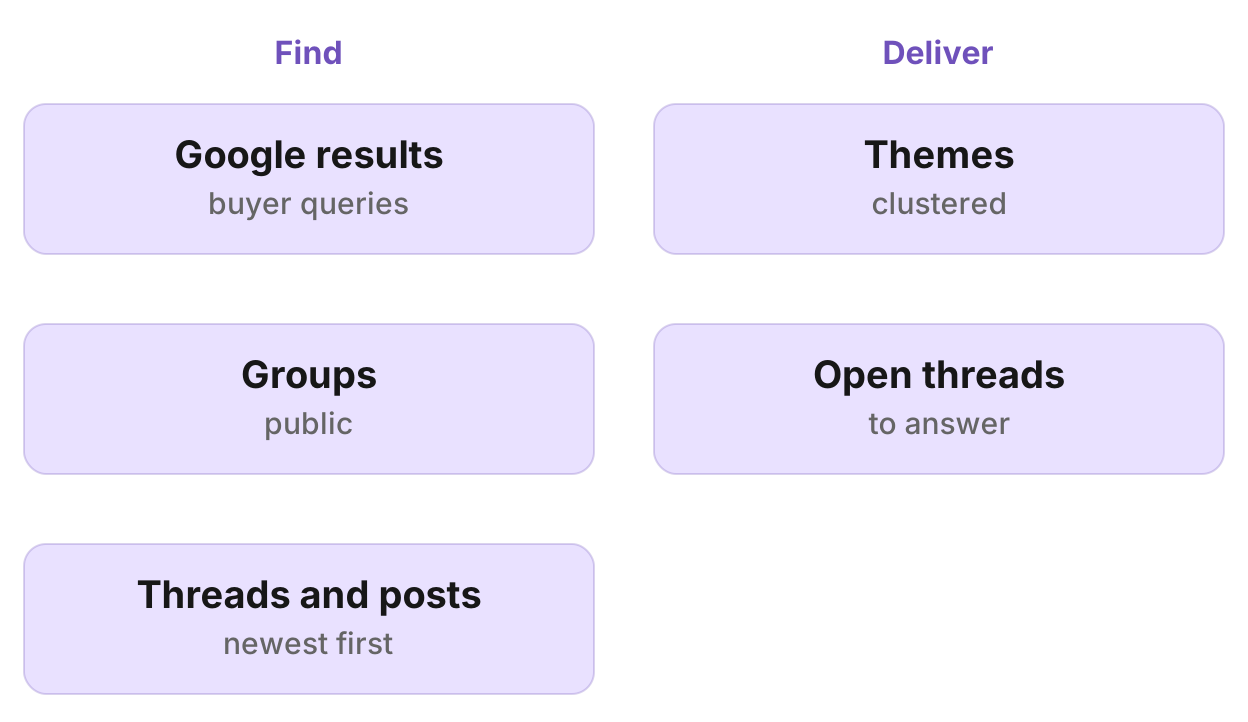
Your agent finds the public groups your buyers use through Google, reads each group's newest posts and the threads on your topic through Manifold MCP, and gives you two tables: the themes members raise and the open threads you could answer. Refreshing Facebook until someone asks for what you sell is a hobby, not a system.
How to find customers in Facebook groups in eight steps
- Connect Manifold MCP to Claude or ChatGPT.
- Find the groups: ask which you already know, then find public groups through Google.
- Read the threads on your topic.
- Check each group's pace and read it.
- Cluster kept posts into themes.
- Deliver the two tables: themes and the open threads you could answer.
- Answer in person, by the group's rules. Your agent can draft a reply; you post it.
- Keep it going: once a week, ask your agent to re-read the same groups since the last date it gave you.
The Facebook tools are on the Facebook tools page. Finding groups uses seo_get_serp on the SEO tools page. Call costs are on the credits page.
What AI engines suggest, and the shorter path
Ask how to find customers in Facebook groups in Claude or ChatGPT today (checked November 2026) and the answers say those chats cannot read Facebook groups on their own. They say Meta's Graph API no longer reads groups, and they describe a group-watching tool plus an AI to qualify posts plus alerts. Meta deprecated the Groups API in Graph API v19.0 and removed it across versions on 22 April 2024.
Manifold MCP reads public groups inside the chat: hosted, with no Facebook login or Meta developer app of your own, and you pay per call. Your agent finds the groups, reads the threads, and writes the two tables. You write the reply. You post it.
This page is the groups workflow, not a page audit. To study a competitor's page and ads instead, see research a Facebook page with an AI agent.
Step 1: connect Manifold MCP
Manifold MCP is a hosted marketing data connector. You skip a Facebook login and a Meta developer app, and you pay per call. Every account gets 250 credits a month on the free plan.
Claude. From the Claude setup guide:
- Open Settings, then Connectors.
- Choose Add custom connector. Name it Manifold and paste the server URL from the setup guide.
- Choose Connect, sign in to Manifold, and approve Claude.
- Start a chat, check that Manifold is on in the chat's tools menu, and ask a question.
A connector you add on the web is also there in the desktop app and on your phone.
ChatGPT. Manifold MCP is an official ChatGPT app. From the ChatGPT setup guide: open Apps, search for Manifold, click Connect, sign in and click Allow. Then type @Manifold or pick it from the + menu under More. There is no URL to paste and no developer mode to turn on. On Business, Enterprise and Edu, an admin decides which apps the workspace can use.
Paste this to check the connection:
What Manifold Facebook tools do you have, and can you run a Google search with seo_get_serp?
Your agent should name facebook_get_group_posts, facebook_get_post, facebook_get_comments and seo_get_serp. Every parameter is on the Facebook tools and SEO tools pages.
Step 2: find the groups
Ask first which groups you already know. People often know the groups their buyers use, including private ones the tools cannot read.
Then your agent runs seo_get_serp for the buyer's question as they would type it, and for "
A site: operator is not a shortcut: it came back unfiltered in Manifold's test, so do not rely on it.
Example queries: "good plumber [your town]", "best bakery [your town]", "[topic] facebook group", "[customer type] facebook group", "[your town] [topic] group".
Step 3: read the threads on your topic
For each kept thread, your agent calls facebook_get_post for its text, date and counts (reactions, comments, shares and views), then facebook_get_comments for what members answered (author, created_at, text, likes, replies, parent_id and depth). Comments across many posts at once are not offered, so it reads one thread at a time. This works on older threads too.
Note each thread's group: those are the groups worth a pace check.
Step 4: check each group's pace and read it
Your agent calls facebook_get_group_posts with the group URL: the posts in one Facebook group, newest first, a few posts a call, with no keyword filter. Page with the cursor and dedupe on post id. Facebook does not offer a complete window since a moment.
Pace is how many days a handful of pages covers. Busy and recent means the group is worth a weekly re-read. Months for a handful of pages means it is quiet.
Each row carries author and author_followers, created_at, text (cut at 2000 characters), likes, comments, shares, saves, views, media, duration_s, links, transcript and top_comments. top_comments are the comments Facebook shows under the post, with each commenter's profile URL. null or empty means the platform does not publish it.
Keep posts that ask a question, describe a problem, ask for a recommendation, or name the category or a competitor. Drop promotions and giveaways. Note who runs the group: a vendor-run group skews to that vendor.
Step 5: cluster into themes
Your agent groups kept posts and comments into themes by the underlying problem, not the words: questions people repeat, pains, and brands or businesses members recommend. Count distinct posts per theme. Count brands or businesses members name, and the objections to each. A feature request is a pain stated as a solution: record the problem behind it.
Counts rank themes against each other. They do not size a market, because no window is complete.
Step 6: the two tables
Deliver two tables. Your agent says how many posts across how many groups the tables rest on.
Themes
| Theme | Posts | Quote | Brands named | Implication |
|---|---|---|---|---|
| [problem] | [n] | "[quote]", with the post URL | [Acme] ([n]), [other] ([n]) | [a message, a post idea, a feature, or an FAQ] |
Open threads
Recent posts that ask something you can answer and have few comments:
| URL | Group | Age | Comments |
|---|---|---|---|
| [post URL] | [group] | [age] | [n] |
Step 7: answer in person, by the group's rules
No tool reads a group's rules. Before anyone answers, read the group's About section and pinned posts. Many groups ban promotion outside a set thread. A helpful answer from you under your own name works. A link drop gets removed.
Your agent can draft a reply in the chat. You post it yourself.
Step 8: keep it going
There is no monitor preset for Facebook groups. Keyword tracking covers Reddit, LinkedIn, Instagram, TikTok and YouTube, not Facebook groups. Social account tracking covers Facebook pages, not groups.
The repeat is on request: once a week, ask your agent to re-read the same groups since the last date it gave you and add new open threads. Claude and ChatGPT do not run that prompt on their own schedule.
For a competitor's Facebook page, a Social account tracking monitor works: how to monitor competitor social media. Open social media monitoring to create one. Monitor checks spend no credits. The free plan keeps 1 monitor. Monitors a workspace can keep, by plan: 1 on Free, 5 on Pro, 25 on Growth, 100 on Agency.
Run this in your agent
Connect Manifold to Claude, ChatGPT or Cursor, then paste this prompt.
Find the public Facebook groups where [Acme]'s buyers ask for recommendations in [your town] for [topic]. Ask me which groups I already know first, including private ones. Then run seo_get_serp for the buyer's question as they would type it, and for "[topic] facebook group", "[customer type] facebook group" and "[your town] [topic] group". Keep rows whose url contains facebook.com/groups. For each kept thread, call facebook_get_post and facebook_get_comments. For each group worth a pace check, call facebook_get_group_posts, newest first, page with the cursor and dedupe on post id. Keep posts that ask a question, describe a problem, ask for a recommendation, or name the category or a competitor. Drop promotions and giveaways. Note who runs each group. Cluster kept posts into themes by the underlying problem. Count distinct posts per theme and the brands members recommend, with objections. Give me two tables. Themes: theme, posts, a representative quote with the post URL, brands named with counts, and the implication (a message, a post idea, a feature, or an FAQ). Open threads: recent posts that ask something I can answer and have few comments, with URL, group, age and comments. Say how many posts across how many groups the tables rest on. Draft a helpful reply I can post myself for the strongest open thread. Then, each week I will ask you to re-read the same groups since the last date you gave me and add new open threads. Do not create a monitor for Facebook groups; there is no group preset.
Limits to know
From Manifold MCP docs and the Facebook tools:
- Public groups only. Private groups are not readable.
- There is no keyword search inside Facebook. Find threads through Google, then read them by URL.
- A group read is newest first, a few posts at a time, so a busy group's week takes several calls. Page with the cursor and dedupe on post id.
- Post and comment text is cut at 2000 characters.
- No tool reads a group's rules. Read the About section and pinned posts before you answer.
Other networks
Reddit communities and LinkedIn keywords can be watched by a Keyword tracking monitor. Facebook groups cannot. For Reddit, see how to monitor Reddit for brand mentions. For LinkedIn, see how to find LinkedIn buying signals. This guide sits with the other lead research articles.
Run the first pass on your topic
Connect Manifold MCP and run the first pass on your topic. Every account gets 250 credits a month on the free plan. Setup is in the docs. Paste the prompt above.
Your agent reads the groups when you ask. Claude and ChatGPT do not run that prompt on their own schedule.