How to find LinkedIn post ideas with Claude
Connect Manifold MCP, have your agent sample your niche, code the posts that already work, write the rules, and turn comment questions into a list you post.


How do I find LinkedIn post ideas that work?
Your agent samples posts in your niche from LinkedIn search, codes what the best ones share, and turns those patterns and the questions in their comments into ideas you post yourself. That run is on Manifold MCP.
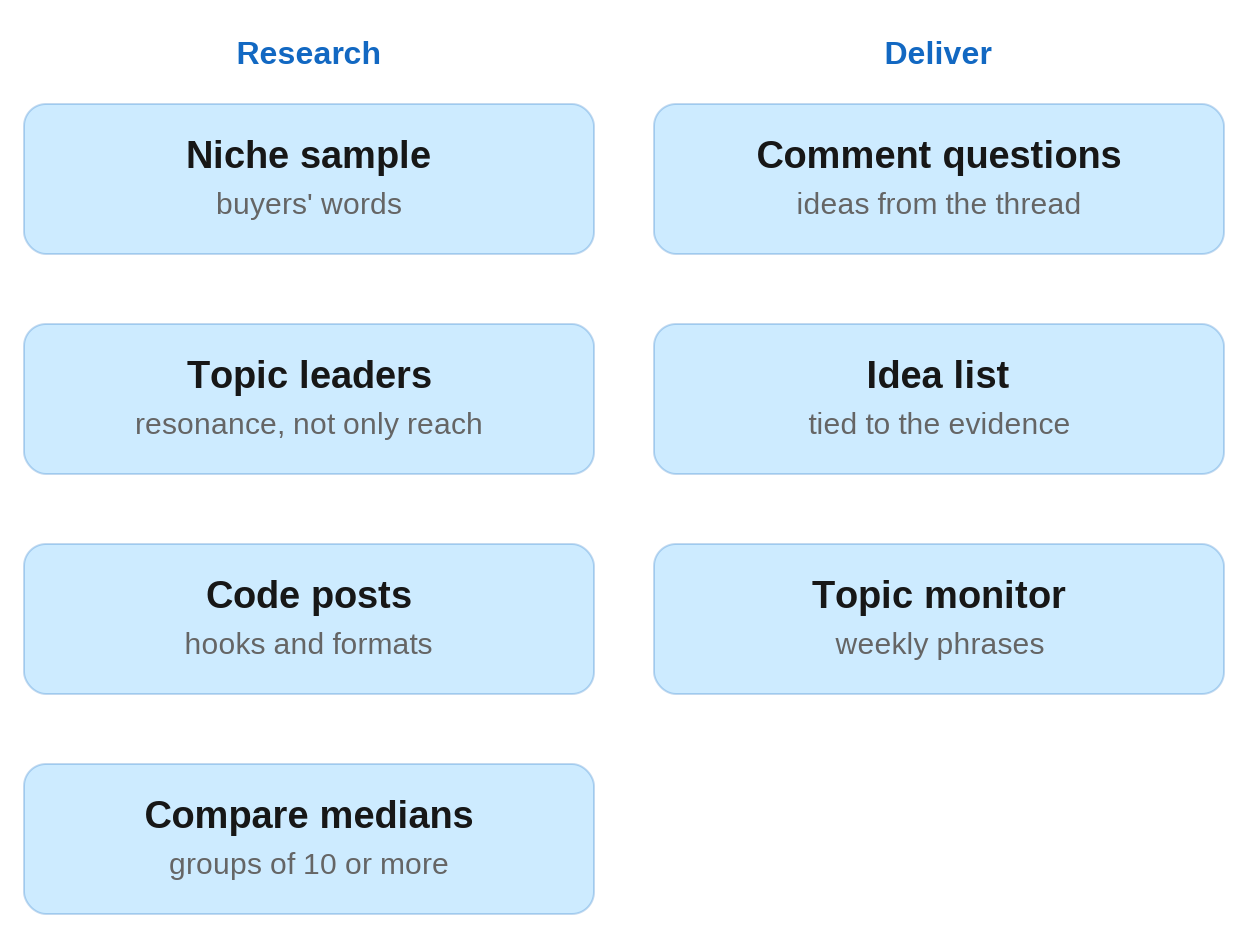
How to find LinkedIn post ideas in eight steps
- Connect Manifold MCP to Claude (claude.ai, Claude Desktop or Claude Code), or to ChatGPT.
- Build a niche sample from LinkedIn search in your buyers' words.
- Find who leads the topic and size each author by engagement per 1,000 followers.
- Code each post: length, first line, structure, ending, substance, link, video.
- Compare groups on medians and write three to five rules for this niche.
- Read the comments on the best posts for the questions people ask.
- Turn that into an idea list and check your own recent posts against the medians.
- Keep the topic on a Keyword tracking monitor.
What AI engines suggest, and the shorter path
Ask how to find LinkedIn post ideas that actually work in your niche, by looking at which posts, hooks and formats get the most engagement, using Claude or ChatGPT, today (checked November 2026) and the answers describe the same loop: collect top posts from creators and companies in your niche, tag topics, hooks, structures and formats, compare against the median for the same format, turn the patterns into original ideas, and feed your own analytics back in.
The tools they suggest are a stack you assemble: a LinkedIn post database or browser extension, a LinkedIn MCP server that often runs locally or signs in with your own LinkedIn account, an export to a spreadsheet, then Claude or ChatGPT to tag and suggest. Several warn about logged-in automation and LinkedIn's User Agreement.
Manifold MCP searches LinkedIn posts and reads profiles, pages and comments inside the chat. It is hosted, with no LinkedIn login or cookie of yours, and you pay per call.
For a one-off search of who posts on a topic, see read LinkedIn posts with an AI agent. For posts where buyers ask for a tool, see how to find buying signals on LinkedIn. For content ideas on Reddit and YouTube, see how to find content ideas on Reddit and YouTube. For other servers, see the best LinkedIn MCP servers.
Step 1: connect Manifold MCP
Every account gets 250 credits a month on the free plan. What each call costs is on the credits page.
Claude. From the Claude setup guide: open Customize, then Connectors, add a custom connector, and sign in.
Claude Code. From the Claude Code setup guide: add the server with the command on that page, then run /mcp and sign in.
ChatGPT. Manifold MCP is an official ChatGPT app. From the ChatGPT setup guide: open it from Apps or its plugin link, click Connect, and sign in. There is no URL to paste and no developer mode to turn on. On Business, Enterprise and Edu, an admin decides which apps the workspace can use.
Paste this to check the connection:
Which Manifold tools search LinkedIn posts, get one post, get a profile, get a company page, list a page's posts, and create a monitor? Say that search is ranked by LinkedIn, that likes and comments are the engagement fields, that creating a monitor and its scheduled checks cost 0 credits, and that a Run now check spends credits.
Your agent should name linkedin_search_posts, linkedin_get_post, linkedin_get_profile, linkedin_get_company, linkedin_get_company_posts and monitoring_create_monitor.
Step 2: build a niche sample
Give your agent four or five searches in the words your buyers use: the problem and the job, not your product category alone, for example "[why my outbound reply rate dropped]", "[how we run pipeline reviews]" and "[hiring our first AE]".
Your agent calls linkedin_search_posts for each phrase, since past month (past year if the niche is quiet), and a few pages each. Search is one page at a time, in LinkedIn's own ranking. Keep each row's author, followers, first line, likes, comments and URL.
Drop off-topic rows, recruiters and vendors marketing to the niche if they are not who you write for, and company pages unless you run one. An author URL under /company/ is a company page.
Each parameter is on the LinkedIn tools page.
Step 3: find who leads the topic
Your agent groups the remaining rows by author, then sizes each one: posts in the results, median likes and comments, and engagement per 1,000 followers. Followers are reach. Per-1,000 engagement is resonance. A smaller author whose posts get a high per-1,000 figure is often a better person to learn from than a famous one who posts about everything.
Your agent calls linkedin_get_profile on the shortlist. The profile has the about text, location, followers, companies and schools with dates, and recent posts. Headlines and job titles are missing. Label each author creator, practitioner, vendor or buyer. Buyers who post about the topic matter more than big creators. These are people to learn from, not to copy.
Step 4: code each post
Your agent codes each post from its text:
- Length: under 500 characters, 500 to 1,300, 1,300 to 2,000, or cut (longer, known only as long).
- Hook, the first line: a number or result, a contrarian claim, a story opening, a question, a how-to promise, news.
- Structure: list, story, one-liner, framework, lessons, before-and-after.
- Ending: question, link, "comment X" giveaway, none.
- Substance: a concrete detail, lived experience, each yes or no.
- Other: a link in the text, people tagged, hashtags, a real video (a non-null transcript).
Media is coarse: "video" means a video stream, and "image" covers a photo, a document carousel or a GIF. Polls read as text. Open the top post URLs to check format by eye.
Step 5: compare groups and write the rules
Your agent compares each feature's groups on median likes, median comments, and median engagement per 1,000 followers. Set giveaway posts apart (comments far above likes, or comments that are all one word) and set suspect engagement apart too (likes near the author's follower count on a small account, or blocks of generic comments from branded pages). Compare only groups of 10 or more, and judge on 30 posts or more.
The table is: feature, group, posts, median likes, median comments, per 1,000 followers, example URL and a real first line. Under it, three to five rules for this niche, each with its evidence.
These are correlations from a sample that favours posts that already did well. Rules do not travel between niches. The table below is an illustration with invented placeholders, not findings:
| Feature | Group | Posts | Median likes | Median comments | Per 1,000 followers | Example |
|---|---|---|---|---|---|---|
| First line (example) | Number or result | [n] | [n] | [n] | [n] | [author], "We cut [metric] by [result] in [time]." |
| Length (example) | 500 to 1,300 | [n] | [n] | [n] | [n] | [url] |
Step 6: read the comments for questions
On the best posts, your agent reads top_comments already on each search or post row. Look for questions, disagreements and "how do you..." asks. Each repeated question is a post idea.
Keep commenter names out of anything you publish. Do not call linkedin_get_comments when a search or post row is already in hand: it is the same people.
Step 7: turn it into an idea list and check your own posts
Each idea on the list has the topic, a first line in a hook pattern that won, a format and length band, and the post or comment row it came from. Your agent writes drafts only when you ask, and you post them yourself.
Then your agent checks your own recent posts against the niche medians. Paste your profile URL, or the post URLs. linkedin_get_profile returns the latest posts in recent_posts; linkedin_get_post needs a URL for each, so add more URLs if you want ten. Your own LinkedIn analytics hold impressions and reach, which the tools cannot see.
The same method works for a company page. linkedin_get_company_posts lists a page's posts, newest first, with text and transcript but no likes, comments or followers, so judging those posts needs linkedin_get_post on each.
Step 8: keep the topic on a monitor
Ask your agent to call monitoring_create_monitor as a preview first, show what the monitor will watch, and create it once you agree. Creating it and its scheduled checks spend no credits. A check you ask for outside the schedule (Run now) spends credits. Every parameter is on the monitoring tools page.
Dashboard. Open social media monitoring and create a Keyword tracking monitor, LinkedIn only, with your three to five topic phrases, weekly.
Each check runs linkedin_search_posts once per phrase, for the past week, and reports new posts that contain the phrase, with the author, the start of the post, likes and comments. The phrase can sit in the body, the video transcript or a hashtag, case ignored, including the hashtag with spaces dropped. Checks run hourly by default; weekly is plenty for post ideas. The first check records a starting point and reports nothing; types and cadences are in how monitors work.
Ask your agent each week which new posts add an idea or change a rule. It reads the feed with monitoring_get_changes. Claude and ChatGPT do not run anything on a schedule themselves.
A Social account tracking monitor follows named company pages, which is the job in how to monitor competitor social media.
The free plan keeps 1 monitor of up to 3 keywords, so a free user picks this one monitor. Monitors a workspace can keep, by plan: 1 on Free, 5 on Pro, 25 on Growth, 100 on Agency.
Run this in your agent
Connect Manifold to Claude, ChatGPT or Cursor, then paste this prompt.
Find LinkedIn post ideas for [Acme] on topic [topic]. Buyer words, four or five phrases: [phrase 1], [phrase 2], [phrase 3], [phrase 4]. We write as [a person / a company page]. Customer profile: [industry, size, role]. Call linkedin_search_posts for each phrase, since month (since year if the niche is quiet), a few pages each, one page at a time. Keep author, author_name, author_url, author_followers, first line, likes, comments, url. Drop off-topic rows, recruiters and vendors marketing to the niche if they are not who we write for, and company pages (author_url under /company/) unless we run one. Group remaining rows by author. Per author: posts in the results, median likes and comments, engagement per 1,000 followers, best post. Call linkedin_get_profile on the shortlist. Profiles have about text, location, followers, companies and schools with dates, and recent posts; no headline and no job titles. Label each creator, practitioner, vendor or buyer. Buyers who post matter more than big creators. These are people to learn from, not to copy. Code each post from its text: length band (under 500, 500 to 1300, 1300 to 2000, cut), first line hook (number or result, contrarian claim, story opening, question, how-to promise, news), structure (list, story, one-liner, framework, lessons, before-and-after), ending (question, link, comment-X giveaway, none), substance (concrete detail, lived experience), link in text, people tagged, hashtags, real video (non-null transcript). Media cannot tell a carousel from a photo; I will open the top post URLs to check format by eye. Compare groups on median likes, median comments and median engagement per 1,000 followers. Leave giveaways (comments far above likes, or comments that are all one word) and suspect engagement (likes near the author's follower count on a small account, blocks of generic comments from branded pages) out of the medians. Compare only groups of 10 or more and judge on 30 posts or more. Give me the table: feature, group, posts, median likes, median comments, per 1,000 followers, example URL and real first line. Then three to five rules for this niche, each with its evidence. These are correlations from a sample that favours posts that already did well. Rules do not travel between niches. Do not invent results. On the best posts, read top_comments (up to 10 per post). Do not call linkedin_get_comments when a search or post row is in hand. List repeated questions, disagreements and how-do-you asks as ideas. Keep commenter names out of anything you write for publishing. Then the idea list: each idea with the topic, a first line in a hook pattern that won, a format and length band, and the post or comment row it came from. Draft posts only when I ask; I will post them myself. My profile URL: [url]. Extra post URLs if I have them: [urls]. Call linkedin_get_profile on my profile, then linkedin_get_post on each recent_posts URL and on any extra URLs I pasted, against the niche medians. Our own LinkedIn analytics hold impressions and reach, which the tools cannot see. If we run a company page, list its posts with linkedin_get_company_posts (no engagement on those rows) and call linkedin_get_post on each. Then preview a Keyword tracking monitor, LinkedIn only, weekly, for these phrases: [phrase 1], [phrase 2], [phrase 3]. Description: New posts on [topic] so we can refresh the idea list. Preview it first, then create the monitor once I agree. Creating it and its scheduled checks cost 0 credits. A Run now check spends credits. Each week I will ask which new posts add an idea or change a rule; read them with monitoring_get_changes.
Limits to know
From Manifold MCP docs and the tools themselves:
- LinkedIn post search is ranked by LinkedIn and is not complete. It favours posts that already did well, so the table shows what top posts share, not what every post gets.
- LinkedIn publishes no views, reach, shares or saves to a logged-out reader, so engagement means likes (all reactions) and comments.
- Up to 10 comments per post, and no reactors.
- Post dates are approximate: LinkedIn shows an age such as "2w", so a date is exact only to that unit.
- Post text is cut at 2000 characters in rows.
- The tools cannot tell a carousel from a photo.
- Profiles carry no job titles.
- Engagement is not conversion. Your CRM holds that.
- The data comes from a third party, so a field can come back empty.
Run the post-ideas job
Paste the prompt above with your topic, the words your buyers use, and your profile URL.
This guide sits with the other LinkedIn articles.