Topical authority with Claude: build a topical map from real data
Connect Manifold MCP and have your agent pull keywords for one topic, group by SERP overlap, map what you already cover with Search Console data, score coverage, plan the pages that build topical authority, and track the head terms.


How do I build topical authority?
Build a topical map from real keyword data with Claude or ChatGPT. Pull the keywords for your topic, group them into subtopics by how much their Google results overlap, check what you already cover in Search Console, score coverage and pick the gaps, plan the pages that build topical authority, then track the head terms with a weekly Google rank tracking monitor. Manifold MCP turns an industry concept into a publishing plan backed by data, inside Claude or ChatGPT.
Related guides:
- Group keywords so two pages never target the same query: keyword clustering.
- Fix two pages competing for one cluster: keyword cannibalization.
- Find which pages need more internal links once they are written: internal linking.
Build a topical map with Claude in seven steps
- Connect Manifold MCP to Claude (claude.ai, Claude Desktop or Claude Code), or to ChatGPT.
- Pull the keyword universe for one topic: a seed search for related keywords, suggestions or ideas, with volume, keyword difficulty, intent and trend. Optionally add AI prompt volume.
- Group into subtopics by overlap in Google's top 10, as in keyword clustering: keywords that share several top 10 URLs belong on one page. Label each cluster pillar, subtopic or skip (other products' brand searches, or head terms too hard for your site).
- Map what you already cover: your sitemap or blog list, plus your Search Console queries and pages for the topic word, to see which of your pages Google already shows and where. Optionally look up the keywords your domain ranks for.
- Score coverage and pick gaps. Per cluster: covered (a page ranks), weak (a page exists but sits past position 20 or has no impressions), missing (no page). Put first the missing clusters with real volume and keyword difficulty your site can win.
- Plan the topical map: a pillar page and supporting posts, with the internal links between them (see internal linking for the linking audit, and keyword cannibalization to keep one query to one page).
- Track it: a Google rank tracking monitor on one head keyword per cluster, so you see each cluster rise as pages go live.
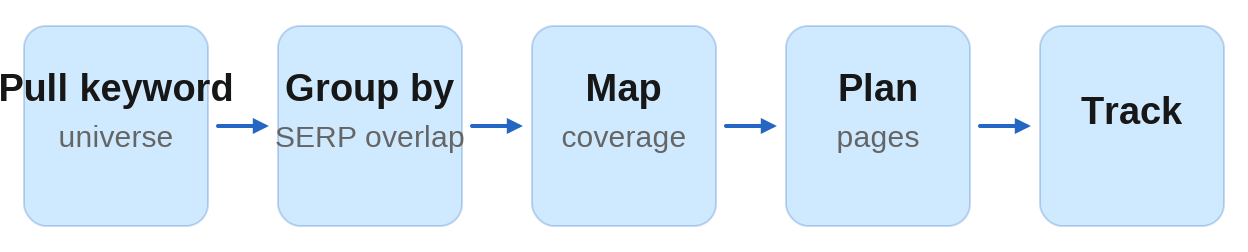
The result: live keyword data, clusters based on what Google ranks, coverage scored from your own Search Console data, a topical map with the gaps named, and a rank monitor on the head terms.
What topical authority is and what it is not
Topical authority is an industry term for how thoroughly a site covers one subject. The idea is that a site covering a topic from many angles, with pages that link to each other, signals expertise. It differs from domain authority, a third-party metric based on backlinks.
Google has not published a topical authority score. What its helpful content guidance does say is that it looks for expertise, experience and trustworthiness, and that quality and depth matter. How much of a topic you cover is one signal among many, not a formula you can reverse-engineer.
The practical reason to build a topical map is that it shows which pages exist, which are missing, and what you already rank for. Without a map you guess. With one you see the whole topic, pick the gaps, and avoid writing pages that compete with ones that already rank.
Step 1: connect Manifold MCP
Manifold is a hosted MCP server, listed in the official MCP registry as com.manifoldmcp/manifold. Steps for every client are in the docs.
Claude.ai and Claude Desktop. From the Claude setup guide:
- Open Settings, then Connectors.
- Choose Add custom connector. Name it Manifold and paste the server URL from the setup guide.
- Choose Connect, sign in to Manifold, and approve Claude.
- Start a chat, check that Manifold is on in the chat's tools menu, and ask a question.
A connector you add on the web also shows up in the desktop app and on your phone. The first time you sign in, Manifold creates your account on the free plan.
Claude Code. Add the server with the URL from the Claude Code setup guide. Start Claude Code, run /mcp, choose manifold, and finish signing in in the browser. Add --scope user to have it in every project.
ChatGPT. Manifold MCP is an official ChatGPT app. Following the ChatGPT setup guide, open Apps, search for Manifold, click Connect, sign in and click Allow. Then type @Manifold or pick it from the + menu under More.
To check the connection, paste:
Which Manifold tools let me search for keywords, pull top 10 SERP results, connect Search Console, pull query and page rows, get the keywords a domain ranks for, and create a rank tracking monitor?
Claude should name seo_search_keywords, seo_get_serp, console_list_properties, console_get_search_analytics, seo_get_ranked_keywords and monitoring_create_monitor.
Step 2: pull the keyword universe
Start with one topic and one seed term. Your agent searches for related keywords, suggestions or broader ideas. Each keyword already comes with volume, keyword difficulty, intent and CPC, so there is no second lookup for metrics.
Paste for a seed search:
Search related keywords for "keyword research", United States, up to 60. Return a table: keyword, volume, keyword difficulty, intent. The search already includes metrics, so do not look them up again.
Claude shows the keywords. You can run several seeds to widen the net. If you already have a list from another tool, ask for metrics on that list instead.
Optionally, ask for AI prompt volume too: how often each keyword shows up in prompts to AI engines, not just in Google searches.
Step 3: group into subtopics
Group by overlap in Google's results, as in keyword clustering. Your agent pulls the top 10 results for each keyword and counts how many each pair shares. Pairs that share 3 or more of 10 belong on one page.
Paste:
For each keyword in the list, pull Google's top 10 results, United States, desktop. Match results by URL, or by title when a result has no domain (those URLs are Google redirect links). Compare the top 10 between every pair of keywords and count the results they share. Pairs sharing 3 or more of 10 belong on one page. For each cluster, name: head term (highest volume), secondaries (the rest), combined volume, average keyword difficulty, main intent, and page type (read from the result titles: guide, tool page, listicle, comparison, definition). Return a table: cluster name, head term, secondaries, combined volume, average keyword difficulty, intent, page type.
Claude pulls each keyword's results, measures the overlap, and names the clusters with their head terms, intent and page type.
Then label each cluster:
- Pillar: the main overview page for the whole topic, usually the highest volume head term.
- Subtopic: a supporting page that covers one part of the topic in depth.
- Skip: brand searches for other products (such as "google keyword planner login"), or head terms with keyword difficulty too high for your site.
The pillar links to the subtopic pages, and they link back to it and to each other where relevant. That is topical authority in practice: a network of pages on one topic, each from a different angle, linked together.
Step 4: map what you already cover
Before writing new pages, check what you already rank for. Your own Search Console data is best (Search Console tools cost 0 credits); a domain lookup works when you have no access.
Search Console. Your agent finds your property first (a Google domain property looks like sc-domain:example.com), then pulls your queries and pages for the topic word to see which pages Google already shows.
Paste:
List my Search Console properties, then pull queries and pages for sc-domain:example.com over the last 90 days where the query contains "keyword research". Keep queries with more than 1 impression and a position under 50. Return a table: query, page, impressions, position. These are the pages we already rank for in this topic.
Claude shows which of your pages already get impressions for the topic. A page at position 8 to 20 is worth strengthening (see keyword gap analysis). A page past position 50, or with zero clicks, may need a rewrite, or a different angle if another page ranks better for the same cluster.
Domain lookup. For a competitor, or for your own site without Search Console access, your agent looks up the keywords the domain ranks for, with volume, position and URL.
Paste:
Get the keywords example.com ranks for, United States, up to 100. Keep keywords that contain "keyword research" with a position under 50. Return a table: keyword, volume, position, url. These are the pages on example.com that rank for this topic.
Step 5: score coverage and pick gaps
Compare each cluster from step 3 with the pages from step 4:
- Covered: one of your pages ranks for the head term (position under 20). That page owns the cluster. Strengthen it, or give it a different angle if another page ranks better for the cluster.
- Weak: a page exists, but it ranks past position 20 or has no impressions. Rewrite or refresh it.
- Missing: none of your pages ranks for the head term. This is a gap.
For each missing cluster, check keyword difficulty and volume. Skip clusters your site cannot win yet (a small site usually skips keyword difficulty over 50 to 60; an established site can go higher). Put first the clusters with real volume and keyword difficulty you can win.
The result is a coverage table: cluster, head term, volume, keyword difficulty, your page, status. Missing clusters you can win are your publishing plan.
Step 6: plan the topical map
A topical map is a pillar page and supporting pages, linked together. The pillar is the overview of the whole topic. Each supporting page covers one subtopic in depth and links back to the pillar. For example:
- Pillar page: "Keyword research" (or the main topic overview). Links to every supporting page.
- Supporting pages: "YouTube keyword research", "How to use Google Keyword Planner", "Keyword research tools", "Keyword clustering", "Keyword gap analysis", "Keyword cannibalization". Each links back to the pillar and to related pages where it reads naturally.
The pillar does not have to rank for the head term, which may be too hard for a small site. It is the internal hub: supporting pages link to it, so Google sees the cluster.
For the links themselves, internal linking maps your existing links, strips sitewide menu and footer links, and writes the exact sentences to link from. To keep one query to one page, see keyword cannibalization.
Each supporting page should cover one cluster from step 3, so together the map covers the topic from many angles. If two pages target the same cluster, that is keyword cannibalization: pick one owner, then give the other a different angle, merge it with a 301, or point internal links at the owner.
Step 7: track with a rank monitor
Once pages are live, create a weekly Google rank tracking monitor on each cluster's head term. Each check looks up the position of every keyword and reports rank moves, including when a different page ranks.
A Google rank tracking monitor holds 1 to 50 keywords for one site, in one location (United States by default), on desktop. Weekly is the default because positions wobble a place or two from day to day. Daily is allowed; hourly is not.
A move counts as news when:
- The position changes by 3 places or more
- The keyword enters or leaves the top 3 or the top 10
- The keyword enters or leaves the top 100
- A different page now ranks for the keyword
That last one tells you the topical map changed which page Google prefers. When it happens, check whether the new page is the one you meant to promote, or a competitor's.
Paste for each cluster, or combine them into one monitor if the keywords share a site:
Create a weekly Google rank tracking monitor for example.com on these head terms: [list the head terms from your keyword map]. Description: Track head terms from topical map so we see rank moves and when a different page ranks. Preview it first, then create it once I agree.
Claude shows a preview of what the monitor will watch, then creates it once you agree.
Free plan limits. The free plan keeps 1 monitor of up to 3 keywords. On a paid plan, a rank tracking monitor holds up to 50 keywords. Creating the monitor and its scheduled checks cost 0 credits. A check you ask for outside the schedule (Run now) spends credits, just as the lookups would if you ran them yourself.
The first check runs within five minutes and records a starting point. Changes appear from the second check on. After the second weekly check, ask:
Read my Google rank tracking monitor. For each keyword, say the old position, the new position, the URL that ranks, and whether a different page now ranks. If a different page ranks, that is a signal the topical map changed which page Google prefers.
The full monitor guide, with alerts and history, is free rank tracker. The product page is monitors, and every option is on the monitoring tools page.
Worked example: keyword research topic on manifoldmcp.com
We built a topical map for "keyword research" on manifoldmcp.com on 25 November 2026, about 08:35 London time, from a keyword search and our own Search Console data. These are the real numbers from that run.
Step 2: pull the keyword universe. A related-keywords search on "keyword research", up to 60, returned 55 keywords (data as of 2026-11-23). The top ones by volume, with keyword difficulty (KD):
| Keyword | Volume | KD |
|---|---|---|
| keyword research | 135,000 | 81 |
| google keyword planner | 49,500 | 58 |
| keyword research in seo | 8,100 | 88 |
| keyword planner | 6,600 | 63 |
| keyword research tool | 3,600 | 81 |
| free keyword research tool | 2,400 | 88 |
| best free keyword research tool | 1,000 | 87 |
| keyword research for youtube | 720 | 34 |
| youtube keyword research tool | 390 | 41 |
| youtube keyword generator | 260 | 40 |
| how to use google keyword planner | 210 | 24 |
| best keywords for youtube channel | 110 | 16 |
Step 3: group into subtopics. For this example we grouped the 55 keywords by topic and intent. The overlap check from step 3 is how you confirm a grouping before writing a page. Our clusters:
| Cluster | Head term | Secondaries | Volume | Avg KD | Intent | Page type |
|---|---|---|---|---|---|---|
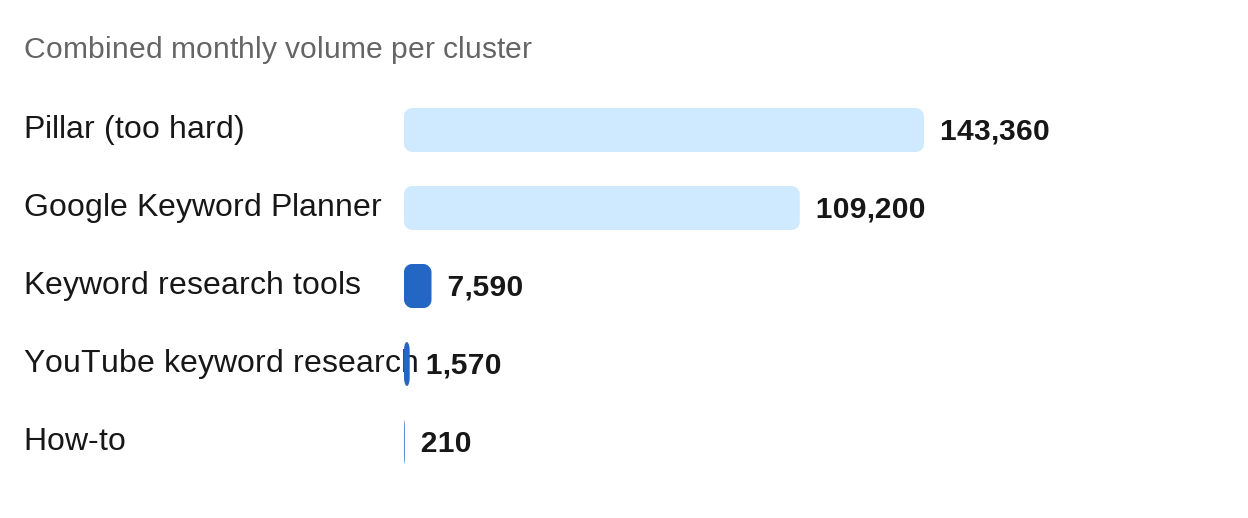
| Pillar (too hard) | keyword research | keyword research in seo, what is keyword research in seo | 143,360 | 72 | Informational | Guide |
| Keyword research tools | keyword research tool | free keyword research tool, best free keyword research tool, best keyword research tool | 7,590 | 83 | Commercial | Tool roundup |
| Google Keyword Planner | google keyword planner | google keyword research planner, google keyword planner for seo, keyword planner | 109,200 | 56 | Commercial | Navigational (skip) |
| YouTube keyword research | keyword research for youtube | youtube keyword research tool, youtube keyword generator, best keywords for youtube channel, google keyword planner for youtube | 1,570 | 34 | Commercial | Guide |
| How-to | how to use google keyword planner | - | 210 | 24 | Informational | Guide |
The pillar cluster has the most volume, but keyword difficulty of 72 to 88 is too hard for a small site, so the realistic play is the supporting clusters. The Google Keyword Planner cluster is people looking for Google's own product, so we skip it. The tools cluster is hard (83) but is a comparison page we could build. YouTube keyword research is the clearest gap: keyword difficulty 34, real volume, and no page on the site yet.
Step 4: map what you already cover. We pulled Search Console queries and pages for sc-domain:manifoldmcp.com from 25 October to 22 November 2026, for queries containing "keyword". That gave 60 query and page pairs. We dropped 25 numbered, bot-like queries on the SERP checker page. The other 35 had 0 clicks. Impressions by page:
/free-tools/serp-checker: 13 queries, 364 impressions, best position 26.2/use-cases/do-keyword-research: 2 queries ("keyword research mcp"), 38 impressions, position 81.8/monitors/reddit: 4 queries ("reddit keyword monitoring"), 37 impressions, position 56/docs/tools/seo: 4 impressions, position 10 (the tool docs)/blog/topics/instagram: "instagram keyword research", 2 impressions, position 16/use-cases/find-competitor-keyword-gaps: 2 impressions, best position 6 for "how can i find gaps in competitors' keyword strategies using ai agents?"
Our workflow posts (keyword clustering, keyword gap analysis, keyword cannibalization) went live less than two weeks before this run, so Google had barely tested them. None showed up in the Search Console window.
Step 5: score coverage and pick gaps. Per cluster:
| Cluster | Top keyword | Volume | KD | Our page | Status |
|---|---|---|---|---|---|
| Pillar (too hard) | keyword research | 135,000 | 81 | (none, too hard) | Skip |
| Keyword research tools | keyword research tool | 3,600 | 81 | (none) | Missing (high KD) |
| YouTube keyword research | keyword research for youtube | 720 | 34 | (none) | Missing (winnable) |
| How-to | how to use google keyword planner | 210 | 24 | (none) | Missing (winnable) |
Our workflow posts each own their own clusters, so they are not counted here. YouTube keyword research is the clearest gap: keyword difficulty 34, 720 monthly searches on the head term, and no page yet. For the full job of picking video topics from keyword data, see YouTube keyword research with Claude. The how-to cluster (keyword difficulty 24, 210 searches) is also winnable. The tools roundup (83) is harder, but a good comparison page can still rank.
Step 6: plan the topical map. Our plan for manifoldmcp.com:
- Pillar:
/use-cases/do-keyword-research, an existing use case page. Too weak to rank for the head term, but it works as the internal hub. - Subtopic 1 (winnable): a YouTube keyword research guide, a new page linking to the pillar.
- Subtopic 2 (winnable): a guide to using Google Keyword Planner, a new page linking to the pillar.
- Subtopic 3 (harder): a keyword research tools roundup, a new page linking to the pillar.
- Supporting workflows (already live): keyword clustering, keyword gap analysis, keyword cannibalization, each linking to the pillar.
Each subtopic page links back to /use-cases/do-keyword-research and to related workflow pages where it reads naturally. Together they form a cluster of keyword research pages around one hub, so Google sees the coverage.
Step 7: track it. A Google rank tracking monitor on the head terms of the winnable clusters: "keyword research for youtube" (720 searches, keyword difficulty 34), "how to use google keyword planner" (210, 24) and "keyword research tool" (3,600, 81). It checks weekly by default and reports rank moves and when a different page ranks. Creating it and its scheduled checks cost 0 credits.
Topical map tools vs this setup
A dedicated topical map tool generates a map from a seed in one click, with saved projects, team seats and CSV exports. They charge per seat or per month.
This setup works inside Claude or ChatGPT. You pull the keywords for one topic, group them by what Google ranks, check what you already cover in your own Search Console, score coverage, plan the pages and track the head terms. You pay per call, with no seat. Prices for Google results lookups are on the SEO tools page. Search Console tools cost 0 credits.
The tradeoff: a topical map tool is one click with a UI and saved projects. This setup builds the map from your own Search Console data and live Google results, with the AI reasoning about coverage and gaps, in the assistant you already use for the rest of your SEO. It takes tens of Google results lookups per topic (one per keyword), so you trade cost per topic for control and reasoning.
Without volumes and Google results, the fallback is grouping by meaning: Claude clusters keywords from its own understanding of language. That needs no tool calls, but it is a guess. Overlap in Google's results reflects what Google actually ranks.
Related reading
- Group keywords so two pages never target the same query: keyword clustering.
- Fix two pages competing for one cluster: keyword cannibalization.
- Find which pages need more internal links: internal linking.
- Find keywords competitors rank for and you do not: keyword gap analysis.
- The rest of your SEO work with Claude: Claude for SEO.
- The full rank monitor guide: free rank tracker.
- Quick wins where you rank 8 to 20 in Search Console: find SEO quick wins.
Run this in your agent
Connect Manifold to Claude, ChatGPT or Cursor, then paste this prompt.
Build a topical map for [topic] on example.com. Call seo_search_keywords for "[seed term]", United States, mode related, limit 60. Return a table: keyword, volume, keyword difficulty, intent. For each keyword, call seo_get_serp, United States, desktop, top 10. Match results on url when the row has a domain, and on title when domain is null (those urls are Google redirect links). Compare the top 10 results between every pair of keywords. Count how many results each pair shares. Pairs sharing 3 or more of 10 belong on one page. For each cluster (keywords sharing 3 or more results), name: head term (highest volume), secondaries (the rest), combined volume, average keyword difficulty, dominant intent, page type (read off the SERP titles: guide, tool page, listicle, comparison, definition). Return a table: cluster name, head term, secondaries, combined volume, average keyword difficulty, intent, page type. Label each cluster: pillar (main overview page), subtopic (supporting page), or skip (navigational brand terms or keyword difficulty too high). Then call console_list_properties, then console_get_search_analytics for property sc-domain:example.com, dimensions query and page, last 90 days, filter query contains "[topic word]". Keep rows with impressions over 1 and position under 50. Return a table: query, page, impressions, position. For each cluster, compare with the Search Console rows: covered (we rank for the head term, position under 20), weak (we rank, position over 20), missing (no page ranks). Return a coverage table: cluster, head term, volume, keyword difficulty, our page, status. For missing clusters with winnable keyword difficulty, plan: pillar page (or existing hub), supporting pages for each missing cluster, internal links from supporting pages to pillar and to related pages. Then preview a weekly Google rank tracking monitor for example.com on these head terms: [list the head terms of winnable clusters]. Description: Track head terms from topical map so we see rank moves and when a different page ranks. Preview it first, then create it once I agree. Creating it and its scheduled checks cost 0 credits. A Run now check spends credits.
Build your first topical map
Connect the SEO MCP tools and Search Console MCP, pull the keyword universe for one topic, and have Claude measure overlap in Google's results, map your coverage and plan the pages. For the full SEO workflow, see the SEO skill. For keyword research and tracking, see do keyword research and create a rank monitor. Every account gets 250 credits a month on the free plan.