The best LinkedIn MCP servers in 2026
LinkedIn has no official MCP server. Here is how the third-party options compare on sign-in, account risk, what they do and price, and which one fits your workflow.


Which LinkedIn MCP server is best?
Every server below is third party, checked October 2026. Pick by whether you need research or publishing, and how much risk to your own account you accept.
The four kinds of LinkedIn MCP server
Session-based servers run a browser signed in to your own LinkedIn account, on your machine or in a vendor's cloud. They see most of what you can see, and some send messages and connection requests, but everything they do is done as you. stickerdaniel's and eliasbiondo's open-source servers and Linked API work this way.
Content tools are hosted servers from LinkedIn writing and scheduling apps. Your agent researches, drafts, schedules and analyses posts inside the app you pay for. Postiv, ContentIn and Taplio are in this group.
Integration platforms connect your LinkedIn account with OAuth and call LinkedIn's own API, which is built around posting and your own account rather than searching other people's posts. Composio, Zapier and Merge offer LinkedIn this way.
Research servers read public LinkedIn data from a data provider, with no LinkedIn login. Manifold's LinkedIn MCP is in this group.
The servers, compared
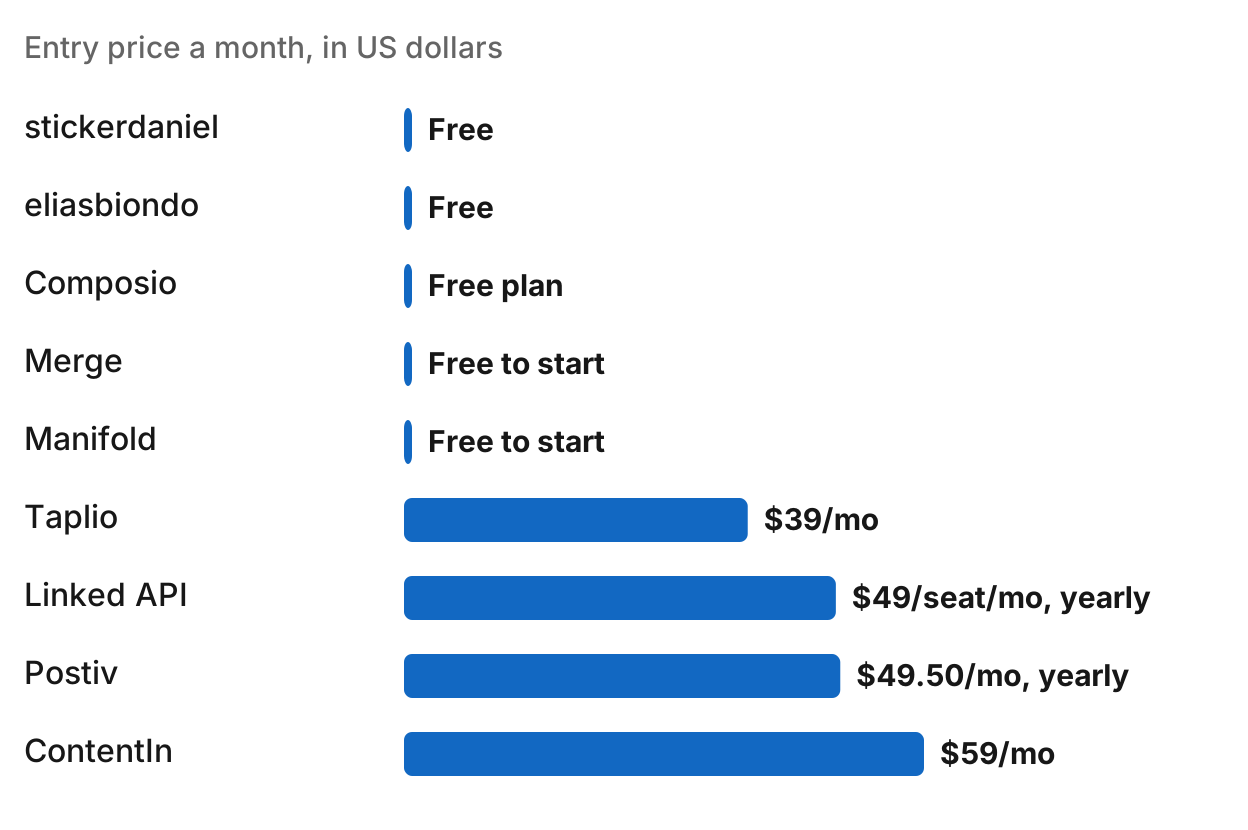
Prices checked October 2026.
| Server | Kind | How you sign in | Entry price | Job |
|---|---|---|---|---|
| stickerdaniel/linkedin-mcp-server | Session, local | Your own LinkedIn session in a local browser | Free (open source, Apache 2.0) | Profiles, companies, people and post search, jobs, messages, connection requests |
| eliasbiondo/linkedin-mcp-server | Session, local | Your own LinkedIn session in a local browser | Free (open source, MIT) | Profiles, people search, companies and their posts, job search |
| Linked API | Session, cloud browser | An account you own, run in Linked API's cloud browser | Core $49/seat/mo billed yearly, 7-day free trial | Lead search, profiles, messages, conversations, company data |
| Postiv | Content tool | Postiv sign-in in Claude and ChatGPT, API key for Claude Code and other clients | Creator Pro from $49.50/mo billed yearly, 7-day free trial | Content research, drafting, visuals, scheduling, analytics |
| ContentIn | Content tool | MCP key per profile, created in ContentIn | Pro $59/mo ($48/mo billed annually), 7-day free trial | Ghostwriter drafts, publish, schedule, analytics, engagement |
| Taplio | Content tool | Taplio account sign-in on first use | From $39/mo (Starter), Growth $69/mo, Pro $199/mo, 7-day free trial | Drafts, scheduling, publishing, comments and replies, analytics |
| Composio | Integration platform | LinkedIn OAuth through Composio's managed app | Free Hobby plan with 100,000 tool calls a month | Posts, articles, comments, reactions, your profile, company page statistics |
| Zapier MCP | Integration platform | Your LinkedIn account connected in Zapier | Not listed on the MCP page | Share updates and company page updates |
| Merge | Integration platform | LinkedIn OAuth, tokens stored by Merge | Free to start building | Text, article and image shares |
| Manifold | Research | No LinkedIn login and no data provider account of your own | 250 free credits a month, Pro from $29/mo | Search public posts, read profiles, company pages, company posts and single posts |
stickerdaniel/linkedin-mcp-server
stickerdaniel/linkedin-mcp-server is a free, open-source server (Apache 2.0) that connects your agent to LinkedIn through your own logged-in browser session, with the browser running on your machine. You install it with uvx (it needs uv), Docker or a Claude Desktop bundle, then sign in through a login browser or import the session from a browser where you are already signed in.
Its tools read profiles and company pages, search people, companies, posts and jobs, read your feed and inbox, and, after confirmation, send messages and connection requests. It is an independent project, not affiliated with LinkedIn, and it acts as your own account.
Best for: Research and outreach through your own LinkedIn account when you are happy to run a local server.
eliasbiondo/linkedin-mcp-server
eliasbiondo/linkedin-mcp-server is a free, open-source Python server (MIT). You clone it, install it with uv, and run its login command once: a browser opens, you sign in to LinkedIn by hand, and the session is saved on your machine.
Its tools read a person's profile, search people, read a company page and its posts, and search jobs and read job details. It lists no tools for messages or connection requests. Its README warns that scraping LinkedIn may violate LinkedIn's terms of service.
Best for: Free local research on people, companies and jobs, without tools that write to LinkedIn.
Linked API
Linked API's MCP server runs LinkedIn actions through a cloud browser on an account you own, so nothing runs on your machine. Linked API says it never stores your password. It lists Claude, Claude Code, ChatGPT, Codex, Cursor, VS Code and Windsurf, and its examples include searching for leads, checking profiles, sending messages, reading conversations and gathering company data.
Pricing is per seat: Core at $49/seat/mo and Plus at $74/seat/mo on the yearly option, both with MCP access and a 7-day free trial.
Best for: Sales teams that want their agent to prospect and message from their own LinkedIn accounts without running a local browser.
Postiv
Postiv's LinkedIn MCP is a hosted server at https://postiv.ai/mcp. In Claude and ChatGPT you sign in to Postiv and pick a workspace; Claude Code and other clients use a Postiv API key. It works with Claude, ChatGPT and Cursor.
Your agent can search Postiv's inspiration library, draft posts with your workspace knowledge, create images and carousels, schedule approved posts and analyze performance for connected LinkedIn accounts. Postiv says it does not scrape profiles or automate DMs and connection requests.
Postiv's pricing page lists MCP access on Creator Pro, from $49.50/mo billed yearly, and every plan starts with a 7-day free trial.
Best for: Teams that want Claude or ChatGPT to run a LinkedIn content workspace with drafting, visuals and scheduling.
ContentIn
ContentIn's LinkedIn MCP server is a hosted remote server included in the Pro plan. You create an MCP key per LinkedIn profile in ContentIn and paste it into your client. ContentIn publishes setup steps for Claude Code, Claude Desktop and Cursor, and says any client that speaks Streamable HTTP MCP can connect, including ChatGPT.
The tools cover drafts in your voice from ContentIn's ghostwriter, publishing and scheduling (each waits for your confirmation), post analytics, and the people engaging with your posts. Pro is $59/mo, or $48/mo billed annually, with a 7-day free trial.
Best for: Creators already on ContentIn Pro who want their ghostwriter and calendar in Claude or Cursor.
Taplio
Taplio's LinkedIn MCP is a hosted server at https://mcp.taplio.com. Add the URL to your assistant and sign in with your Taplio account on the first call. Taplio lists Claude, Cursor, ChatGPT, VS Code, Windsurf and Zed.
The tools research high-performing posts, draft and edit posts, schedule and publish, find posts to comment on, draft comments and replies, attach media and read analytics. Publishing waits for your confirmation.
You need a Taplio account. Plans start at $39/mo (Starter), with Growth at $69/mo and Pro at $199/mo billed monthly, and a 7-day free trial.
Best for: Creators who want writing, scheduling and engagement from their assistant through Taplio.
Composio
Composio's LinkedIn toolkit is a hosted MCP server, or a REST API, that connects your LinkedIn account with OAuth through Composio's managed app, so you need no LinkedIn developer app of your own. Its tools create posts, article shares and comments, delete posts, list reactions, upload images, and read your own profile, share statistics and company page statistics. Composio lists Claude Code, Cursor, ChatGPT and VS Code among its clients.
Composio's free Hobby plan includes 100,000 tool calls a month, up to 20,000 of them through managed apps such as LinkedIn.
Best for: Developers who want their agent to post to LinkedIn through LinkedIn's own API, alongside other apps on the same platform.
Zapier MCP
Zapier MCP exposes Zapier's LinkedIn actions to your agent from mcp.zapier.com. For LinkedIn it lists two actions: create a share update and create a company page update. You connect LinkedIn in Zapier once, and the agent calls the actions you allow.
Best for: Teams already on Zapier that want their agent to post updates without another tool.
Merge
Merge's LinkedIn MCP connector lets an agent publish text, article and image shares. Merge stores and refreshes the LinkedIn OAuth tokens, and you connect your agent with Merge's MCP URL and an API key. Its page offers to start building for free and does not list a price.
Best for: Product teams building LinkedIn publishing into their own agent or app.
Manifold
Manifold is a hosted MCP server with no LinkedIn login and no data provider account of your own. Its LinkedIn tools search public posts and read profiles, company pages, company posts, single posts and the commenters on a post, with their profile URLs. It reads public LinkedIn data through a data provider, so nothing runs as your account. The same server also covers SEO, Reddit, ad libraries and leads.
Manifold is pay per call. Every account gets 250 free credits a month, and Pro starts at $29/mo. For what each tool returns, see the LinkedIn tools documentation. To get new posts asking for a tool like yours on a schedule, see how to find buying signals on LinkedIn with Claude.
Honest limits: Manifold does not draft, schedule, publish, comment or send messages. The content tools and integration platforms handle publishing. Manifold searches public posts and reads profiles, company pages and the commenters LinkedIn shows on a post, up to 10.
Best for: Public LinkedIn research without a LinkedIn login, with pay per call pricing, in the same server as your SEO, Reddit, ads and leads research.
Is a LinkedIn MCP server safe? LinkedIn's terms and account restrictions
LinkedIn's User Agreement lists what members must not do in section 8.2. Two items matter for MCP servers: using software, scripts or bots "to scrape or copy the Services, including profiles", and using "bots or other unauthorized automated methods" to access LinkedIn, send messages or engage with posts. How much that touches you depends on the kind of server.
- Session-based servers act as you. stickerdaniel's and eliasbiondo's servers drive a browser signed in to your account, and Linked API runs a cloud browser on an account you own. If LinkedIn restricts the activity, the account it restricts is yours.
- Integration platforms use LinkedIn's own API. Composio, Zapier and Merge connect with OAuth and stay within what LinkedIn's API allows, which is mostly posting and your own data.
- Content tools publish through their own apps. Postiv says it does not scrape profiles or automate DMs and connection requests, and ContentIn and Taplio wait for your confirmation before they publish.
- Research servers involve no LinkedIn account. Manifold reads public data through a data provider, so there is no session or cookie of yours in the loop.
How to add a LinkedIn MCP server to Claude, ChatGPT or Cursor
There are two ways in, depending on where the server runs.
- Hosted servers (Linked API, Postiv, ContentIn, Taplio, Composio, Zapier, Merge and Manifold) give you a URL. In Claude, open Customize → Connectors, choose Add, then Add custom connector, and paste it. In Cursor, add it under Cursor Settings → MCP. In ChatGPT, add it as an app in developer mode. Then sign in, or send the vendor's API key if it uses one.
- Local servers (stickerdaniel and eliasbiondo) run on your machine. Add the server's command to your client's MCP config, run its login step once so it saves your LinkedIn session, and use a desktop client such as Claude Desktop, Claude Code or Cursor. A local server does not reach Claude on the web or ChatGPT unless you host it behind a public URL yourself.
Step-by-step setup for each client is in the client guides.
Which LinkedIn MCP server should you use?
Pick by what you already pay for, whether you need publishing or research, and whether the server may act as your account.
You already use Postiv, ContentIn or Taplio. Use their MCP server, so your agent works with the content tool and LinkedIn accounts you already have.
You want free research through your own account, and can run a local server. stickerdaniel's server adds messages and connection requests; eliasbiondo's server sticks to profiles, companies and jobs.
You want your agent to prospect and message from your account, hosted. Linked API runs your account in its cloud browser, priced per seat.
You want to post through LinkedIn's own API. Composio, Zapier MCP and Merge connect with OAuth and publish updates.
You want drafting, scheduling and engagement from your assistant. Postiv, ContentIn and Taplio all handle content workflows. Pick the tool you already use, or the one whose pricing fits. Whichever tool posts for you, the first two lines still decide whether anyone clicks "see more", so give your agent a LinkedIn hook library to draft openings from.
You want public research without a LinkedIn login, with pay per call pricing. Manifold's LinkedIn MCP covers LinkedIn alongside SEO, Reddit, ads and leads in one hosted server.
You want to see the ads competitors run on LinkedIn. Several servers read LinkedIn's Ad Library; compare them in the best ad library MCP servers, and see the best MCP servers for competitor research for SEO and traffic data too.
Run this in your agent
Connect Manifold to Claude, ChatGPT or Cursor, then paste this prompt.
Search LinkedIn for posts about [topic] from the last month, list the authors and companies, and summarise the main complaints and questions.