How to find hiring signals on LinkedIn with Claude
Connect Manifold MCP, map the role that buys from you, and have your agent turn open postings and hiring posts into a ranked account table.


Who is hiring the role that buys from me?
A job posting for the role that buys your product is a reason to look. A hiring post or a new leader in that seat, in the same window, is a reason to write now. This guide is the job as your agent runs it on Manifold MCP: a ranked account table from open postings and LinkedIn hiring posts, then a monitor so the list stays current.
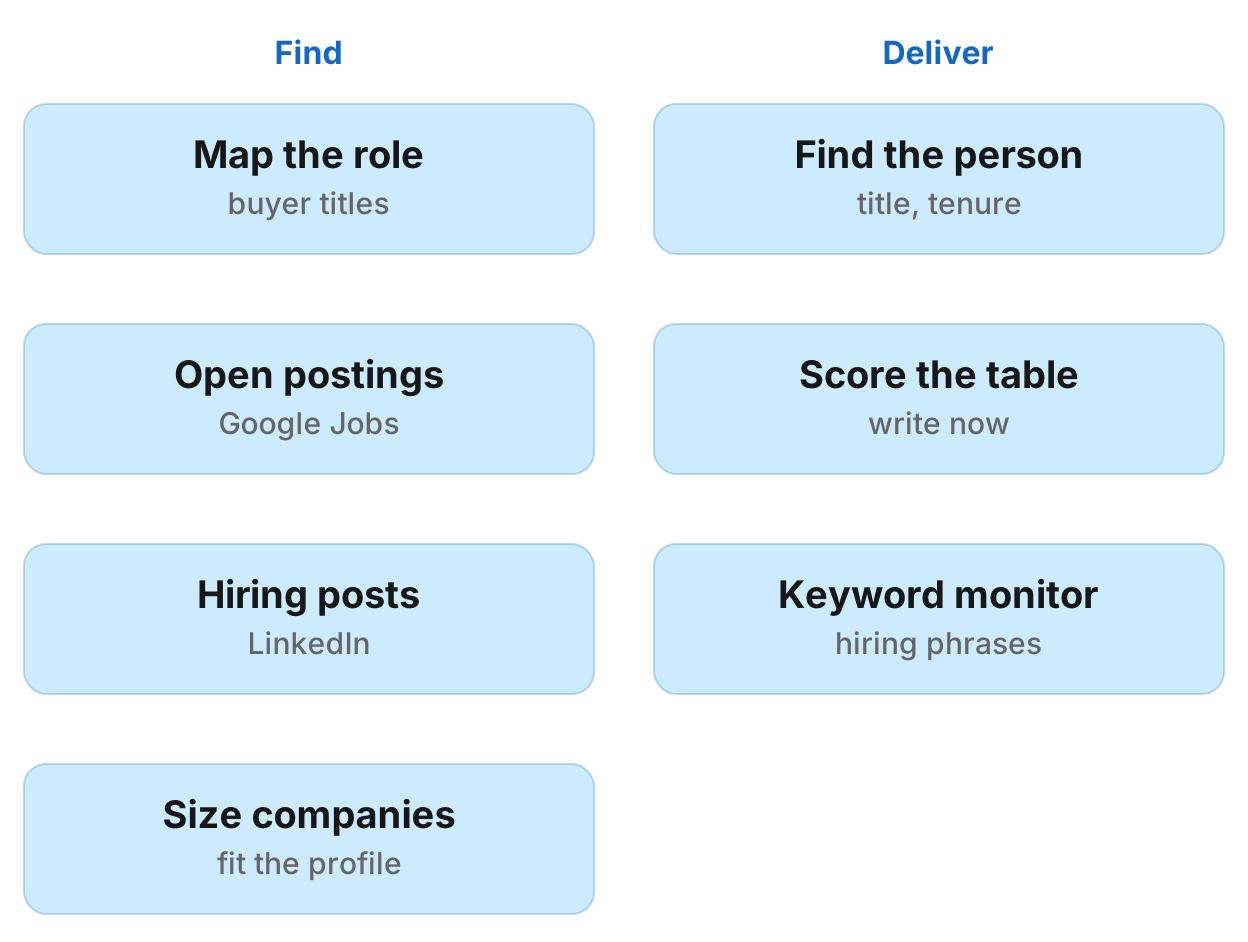
How to find hiring signals on LinkedIn in eight steps
- Connect Manifold MCP to Claude (claude.ai, Claude Desktop or Claude Code), or to ChatGPT.
- Map your product to the buying role and the titles a job seeker would search.
- Find open postings for that role.
- Find hiring and new-leader posts on LinkedIn.
- Size each employer and drop companies outside your customer profile.
- Find the person to contact.
- Score each account and get one table.
- Keep it fresh: a Keyword tracking monitor on LinkedIn, and a weekly job search on request.
Monitors come with every plan, including Free. For types and cadences, see how monitors work.
What AI engines suggest, and the shorter path
Ask how to find companies hiring for the role that buys your product, using LinkedIn job posts and hiring posts as buying signals, in Claude or ChatGPT today (checked November 2026) and the answers describe a stack you assemble: a jobs scraper or jobs API, an enrichment tool for company size and contacts, a spreadsheet or CRM, then Claude or ChatGPT to score the rows, plus an automation tool for repeats. Two engines warn that LinkedIn's User Agreement forbids scraping and unauthorized automated activity.
Manifold MCP reads Google Jobs postings, LinkedIn posts and company and people records inside the chat. It is hosted, with no LinkedIn developer app or jobs API of your own, and you pay per call.
This page is hiring as a buying signal. For posts where buyers ask for a tool, see how to find buying signals on LinkedIn. For a list built by company size and industry, see build a lead list with an AI agent. For a one-off LinkedIn topic search, see read LinkedIn posts with an AI agent. For other servers, see the best LinkedIn MCP servers and the best lead generation MCP servers.
Step 1: connect Manifold MCP
Manifold MCP is a hosted marketing data connector. You skip a LinkedIn developer app and a jobs API of your own, and you pay per call. Every account gets 250 credits a month on the free plan.
Claude. From the Claude setup guide:
- Open Customize, then Connectors.
- Choose Add, then add a custom connector. Name it Manifold and paste the server URL from the setup guide.
- Choose Continue through the sign-in settings Claude detects, then Add. Sign in to Manifold and approve Claude.
- In a chat, choose +, then Connectors, check that Manifold is on, and ask a question.
A connector you add on the web is also there in the desktop app and on your phone.
Claude Code. From the Claude Code setup guide: add the server with the URL from that guide. Start Claude Code, run /mcp, choose manifold, and finish sign-in in the browser. Add --scope user to have it in every project.
ChatGPT. Manifold MCP is an official ChatGPT app. From the ChatGPT setup guide: open Apps, search for Manifold, click Connect, sign in and click Allow. Then type @Manifold or pick it from the + menu under More. There is no URL to paste and no developer mode to turn on. On Business, Enterprise and Edu, an admin decides which apps the workspace can use. If Connect is missing, ask an admin to turn on Manifold under Workspace settings, then Apps.
Paste this to check the connection:
What Manifold tools search job postings, search LinkedIn posts, get a company by domain, search people, get a person by profile URL, and create a monitor? Say that job rows have no description text, that LinkedIn post search is a ranked sample, and that creating a monitor costs 0 credits.
Your agent should name leads_search_jobs, linkedin_search_posts, leads_get_company, leads_search_people, leads_get_person and monitoring_create_monitor.
Step 2: map the role
Your agent writes the buyer role and the adjacent titles as a job seeker searches them: "head of growth", "revops manager", not the way you market the job. One role per search.
To find companies hiring people who use a tool, add the tool's name as it appears in postings ("hubspot"). A mention in a posting is not proof the company runs it.
Ask your agent which titles a job seeker would type for the person who buys [Acme], and which adjacent titles sit on the same team. Keep one list for postings and one for LinkedIn phrases.
Step 3: open postings
Your agent searches open postings with leads_search_jobs, which reads Google Jobs, so it covers LinkedIn, other boards and company careers sites. It takes a keyword and a location, and also employment_type and depth. Each row has the title, company, company URL, location, source (the board or careers site), url (the posting), salary as written, contract type, and posted date (only to the day). No description text comes back.
The search is by role or skill, not by company: a company's name in the keyword finds jobs that mention it. One role listed on several boards fills several rows, so your agent groups by company. Results are cached 1 day.
To read what a role is for, your agent can call seo_get_page on the employer's careers page for its headings and, with include, the page text and links, or you open the posting.
Each parameter is on the people and companies tools page.
Step 4: hiring and new-leader posts on LinkedIn
Your agent searches LinkedIn with linkedin_search_posts for phrases such as "hiring a head of growth", "we're hiring" plus the role, and "starting a new position as" plus the buyer title, since month. Each row has the author, created_at (approximate, such as "3 weeks ago"), text cut at 2000 characters, likes, comments and top comments.
LinkedIn ranks the search, so this is a sample, not every post. Your agent maps an author to a company with leads_get_person by profile URL. Hiring and culture posts draw likes from staff and candidates, so likes do not measure intent.
Each parameter is on the LinkedIn tools page.
Step 5: size and filter
Your agent sizes each employer with leads_get_company by domain. The record includes employees, headcount range, headcount growth, industry and location. Headcount growth can be empty.
Drop companies outside your customer profile. An existing customer hiring the role is an expansion lead for its account owner.
Step 6: the person
Your agent finds the person with leads_search_people, filtered to those company domains and titles: the leader of the team being hired into, or the new leader. Time in the role is dated to the month. As a rule of thumb, new leaders are most open to new tools in their first few months in the seat. Records lag a move by weeks.
Person records carry no email. leads_get_email is the paid reveal for the people worth contacting. Prices are on the credits page.
If you already know a champion, buyer or power user, a move to a new company is a separate, warmer list: the shared history is the reason to write. Treat a still-there result as dated.
Step 7: score and the account table
Your agent scores each account: two points for someone at the account posting about the problem or the hire inside the window, and one for each other signal (an open posting for the buying role, a new leader, a tool named in postings). Keep accounts on two or more. Date every row. A posting older than about a month is weaker.
The table is one row per account: account, domain, score, each signal with its evidence, link and date, the person to contact, and a one-line "why now". Your agent drafts the first message referencing the role. You send it yourself.
Example only (invented names, not findings):
| Account | Domain | Score | Signals | Person | Why now |
|---|---|---|---|---|---|
| Acme (example) | acme.example | 3 | Open posting for [role], posted 2026-11-12, LinkedIn; hiring post, about 3 weeks ago | [Name], head of [team], started 2026-09 | Hiring the buyer role this month, new leader in the seat |
Step 8: keep it fresh
Your agent creates a Keyword tracking monitor (the mentions preset) on LinkedIn with the hiring phrases. Ask it to call monitoring_create_monitor as a preview first, show what the monitor will watch, and create it once you agree. Creating it and its checks spend 0 credits. Every parameter is on the monitoring tools page.
Dashboard. Open social media monitoring and create a Keyword tracking monitor, LinkedIn only. The form shows what the monitor will watch before it starts.
Each check runs linkedin_search_posts once per phrase, for the past week. A post is kept only when its text, transcript or hashtags contain the phrase as written, ignoring case, so exact wording matters. A multi-word phrase also matches the hashtag with the spaces run together. Checks run hourly by default; daily or weekly is enough when hiring posts move slowly. Checks skip the cache, because an hours-old search would find nothing new.
There is no monitor for job postings, so the job search is re-run weekly on request and your agent compares it with last week's table. Claude and ChatGPT do not run that search on a schedule by themselves. To watch one company's careers page, see how to monitor website changes.
The free plan keeps 1 monitor of up to 3 keywords, so a free user picks this one monitor. Monitors a workspace can keep, by plan: 1 on Free, 5 on Pro, 25 on Growth, 100 on Agency.
Email alerts are on every plan: at most one email a day per monitor, with the rest waiting in the feed your agent reads. Slack and webhook alerts are on the Growth and Agency plans. They are not on Free or Pro.
Run this in your agent
Connect Manifold to Claude, ChatGPT or Cursor, then paste this prompt.
Map [Acme]'s product to the role that buys it and the job titles a job seeker would search, such as "[role]" and adjacent titles. One role per search. Then call leads_search_jobs with that role as keyword and location [city]. Group duplicate postings of the same role across boards by company. Job rows have no description text; if you need to see what a role is for, call seo_get_page on the employer's careers page or I will open the posting. Search LinkedIn with linkedin_search_posts for "hiring a [role]", "we're hiring" plus the role, and "starting a new position as" plus the buyer title, since month. Map each author to a company with leads_get_person by profile URL. Likes do not measure intent. Call leads_get_company on each employer domain. Drop companies outside this customer profile: [industry, size, location]. Keep an existing customer as an expansion lead. Then call leads_search_people with those company_domains and the titles of the team lead or the new leader. title_start shows time in the role. Person records have no email; after I pick who to contact, call leads_get_email for those people only. Score each account: two points if someone there posted about the hire or the problem inside the window, one point for each other signal (open posting for the buying role, new leader, a tool named in postings). Keep accounts on two or more. Date every row; a posting older than about a month is weaker. Give me one table: account, domain, score, each signal with its evidence, link and date, the person to contact, and a one-line why now. Draft a first message that references the role; I will send it. Then preview a Keyword tracking monitor, LinkedIn only, daily, for these hiring phrases: hiring a [role], we're hiring [role], starting a new position as [role]. Description: New hiring posts for the role that buys [Acme], so we write while the seat is open. Preview it first, then create the monitor once I agree. There is no monitor for job postings; each week I will ask you to re-run leads_search_jobs and compare it with last week's table.
Limits to know
From Manifold MCP docs and the tools themselves:
- The jobs search is by role or skill, not by company. A company's name in the keyword finds jobs that mention it.
- Job rows have no description text.
- Posted dates are only to the day, and the jobs search is cached for a day.
- One role on several boards fills several rows. Your agent groups by company.
- LinkedIn post search is ranked by LinkedIn and is a sample, not every post. Dates are ages such as "3 weeks ago", exact only to that unit.
- Company and person records can lag a move by weeks, and a field can come back empty.
- There is no monitor for job postings. Ask your agent to re-run that search each week.
Run the hiring-signals job
Paste the prompt above with your product, the buying role and the city. Creating the LinkedIn keyword monitor and its checks cost nothing. From the second check on, ask your agent which new hiring posts appeared. Your agent reads the monitor's feed when you ask.
This guide sits with the other LinkedIn articles.