How to find LinkedIn influencers with Claude
Have your agent find LinkedIn voices your buyers already engage with, size them on resonance, and pick who to learn from, comment on, collaborate with or sponsor.

How do I find LinkedIn influencers?
Your buyers already follow a small set of people. This is how your agent finds those LinkedIn influencers in your niche, sizes them on how well posts land rather than how famous they are, and turns the sample into partners. The lookups go through Manifold MCP.
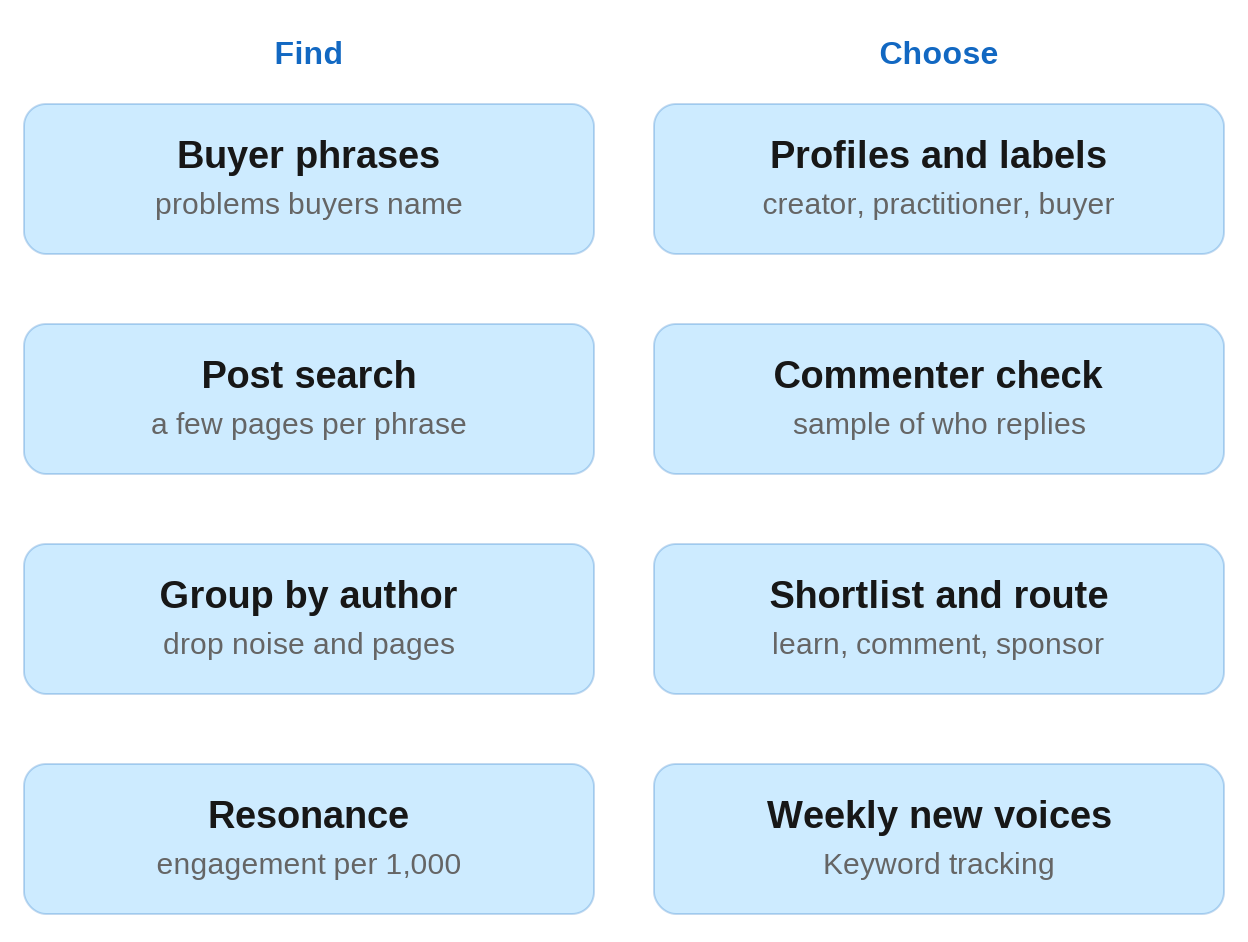
How to find LinkedIn influencers in eight steps
- Connect Manifold MCP to Claude (claude.ai, Claude Desktop or Claude Code), or to ChatGPT.
- Write the topic in your buyers' words: three to five phrases, a window, and who counts.
- Search LinkedIn posts on each phrase, group the rows by author, and drop the noise.
- Size each author on engagement per 1,000 followers, next to follower count.
- Read the profiles of the top 20 to 25 and label each.
- Check who comments on each finalist's best posts, and how many fit your customer profile.
- Build the shortlist and pick a route: learn from, comment on, collaborate with, or sponsor.
- Keep finding new voices with a weekly Keyword tracking monitor, LinkedIn only, on the same phrases.
The output is a partnership shortlist of B2B creators and practitioners, not a content calendar.
Related guides:
- What to post yourself from the same niche: how to find LinkedIn post ideas with Claude.
- Buyer intent and accounts: how to find buying signals on LinkedIn.
- A one-off topic read: read LinkedIn posts with an AI agent.
- Other networks: how to find Instagram influencers with Claude and how to find UGC creators on TikTok with Claude.
- A comparison of LinkedIn servers: the best LinkedIn MCP servers.
What AI engines suggest, and the shorter path
Ask Claude or ChatGPT how to find people your buyers actually follow and engage with on LinkedIn, so you can partner with them (checked November 2026), and the shared loop is: define the buyer by role, seniority and industry; find voices through those buyers rather than through influencer lists; search posts on buyer topics and group the authors; score topic fit, audience fit, engagement quality and commercial fit; leave engagement pods and giveaways out; prefer smaller specialists with engaged buyers over big generalists; check overlap by sampling commenters, asking the creator for analytics, and asking your own customers who they follow; watch brand fit and competitor conflicts; use LinkedIn's own creator programs where they apply; draft outreach in the chat and send it as a person. Several answers warn about LinkedIn's terms for tools that drive a logged-in account.
What they name is a kit you would have to join up: influencer directories, audience research products, enrichment and outbound platforms, community intelligence, generic automation connectors, and LinkedIn servers that run on a session of yours. Some of those need their own account and a paid plan, and some run as a logged-in LinkedIn session.
Inside the chat, Manifold MCP reads public LinkedIn posts, profiles and commenters. The server is hosted, you pay per call, and you skip a LinkedIn login, a session cookie, a browser extension and a local server of yours.
Step 1: connect Manifold MCP
Every account gets 250 credits a month on the free plan. See the credits page for what calls cost.
Claude. The Claude setup page walks through Customize, Connectors, a custom connector named Manifold, and the sign-in window.
Claude Code. The Claude Code setup page prints the command. Run it, then /mcp to sign in from the browser.
ChatGPT. Use the link on the ChatGPT setup page to find Manifold in ChatGPT. Connect and sign in. You are not asked for a server URL. On Business, Enterprise or Edu, an admin chooses whether the workspace can use it.
Paste this to confirm LinkedIn is attached:
Which Manifold tools search LinkedIn posts, read a LinkedIn profile, read one post's commenters, look up a person's job title, find a verified work email and create a monitor?
The reply should name linkedin_search_posts, linkedin_get_profile, linkedin_get_comments, leads_get_person, leads_get_email and monitoring_create_monitor.
Step 2: the topic in your buyers' words
Give your agent three to five phrases in the words the customer profile uses, not only the product category. Add the problems and jobs: "[problem phrase]", "[role] [task]", a complaint, a workflow. Add who the buyer is, a window (the past month for who is active now, the past year for who has owned the topic longer), and who counts: all voices, or practitioners only.
Acme in [category] might hand over "why [process] stalls", "[role] [task] without a team" and "[complaint about a rival approach]", plus "practitioners who do the work, not vendors pitching it."
Step 3: search and group by author
Your agent searches LinkedIn posts for each phrase, a few pages each. LinkedIn ranks those pages itself; they are not sorted by likes. For each post it keeps the author, the author's followers, likes, comments, date and link.
Then it groups the rows by author: how many of that person's posts sit in the results, median likes and comments, and the best post. It keeps authors with at least two posts in the results, or one post in the top tenth by engagement. Company pages go to one side unless you asked for them. Giveaway posts (comments far above likes, or a flood of one-word replies) and suspect engagement (likes near the follower count on a small account, or a block of generic comments from branded pages) stay out of the medians.
Treat the table as a sample of who is in the ranked results, not as the whole network. LinkedIn's ranking prefers posts that already did well, so a quiet weekly poster can be absent until you search a tighter phrase.
What each lookup returns is on the LinkedIn tools page.
Step 4: size them on engagement per 1,000 followers
Your agent puts engagement per 1,000 followers next to follower count. Followers are reach. Per-1,000 engagement is resonance: how hard the posts land with the people who already see them. A smaller specialist with high resonance can be a better partner than a famous generalist who posts across many topics.
The table below is an illustration. Names and figures are placeholders, not a real shortlist:
| Author | Followers | Posts in the results | Median likes | Median comments | Per 1,000 followers |
|---|---|---|---|---|---|
| [Creator A] | [n] | [n] | [median] | [median] | [n] |
| [Creator B] | [n] | [n] | [median] | [median] | [n] |
| [Creator C] | [n] | [n] | [median] | [median] | [n] |
Step 5: read the profiles and label each
Your agent reads the profiles of the top 20 to 25: about text, location, followers, companies and schools with dates, recent posts (how often they post), and similar profiles LinkedIn suggests, which is a way to widen the list. A LinkedIn profile read has no job titles and no headline. For a few finalists, if a title matters, the agent looks up the person record, which carries title and employment history.
It labels each voice: creator (writes for an audience), practitioner (writes about their own work), vendor or consultant (writes to sell), or buyer (fits the customer profile). Competitors and their employees are marked. Buyers who post about the topic stay on the list even with small numbers.
For the top five, one past-year search on their main topic shows whether they post steadily or had one hit.
Step 6: check who comments
On each finalist's best posts, your agent reads the commenters LinkedIn shows (up to 10 per post) and, for a small sample, their profiles. It counts how many fit the customer profile. That sample is the best public proxy for audience fit. LinkedIn does not publish follower demographics (industry, seniority, job function), impressions or profile views, so before you pay, ask the creator for a screenshot of their own analytics, or use LinkedIn's own tools.
Leave commenter names off any table you share outside the chat. Top commenters are people to learn about, not a contact list.
Step 7: shortlist and pick a route
Your agent delivers one row per person: name, profile link, label, followers, posts in the results, median likes and comments, engagement per 1,000 followers, buyers seen in comments, best post link, and why they matter. The route is learn from, comment on, collaborate with (a co-authored or collaborative post), or sponsor.
This table is an illustration. Names, counts and routes are placeholders:
| Name | Label | Followers | Posts | Median likes / comments | Per 1,000 | Buyers in comments | Best post | Route |
|---|---|---|---|---|---|---|---|---|
| [Creator A] | practitioner | [n] | [n] | [median] / [median] | [n] | [n of sample] | [url] | learn from, comment on |
| [Creator B] | creator | [n] | [n] | [median] / [median] | [n] | [n of sample] | [url] | collaborate with |
| [Creator C] | creator | [n] | [n] | [median] / [median] | [n] | [n of sample] | [url] | sponsor |
For sponsorship, LinkedIn's own options (checked November 2026):
- A member who shares content in exchange for value, including payment or free products, must turn on the Brand partnership label on that public post. The toggle is on public posts only and resets for each post.
- With the author's permission you can promote a member's post as a Thought Leader Ad in Campaign Manager. Company page posts and reshares cannot be promoted this way. Content from authors in EU Digital Markets Act countries is not supported.
- Creator Marketplace is invitation only in the US and Canada. Eligibility looks at posting activity, followers, impressions and an invitation, and LinkedIn says it may change. Opted-in creators share a contact email and content analytics with brands. Manifold MCP does not read Creator Marketplace.
- A promoted post from a non-employee shows "Promoted - Partnership with [company]"; the author adds any other disclosure the post needs.
Price and pick on what a creator's posts actually earn, not on followers.
Your agent drafts a first message. You send it. A verified work email is only for the finalists you pick; a profile read has none. That lookup is on the people and email tools page.
Step 8: keep finding new voices
Ask your agent to preview a Keyword tracking monitor, then create it once you agree: LinkedIn only, weekly, the same buyer phrases. Each check searches LinkedIn posts for those phrases and reports new ones. Until a second run, there are no new-author alerts; that first run is only a baseline. Email alerts are at most one a day per monitor.
Each week, ask which new authors appeared and whether any beat the shortlist on resonance. There is no monitor that follows a person's LinkedIn profile. Social account tracking on LinkedIn reads a company page's posts only. To re-check finalists, ask your agent to run the profile and post check again, about once a quarter.
You can start the same watch from social media monitoring: Keyword tracking, LinkedIn only, weekly. Creating or editing the monitor and its scheduled checks spend no credits. Run now, from the dashboard or the agent, is the one check that spends credits, and the amount is shown first. How many monitors a plan keeps is on how monitors work. The monitoring tools page lists what a monitor can be set to watch.
Run this in your agent
Connect Manifold to Claude, ChatGPT or Cursor, then paste this prompt.
Build a shortlist of LinkedIn voices [Acme] in [category] should partner with. Customer profile: [industry, size, role]. Buyer phrases, three to five, in their words not only the category: [phrase 1], [phrase 2], [phrase 3]. Window: past month for who is active now (use past year if we want who has owned the topic longer). Who counts: [all voices / practitioners only]. Call linkedin_search_posts for each phrase, a few pages each, one page at a time via cursor. Search is ranked by LinkedIn, not by engagement, and is a sample. Keep author, author_name, author_url, author_followers, created_at, likes, comments, url, text, top_comments. created_at is approximate (LinkedIn shows an age). shares, views, saves, duration_s and is_ad are empty on LinkedIn. Group rows by author. Per author: posts in the results, median likes and comments, best post. Keep authors with at least two posts in the results, or one post in the top tenth by engagement. Set company pages aside (author_url under /company/) unless I asked for them. Leave giveaway posts (comments far above likes, one-word comment floods) and suspect engagement (likes near the follower count on a small account, blocks of generic comments from branded pages) out of the medians. If the list looks thin, add a narrower phrase and search again. Size each kept author on engagement per 1,000 followers next to followers. Followers are reach; per-1,000 engagement is resonance. A smaller specialist with high resonance can beat a famous generalist. Call linkedin_get_profile on the top 20 to 25. Profiles have name, bio (about text, can be cut short), followers, following (connections), location, experience (companies and schools with dates, no job titles), recent_posts (url, first 280 characters, date, no engagement), related (similar profiles LinkedIn suggests, name and url). No headline, no job title, no email, no website, posts_count is empty. Label each creator, practitioner, vendor or consultant, or buyer. Mark competitors and their employees. Keep buyers who post on the topic even if their numbers are small. Use related profiles to widen the list. For the top five, one linkedin_search_posts on their main topic with since year, and say whether they post steadily or had one hit. If a title matters for a few finalists, call leads_get_person with the LinkedIn profile URL; that record has title, headline, company, company_domain and employment_history with titles, and no email. On each finalist's best posts, read top_comments already on the search rows (up to 10 commenters per post, each with author, author_url and text). Call linkedin_get_comments only when those are empty. For a small sample, call linkedin_get_profile on commenters and count how many fit the customer profile. Treat that count as the public stand-in for audience fit. There are no impressions, profile views or audience demographics here; I will ask finalists for their own analytics (industry, seniority, job function) before paying. Keep commenter names out of anything you write for publishing. Give me a table: name, profile link, label, followers, posts in the results, median likes and comments, engagement per 1,000 followers, buyers seen in comments, best post link, why they matter (learn from, comment on, collaborate with, or sponsor). Do not invent numbers or findings. Mark any example as an illustration. For sponsorship, explain LinkedIn's own options and link LinkedIn's help pages: Brand partnership label (a member who shares content in exchange for value, including payment or free products, must label the public post; the toggle resets each post), Thought Leader Ads (promote a member's post with their permission; company page posts and reshares cannot be promoted this way; authors in EU Digital Markets Act countries are not supported), Creator Marketplace (invitation only in the US and Canada as of November 2026; opted-in creators share a contact email and content analytics with brands). Creator Marketplace is not in these lookups. Draft a first message for each route I pick; I will send it. Call leads_get_email only for the finalists I pick, with first_name, last_name and company_domain (as domain); a profile read has no email. Then preview a Keyword tracking monitor, LinkedIn only, weekly, for these phrases: [phrase 1], [phrase 2], [phrase 3]. Description: New LinkedIn authors posting about [topic] so we can add them to the shortlist. Preview first, create once I agree. Until a second run there are no new-author alerts; that first run is only a baseline. Each week I will ask which new authors appeared and whether any should join the shortlist; read them with monitoring_get_changes. No monitor watches a named person's profile, so I will ask you to re-check finalists each quarter. Creating, reading and changing the monitor spend no credits, and scheduled checks spend no credits. A Run now check spends credits, shown before it runs.
Limits to know
What a logged-out visitor can see, and what comes back:
- Search uses LinkedIn's own ranking. It is a sample, not the full set of posts on the network, and it favours posts that already did well.
- Dates are approximate. LinkedIn writes an age ("3 weeks ago"), so the stamp is only as precise as that unit.
- Job titles and the headline are missing from a profile lookup. The about text can come back cut short.
- LinkedIn shows up to 10 comments per post to a logged-out reader, so the commenter check is a sample, not the thread. Who liked a post is not shown.
- Impressions, profile views and audience demographics (industry, seniority, job function) are not in the lookups.
- Share, save and view counts do not come back for LinkedIn posts.
- Private posts and connections-only posts are not readable.
- When LinkedIn does not publish a field, that cell comes back empty.
Paste the prompt with your buyer phrases, the customer profile and the window.
See the other LinkedIn articles for adjacent jobs.