How to find Instagram influencers with Claude
Connect Manifold MCP, search your niche hashtags, and have your agent shortlist Instagram creators by median views, not followers.


How do I find Instagram influencers?
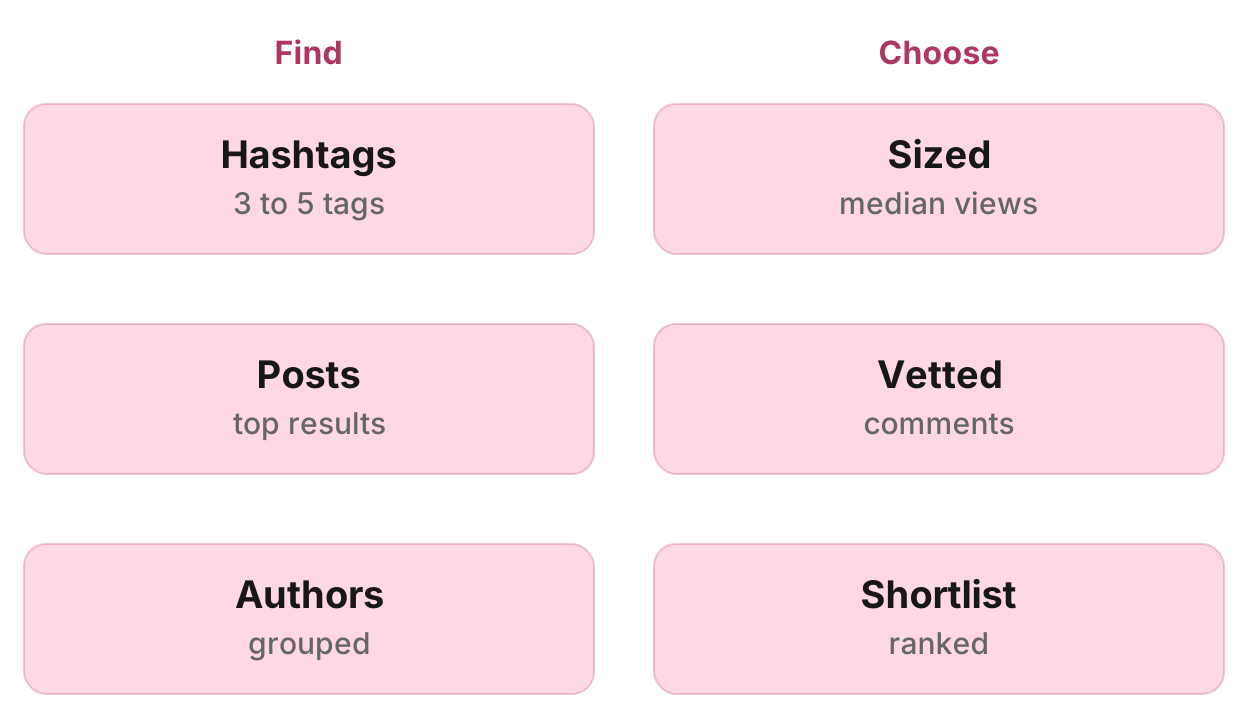
Your agent searches your niche hashtags on Instagram through Manifold MCP, groups the posts by author, sizes each author with their profile and recent posts, and ranks them on niche fit and median views, not followers. A Keyword tracking monitor on those hashtags then surfaces new creators. Refreshing Instagram until the right person appears is a hobby, not a system.
How to find Instagram influencers in six steps
- Connect Manifold MCP to Claude or ChatGPT.
- Pick three to five hashtags people actually use.
- Search each tag and group the posts by author.
- Size each author with their profile and recent posts.
- Vet the finalists and rank a shortlist by niche fit, then median views.
- Create a Keyword tracking monitor so new creators keep showing up.
Monitors come with every plan, including Free, and their checks cost no credits. Default cadence is hourly. Alerts start on. The free plan keeps 1 monitor. A Keyword tracking monitor on Free watches up to 3 keywords. Monitors a workspace can keep, by plan: 1 on Free, 5 on Pro, 25 on Growth, 100 on Agency. For types and cadences, see how monitors work.
What AI engines suggest, and the shorter path
Ask how to find Instagram influencers in Claude or ChatGPT today (checked November 2026) and the answers say those chats cannot read Instagram on their own. They describe a data source, the model as a scoring layer, and a spreadsheet you refresh every week.
Manifold MCP is the data source inside the chat: hosted, with no Instagram login or Meta developer app of your own, and you pay per call. The Keyword tracking monitor does the repeat. You do not build the pipeline.
This page is the shortlist, not a server comparison. That roundup is the best Instagram MCP servers.
Step 1: connect Manifold MCP
Manifold MCP is a hosted marketing data connector. You skip an Instagram login and a Meta developer app, and you pay per call. Every account gets 250 credits a month on the free plan.
Claude. From the Claude setup guide:
- Open Settings, then Connectors.
- Choose Add custom connector. Name it Manifold and paste the server URL from the setup guide.
- Choose Connect, sign in to Manifold, and approve Claude.
- Start a chat, check that Manifold is on in the chat's tools menu, and ask a question.
A connector you add on the web is also there in the desktop app and on your phone.
ChatGPT. Manifold MCP is an official ChatGPT app. From the ChatGPT setup guide: open Apps, search for Manifold, click Connect, sign in and click Allow. Then type @Manifold or pick it from the + menu under More. There is no URL to paste and no developer mode to turn on. On Business, Enterprise and Edu, an admin decides which apps the workspace can use.
Paste this to check the connection:
What Manifold Instagram and monitor tools do you have? Then tell me that creating a monitor is free, and how many monitors this workspace can keep.
Your agent should name instagram_search_posts, instagram_get_profile, instagram_get_reels, instagram_get_posts and instagram_get_comments, plus monitoring_create_monitor, monitoring_get_monitors, monitoring_get_changes, monitoring_get_history, monitoring_update_monitor and monitoring_delete_monitor. The monitoring tools are free. Monitor checks use no credits. The plan sets how many monitors you can keep. Credits still apply to the agent's own tool calls. Every parameter is on the Instagram tools and monitoring tools pages.
Step 2: pick three to five hashtags
Settle the search before you run it. Pick three to five hashtags: the category, the problem the product solves, a use case, and a competitor's name. Creators who already reviewed a rival already cover the category. Read the next tags off the captions of the first results.
Instagram search here is by hashtag only. A phrase is run together into one tag, so "gym wear" searches #gymwear. Pick tags people actually use.
Settle a size band too, so a huge brand account does not crowd out people you would actually hire. Search has no country filter. Keep creators whose captions and speech are in the buyers' language.
For a one-off look at an account or reel, see the other Instagram guides on the blog. This page stays on the shortlist.
Step 3: search and group
Ask your agent to run instagram_search_posts once per hashtag. Each call returns a list ranked by Instagram: a sample of posts under that tag, not every post. Say "in the top results for #tag", not "on Instagram". See the Instagram tools for what each row includes (author and author_followers when Instagram publishes them, caption, likes, comments, views, transcript).
Your agent groups the rows by author and counts matching posts per author. Niche fit beats one viral hit. Drop brand accounts and resellers.
Many good creators do not tag, so Instagram is under-found. Widen with more tags rather than treating a quiet result as proof nobody is posting.
When an owner hides like counts, search reads them as exactly 3. Leave those rows out of engagement rates.
Step 4: size each author
For each author worth keeping, your agent calls instagram_get_profile for followers, bio, website, links, and the business contact buttons (email and phone where a business account publishes them). The email field is often empty when the bio shows an address, so read the bio. kind does not settle person or brand: many creators run business accounts. posts_count is null, because a signed-out visitor is shown 12 posts whatever the account has.
Then one page of instagram_get_reels (or instagram_get_posts for image accounts), newest first. Your agent works out median views, engagement, posting cadence, niche share and sponsored share. On reels, engagement is likes plus comments over views; for a rate on image posts, use the Instagram engagement rate calculator. When an owner hides like counts, instagram_get_reels and instagram_get_posts return likes as null. Leave those rows out of the rate. Null is not zero.
Rank by niche fit first (share of recent posts on the topic), then median views, then engagement. Not by followers. Followers are what a creator charges for. Median views on recent posts are what you get.
The method is the creators skill: find, size, vet, then brief.
Step 5: vet the finalists
Judgment, not a platform-wide percentage. Your agent reads comments on a few posts with instagram_get_comments (leave replies off). Generic or repeated comments are a warning. A real audience answers what was said.
Check sponsored posts against the creator's own median. Far below it, the audience may skip ads. Views that sit low against followers are a warning too.
Instagram publishes no audience country split. Read caption and comment language, and ask the creator for a screenshot of their own analytics before a large fee.
Your agent does not message, contract or pay anyone. It delivers the table. You do the outreach from your own account.
Step 6: the shortlist table
Deliver one row per person:
| Handle and link | Followers | Median views | Engagement | Posts a week | Last post | Niche share | Sponsored | Contact | Fit |
|---|---|---|---|---|---|---|---|---|---|
| @[handle] | [count] | [views] | [rate] | [n] | [date] | [share, with one example link] | [n of recent] | [bio or contact button] | [one line] |
Contact comes from the bio and the public contact buttons only. Your agent can draft the message in the chat. You send it.
Step 7: keep finding new creators
The shortlist is a snapshot. To keep finding people, your agent creates a Keyword tracking monitor (preset mentions, platforms Instagram) on the best hashtags, with a preview first:
Track Instagram every week for new posts under #tag1, #tag2, #tag3. Description: new creators posting about [niche] we might partner with. Preview it first.
Creating it and its checks cost 0 credits. On the free plan a Keyword tracking monitor takes up to 3 keywords, and the workspace keeps 1 monitor. Default cadence is hourly. Weekly or daily is enough for creator discovery. The preview shows the tags and cadence before anything is made.
Dashboard. Open social media monitoring and create a Keyword tracking monitor, Instagram only. The form shows what the monitor will watch before it starts.
Each post is news once, by its id. A post counts when its text, transcript or hashtags contain the term. A multi-word term also matches the hashtag with the spaces run together, so "gym wear" matches #gymwear.
The first check is a starting point and reports nothing. That starting point stops last week's posts arriving as news. From the second check on, each new matching post is one new mention.
Each Monday, ask your agent which new authors appeared in the monitor's feed and to size them as in step 4. Your agent reads the feed when you ask. Claude and ChatGPT do not run that prompt on their own schedule.
Alerts
Keyword tracking alerts start on. Email alerts are on every plan: at most one email a day per monitor, with the rest waiting in the feed your agent reads. Each person in the workspace turns a monitor's alerts on or off for themselves.
Slack and webhook alerts are on the Growth and Agency plans. They are not on Free or Pro.
Run this in your agent
Connect Manifold to Claude, ChatGPT or Cursor, then paste this prompt.
Build a shortlist of Instagram creators for [Acme gym wear]. Search #gymwear, #activewear and #[competitor] with instagram_search_posts. Group by author, drop brand accounts and resellers, and keep people whose posts fit the niche. Size each with instagram_get_profile and one page of instagram_get_reels (or instagram_get_posts for image accounts). Read comments on a few posts with instagram_get_comments. Rank by niche fit, then median views, then engagement, not followers. Give me a table: handle and link, followers, median views, engagement, posts a week, last post, niche share with one example link, sponsored posts seen, contact and its source, one line on fit. Then preview a weekly Keyword tracking monitor on those hashtags, Instagram only. Description: new creators posting about gym wear we might partner with. Preview it first, then create the monitor once I agree. Each Monday, read that monitor's feed and size any new authors the same way.
Limits to know
From Manifold MCP docs and the tools:
- Instagram search is by hashtag only. There is no free-text search.
- Search is ranked by Instagram and is a sample, not every post under the tag.
- Many good creators do not tag, so they are missed.
- Hidden like counts read as exactly 3 in search, and as null on
instagram_get_postsandinstagram_get_reels. Leave those rows out of engagement rates. - Private accounts are not available. Only what anyone can see without following.
- A signed-out reader is shown 12 posts on a profile, so
posts_countis null. Count posts frominstagram_get_postsorinstagram_get_reels.
Instagram and TikTok together
The same method works on TikTok, where tiktok_search_videos is free text. To track the same hashtags on TikTok, see how to track TikTok hashtags and keywords with Claude. To see which posts work, not who to hire, see research TikTok and Instagram with an AI agent. The same Keyword tracking monitor can add TikTok and YouTube later.
Create your Instagram creator monitor
Create a Keyword tracking monitor for Instagram. Creating it and its checks cost nothing. Open social media monitoring and start from the form, or connect Claude or ChatGPT and paste the prompt above.
The first check is a starting point. From the second check on, ask your agent which new authors appeared and to size them. Your agent reads the monitor's feed when you ask. Claude and ChatGPT do not run that prompt on their own schedule.