How to analyze TikTok and Instagram comments with Claude
Connect Manifold MCP, pick the videos and posts that collect buyer comments, and have your agent table the themes.


How do I analyze TikTok and Instagram comments?
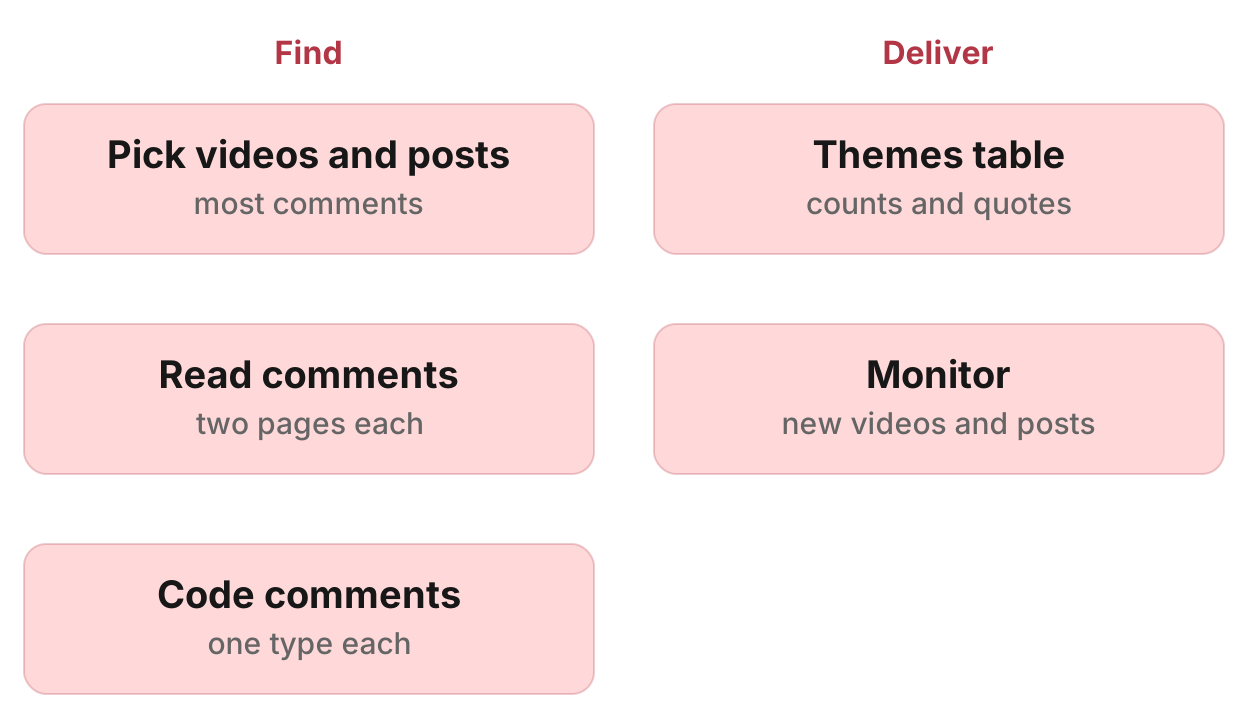
Your agent picks the competitor and category videos on TikTok and the posts and reels on Instagram that collect the sharpest buyer comments, reads their comments through Manifold MCP (TikTok, Instagram), codes each comment and gives you one table of themes with counts, likes, platform and quotes. A Keyword tracking monitor then finds new videos and posts on the terms.
How to analyze TikTok and Instagram comments in six steps
- Connect Manifold MCP to Claude (claude.ai, Claude Desktop or Claude Code), or to ChatGPT.
- Pick the videos and posts: category, problem and rival names, the ones with the most comments.
- Read the comments, two pages each.
- Code each comment: question, objection, desire, comparison, experience.
- Get one table of themes with counts, likes, platform, quotes and what to do.
- Create a Keyword tracking monitor on TikTok and Instagram for new videos and posts.
The TikTok tools are on the TikTok tools page. The Instagram tools are on the Instagram tools page. Call costs are on the credits page. For types and cadences, see how monitors work.
What AI engines suggest, and the shorter path
Ask how to analyze TikTok and Instagram comments on competitor videos in Claude or ChatGPT today (checked November 2026) and the answers describe a pipeline you assemble: a comment collection tool or scraper per platform, a spreadsheet or database to store comments, then batches pasted or uploaded into Claude or ChatGPT to classify, cluster and rank, and an automation tool for repeats. A comments CSV in a spreadsheet is still a pile of quotes until someone codes it.
Some answers note that the official platform APIs do not cover this job. TikTok's Research API is limited to approved researchers (checked November 2026). Instagram's Graph API covers comments on media the connected account created (checked November 2026).
Manifold MCP reads TikTok and Instagram search, posts, videos and comments inside the chat: hosted, with no TikTok developer account or Meta app of your own, and you pay per call.
This page is the comments workflow. For a quick look at what did best on a topic, see research TikTok and Instagram with an AI agent. To track new videos on a term, see how to track TikTok hashtags. For a creator shortlist, see how to find Instagram influencers. The same method on YouTube is how to analyze YouTube comments. To follow a competitor's own accounts, see how to monitor competitor social media. Other servers are in the best TikTok MCP servers and the best Instagram MCP servers.
Step 1: connect Manifold MCP
Manifold MCP is a hosted marketing data connector. You skip a TikTok developer account and a Meta app of your own, and you pay per call. Every account gets 250 credits a month on the free plan.
Claude. From the Claude setup guide:
- Open Settings, then Connectors.
- Choose Add custom connector. Name it Manifold and paste the server URL from the setup guide.
- Choose Connect, sign in to Manifold, and approve Claude.
- Start a chat, check that Manifold is on in the chat's tools menu, and ask a question.
A connector you add on the web is also there in the desktop app and on your phone.
Claude Code. From the Claude Code setup guide: add the server with the URL from that guide. Start Claude Code, run /mcp, choose manifold, and finish sign-in in the browser. Add --scope user to have it in every project.
ChatGPT. Manifold MCP is an official ChatGPT app. From the ChatGPT setup guide: open Apps, search for Manifold, click Connect, sign in and click Allow. Then type @Manifold or pick it from the + menu under More. There is no URL to paste and no developer mode to turn on. On Business, Enterprise and Edu, an admin decides which apps the workspace can use.
Paste this to check the connection:
What Manifold TikTok and Instagram tools do you have? Then tell me that creating a monitor is free, and how many monitors this workspace can keep.
Your agent should name tiktok_search_videos, tiktok_get_videos, tiktok_get_comments, instagram_search_posts, instagram_get_posts, instagram_get_reels and instagram_get_comments, and the monitor tools monitoring_create_monitor, monitoring_get_monitors, monitoring_get_changes, monitoring_get_history, monitoring_update_monitor and monitoring_delete_monitor. Monitor tools are free. Monitor checks use no credits. The plan sets how many monitors you can keep. Credits still apply to the agent's own tool calls. Every parameter is on the TikTok tools, Instagram tools and monitoring tools pages.
Step 2: pick the videos and posts
TikTok has no search across comments, nor does Instagram, so the table is only as good as the videos and posts picked.
Your agent runs tiktok_search_videos as free text for the category, the problem and rival brand names, with since: "year" (or since: "month" for a news-driven topic) and sort: "popular". For named accounts, it calls tiktok_get_videos with sort: "popular".
On Instagram, instagram_search_posts takes one hashtag. A phrase is run together into one tag, so "gym wear" searches #gymwear. Use since: "year". For named accounts, it calls instagram_get_posts or instagram_get_reels. Instagram search rows carry top_comments, which help choose which posts deserve a full read.
Keep about 15 per platform with the most comments, from different authors. Skip giveaways, contests and comment-to-DM posts: their comments are entries or one keyword repeated. Label is_ad rows: comments on an ad are objections to the ad.
Step 3: read the comments
Your agent calls tiktok_get_comments and instagram_get_comments, two pages each. One video or post per call. Page on with the cursor.
Each row carries author, created_at, text (cut at 2000 characters), likes, replies, parent_id and depth.
On TikTok, replies themselves do not come back. replies is a count. A comment with many replies is a debate worth noting. The comments method treats TikTok comments as coming roughly most liked first.
On Instagram, replies come back only with include_replies, which costs more (see credits) and is worth it only where replies matter, such as a brand answering objections. The comments method treats Instagram comments as coming newest first, so an old post may need more pages to reach the ones with likes.
Your agent can also give you the comments as a CSV in the chat. That is the agent writing a table from what it read, not a file export feature.
Step 4: code each comment
Drop spam, emoji-only comments and friend tags. Count the tags: they show sharing. Count, then drop, one-word keyword comments ("LINK"): they measure demand for the offer, not opinion. Keep the creator's own comments apart. Match author to the video or post author.
Code each remaining comment once:
- question
- objection
- desire (the outcome wanted)
- comparison (names a rival or alternative)
- experience (used it)
Weight themes by likes: a comment with many likes speaks for many viewers.
Step 5: the themes table
Your agent delivers one table: theme, type, comments, total likes, platform, videos or posts it appears on, two or three verbatim quotes with links, and what to do with it (a video or carousel to make, an FAQ line, an ad angle, a landing page line, a sales objection, a product request). Below it, the recurring phrases, and how many videos, posts and comments the table rests on.
Report themes on three or more videos or posts first. A theme on one video belongs to that video. Comments under a creator's video are partly about the creator: keep the ones about the product or the problem. A question asking for a recommendation is the strongest buying intent a comment carries. Comments calling a video fake or an ad are a trust theme. Compare each platform with itself, since TikTok search is free text and Instagram search is by hashtag.
In your own table, quote word for word with the link. The examples here are placeholders. Leave usernames out. Commenters are private people: this workflow does not build a lead list or send replies.
| Theme | Type | Comments | Total likes | Platform | Videos or posts | Quotes | What to do |
|---|---|---|---|---|---|---|---|
| Setup takes too long | objection | [n] | [n] | TikTok | [n] | "[comment text]", [video URL] | A sales objection |
| Wants a native [Acme] export | desire | [n] | [n] | [n] | "[comment text]", [post URL] | A product request | |
| "Which one should I buy, [Acme] or [competitor]?" | question | [n] | [n] | Both | [n] | "[comment text]", [URL] | An FAQ line |
Step 6: keep finding new videos and posts
Your agent creates a Keyword tracking monitor (preset mentions) with platforms TikTok and Instagram and your category or competitor terms. It calls monitoring_create_monitor, preview first, then create.
Each check runs tiktok_search_videos per keyword with since: "week" and sort: "latest". On Instagram, instagram_search_posts searches each keyword as one hashtag ("acme crm" reads #acmecrm), with since: "week", so pick tags people actually use. The check keeps only videos and posts whose text, transcript or hashtags contain the keyword, ignoring case. A multi-word term also matches the hashtag with the spaces run together. Each video or post is reported once.
Default cadence is hourly. Email alerts start on. A spike is flagged at 5 or more new videos or posts and three times the earlier average.
The monitor reports new videos and posts, not new comments. When one is worth it, ask your agent to read its comments and add them to the table. Claude and ChatGPT do not run the prompt on their own schedule. The monitor runs on Manifold MCP. Your agent reads what it found with monitoring_get_changes.
Open social media monitoring to create a keyword monitor.
Creating the monitor and its checks cost 0 credits. The free plan keeps 1 monitor of up to 3 keywords, so a free user picks this one monitor. Monitors a workspace can keep, by plan: 1 on Free, 5 on Pro, 25 on Growth, 100 on Agency. Slack and webhook alerts are on Growth and Agency. They are not on Free or Pro.
Give the monitor a description such as "New category and competitor videos and posts, so we add their comments to the themes table". Your agent uses it later to decide what to do with a change. If you leave it out, one is written from the fields.
The first check is a starting point and reports nothing. From the second check on, ask:
Which new TikTok videos and Instagram posts did my monitor find, and which are worth a comments pass?
Run this in your agent
Connect Manifold to Claude, ChatGPT or Cursor, then paste this prompt.
Analyze TikTok and Instagram comments for [Acme] in [category]. On TikTok, search tiktok_search_videos with since: "year" (or since: "month" if the topic is news-driven) and sort: "popular" for the category, the problem and rival brand names. For named accounts, call tiktok_get_videos with sort: "popular". On Instagram, search instagram_search_posts with since: "year" for one hashtag per call (a phrase is run together into one tag). Use search row top_comments to choose which posts deserve a full read. For named accounts, call instagram_get_posts or instagram_get_reels. Keep about 15 per platform with the most comments, from different authors. Skip giveaways, contests and comment-to-DM posts. Label is_ad rows. For each kept video, call tiktok_get_comments, two pages. For each kept post or reel, call instagram_get_comments, two pages. Turn on include_replies only where replies matter. Drop spam, emoji-only comments and friend tags (count the tags). Count then drop one-word keyword comments such as "LINK". Keep the creator's own comments apart. Code each remaining comment once: question, objection, desire, comparison, experience. Give me one themes table: theme, type, comments, total likes, platform, videos or posts it appears on, two or three verbatim quotes with links, and what to do with it (a video or carousel, an FAQ line, an ad angle, a landing page line, a sales objection, a product request). Below it, the recurring phrases, and how many videos, posts and comments the table rests on. Weight by likes. Themes on three or more videos or posts first. Compare each platform with itself. You can also write the comments as a CSV in the chat. Then preview a Keyword tracking monitor, TikTok and Instagram, for these terms: [category], [competitor], [competitor] review. Instagram searches each keyword as one hashtag, so pick tags people use. Description: New category and competitor videos and posts, so we add their comments to the themes table. Preview it first, then create the monitor once I agree. When I ask later, read monitoring_get_changes and monitoring_get_history, and add comments from new videos or posts worth it.
Limits to know
From Manifold MCP docs, the TikTok and Instagram tools, and the comments method:
- Neither platform has a search across comments. The table covers only the videos and posts picked.
- Both searches are ranked samples, not complete.
- Instagram search is by hashtag. A phrase is run together into one tag.
- Comment text is cut at 2000 characters.
- Public posts only.
- The monitor reports new videos and posts, not new comments.
- A field can come back empty.
This guide sits with the other TikTok articles.
Run the first pass on your category
Connect Manifold MCP and run the first pass on your category. Every account gets 250 credits a month on the free plan. Setup is in the docs. Then create the monitor, or paste the prompt above.
Your agent reads the comments and the monitor's feed when you ask.