How to track TikTok hashtags and keywords with Claude
Connect Manifold MCP, create a TikTok keyword monitor, and have your agent write up new videos and a creator shortlist.


How do I track a TikTok hashtag?
A Keyword tracking monitor on Manifold MCP, set to TikTok, searches TikTok for each keyword or hashtag on a schedule, keeps only videos it has not seen and that really contain the term, and your agent reads the new videos and writes them up. Refreshing TikTok until your tag shows up is a hobby, not a system.
How to track a TikTok hashtag in five steps
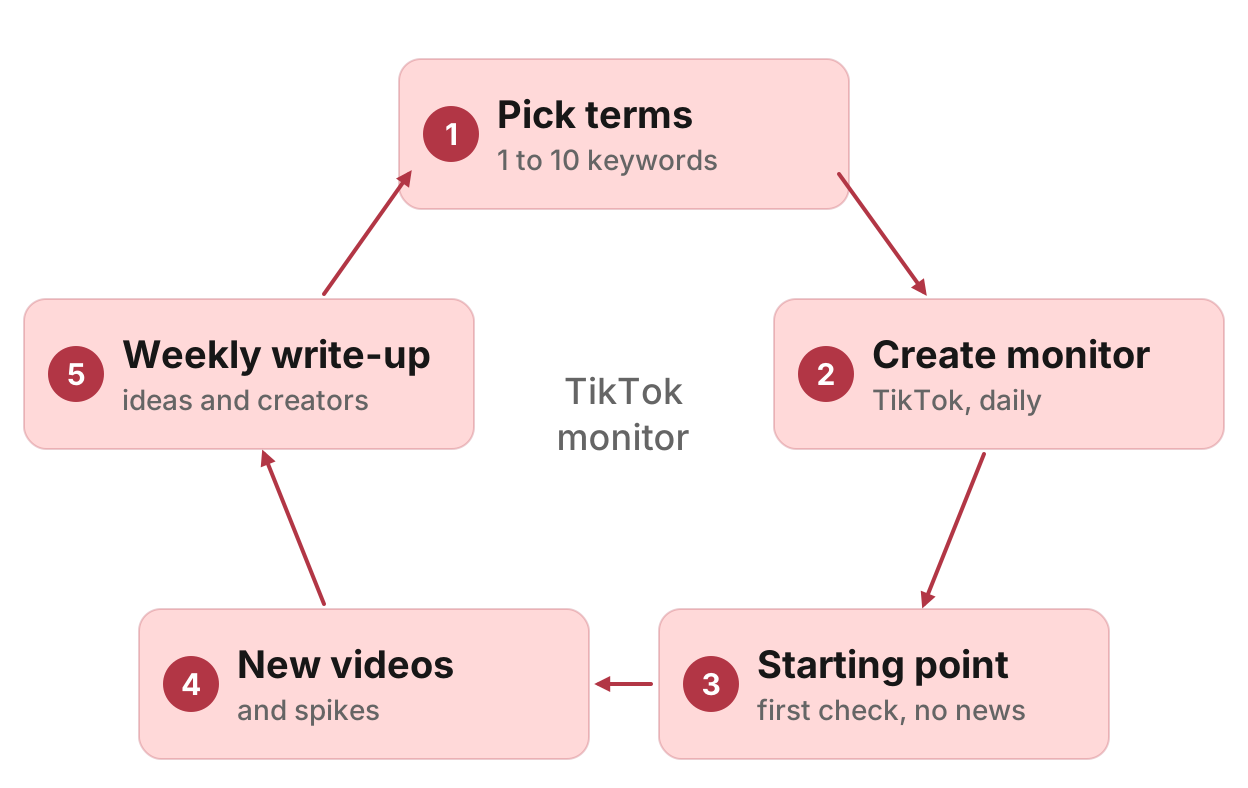
- Connect Manifold MCP to Claude or ChatGPT.
- Pick 1 to 10 keywords or hashtags.
- Create a Keyword tracking monitor with platform TikTok and a cadence. Preview the monthly cost first.
- Let the first check set a starting point. It reports nothing.
- Ask your agent what is new.
Creating a monitor costs 0 credits. Each check pays for the TikTok searches it makes, at the same credit prices as a one-off call. Each keyword is one TikTok search per check. Default cadence is hourly, so on the free plan ask for daily or weekly. Three keywords on TikTok, checked daily, is 92 credits a month on the same estimate the preview shows. Alerts start on. The free plan includes 250 credits a month and keeps 1 monitor. Monitors a workspace can keep, by plan: 1 on Free, 5 on Pro, 25 on Growth, 100 on Agency. For types, cadences and the estimate the form shows, see how monitors work.
What AI engines suggest, and the shorter path
Ask how to track a TikTok hashtag in Claude or ChatGPT today and the answers describe a pipeline you assemble: a TikTok data source, a scheduler such as n8n, Make or Zapier, a store of video ids so you do not alert twice, the model to summarise, then an alert.
The Keyword tracking monitor on Manifold MCP does the searching, the schedule, the dedupe and the alerts. Your agent does the reading and the analysis. You do not build the pipeline.
This page is the scheduled watch, not a server comparison. That roundup is the best TikTok MCP servers.
Step 1: connect Manifold MCP
Manifold MCP is a hosted marketing data connector. You skip a TikTok developer account, and you pay per call. Every workspace gets 250 credits a month on the free plan.
Claude. From the Claude setup guide:
- Open Settings, then Connectors.
- Choose Add custom connector. Name it Manifold and paste the server URL from the setup guide.
- Choose Connect, sign in to Manifold, and approve Claude.
- Start a chat, check that Manifold is on in the chat's tools menu, and ask a question.
A connector you add on the web is also there in the desktop app and on your phone.
ChatGPT. Manifold MCP is an official ChatGPT app. From the ChatGPT setup guide: open Apps, search for Manifold, click Connect and sign in. Then type @Manifold or pick it from the + menu. There is no URL to paste and no developer mode to turn on. On Business, Enterprise and Edu, an admin may need to allow it.
Paste this to check the connection:
What Manifold monitor tools do you have? Then tell me that creating a monitor is free, and how many monitors this workspace can keep.
Your agent should name monitoring_create_monitor, monitoring_get_monitors, monitoring_get_changes, monitoring_get_history, monitoring_update_monitor and monitoring_delete_monitor. Those tools are free. The calls each check makes are not. Every parameter is on the monitoring tools page.
Step 2: test your terms first
Before you create the monitor, ask your agent to search TikTok once per candidate term, newest first, for the past week. Drop terms that pull in noise: a common word, a tag everyone uses, a phrase that matches the wrong niche.
Your agent calls tiktok_search_videos with sort latest and since week. See the TikTok tools for what each row includes (creator, caption, likes, comments, views, transcript). TikTok search is ranked by the platform and is not complete, so the monitor finds new examples. It does not count every video.
Browse TikTok articles if you still need a one-off search. This page stays on the scheduled watch.
Step 3: pick 1 to 10 keywords or hashtags
A Keyword tracking monitor holds 1 to 10 keywords, each 2 to 60 characters. Mix a niche phrase, a product category, a campaign tag and a trend you want to ride. A brand name can be one keyword among those. This is not a brand-monitoring setup.
A video counts only when its caption, transcript or hashtags contain the term. A multi-word term also matches the hashtag with the spaces run together: "skincare tips" matches #skincaretips. A niche phrase covers its hashtag too.
Start with a few terms you already tested. You can change the list later.
Step 4: create the monitor
Two paths, both real.
Dashboard. Open social media monitoring and create a Keyword tracking monitor, TikTok only. The form shows the monthly estimate before it starts.
Your agent. Ask, for example:
Track TikTok every day for new videos about skincare tips, spf and sunscreen. Description: New videos in our niche, for next week's content ideas. Preview the monthly cost first.
Your agent calls monitoring_create_monitor with preset mentions, platforms TikTok and the keywords, with preview first. It shows the monthly estimate and creates the monitor once you agree. Creating it costs 0 credits.
Give the monitor a description such as "New videos in our niche, for next week's content ideas". Your agent uses it later to decide what to do with a change. If you leave it out, one is written from the fields.
Default cadence is hourly. Daily or weekly cost less, so on the free plan ask for daily or weekly. The free plan keeps 1 monitor, so a free user picks this one monitor. Three keywords on TikTok, daily, is 92 credits a month. The preview shows the exact number for your terms and cadence.
A spend cap pauses checks at the cap. With no credits left, a monitor pauses until you add credits or the plan renews. A failed check is not retried.
Step 5: the first check is a starting point
The first check runs within five minutes. It records what is there and reports nothing. That starting point stops last week's videos arriving as news.
From the second check on, each new video that contains a term is one new mention, with the creator, the start of the caption, likes, comments and views. Each check reads the past week of TikTok search, newest first, and drops videos already seen, so overlapping windows do not double count. Checks skip the cache, because an hours-old search would find nothing new.
A spike is raised when a check finds at least 5 new mentions and at least three times the average of the earlier checks. It needs at least 3 earlier checks before it can compare.
Step 6: read what changed and dig in
After the second check, ask:
What new TikTok videos did my monitor find this week, and which took off?
Your agent reads monitoring_get_changes, groups the videos by angle and format, then for the best ones calls tiktok_get_transcript (what is said), tiktok_get_comments (what viewers ask) and tiktok_get_profile (size the creator). monitoring_get_history shows new mentions per check over time.
End the week with a write-up: three content ideas with example videos, and a shortlist of creators worth a closer look. To watch the creators you find, track their accounts with how to monitor competitor social media.
Use monitoring_update_monitor to pause, change keywords or cadence, or run a check now.
Step 7: alerts
Keyword tracking alerts start on. Email alerts are on every plan: at most one email a day per monitor, with the rest waiting in the feed your agent reads. Each person in the workspace turns a monitor's alerts on or off for themselves.
Slack and webhook alerts are on the Growth and Agency plans. They are not on Free or Pro.
Limits to know
From Manifold MCP docs and the monitor itself:
- TikTok search is ranked by the platform and is not complete. The monitor finds new examples, not every video.
- A video is kept only when its caption, transcript or hashtags contain a term.
- Manifold MCP does not keep follower history, score sentiment or compute hashtag view totals. Your agent reads the videos and sorts them.
- Facebook keyword search is not covered. Facebook is page tracking only.
Do not treat a quiet week as proof the tag is dead. It may only be missing from TikTok's ranked sample.
One-off look vs monitor
A one-off look searches TikTok (and Instagram) once, ranks the videos and says what they have in common. That run is research TikTok and Instagram with an AI agent. Use it to test a term, then put the keepers on a monitor.
The same Keyword tracking monitor can add Instagram, LinkedIn, YouTube and Reddit later. Instagram searches each keyword as one hashtag, so pick a tag people actually use.
Other TikTok trackers
Checked November 2026, on each vendor's own page:
- ShortsIntel has an MCP server with a track tool for creators, hashtags, sounds and keywords, and daily change reports. A daily cycle costs 3 credits per hashtag or keyword. Credits are 1,000 per US dollar. New accounts get 1,000 free credits, valid for 90 days. You sign in with OAuth. There is no API key to paste.
- FYPNow is a TikTok MCP server for Claude.
create_nichewatches a niche by 1 to 10 keywords, weekly by default, daily on Starter or higher. MCP access needs a paid plan (a free trial counts). It is not yet in the ChatGPT app directory.
Run this in your agent
Connect Manifold to Claude, ChatGPT or Cursor, then paste this prompt.
Track TikTok every day for new videos about skincare tips, spf and sunscreen. Description: New videos in our niche, for next week's content ideas. Preview the monthly credit cost first, then create the monitor once I agree. Each Monday, read that monitor's feed and write up three content ideas with example videos, plus a shortlist of creators worth a closer look.
Create your TikTok keyword monitor
Create a Keyword tracking monitor for TikTok. Creating it costs nothing. The free plan includes 250 credits a month. Open social media monitoring and start from the form, or connect Claude or ChatGPT and paste the prompt above.
The first check is a starting point. From the second check on, ask your agent what is new. Your agent reads the monitor's feed when you ask. Claude and ChatGPT do not run that prompt on their own schedule.