How to analyze YouTube comments with Claude
Connect Manifold MCP, pick the videos your buyers watch, and have your agent table the themes in their comments.

How do I analyze YouTube comments with Claude?
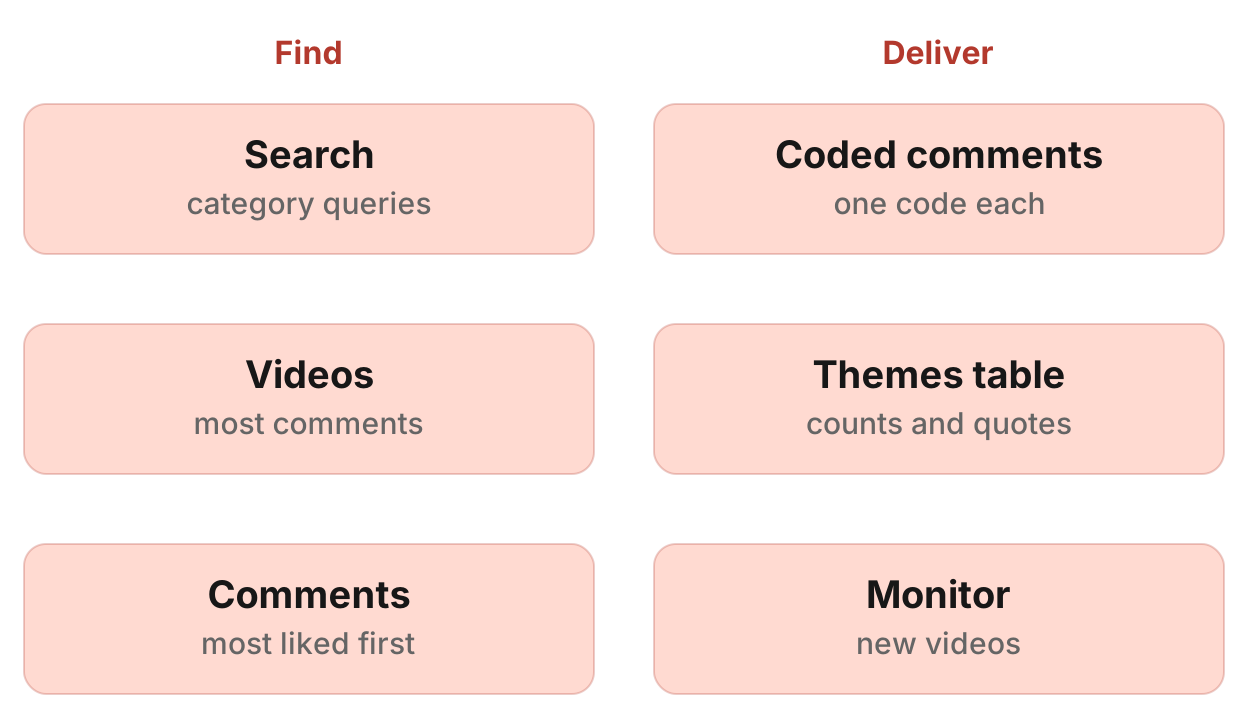
Your agent picks the YouTube videos your buyers watch, reads their comments through Manifold MCP, codes each comment and gives you a table of themes with counts, likes and quotes. A Keyword tracking monitor then finds new videos on the topic.
How to analyze YouTube comments in six steps
- Connect Manifold MCP to Claude or ChatGPT.
- Pick the videos: competitor reviews, comparisons and tutorials in your category.
- Read the comments, most liked first.
- Code each comment: question, objection, comparison, feature request, praise, use case.
- Get a table of themes with counts, likes and verbatim quotes.
- Create a Keyword tracking monitor on YouTube for new videos on the topic.
The YouTube tools are on the YouTube tools page. Call costs are on the credits page. For types and cadences, see how monitors work.
What AI engines suggest, and the shorter path
Ask how to analyze YouTube comments on competitor videos in Claude or ChatGPT today (checked November 2026) and the answers describe a pipeline you assemble: a YouTube data source or a comment export, an AI pass that tags buyer questions, objections and comparisons, and a scheduler for new videos.
Manifold MCP reads YouTube search, videos, comments and transcripts inside the chat: hosted, with no Google Cloud project, YouTube API key or quota of your own, and you pay per call. A Keyword tracking monitor finds new videos on its own schedule.
This page is the comments workflow, not a one-off topic search. For a quick look at what videos exist on a topic, see research YouTube videos with an AI agent. To turn the same comments into content ideas, see how to find content ideas on Reddit and YouTube. This page stays on buyer questions and objections for messaging, sales and product. Other servers are in the best YouTube MCP servers. Exporting one video's comments without an agent is the YouTube comment export. Finding one comment is YouTube comment search. The same method on TikTok videos and Instagram posts and reels is how to analyze TikTok and Instagram comments with Claude.
Step 1: connect Manifold MCP
Manifold MCP is a hosted marketing data connector. You skip a Google Cloud project, a YouTube API key and its daily quota, and you pay per call. Every account gets 250 credits a month on the free plan.
Claude. From the Claude setup guide:
- Open Settings, then Connectors.
- Choose Add custom connector. Name it Manifold and paste the server URL from the setup guide.
- Choose Connect, sign in to Manifold, and approve Claude.
- Start a chat, check that Manifold is on in the chat's tools menu, and ask a question.
A connector you add on the web is also there in the desktop app and on your phone.
ChatGPT. Manifold MCP is an official ChatGPT app. From the ChatGPT setup guide: open Apps, search for Manifold, click Connect, sign in and click Allow. Then type @Manifold or pick it from the + menu under More. There is no URL to paste and no developer mode to turn on. On Business, Enterprise and Edu, an admin decides which apps the workspace can use.
Paste this to check the connection:
What Manifold YouTube tools do you have? Then tell me that creating a monitor is free, and how many monitors this workspace can keep.
Your agent should name youtube_search_videos, youtube_get_video, youtube_get_videos, youtube_get_comments and youtube_get_transcript, and the monitor tools monitoring_create_monitor, monitoring_get_monitors, monitoring_get_changes, monitoring_get_history, monitoring_update_monitor and monitoring_delete_monitor. Monitor tools are free. Monitor checks use no credits. The plan sets how many monitors you can keep. Credits still apply to the agent's own tool calls. Every parameter is on the YouTube tools and monitoring tools pages.
Step 2: pick the videos
YouTube has no search across comments, so the table covers only the videos picked. Pick them on purpose.
Your agent runs youtube_search_videos with since: "year" on queries such as "[competitor] review", "[category] tutorial", "[competitor] vs [competitor]", "is [competitor] worth it". For a competitor channel's own videos, it calls youtube_get_videos with sort: "popular".
Search rows carry views and length. They do not carry reliable comment counts. Your agent calls youtube_get_video on the most viewed candidates for the comments count, and keeps the ones with the most comments, from different channels.
Skip giveaways and contests: their comments are entries, not opinions. About ten videos is a starting point, not a measured result. For recent opinion, pick recent videos.
Step 3: read the comments
Your agent calls youtube_get_comments on each video: the comments on one YouTube video, most liked first. One video per call. Page on with the cursor.
Each row carries author, created_at (approximate, from an age label such as "3 weeks ago"), text (cut at 2000 characters), likes, replies, is_creator (true when the channel itself replied), and parent_id and depth for a reply.
Comments come most liked first, not newest. For recent opinion, pick recent videos rather than paging for new comments on an old hit.
Step 4: code each comment
Drop spam, timestamps, jokes, emoji-only comments and "great video". Keep the channel's own replies (is_creator) apart: they answer, they do not ask.
Code each remaining comment once:
- question
- objection or complaint
- feature request
- comparison (names another product)
- praise
- use case
Read replies (depth above 0) before calling a question unanswered. They often hold the answer.
When a comment argues with the video, youtube_get_transcript shows exactly what was said. It returns NoData when the video has no captions.
Step 5: the themes table
Your agent delivers a table: theme, code, comments, total likes, videos it appears on, two or three verbatim quotes with the video URL, and what to do with it (an FAQ or sales-page question, a phrase for copy, an objection for sales, a feature request for the product team). Below it, the phrases people repeat, and how many videos and comments the table rests on.
Weight by likes: a comment with many likes speaks for many viewers. A theme that recurs across several channels' videos beats one busy thread. A comment asking for a recommendation is the strongest buying intent a comment carries. Separate complaints about the product from reactions to the video or the creator.
In your own table, quote word for word with the video link. The examples here are placeholders.
| Theme | Code | Comments | Total likes | Videos | Quotes | What to do |
|---|---|---|---|---|---|---|
| Setup takes too long | objection | [n] | [n] | [n] | "[comment text]", [video URL] | An objection for sales |
| Wants a native [Acme] export | feature request | [n] | [n] | [n] | "[comment text]", [video URL] | A request for the product team |
| "Which one should I buy, [Acme] or [competitor]?" | question | [n] | [n] | [n] | "[comment text]", [video URL] | An FAQ on the sales page |
Step 6: keep finding new videos
Your agent creates a Keyword tracking monitor (preset mentions) with platform YouTube and your category or competitor terms. It calls monitoring_create_monitor, preview first, then create.
Each check runs youtube_search_videos per keyword with since: "week". YouTube has no newest-first search, so results are YouTube's ranking within the week. The check keeps only videos whose text, transcript or hashtags contain the keyword, ignoring case, so pick the words people put in titles. Each video is reported once.
Default cadence is hourly. Email alerts start on. A spike is flagged at 5 or more new videos and three times the earlier average.
The monitor reports new videos, not new comments. When one is worth it, ask your agent to read its comments and add them to the table. Claude and ChatGPT do not run the prompt on their own schedule. The monitor runs on Manifold MCP. Your agent reads what it found with monitoring_get_changes.
For a competitor's own channel, a Social account tracking monitor works: how to monitor competitor social media. Open social media monitoring to create a keyword or account monitor.
Creating the monitor and its checks cost 0 credits. The free plan keeps 1 monitor of up to 3 keywords, so a free user picks this one monitor. Monitors a workspace can keep, by plan: 1 on Free, 5 on Pro, 25 on Growth, 100 on Agency. Slack and webhook alerts are on Growth and Agency. They are not on Free or Pro.
Give the monitor a description such as "New review and tutorial videos in our category, so we add their comments to the themes table". Your agent uses it later to decide what to do with a change. If you leave it out, one is written from the fields.
The first check is a starting point and reports nothing. From the second check on, ask:
Which new YouTube videos did my monitor find, and which are worth a comments pass?
Run this in your agent
Connect Manifold to Claude, ChatGPT or Cursor, then paste this prompt.
Analyze YouTube comments for [Acme] in [category]. Search youtube_search_videos with since: "year" for "[competitor] review", "[category] tutorial", "[competitor] vs [competitor]" and "is [competitor] worth it". For a competitor channel, call youtube_get_videos with sort: "popular". Call youtube_get_video on the most viewed candidates for the comments count. Keep about ten videos with the most comments, from different channels. Skip giveaways and contests. For each kept video, call youtube_get_comments, most liked first, and page with the cursor. Drop spam, timestamps, jokes, emoji-only comments and "great video". Keep is_creator replies apart. Code each remaining comment once: question, objection or complaint, feature request, comparison, praise, use case. Read replies (depth above 0) before calling a question unanswered. When a comment argues with the video, call youtube_get_transcript (NoData means no captions). Give me a themes table: theme, code, comments, total likes, videos it appears on, two or three verbatim quotes with the video URL, and what to do with it (an FAQ or sales-page question, a phrase for copy, an objection for sales, a feature request for the product team). Below it, the phrases people repeat, and how many videos and comments the table rests on. Weight by likes. A theme across several channels first. Then preview a Keyword tracking monitor, YouTube only, for these terms: [category], [competitor], [competitor] review. Description: New review and tutorial videos in our category, so we add their comments to the themes table. Preview it first, then create the monitor once I agree. When I ask later, read monitoring_get_changes and monitoring_get_history, and add comments from new videos worth it.
Limits to know
From Manifold MCP docs and the YouTube tools:
- YouTube has no search across comments. The table covers only the videos picked.
- Comments come most liked first, with approximate dates from age labels such as "3 weeks ago".
- Comment text is cut at 2000 characters.
- Search rows carry no reliable comment counts.
youtube_get_videodoes. - Transcripts only where the video has captions.
youtube_get_transcriptreturns NoData when it does not. - Public videos only.
- The YouTube tools read public data, so another channel's impressions, click-through and retention are not visible.
This guide sits with the other YouTube articles.
Run the first pass on your category
Connect Manifold MCP and run the first pass on your category. Every account gets 250 credits a month on the free plan. Setup is in the docs. Then create the monitor from social media monitoring, or paste the prompt above.
Your agent reads the comments and the monitor's feed when you ask. Claude and ChatGPT do not run that prompt on their own schedule.