TikTok competitor analysis with Claude: outliers and a content plan
Connect Claude to Manifold MCP, pull rival profiles and outlier videos, read comments and transcripts, then have Claude write a 2 week content plan.


How do I do TikTok competitor analysis?
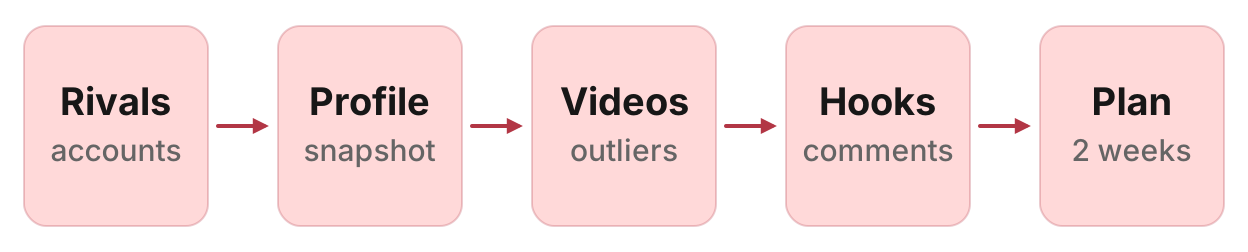
Here is the whole TikTok competitor analysis job in Claude, from picking rivals to a 2 week content plan, run on Manifold MCP:
- Connect Manifold MCP to Claude (claude.ai, Claude Desktop or Claude Code), or to ChatGPT.
- Pick 3 to 5 rival accounts: ones you know, plus accounts that keep showing up in niche search.
- Pull each rival's profile: followers, lifetime likes, video count, bio and the link in bio.
- List their recent videos, compute view-based engagement, and flag videos at 2x or more the account's own median views.
- Read the outliers' spoken hooks, captions, sounds, length and comments.
- Ask Claude for the content gap and your next 2 weeks of videos.
This page covers rival TikTok accounts, outlier videos and the plan. For a one-off look at what is posted on a term, see research TikTok and Instagram. For sorting comments across many videos, see how to analyze TikTok and Instagram comments. For a scheduled watch on a tag, see how to track TikTok hashtags. For ads, pages, rankings and social accounts together, see how to track competitors. For the same job on Instagram accounts, see Instagram competitor analysis. For YouTube channels, see YouTube competitor analysis.
How to run TikTok competitor analysis in Claude
Each tool's parameters are on the TikTok tools page, and call costs on the credits page. To keep watching the same accounts afterwards, there is a monitor at the end of this guide (how monitors work).
What to compare
TikTok competitor research is not one follower number. Compare the same things on you and on each rival, and know which tool answers each. Follower growth over time, reach, average watch time, audience age or gender, TikTok Shop sales and a profile's lifetime views are not returned, so do not ask Claude to invent them.
| What | Tool | What you get |
|---|---|---|
| Followers, likes and video count | tiktok_get_profile | Followers, following, lifetime likes, video count (posts_count), bio, verified, and website (the link in bio). Profile views comes back empty. kind is always person. |
| Posting cadence | tiktok_get_videos | The exact created_at of each video, so Claude can count posts per weekday. Sort latest (the default) for cadence; popular is most viewed first across what the listing returns, not a posting calendar. |
| Median views | tiktok_get_videos | Views on each row. Claude works out the account's own median. |
| Engagement rate per video | tiktok_get_videos | Likes, comments, shares and views. Rate is (likes + comments + shares) / views, an estimate. Saves come back as a separate column and are not in that rate. |
| Outlier videos | tiktok_get_videos | Claude flags 2x or more the account's own median views. Use the median, not the mean. |
| Formats, length and sounds | tiktok_get_videos, tiktok_get_video | media is video or image (a photo carousel is image, with duration_s empty). Length is duration_s in seconds. music is the sound as title and artist. |
| Captions and hashtags | tiktok_get_videos | Caption text, cut at 2,000 characters, hashtags (without the #), and mentions. |
| Comment themes | tiktok_get_comments | Top-level comments on one video, with likes and a replies count. The reply comments themselves do not come back. |
| Hooks | tiktok_get_transcript, tiktok_get_video | The full transcript, uncut, with no timestamps, or NoData when the video carries no speech the platform kept. The listing already has likes, comments, shares, saves, views, length, caption and sound; tiktok_get_video is for a URL you only have as a link. |
| Niche search | tiktok_search_videos | TikTok's own ranked sample for a keyword or a hashtag-shaped query. Dates can be filtered with since. Sort is relevance (default), latest or popular. Search is ranked and never complete. |
| Audience country (optional) | tiktok_get_audience | Country, country code and share (percent of a follower sample). count is followers in that sample, not in the account: read share and ignore count as a size. |
Profile and listing tools take a handle, with or without the @. Comment, transcript and single-video tools take the full TikTok URL.
Step 1: connect Manifold MCP to Claude
Manifold is a hosted MCP server, listed in the official MCP registry as com.manifoldmcp/manifold. There is no TikTok login or developer app of your own to set up. You pay per call, and every account gets 250 credits a month on the free plan. Full client steps are in the docs, and credit formulas on the credits page.
Claude.ai and Claude Desktop. From the Claude setup guide:
- Open Settings, then Connectors.
- Choose Add custom connector. Name it Manifold and paste the server URL from the setup guide.
- Choose Connect, sign in to Manifold, and approve Claude.
- Start a chat, check that Manifold is on in the chat's tools menu, and ask a question.
A connector you add on the web is also there in the desktop app and on your phone. The first time you sign in, Manifold creates your account on the free plan.
Claude Code. From the Claude Code setup guide: add the server with the URL from that guide. Start Claude Code, run /mcp, choose manifold, and finish sign-in in the browser. Add --scope user to have it in every project.
ChatGPT. Manifold MCP is an official ChatGPT app. From the ChatGPT setup guide: open Apps, search for Manifold, click Connect, sign in and click Allow. Then type @Manifold or pick it from the + menu under More. There is no URL to paste and no developer mode to turn on.
On Business, Enterprise and Edu, an admin decides which apps the workspace can use. The rest of this guide uses Claude, and the same TikTok tools work in ChatGPT.
Paste this to check the connection:
Which Manifold tools get a TikTok account, list an account's videos, get one video, get comments, get a transcript, search TikTok, and get an audience country split? Say that tiktok_get_profile returns followers, lifetime likes and posts_count but profile views is empty, that a video listing carries views, likes, comments, shares, saves, duration_s, music and hashtags, that engagement is (likes + comments + shares) / views, that tiktok_get_transcript returns NoData when there is no speech the platform kept and takes ai_fallback for audio on videos up to 2 minutes, that tiktok_search_videos is ranked keyword search, that tiktok_get_comments returns top-level comments with a replies count, and that a Social account tracking monitor can watch those accounts on a schedule at 0 credits per check.
Claude should name tiktok_get_profile, tiktok_get_videos, tiktok_get_video, tiktok_get_comments, tiktok_get_transcript, tiktok_search_videos and tiktok_get_audience.
Step 2: pick rivals from niche search
Start with accounts you already lose to, then add anyone who keeps showing up for the terms and hashtags your buyers search. tiktok_search_videos is TikTok's own ranked sample for a keyword, over the last month by default. It is not hashtag-only: a phrase such as "standing desk setup" is a search, and a tag-shaped query such as "standingdesk" is also a search. Search is ranked and never complete, so treat repeating authors as a shortlist, not a census.
since: "year" on TikTok is the last six months of ranked results, not a calendar year. since: "all" is all-time ranked search. Use since: "year" so you see who stays in the sample rather than who had one lucky week.
Paste:
Search TikTok with tiktok_search_videos for these queries, since year: "[niche]", "[niche] setup", "[niche] tips". One query per call. Return a table: author (handle), author_followers, url, views, likes, comments, shares, created_at, duration_s, music, text. Flag which handles appear more than once. Add these accounts I already know: [@handle1], [@handle2]. Keep 3 to 5 rivals. Do not invent handles, views or likes.
That is how to pick your TikTok competitors you have not named yet: see who keeps showing up, and keep their handles for the next step. A scheduled watch on a tag without the rival teardown is how to track TikTok hashtags.
Step 3: profile snapshot
This is the TikTok profile analyzer pass. tiktok_get_profile returns one account's followers, following, lifetime likes, video count, bio, website and verified. It has no lifetime view total and no follower history. The videos come in the next step.
Paste:
Call tiktok_get_profile on these handles: [yours], [@rival1], [@rival2], [@rival3]. Return a comparison table: handle, name, followers, following, posts_count, likes, verified, website. Profile views is empty: do not invent a view total. If a field is empty, say so. Save the table in this chat.
What to look at, not a score:
Followers vs recent views. Size the account by what its new videos get in the next step, not by followers alone. A large following with a low recent median means most of the audience no longer watches.
Lifetime likes vs video count. High lifetime likes on few videos can mean a handful of old hits. High video count with modest likes often means a daily poster whose typical video is small.
Website. The link in bio can be a link-in-bio page rather than the homepage.
To analyze a TikTok account on its own, without rivals, the same profile call is the start of the TikTok engagement rate calculator.
If you sell in a specific country, an optional tiktok_get_audience call after the snapshot shows where a sample of that account's followers sits, as a percent (share). count is the sample, not the account: read share. Do this on keepers, not on every handle you searched.
Step 4: recent videos, engagement and outliers
tiktok_get_videos lists one account's videos, newest first by default, with sort: "popular" for most viewed first. Each row has the date, caption, likes, comments, shares, saves, views, length, sound, hashtags, media (video or image) and URL.
This is the TikTok video analyzer pass, and the numbers you need for a TikTok audit of what actually got watched.
Engagement rate per video is (likes + comments + shares) / views. It is an estimate, the same formula the TikTok engagement rate calculator uses, and it is a benchmark, not an official TikTok metric. Views beat followers on TikTok because a video is shown far past the people who follow the account; a rate over followers would treat a breakout as if only fans had seen it. Keep saves as a separate column. Leave out rows where likes or views is empty. For photos (media is image), length is empty: still include them in views and engagement.
An outlier here is a video at 2x or more the median views of that account's recent listings. Use the median, not the mean: one hit drags an average away from what a new video will get. Leave out videos under 14 days old, whose numbers are still climbing, when you have enough older rows. Sort latest for cadence and for that median; do not mix in popular rows from years ago.
Paste:
Call tiktok_get_videos on [yours] and on [@rival1], [@rival2], [@rival3], sort latest. Page once if you need more rows. For each account: median views of videos 14 days or older, median engagement as (likes + comments + shares) / views, posts per week, posts by weekday from created_at, median duration_s of video rows, and every video at 2x or more the median views, with url, views, likes, comments, shares, saves, duration_s, music, created_at, and the caption's first line. Then a combined outlier table, sorted by how many times the median views it did. Do not invent views, likes, shares or dates. Leave out rows where likes or views is empty.
Cadence is the weekday pattern in the dates, not a promise they will post that day next week. An account with no video in 90 days is paused: keep it as topic evidence, not as a posting model.
Step 5: hooks, captions and sounds
Captions, hashtags, length and sounds come from the listing. For the spoken open of a video you need tiktok_get_transcript on the video URL. The text comes whole, with no timestamps: take the first lines as the hook. NoData means the platform kept no speech (a sound and text on screen), so take the hook from the caption and say so. Always call the transcript tool. The listing can carry a short transcript field; call tiktok_get_transcript for the full uncut text.
Optional ai_fallback: true transcribes the audio when TikTok holds no captions. It costs extra (see the credits page) and covers videos up to 2 minutes. Use it only on an outlier you cannot read otherwise. Pass language when the video has several transcripts.
The TikTok transcript generator is the same call on one URL.
Paste:
Call tiktok_get_transcript on the top 3 outlier video URLs from the last table. For each: url, duration_s, views, likes, comments, shares, the first lines of the transcript (or NoData), the caption's first line, the hashtags, and music. Then a short list of hook, caption, length and sound patterns the outliers share that our recent videos do not. Do not invent transcript lines. Do not claim a duration on a row whose media is image.
Look at:
The first lines. A question, a result, a mistake, a promise. That is the hook you can copy the shape of, not the wording. On TikTok that open is often the first second or two of speech.
Caption formulas. Who leads with a question, a number, a vs, a how-to, a payoff in the first line.
Hashtags. Which tags the outliers actually use. Broad tags (#fyp, #viral) are noise. Read real niche tags off the captions.
Length and sound. A 12-second demo and a 45-second walkthrough are different formats. music names the sound; repeating original sounds are a house style, licensed tracks are a trend you can check against your own listing.
Step 6: comments on the outliers
tiktok_get_comments returns the comments on one video: the author, date, the text, likes, and how many replies that comment has. Those rows are top-level (depth 0). Reply text does not come back, so a high replies count is a debate worth noting, not a thread you can quote. Page with cursor for another page.
Paste:
Call tiktok_get_comments on the same outlier URLs. Page once per video. Drop spam, giveaways, "comment X for the link", jokes and emoji-only comments. Return a themes table: requests, objections, questions. For each theme: count, total likes, which videos, two verbatim quotes with the video URL. Do not invent comments.
That is enough to see what viewers ask your TikTok competitors to post next. The deeper pass, with every comment tagged and themes weighted by likes, is how to analyze TikTok and Instagram comments with Claude.
Step 7: content gap and a 2 week plan
You now have four tables: the profile snapshot, recent videos with outliers, hook and caption patterns, and comment themes. Ask Claude to write the plan, citing the rows rather than inventing a view count.
Also search the terms you want to show up for, with since: "year", so the plan shows who already owns each query rather than this week's spike.
Paste:
From the profile table, the outlier table, the hook and caption notes, and the comment themes, write a content gap and a 2 week content plan for [our account]. First call tiktok_search_videos for these queries, since year: [query 1], [query 2], [query 3]. Note who shows up (author, url, views). Then: (1) topics rivals win that we have not posted; (2) comment requests nobody answered with a video; (3) 14 video ideas, each with a length band from the outlier mix, a first-line caption that uses a pattern from the outliers, a weekday from the cadence table, a sound note (original or a named track from the outliers), the rival video or comment it answers, and the search query it should compete on. Cite the row each idea came from. Do not invent views, comments or ranks. Do not claim Shop, reach, watch time or follower growth.
Run this in your agent
Connect Manifold to Claude, ChatGPT or Cursor, then paste this prompt.
Run TikTok competitor analysis for [niche], rivals [@handle1], [@handle2], [@handle3] if I already know them. Search tiktok_search_videos for "[niche]", "[niche] setup", "[niche] tips" with since: "year" (one query per call; on TikTok year is the last six months of ranked results). List accounts that keep showing up. Then call tiktok_get_profile on each rival (handle with or without @). Profile views is empty; do not invent a view total. Call tiktok_get_videos on each, sort latest, page if needed. Compute median views of videos 14 days or older, median engagement as (likes + comments + shares) / views, flag videos at 2x or more the median views, and cadence by weekday from created_at. Leave out rows where likes or views is empty. media is video or image; duration_s is empty on photos. Call tiktok_get_transcript on the top video outliers (NoData means no speech the platform kept; ai_fallback is optional on videos up to 2 minutes). Call tiktok_get_comments on those outliers (top-level comments; replies is a count). Call tiktok_search_videos for our target queries and note who shows up. Return tables: profile snapshot (followers, following, posts_count, likes, verified, website), recent videos with outliers, format mix, caption, hashtag and sound patterns, comment themes, search. Then write a content gap and a 2 week content plan with video ideas, citing the rows. Do not invent followers, likes, views, dates or comments. Follower growth, reach, watch time, Shop and profile views are not returned. Then preview a Social account tracking monitor for the rival TikTok handles, daily. Preview it first, then create it once I agree.
That is the TikTok competitor analysis tool in this setup: the same agent reads across accounts, comments and transcripts and writes the plan. You post the videos yourself.
Worked example (illustrative)
The names, handles, followers, dates and comments below are an example, not measurements of a real account.
Acme Desk posts standing-desk setup videos as @acmedesk. After connecting Claude, Acme pastes the search prompt for "standing desk", "standing desk setup" and "standing desk tips". Six months of ranked results keep showing @rivaldesk, @otherframe and @thirdtop, plus @acmedesk on a few rows. Acme keeps those three.
Acme then pastes the profile snapshot prompt. Example profile table (illustrative):
| Handle | Followers | Videos | Lifetime likes | Verified |
|---|---|---|---|---|
| @rivaldesk | 214,000 | 480 | 9,100,000 | yes |
| @otherframe | 88,000 | 210 | 2,400,000 | no |
| @thirdtop | 41,000 | 95 | 890,000 | no |
| @acmedesk | 11,200 | 64 | 310,000 | no |
On @rivaldesk, the median of videos 14 days or older is 38,000 views, and median engagement is 4.2%. Three outliers clear 2x views: "Cable management in 12 seconds" (410,000 views, 12 seconds, original sound), "I tried 7 standing desk mats" (190,000 views, 41 seconds) and a photo carousel "Drawer desk tour" (95,000 views, no duration). Rival posts short videos on Tuesdays and Fridays. @otherframe has a median of 12,000 views, posts on Mondays, and has one outlier, "Budget standing desk setup". @thirdtop has a median of 6,400 views, no fixed cadence, and one outlier, "72-inch cable lengths".
The first lines of Rival's cable-management video ask "Why does every standing desk look messy after a week?", then cut to a 12-second layout. Its comments ask for a dual-monitor arm version, complain that the tray in the video is out of stock, and ask about cable length for a 72-inch top. Acme has no cable-management video, and a search for "standing desk tips" ranks Rival often and Acme nowhere.
Example Claude table (illustrative):
| Idea | Format | Why | Evidence |
|---|---|---|---|
| Cable management for dual monitors | Video, about 12 seconds, original sound | Rival's outlier; comments ask for dual-monitor arms | Outlier table; comment theme |
| Budget standing desk mat | Video, "I tried N", about 40 seconds | Other's mat outlier; Acme has no mat video | Outlier table |
| Drawer desk cable routing | Photo carousel, tour | Rival's image outlier; comment request on trays | Comment theme; Rival image post |
| 72-inch cable lengths | Video, how-to | Third's outlier; comment questions on cable length | Comment quotes; Third video |
| Standing desk vs treadmill desk | Video, vs | Rival caption pattern; Acme has neither side | Caption notes; gap list |
None of those rows are live measurements. They show the shape of a digest Claude can write from the four tables: a gap, a format, a first line that copies a pattern, a weekday, and the row it came from.
Keep it current: a social account monitor
The snapshot is on demand. To watch those rival TikTok accounts on a schedule, create a Social account tracking monitor. Product page: social media monitoring. The full setup, take-off rule and worked examples are in how to monitor competitor social media.
The monitor reads public accounts on LinkedIn company pages, Instagram, TikTok, YouTube and Facebook pages, 1 to 10 accounts per monitor. For TikTok, pass the handle. Each TikTok check calls tiktok_get_videos.
Each check lists the latest posts. A new post is reported once, when it first shows. It is reported again if it takes off: at least 3 times the median views of that account's posts in the same check, and at least 1,000 views. The check needs 5 or more posts with views before it can take a median. That is stricter than the 2x you used above.
Creating the monitor and its checks cost 0 credits on every plan, including Free. The free plan keeps 1 monitor. Monitors a workspace can keep, by plan: 1 on Free, 5 on Pro, 25 on Growth, 100 on Agency.
Checks run hourly by default. Daily or weekly is enough for rival TikTok accounts, unless they post in bursts you need the same day. Alerts start on: email on every plan (at most one a day per monitor), Slack and webhooks on Growth and Agency. The first check runs within five minutes and only records a starting point, so changes appear from the second check on. Checks skip the cache, so they read live data.
Paste, then let it preview:
Create a Social account tracking monitor named "[niche] rival TikTok" for these TikTok handles, daily: [@rival1], [@rival2], [@rival3]. Description: "New rival videos, so we add outliers to the comparison table and refresh the 2 week plan." Preview it first, then create it once I agree.
On Free, put the rival TikTok handles in the one monitor you keep. You can mix platforms in that same monitor, up to 10 accounts. After the second check, ask Claude to read monitoring_get_changes and to pull the transcript and comments on any take-off worth a full pass.
TikTok competitor analysis tools vs this setup
TikTok Analytics in TikTok Studio and the app is free, and it is the right view of your account: views, traffic sources, audience and which of your videos did well. It does not cover a rival account. Native analytics only covers the account you are signed into.
Social suites such as Sprout Social and Hootsuite are TikTok analytics tools in the usual sense: dashboards, historical charts, scheduled publishing and client reports, priced per seat. A dedicated TikTok analyzer with a competitor graph is the right software when you need a year of follower charts, a shared calendar, or a report you send to a client.
This setup is a different job. You already work in Claude or ChatGPT. You pass handles, the agent calls the TikTok tools on demand, and the same agent writes a 2 week plan from the tables. You pay per call, with no seat in a social suite. There is no follower history chart, no Shop dashboard and no browser overlay on tiktok.com. History is the table you saved, plus the monitor's new posts and take-offs.
Use this setup when you want the AI to read across accounts, comments and transcripts and write the plan, without a suite login. Use TikTok's own analytics when you want Studio-side numbers on your account. Use a dedicated suite when you need historical charts, scheduling, or a client-ready report.
So the honest answer to "what is the best TikTok account analyzer" depends on that split. For your own Studio numbers, TikTok's analytics is the tool. For three rivals, comment themes and a pasteable 2 week plan from inside Claude, it is this guide.
Run your first TikTok competitor analysis
Run your first TikTok competitor analysis on the free plan, with 250 credits a month. Connect Claude to the TikTok MCP tools and paste the prompt above with your niche and handles. For a one-off topic search without the rival teardown, see research TikTok and Instagram. For scheduled videos from those accounts, see social media monitoring.