Google Analytics MCP: connect GA4 to Claude and ChatGPT
A setup guide to Google Analytics MCP: three ways to connect GA4 to your agent (the official Google server, hosted vendors, and Manifold), when to use each, what prompts work well, and how to pair Analytics with Search Console for organic traffic analysis.

How do I connect Google Analytics to Claude?
A Google Analytics MCP server lets you ask Claude, ChatGPT or Cursor about your site's Google Analytics 4 data in plain language. You can pull sessions, conversions, revenue and engagement by channel, campaign, landing page or date range, then compare it against Search Console clicks or trace a traffic drop. The setup depends on which server you choose: the official Google Analytics MCP server if you are comfortable with Google Cloud setup, a hosted option if you want to sign in instead of managing credentials, or a hosted marketing server if you want Analytics next to Search Console, SEO and AI visibility data.
This guide walks through the three ways to connect Google Analytics 4 to your agent, covers the setup and common errors for each, shows real prompts for organic traffic analysis and conversion tracking, and explains when to pick which option.
What is a Google Analytics MCP server?
A Google Analytics MCP server bridges your AI agent and the Google Analytics API. You ask a question in plain language about sessions, conversions or revenue, and your agent calls the right Analytics tools to fetch the data. The server handles authentication, request formatting and response parsing, so you can ask "what were our top landing pages for organic traffic last month?" and get a table back.
The three realistic options are:
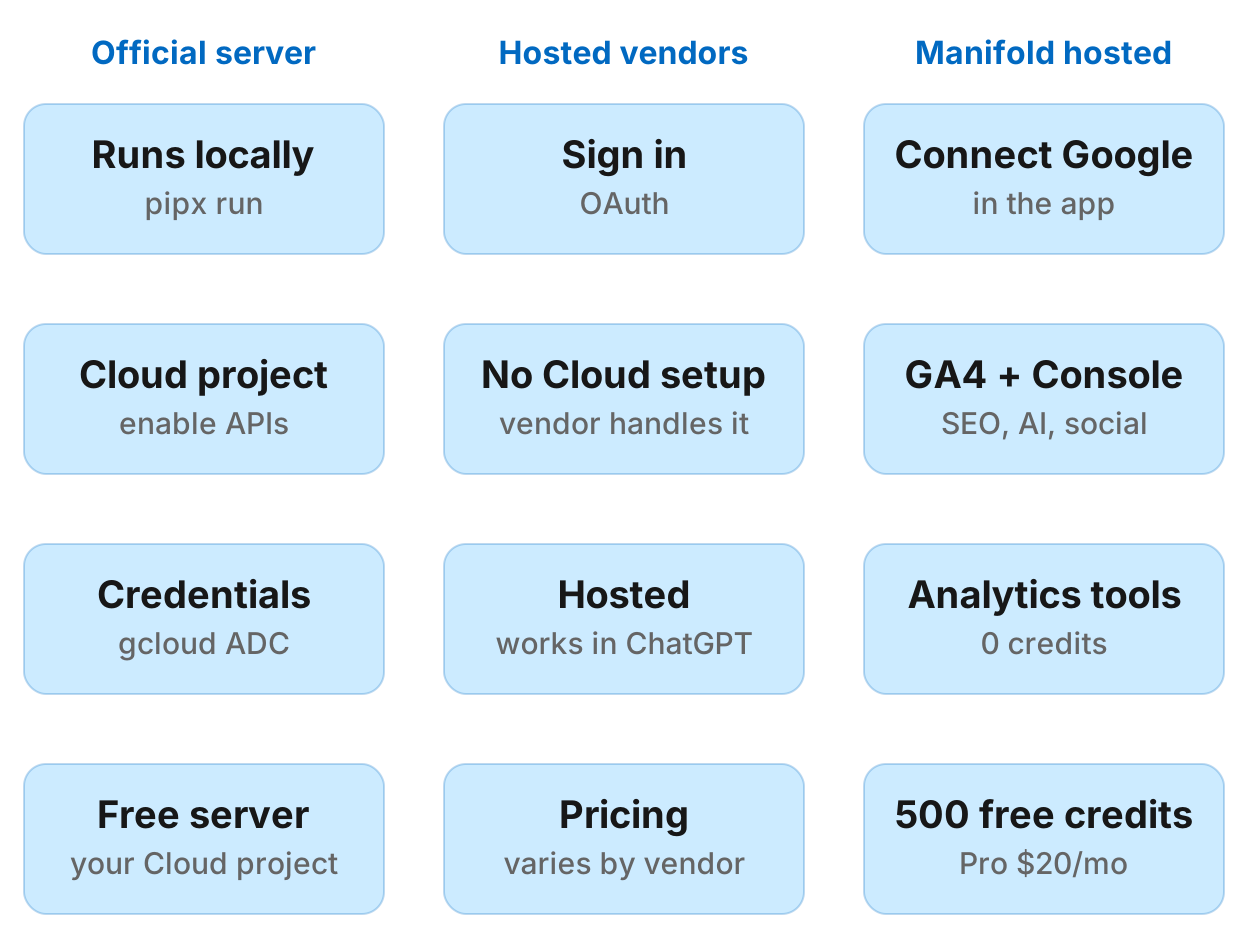
- Official Google Analytics MCP server (
googleanalytics/google-analytics-mcp): Google's own Python server, marked experimental. Runs locally on your machine. Requires a Google Cloud project with the Analytics Admin API and Data API enabled, and Application Default Credentials for a Google user with access to your GA4 property. - Hosted vendors: Stape, Composio and Windsor.ai offer hosted GA4 connections for MCP clients. They handle the Google Cloud setup, and you sign in with Google.
- Manifold: A hosted marketing MCP server that puts GA4 tools next to Search Console, Bing, keyword data, backlinks and AI visibility. You connect Google on the Connections page, and the Analytics tools cost 0 credits, like the Search Console and Bing tools.
Quick setup steps
- Pick a server. Official if you already work with Google Cloud, hosted if you want a sign-in.
- Connect your Google account or set up credentials. OAuth for hosted servers, credentials for the official server.
- Add it to your AI client (Claude Desktop, Claude Code, ChatGPT, Cursor).
- Ask your first question. "List my Analytics properties, then show sessions and conversions by channel last 28 days."
Option 1: official Google Analytics MCP server
The official Google Analytics MCP server is Google's own Python server, still labelled experimental. It uses the Google Analytics Admin API and Data API, with tools for account summaries, property details, Google Ads links, core reports, funnel reports, realtime reports and custom dimensions. You run it locally with pipx run analytics-mcp. The server itself is free.
Setup steps
1. Create a Google Cloud project
Open console.cloud.google.com, create a project, and note its project ID.
2. Enable both APIs
In your Cloud project, enable the Analytics Admin API and the Analytics Data API.
Without both, the server fails with "API not enabled" errors.
3. Set up credentials
Install pipx, then set up Application Default Credentials for a Google user who can see your GA4 property. The README asks for the Analytics scope plus the Cloud platform scope, using an OAuth client JSON you create in your Cloud project:
gcloud auth application-default login \
  --scopes https://www.googleapis.com/auth/analytics.readonly,https://www.googleapis.com/auth/cloud-platform \
  --client-id-file=YOUR_CLIENT_JSON_FILE
The command prints the path of the saved credentials file. Copy it, because every client config below needs it as GOOGLE_APPLICATION_CREDENTIALS. The README also shows a variant that impersonates a service account.
4. Check GA4 access
The credentials only see what that Google user (or service account) can see. If the account is not on the property yet, open Admin → Property access management in Google Analytics, click +, and add it with the Viewer role.
Without access, the server returns "Permission denied" on every Analytics call.
5. Test the server
pipx run analytics-mcpIf it starts without a credentials error, stop it and add it to your client.
6. Connect in Claude Desktop
Edit ~/Library/Application Support/Claude/claude_desktop_config.json (macOS) or %APPDATA%\Claude\claude_desktop_config.json (Windows):
{
  "mcpServers": {
    "analytics-mcp": {
      "command": "pipx",
      "args": ["run", "analytics-mcp"],
      "env": {
        "GOOGLE_APPLICATION_CREDENTIALS": "PATH_TO_CREDENTIALS_JSON",
        "GOOGLE_PROJECT_ID": "YOUR_PROJECT_ID"
      }
    }
  }
}
Replace the two placeholders with your credentials path and Cloud project ID, then restart Claude. The server appears under Settings → Developer.
7. Connect in Claude Code
claude mcp add analytics-mcp \
  --scope user \
  -e "GOOGLE_APPLICATION_CREDENTIALS=PATH_TO_CREDENTIALS_JSON" \
  -e "GOOGLE_PROJECT_ID=YOUR_PROJECT_ID" \
  -- pipx run analytics-mcp
Then run /mcp in Claude Code to check it is connected.
8. Connect in Gemini CLI
The official README shows the Gemini CLI config. Create or edit ~/.gemini/settings.json:
{
  "mcpServers": {
    "analytics-mcp": {
      "command": "pipx",
      "args": ["run", "analytics-mcp"],
      "env": {
        "GOOGLE_APPLICATION_CREDENTIALS": "PATH_TO_CREDENTIALS_JSON",
        "GOOGLE_PROJECT_ID": "YOUR_PROJECT_ID"
      }
    }
  }
}
9. Connect in Cursor
Add the same entry to ~/.cursor/mcp.json (or the project's .cursor/mcp.json):
{
  "mcpServers": {
    "analytics-mcp": {
      "command": "pipx",
      "args": ["run", "analytics-mcp"],
      "env": {
        "GOOGLE_APPLICATION_CREDENTIALS": "PATH_TO_CREDENTIALS_JSON",
        "GOOGLE_PROJECT_ID": "YOUR_PROJECT_ID"
      }
    }
  }
}
Troubleshooting
Error: Credentials not found
Cause: No credentials set, or the wrong path.
Fix: Run the gcloud auth application-default login command above, and check that GOOGLE_APPLICATION_CREDENTIALS in your client config points to the file it saved.
Error: API not enabled
Cause: One or both Analytics APIs are not enabled in your Cloud project.
Fix: Enable the Analytics Admin API and Analytics Data API.
Error: Permission denied
Cause: The account (your user or the service account) lacks GA4 access.
Fix: Open Admin → Property access management in Google Analytics and add the email with Viewer role.
Error: Wrong property ID
Symptom: "Property not found" or empty results.
Fix: Ask the server for your account summaries first and copy the property ID from there. GA4 property IDs are numbers, written properties/123456789 in the API.
What you get
The official server's tools run reports and read account and property details. None of them change GA4 settings. One Data API report takes at most 10 metrics and 9 dimensions.
Who it fits
You already work with Google Cloud, know how to enable APIs and manage credentials, want Google's own code with no third party, and use a local client such as Claude Code, Claude Desktop, Gemini CLI or Cursor.
Option 2: hosted vendors
Several vendors run GA4 MCP servers for you. They handle the Google Cloud side, and you sign in with Google. Each sets its own pricing and limits, so check their pages before you commit.
Stape
Stape, a server-side tagging platform, runs a GA4 MCP server at https://mcp-google-analytics.stape.io/mcp. Its page says it is free. You add the URL as a custom connector (or through mcp-remote in older clients) and sign in with Google. It runs reports, checks realtime activity and reads property details.
Composio
Composio is an integration platform for AI agents with a hosted Google Analytics toolkit, available over MCP or its API. It manages the OAuth app and token refresh for you, and has a free tier with paid plans above it.
Windsor.ai
Windsor.ai is a marketing data integration platform. It connects GA4 to Claude and ChatGPT as a hosted connector, and can put other sources such as Search Console and Google Ads in the same conversation.
Setup
Each vendor has its own flow. The usual pattern: add the server URL to your MCP client as a custom connector, sign in with Google when prompted, and pick the GA4 property.
Who they fit
You want a sign-in instead of managing a Cloud project and credentials yourself, or you already use one of these vendors for other integrations.
Option 3: Manifold
Manifold is a hosted marketing MCP server that puts GA4 tools next to Search Console, Bing, keyword research, backlinks, technical crawl and AI visibility. You connect Google on the Connections page, and the Analytics tools cost 0 credits, like the Search Console and Bing tools, because it is your own data.
Setup steps
1. Connect Google
Open Claude, ChatGPT or Cursor, add Manifold as a custom MCP server (https://mcp.manifoldmcp.com/mcp), and sign in.
Then open Connections in the Manifold app and connect your Google account. Google asks for permission to view your Search Console data and your Google Analytics data; leave both ticked.
If you connected Google before Analytics was added, or unticked Analytics, the tools return NotConnected and ask you to reconnect. The Connections page marks those accounts No Analytics. Click Reconnect, and your Search Console access continues as before.
2. List properties
In your agent, ask: "List my Analytics properties." This calls analytics_list_properties and returns your GA4 properties as properties/123456789.
3. Run a report
Once you have a property ID, ask for a report. For example:
"Show sessions and key events by channel for property 123456789, last 28 days."
The agent calls analytics_get_report with sessions, keyEvents and sessionDefaultChannelGroup. With no dates, a report covers the 28 days ending yesterday.
What you get
Manifold offers three GA4 tools:
analytics_list_properties: list your GA4 propertiesanalytics_get_fields: list every metric and dimension a property reports, including custom onesanalytics_get_report: run a report with up to 10 metrics and 9 dimensions, with filters, sorting and an optional second date range to compare against
The Analytics tools cost 0 credits. Instead of a price, they share the Search Console tools' rate limit. The Analytics tools reference lists every parameter.
Combining Analytics and Search Console
One of the most useful patterns is pairing GA4 organic sessions with Search Console clicks for the same period. For example:
"Show GA4 organic sessions by landing page last 28 days, then pull Search Console clicks and impressions by page for the same dates. Which pages had clicks but low sessions?"
This surfaces pages where Google delivered clicks but visitors did not stay, often a sign of a title and snippet mismatch.
Who it fits
You want one hosted server across GA4, Search Console, Bing, SEO, AI visibility, social and Reddit, with no API keys of your own and pay per call pricing. You want to pair Analytics with Search Console or keyword data in the same chat.
Comparison table
| Official server | Hosted vendors | Manifold | |
|---|---|---|---|
| Setup | Google Cloud project, enable APIs, credentials, GA4 access | Sign in with Google | Connect Google in the app |
| Where it runs | Local Python server on your machine | Hosted by vendor | Hosted by Manifold |
| Authentication | Application Default Credentials | OAuth via vendor | OAuth via Google |
| What else it can see | Only Analytics (Admin and Data APIs) | Varies by vendor | Search Console (0 credits), Bing (0 credits), SEO, AI visibility, social, Reddit, ads, leads |
| Cost | Free server, runs on your Cloud project | Varies by vendor | Analytics, Search Console and Bing tools cost 0 credits; 500 free credits per workspace, Pro from $20/mo |
| Works from ChatGPT | Not without a tunnel | Yes | Yes |
| Best for | You already work with Google Cloud and want no third party | You want a sign-in instead of Cloud setup | One hosted server across GA4, Search Console, SEO and AI visibility |
What to ask once it's connected
Here are concrete prompts for common Analytics jobs, and which tools they call.
Sessions and conversions by channel
"Show sessions and key events by channel for property 123456789, last 28 days versus the previous 28 days."
Tools: analytics_get_report with sessions, keyEvents, sessionDefaultChannelGroup, and a comparison date range.
What you get: A table with current and previous sessions and conversions per channel (Organic Search, Direct, Paid Search, etc.), so you can see which channels grew or dropped.
Top landing pages for organic traffic
"What were the top 20 landing pages for organic traffic last month? Include sessions and bounce rate."
Tools: analytics_list_properties, then analytics_get_report with sessions, bounceRate, landingPage and a filter where sessionDefaultChannelGroup equals Organic Search.
What you get: A ranked list of your organic landing pages and how visitors behaved there.
Pairing GA4 and Search Console
"Show GA4 organic sessions by landing page last 28 days, then Search Console clicks and impressions by page for the same dates. List pages with over 100 clicks but under 50 sessions."
Tools: analytics_get_report for GA4 organic sessions, console_get_search_analytics for Search Console data, then the agent filters and compares.
What you get: Pages where Google delivered clicks but visitors bounced or did not register sessions, often because the page did not match the title and snippet promise.
Traffic drop diagnosis
"Sessions dropped 30% last week. Break it down by channel, then by landing page within organic. What changed?"
Tools: analytics_get_report with date comparison (current week versus previous), first by channel, then by landing page filtered to organic.
What you get: Whether the drop was across all channels or one (for example organic fell while paid stayed flat), and which pages lost the most traffic.
Conversions by campaign
"Show conversions by campaign last 30 days, sorted by conversion rate."
Tools: analytics_get_report with keyEvents, sessions, sessionCampaignName, then the agent calculates conversion rate.
What you get: A ranked list of your campaigns and which converted best, so you can double down on the winners.
Revenue by source and medium
"What was revenue by source and medium last quarter?"
Tools: analytics_get_report with totalRevenue, sessionSource, sessionMedium.
What you get: A breakdown of where your revenue came from: organic, paid, social, email, referral, etc.
Custom dimensions and metrics
"List all custom dimensions and metrics for property 123456789."
Tools: analytics_get_fields.
What you get: Every metric and dimension the property reports, including your custom ones, with their API names. Use those names in analytics_get_report.
Limits and gotchas
Report size
One Google Analytics Data API report takes at most 10 metrics and 9 dimensions. If you need more, split it into several reports.
Data thresholding
Google applies thresholding to GA4 reports when the number of users in a segment is too small, to protect user privacy. Small row counts may be withheld or aggregated.
Data settling
GA4 data can take a day or more to settle, so yesterday's numbers may still move. For totals you will compare later, end the range a couple of days back.
LLMs doing arithmetic
When you ask for a calculated metric like conversion rate or revenue per session, the agent fetches the raw numbers and calculates it. LLMs can make arithmetic mistakes on large numbers. Check the math yourself when it matters.
The official server sees only GA4
The official Google Analytics MCP server covers GA4 only. It cannot read Search Console or Bing. If you want those next to Analytics, use Manifold or a vendor that offers both. For Search Console options on their own, see the best Google Search Console MCP servers.
Run this in your agent
Connect Manifold to Claude, ChatGPT or Cursor, then paste this prompt.
List my Analytics properties, then show sessions and key events by channel last 28 days versus the previous 28 days. Then pull Search Console clicks by page for organic traffic in the same period. Which pages had clicks but low sessions?