Clay MCP: set up Clay's official server
Clay's official MCP server brings Clay's people search, enrichment and Functions into Claude and ChatGPT. This guide covers what it costs, the admin setup in Clay, connecting each client, prompts to start with, and the gotchas in Clay's docs.

How do I connect Clay to Claude?
Clay MCP is Clay's official MCP server. It connects Claude, ChatGPT and other AI tools to a Clay workspace, so you can find people and companies, enrich them with verified emails and phone numbers, and run your ops team's Functions from a chat. Clay hosts it at https://api.clay.com/v3/mcp and you sign in with OAuth, so there is nothing to install and no API key to copy. Anyone can try it with 500 free Clay credits; the admin controls (rep access, credit limits and Functions for MCP) come with Clay's paid Launch, Growth and Enterprise plans.
This guide covers what Clay MCP does, what it costs, the admin setup in Clay, how to connect it in Claude and ChatGPT, prompts to start with, and the gotchas Clay's own docs warn about.
Is there an official Clay MCP server?
Yes. Clay documents it in MCP in Clay, with client guides for Claude and ChatGPT. Clay lists Claude, ChatGPT, Microsoft 365 Copilot and Glean as the places reps use it, and its guides add Claude Code and Codex. The server runs on Clay's infrastructure, and every request runs against the workspace you picked on Clay's consent screen.
What about clay-inc/clay-mcp?
clay-inc/clay-mcp on GitHub is a different product. Its README calls it "A simple Model Context Protocol (MCP) server for Mesh", the personal contacts app at me.sh that was previously called Clay. It searches your own network, notes and meetings, not a B2B data platform. If you want prospecting and enrichment from Clay.com, connect the hosted server at api.clay.com, not the Mesh one.
What Clay MCP can do
Clay's product page says the server brings data from 200+ providers and ops-managed workflows into the AI tools reps already use. In practice, a rep can:
- Find contacts and companies: search Clay's people and company database in plain language, by title, seniority, location, headcount or industry
- Enrich them: add verified emails, phone numbers, work history and other data points through Clay's waterfall of providers
- Research accounts: tech stack, funding, hiring trends, website traffic and leadership changes
- Draft outreach: write emails from the research already in the conversation
- Run Functions: call an enrichment or workflow your ops team built in Clay and enabled for MCP, such as lead scoring or account prep
- Query CRM accounts: with Clay Audiences on Enterprise, ask about the Salesforce accounts and opportunities a rep owns
In Claude and ChatGPT, results come back in an interactive view, 20 at a time and up to 100 in total, where you can filter, enrich and click Open in Clay to turn them into a table. Pushing contacts to a sequencer or CRM goes through a Function your ops team builds; by default the Claude connector has no access to Clay's Sequencer.
What Clay MCP costs
Connecting is free. Clay gives 500 credits the first time you connect from Claude or ChatGPT, and a free Claude or ChatGPT account is enough. When those run out, you can keep searching for people and companies without enrichments, keep going in a Clay trial with 2,000 more credits, or move to a paid plan.
After that, MCP spends the same credits as the Clay web app, with no MCP surcharge. Clay's example: a Function that costs 12 credits in a table costs 12 credits from Claude or ChatGPT. Its ChatGPT guide says a typical interaction uses 20 to 100 credits.
Checked October 2026 on Clay's US pricing page:
| Plan | Monthly billing | Annual billing | Included each month |
|---|---|---|---|
| Free | $0 | $0 | 100 data credits, 500 actions |
| Launch | From $185/mo | From $167/mo | 2,500 data credits, 15,000 actions |
| Growth | From $495/mo | From $446/mo | 6,000 data credits, 40,000 actions |
| Enterprise | Custom, annual commitment | Custom | 100,000+ data credits, 200,000+ actions |
Data credits pay for data bought from Clay's marketplace, such as an email or phone number. Actions pay for the platform work. Credit limits and usage monitoring for MCP, and the MCP for reps option on Functions, are on modern Launch, Growth and Enterprise plans plus Legacy Enterprise. Audiences controls are Enterprise only.
Admin setup in Clay
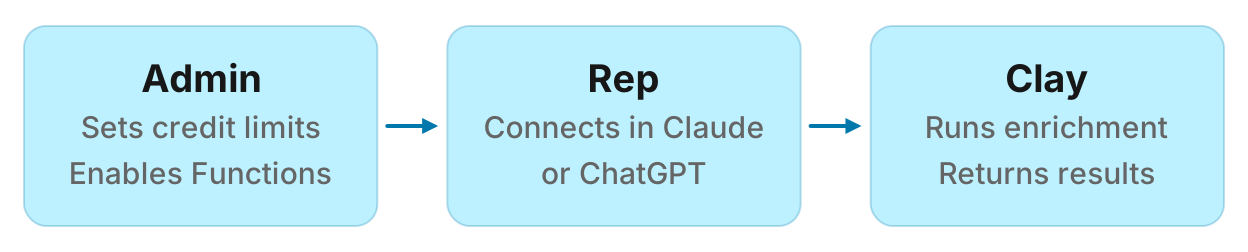
Clay's minimum setup is an invite and a credit budget; Functions and Audiences are optional. The steps, from MCP in Clay:
- Invite reps. In Settings, then Team, invite each rep with the Sales Rep permission type. It gives MCP-only access: they cannot see the Clay web app, tables, API keys or workflows. The Invite users button on the MCP page opens the same invite with Sales Rep already selected.
- Set a default credit limit. On the Clay homepage, click MCP in the sidebar, then Set default limit. It applies to every rep when they first connect, so set it before they start. Spend resets on the 1st of each month at midnight UTC.
- Enable Functions (optional). In the Functions tab, open a function and select MCP for reps under Integrations. Give it a clear Routine name and Description, because that is what reps see.
- Configure Audiences (optional, Enterprise). Sync user IDs from audiences matches reps to the Salesforce accounts they own. Restrict account querying by Salesforce owner limits each rep to their own accounts.
- Check which clients are allowed. Under Allowed MCP clients on the MCP users settings page, each client Clay recognises has its own toggle, plus Unknown for any other MCP client.
- Send reps the guide for their tool: Claude or ChatGPT.
The MCP users table then shows each rep who has connected, the platforms they use, their limit and their live usage. MCP spend also appears in Settings, then Credit Usage.
How to connect Clay MCP to Claude
From Using Clay in Claude:
- Open the Claude Connectors page and connect Clay. An existing Clay account connects straight away; a new one is created during setup. On Claude Enterprise, an admin has to add the Clay connector first.
- Pick the company workspace on Clay's consent screen.
- Ask Claude to find people, research an account or enrich contacts. You do not need to name Clay; Claude turns the connector on when the question calls for it.
Clay is also available in Claude Code, where the same tools return their results as text instead of the interactive view.
How to connect Clay MCP to ChatGPT
From Using Clay in ChatGPT:
- In the browser, start your prompt with
@Clay. In the desktop app, start it with/Clay. - Sign in to Clay when prompted and choose your workspace.
- Describe what you need. Clay returns the results in its interactive view, where you can filter, enrich, and draft emails.
Clay is also available in Codex, OpenAI's coding agent.
Prompts to start with
Clay's guides recommend giving the company domain, not just the name, and being specific about titles, locations and seniority. These follow that advice:
- "Find VP and Director level RevOps leaders at rippling.com who started in the last 9 months, with their work emails."
- "Find B2B SaaS companies in New York with 200 to 500 employees."
- "What is the headcount growth, website traffic and tech stack of hex.tech?"
- "Find the Head of Partnerships at canva.com and draft a short email about their partner priorities."
- "What functions do you have?" lists the Functions your ops team enabled for you.
- "Run Company enrichment waterfall for acme.com" runs one of them by name.
Gotchas and limits
A Function returns nothing. Clay says a Function needs an enrichment or output column. Turning on MCP and setting inputs is not enough.
The wrong tool runs. If a Function is named like one of Clay's built-in tools, such as "find contacts" or "enrich company", the AI tool may call the built-in one. Give Functions distinct names.
A rep is connected but missing from the MCP users table. They connected before accepting the workspace invite, so they joined their own personal workspace. Have them disconnect, accept the invite (resend it from Settings, then Team if it expired), and reconnect to the company workspace.
A rep hits their limit. Further actions are blocked until the reset on the 1st at midnight UTC, which is the evening of the last day of the month in the US. Admins can raise the limit in the MCP users table and it applies straight away.
Overrides replace the default. A per-user limit replaces the workspace default; it does not add to it. A rep showing "No limit" has no cap at all.
You cannot revoke a connection from the MCP page. To cut a rep off, remove them from the workspace or set their limit to 0.
Clients Clay does not list. Other MCP clients can register themselves with Clay's OAuth server, but they only connect if an admin leaves the Unknown client toggle on.
Run this in your agent
Connect Manifold to Claude, ChatGPT or Cursor, then paste this prompt.
Find the VP of Sales and the Head of Marketing at acme.com, then find and verify a work email for each of them.
If you do not use Clay
Clay MCP makes sense when your team already runs prospecting in Clay. If you only need people and company lookups and verified work emails in your agent, Manifold is a hosted MCP server with no API keys of your own, paid per call, with 500 free credits per workspace and the same server covering SEO, Search Console, Reddit and social data. For the side by side, read Clay MCP alternative. To compare every marketing server, read the best MCP servers for marketing.