Attio MCP: how to set it up in Claude, ChatGPT and Cursor
Attio hosts an MCP server at mcp.attio.com. This guide covers OAuth setup in Claude, ChatGPT, Claude Code and Cursor, the tool list, prompts that work, rate limits, and the community server on GitHub.


How do I connect Attio to Claude?
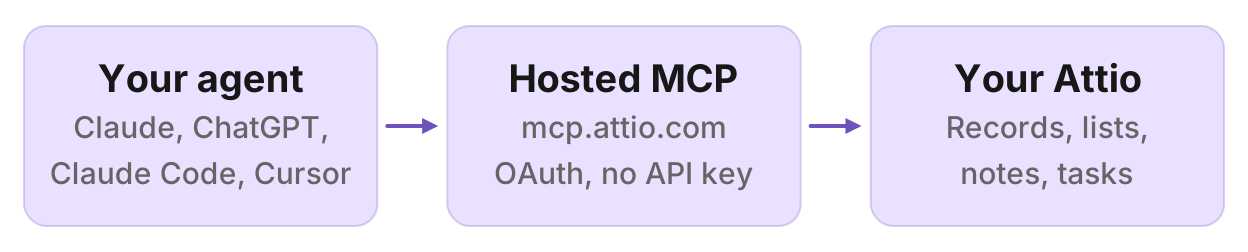
Attio MCP is Attio's hosted MCP server. It runs at https://mcp.attio.com/mcp and connects Claude, ChatGPT, Cursor and other MCP clients to your Attio workspace. You sign in with OAuth. There is no API key to copy. Access follows your Attio user permissions, and you can revoke sessions from Attio account settings.
Two other things show up in search. kesslerio/attio-mcp-server is a community Node server you run locally with an Attio API key. Pipedream hosts a wrapper at a Pipedream URL, not Attio's. Use Attio's own server unless you have a reason to run something else.
By the end you will have a working connector, a whoami check, the tools grouped by job, prompts you can paste, the rate limits, and a short comparison of official, community and wrapper servers.
Before you start
Attio's MCP overview lists two prerequisites:
- An active Attio workspace
- An MCP client (Claude Desktop, Claude.ai, ChatGPT, Cursor, or another client that can add a remote MCP server)
You do not create an Attio API key for the official server. Attio documents OAuth only. Checked 4 November 2026, https://mcp.attio.com/.well-known/oauth-protected-resource lists the authorization server as https://app.attio.com and the scopes mcp, offline_access and openid.
SQL through query-particle-sql is not available on every Attio billing plan. Everything else in this guide works against the workspace you already have. Attio does not publish a separate MCP price.
Set it up in Claude
Attio lists Attio as a built-in connector for Claude Desktop and Claude.ai. From the MCP overview:
- Open Settings, then Connectors, then Browse connectors.
- Search for Attio.
- Install Attio and sign in with your Attio account.
Attio's Claude app page documents a close path: in the side navigation choose Customize, then Connectors, add a connector, search for Attio, and confirm access on Attio's consent screen. Pick the workspace you want the agent to use.
Claude keeps the connector across chats. For how Claude talks to a remote MCP server in general, see the Claude client docs.
Set it up in ChatGPT
Attio ships an official ChatGPT app. From the MCP overview and the MCP app page:
- In ChatGPT, open Apps.
- Search for Attio.
- Click Connect and sign in with your Attio account.
There is no server URL to paste for this path. ChatGPT keeps the app across chats.
Set it up in Claude Code
Attio does not document a Claude Code click path. This is the standard Claude Code command for a remote HTTP server, then /mcp to sign in:
claude mcp add --transport http attio https://mcp.attio.com/mcpStart Claude Code, run /mcp, choose attio, and finish OAuth in the browser. Full Claude Code steps for remote servers are in the Claude Code client docs.
Set it up in Cursor
Attio does not document a Cursor click path. Add the official URL to ~/.cursor/mcp.json (or .cursor/mcp.json in a project), matching the Cursor client docs:
{
  "mcpServers": {
    "attio": {
      "url": "https://mcp.attio.com/mcp"
    }
  }
}
Restart Cursor. On first use it should prompt you to sign in to Attio. Keep this in your user config if you do not want the server committed with a project.
Other MCP clients
For any other client, Attio documents:
https://mcp.attio.com/mcpAdd that URL as a remote MCP server and complete OAuth when prompted. You will be authenticated as your Attio user, with the same access you have in the Attio app.
Test the connection
After connecting, run one of Attio's own checks:
"What's my user ID?"
or:
"What objects do we have?"
A working connector calls whoami or list-objects and returns your workspace identity or the objects in the workspace (companies, people, deals, and any custom objects). If you get a sign-in or permission error, skip to troubleshooting.
What Attio MCP can do
Attio's tool list is grouped by job. The names below are Attio's.
| Group | Tools | What they do |
|---|---|---|
| Records and objects | list-objects, search-records, list-records, get-records-by-ids, create-record, upsert-record, update-record, merge-records, list-attribute-definitions | Find and change people, companies, deals and custom objects |
| Activities | list-activities, list-activity-attribute-definitions, list-activity-records, create-activity-record, update-activity-record, upsert-activity-record | Log and update things that happen over time, such as calls or site visits |
| Lists | list-lists, create-list, list-list-attribute-definitions, list-records-in-list, add-record-to-list, update-list, update-list-entry-by-id, update-list-entry-by-record-id | Build pipelines and move records through stages |
| Comments | create-comment, list-comments, list-comment-replies, delete-comment | Comment on records and list entries |
| Notes | create-note, search-notes-by-metadata, semantic-search-notes, get-note-body, update-note | Log and search notes on records |
| Tasks | list-tasks, create-task, update-task, delete-task | Create, complete and delete follow-ups |
| Meetings and calls | search-meetings, search-call-recordings-by-metadata, semantic-search-call-recordings, get-call-recording | Find meetings and pull call transcripts |
| Emails | search-emails-by-metadata, semantic-search-emails, get-email-content | Find and read emails in the workspace |
| Workspace | list-workspace-members, list-workspace-teams, whoami | Members, teams and the signed-in user |
| Reporting | run-basic-report | Totals, averages and grouped breakdowns |
| SQL | query-particle-sql | Query workspace data with SQL, on plans that include it |
Attio says these tools work together through prompts. One prompt can search, create a record, log a note and add a task.
Prompts that work
These follow Attio's own examples, grouped the way you would use them. They are prompts, not results. Your workspace will not match Attio's sample names.
Morning pipeline check
"Show me all entries in the sales pipeline"
"Count open deals by stage"
"Show average deal size by owner"
"Show my incomplete tasks due this week"
Ask for the list name and the metric you care about. A vague "how is the pipeline" leaves the agent to pick a list.
Account research before a call
"Find all contacts at Stripe"
"Who's the decision maker at Notion?"
"What was the last interaction with Linear?"
"What meetings do I have with Notion this week?"
"Find calls where we discussed enterprise pricing"
"Show me everything we know about TheSwarm"
Name the company the way it appears in Attio. If search misses, ask list-objects first, then search that object.
Logging notes and tasks after a call
"Log a note on the Linear account: had a great demo call, they want to see pricing"
"Add a task to follow up with Ramp in 3 days"
"Add a comment to the Acme company record: waiting on legal review"
Writes ask you to confirm. Read the proposed note or task before you approve it.
Pipeline hygiene
"Find all Series B companies in our CRM"
"Add Acme to the sales pipeline"
"Update Acme's entry in the sales pipeline to Proposal Sent"
"Merge these two duplicate Acme company records"
merge-records is its own rate-limit tier (5 requests per second). Ask the agent to show both records first, then merge.
Reporting
"Count open deals by stage"
"Show average deal size by owner"
If query-particle-sql is on your plan, Attio's examples include weighted pipeline reports and source mix for deals over a threshold. If the SQL tool is missing, use run-basic-report instead.
Approvals and rate limits
Attio MCP uses MCP safety annotations:
- Read operations are auto-approved
- Write operations request confirmation before they create or update data
That is Attio's server, not a claim about other connectors in the same chat.
Rate limits are per workspace. Tools in the same tier share one bucket. From Attio's table:
| Tier | Limit | Examples |
|---|---|---|
| Read | 100 requests per second | whoami, list-objects, list-records, get-note-body |
| Write | 25 requests per second | create-record, upsert-record, create-note, create-task |
| Merge | 5 requests per second | merge-records |
| Search | 300 requests per minute | search-records, search-meetings, search-emails-by-metadata |
| Semantic search | 2 requests per second | semantic-search-notes, semantic-search-emails, semantic-search-call-recordings |
| Reporting | 2 requests per second | run-basic-report |
| SQL | 2 requests per second | query-particle-sql |
Attio says the Read and Write tiers match the equivalent REST API limits. If you hit a limit: ask the agent to reduce parallel calls, space out requests, and retry after a short wait. Attio says normal conversational use stays inside the limits.
Enrich your CRM with outside data
Attio MCP works on data already in Attio. It does not replace a prospecting database. To find companies and people who are not in the workspace yet, connect a leads server in the same chat, then ask Attio to upsert the rows and add them to a list.
Manifold is a hosted MCP server with people and company tools: leads_search_companies, leads_search_people, leads_get_email and leads_get_email_status. You pay per call with credits. Every workspace gets 250 free credits a month. There are no API keys of your own to manage. It is listed in the official MCP registry as com.manifoldmcp/manifold. For a side-by-side of prospecting servers, see the best lead generation MCP servers. A worked example of building a first list is in Build a B2B lead list. If your CRM is HubSpot instead of Attio, see the HubSpot MCP setup guide.
Example prompt with both connectors in one chat:
"Find B2B SaaS companies in the US with 50 to 200 employees. For each, find a VP of Sales, get a verified work email, then upsert those people in Attio and add them to a list called Q1 SaaS Outreach. Show me the draft before you write."
The agent uses Manifold for the list and Attio for the write. Keep the Attio step as a draft until you have checked the rows.
Official server vs community server vs wrappers
| Official Attio MCP | Community server | Pipedream wrapper | |
|---|---|---|---|
| Where it runs | Attio hosts https://mcp.attio.com/mcp | Your machine, kesslerio/attio-mcp-server | Pipedream hosts https://mcp.pipedream.net/v2 |
| Auth | OAuth with your Attio account | ATTIO_API_KEY in the client config | Pipedream account, then connect Attio |
| Setup | Browse connectors in Claude, Apps in ChatGPT, or paste the URL | npm install -g attio-mcp, then set the key | Paste Pipedream's URL and sign in |
| Use it when | You want Attio to host the server | You want the key on your machine, or you need to change the code | You already run other tools through Pipedream |
The community README documents a local attio-mcp command and an ATTIO_API_KEY environment variable. Check that README before you install it; the tool names and install paths change. Prefer the official server unless one of the local reasons applies.
Troubleshooting
The OAuth prompt does not appear. Confirm the URL is exactly https://mcp.attio.com/mcp. In Claude, use Browse connectors and install Attio rather than pasting a custom URL. In Cursor, restart after you save mcp.json, then trigger a tool so the client starts OAuth. In Claude Code, run /mcp and choose attio.
Wrong workspace. Attio's Claude app page says you choose the workspace on the consent screen. Disconnect, connect again, and pick the right one.
Permission errors. Attio says access is tied to your Attio user permissions. If you cannot see deals in the Attio app, the agent cannot see them either. Check your role in Attio, or ask a workspace admin.
Rate limited. Ask the agent to reduce parallel calls, space out requests, and retry after a short wait. Semantic search, reporting and SQL share a tighter 2 requests per second cap.
SQL tool missing. query-particle-sql is not on every billing plan. Use run-basic-report for counts and averages, or check your Attio plan.
You connected a different server. Search results for "attio mcp" include Pipedream's wrapper and the kesslerio GitHub repo. The official hosted URL is https://mcp.attio.com/mcp.
Run this in your agent
Connect Manifold to Claude, ChatGPT or Cursor, then paste this prompt.
Find B2B SaaS companies in the US with 50 to 200 employees. For each, find a VP of Sales, get a verified work email, then upsert those people in Attio and add them to a list called Q1 SaaS Outreach. Show me the draft before you write.