How to track AI visibility with Claude or ChatGPT
Connect Claude or ChatGPT to Manifold MCP, create a weekly AI visibility monitor, and have your agent read share of answers, citations and what changed.

How do I track AI visibility weekly?
Engines still answer that job with a prompt list, a spreadsheet and a dedicated tracker. This is the setup your agent runs instead. It uses the AI visibility tracker on Manifold MCP: scheduled questions on ChatGPT, Claude, Gemini, Perplexity, Google AI Overviews and Google AI Mode. Your agent creates the monitor, reads what moved, and keeps the history.
Why a weekly monitor, not one ask
One answer is mostly noise. The same prompt can name you on Monday and skip you on Tuesday. Share of answers moves slowly, so a weekly check is the default: a seventh of the daily price, per the monitor docs.
The numbers to watch are mention rate, share of voice and citation rate. The manual method for those, and a one-off ChatGPT check, lives in how to track your brand's visibility in ChatGPT. This guide is the scheduled monitor across engines.
For Google AI Overviews only, see the AI Overview tracker. For watching a competitor's site and ads as well as their AI share, see how to track competitors. Keep this page on your own brand's share of answers.
Step 1: connect Manifold MCP in Claude or ChatGPT
Manifold MCP is a hosted marketing data connector. You need no API keys of your own, and you pay per call. Every workspace gets 250 free credits a month, and Pro starts at $20/mo.
Claude. From the Claude setup guide:
- Open Settings, then Connectors.
- Choose Add custom connector. Name it Manifold and paste the server URL from that guide.
- Choose Connect, sign in to Manifold, and approve Claude.
- Start a chat, check that Manifold is on in the chat's tools menu, and ask a question.
A connector you add on the web is also there in the desktop app and on your phone.
ChatGPT. Manifold is an official ChatGPT app. From the ChatGPT setup guide: open the Manifold app in ChatGPT (or open Apps and search for Manifold), click Connect, and sign in. Custom MCP servers are added at chatgpt.com/plugins: choose Add, then Create custom MCP server. That works on Plus, Pro, Business, Enterprise and Edu, on the web. There is no developer mode to turn on.
Paste this to check the connection:
What Manifold monitor tools do you have? Then tell me that creating a monitor is free, and how many monitors this workspace can keep.
Your agent should name monitoring_create_monitor, monitoring_get_monitors, monitoring_get_changes, monitoring_get_history, monitoring_update_monitor and monitoring_delete_monitor. Those tools are free. The calls each check makes are not. Every parameter is on the monitoring tools page.
Step 2: pick the questions
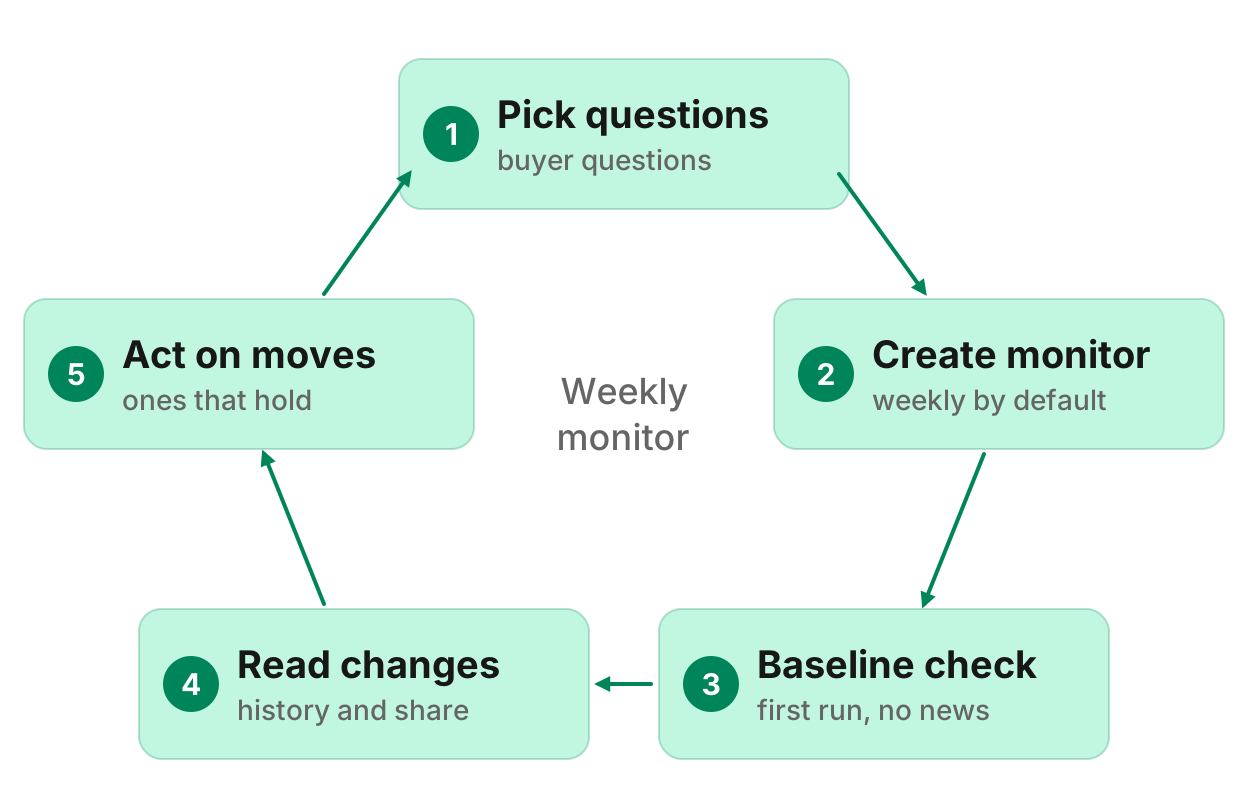
A monitor holds 1 to 25 questions. Use buyer questions, not vanity prompts such as "tell me about [brand]".
Good prompts look like the ones people ask before they buy:
- What are the best [category] tools for [segment]?
- [Category] tools compared
- Best alternatives to [competitor]
- Which [category] would you recommend for [job]?
Questions that name your brand are counted apart from the rest, so you can see branded and unbranded share separately.
Optionally, run aeo_search_prompts once to find prompts people already ask. See the AI answer tools. Do not invent search volumes.
Step 3: set brand, competitors and engines
Give your agent the fields the monitor needs:
- Brand. The name answers should count as you.
- Aliases. Up to 5 other names answers use (a short form, a product name).
- Domain. Your site, so citation share can count a link to you, not only a mention.
- Competitors. Up to 9 brands to measure share of voice against.
- Engines. A monitor starts with ChatGPT, Gemini and AI Overviews. Add Claude, Perplexity or AI Mode for more cost.
- Samples. 1 to 3 asks per question per check, to steady the rate.
- Location and language. Keep them fixed so a move is a move.
Browse AI search articles if you still need the wider job (citations, crawlers, getting named). This page stays on the weekly monitor.
Step 4: create the monitor
Two paths, both real.
Dashboard. Open the AI visibility tracker and create the monitor from the form. The form shows the monthly estimate before it starts.
Your agent. Ask, for example:
Track how often ChatGPT, Gemini and AI Overviews recommend us for these ten questions, weekly.
Or: "monitor this every week". Your agent calls monitoring_create_monitor with preview true first, shows the monthly estimate, and creates the monitor once you agree. Creating it costs 0 credits.
You can also create it from the monitors docs. A workspace can keep 25 monitors.
Step 5: wait for the baseline
The first check runs within five minutes. It records what is there and reports nothing. That starting point stops last week's answers arriving as news. Changes appear from the second check on.
Checks read live data. They skip the cache, because an hours-old answer would find nothing new.
Step 6: read what changed
After the second check, ask:
What changed in AI answers this month? Which pages do the engines cite instead of ours?
Or: "is our AI visibility going up?"
Your agent reads the feed with monitoring_get_changes and the trend with monitoring_get_history: share per engine, cited share, share of voice, and branded prompts.
When a citation drops and you want the fix, see how to get cited by ChatGPT. The monitor tells you it happened. It does not write the page.
Step 7: alerts, cadence and a check now
Alerts start off for AI visibility, because one answer is noisy. When you turn them on, they wait for a move that holds. At most one email alert a day per monitor. Each person in the workspace turns a monitor's alerts on or off for themselves.
Your agent pauses, changes cadence or fields, or runs a check now with monitoring_update_monitor. Cadence can be hourly, daily or weekly. Weekly stays the default unless you ask for more.
What the monitor tracks
Verified from the AI visibility tracker and the monitor docs:
- Share of answers by engine against up to nine competitors
- Pages each engine cites
- Brands that start appearing in ChatGPT's answers
Engines: ChatGPT, Claude, Gemini, Perplexity, Google AI Overviews, Google AI Mode. A monitor starts with ChatGPT, Gemini and AI Overviews. Add the others for more cost.
Kept: brands and citations. Whole answer text is not stored. There is no sentiment yet, and no "how the answer describes you". Copilot is not covered. A workspace can keep 25 monitors.
If you want a dashboard comparison of Peec, OtterlyAI, Profound, Scrunch and the rest, that roundup is the best AI visibility MCP servers. This page is the agent setup.
What it costs
Creating, reading and changing monitors is free. Each check charges for the calls it makes, at the same credit prices as your agent's calls. The form and the agent's preview show the monthly estimate first. Examples from the live docs (checked 5 November 2026):
- 10 questions on 3 engines, weekly: 261 credits a month
- 10 questions on 3 engines, daily: 1,827 credits a month
- 25 questions on 6 engines, weekly: 3,153 credits a month
The free plan includes 250 credits a month. Pro starts at $20/mo. A spend cap pauses checks at the cap. With no credits left, a monitor pauses until you add credits or a plan renews. See how monitors work.
One-off check vs monitor
For a single look now, use aeo_run_ai_answers (then get_task). For history and what changed, use the ai_visibility monitor. The one-off tools are on the AI answer tools page. The scheduled tools are on the monitoring tools page.
Run this in your agent
Connect Manifold to Claude, ChatGPT or Cursor, then paste this prompt.
Track how often ChatGPT, Gemini and AI Overviews recommend us for these ten questions, weekly: [questions]. Brand [brand], domain [domain], competitors [competitor] and [competitor]. Preview the monthly credit cost first, then create the monitor once I agree. After the second check, tell me what changed in AI answers and which pages the engines cite instead of ours.
Create your weekly AI visibility monitor
Create the AI visibility monitor. Creating it costs nothing. The free plan includes 250 credits a month. Open the AI visibility tracker and start from the form, or connect Claude or ChatGPT and paste the prompt above.
The first check is a starting point. From the second check on, ask your agent what changed.