AI Overview tracker: how to track Google AI Overviews
An AI Overview tracker records which searches show a Google AI Overview, which pages it cites and which brands it names. We checked eight searches and found most cited pages do not rank on page one, so here is how to track the citations themselves.

Which AI Overviews cite us?
An AI Overview tracker checks a fixed list of searches on a schedule and records, for each one, whether Google shows an AI Overview, which pages it cites, and whether your brand is named or your page is cited. A rank tracker does not tell you this, because the pages an AI Overview cites are often not the pages that rank. We checked eight CRM searches on 18 October 2026: every one had an AI Overview, and of the 67 pages they cited, 11 ranked in Google's top 10 for the same search. Below is what to track, how to set it up, and how to have your agent run it.
What an AI Overview tracker measures
Four things, for each search on your list:
- Trigger. Did Google show an AI Overview for the search at all? Google says it shows one only when its systems decide it adds to the classic results, so this changes from search to search and over time.
- Citations. Which pages the AI Overview links as sources, in what order. This is the part you can change: Google cites pages, and a cited page earns the click.
- Mentions. Which brands the answer text names, yours and your competitors', whether or not their pages are cited.
- Change. What moved since the last check: a new AI Overview, a citation lost or won, a competitor named for the first time.
Record the date, the location and the device with every check. AI Overviews differ by country and city, and between desktop and mobile, so a result means little without them.
Why rank tracking does not show your AI Overview citations
We pulled the AI Overview and the top 10 organic results for eight CRM searches, from definitions to pricing, on 18 October 2026 (United States, desktop).
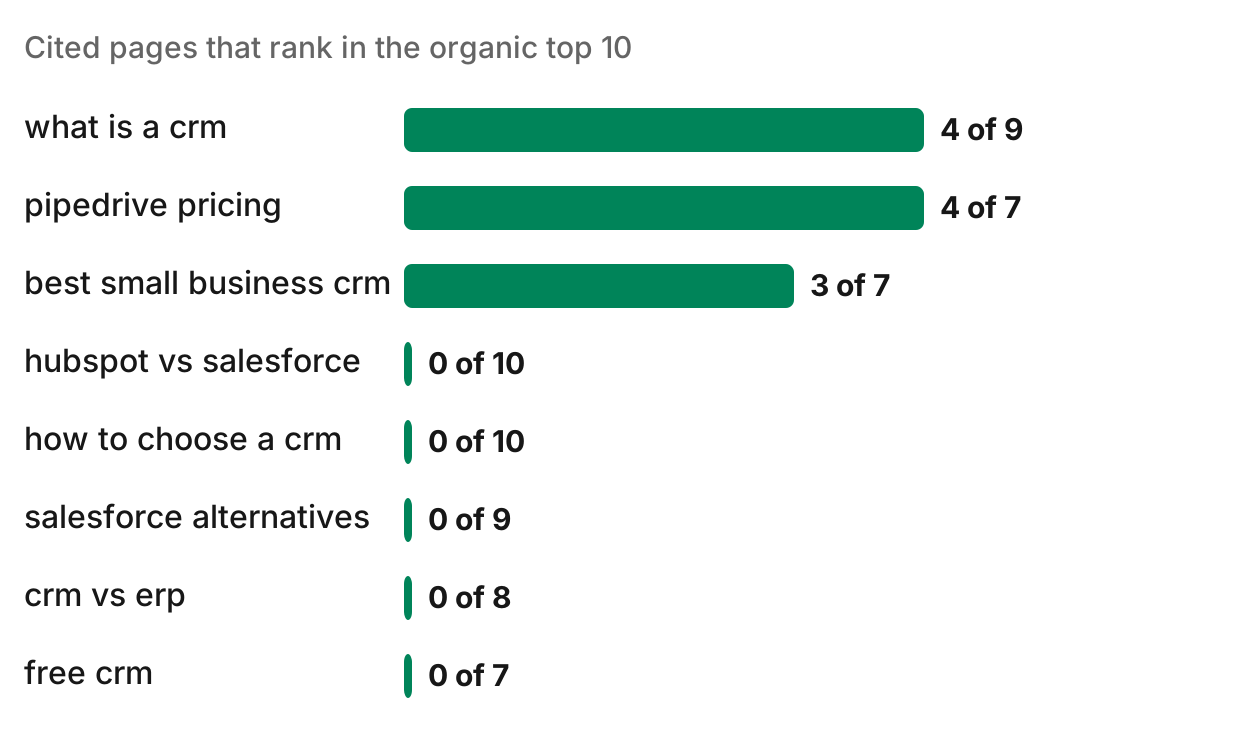
- All eight searches showed an AI Overview. Each cited 7 to 10 pages.
- 11 of the 67 cited pages ranked in the organic top 10. 4 more were Reddit threads in the forum box on page one. The other 52 were not on page one.
- The two kinds of search behaved differently. For "what is a crm" and "pipedrive pricing", 4 cited pages ranked in the top 10, and the number one result was cited. For the comparison and how-to searches ("hubspot vs salesforce", "how to choose a crm", "crm vs erp", "salesforce alternatives", "free crm"), no cited page ranked in the organic top 10.
- Video and forums are a large share. 14 of the 67 citations were YouTube videos and 6 were Reddit threads.
Google's documentation on AI features explains part of this: AI Overviews may use a "query fan-out" technique that runs several related searches across subtopics, so the sources can come from searches you never tracked. Eight searches in one category is a small sample, and AI Overviews change from day to day. Check your own searches before you plan around these numbers.
How to track AI Overviews
1. Choose the searches
Start with 20 to 50. Take the queries that already bring you impressions in Google Search Console, then add the questions your buyers ask before they buy: comparisons, alternatives, "how to choose", pricing. Keep the list fixed so each check compares like with like.
2. Fix the location and the device
Pick the country, and the city if you sell locally, plus desktop or mobile. Use the same settings on every check.
3. Record each AI Overview in full
For each search, save whether an AI Overview showed, every cited URL in order, and every brand named in the text. Save the answer text too, so you can see later why a citation changed.
4. Check on a schedule
Weekly is enough for most sites, and daily for a launch or a news topic. One check is a snapshot; the trend over several checks is what you act on.
5. Act on what moved
When a competitor is cited and you are not, open the cited page and see what it answers that yours does not. When a Reddit thread or a YouTube video is cited, that is a place to take part. When you lose a citation, check that the page is still indexed and eligible for a snippet, since Google says those are the only requirements for a page to be a supporting link.
Can you track AI Overviews in Google Search Console?
Not on their own. Google says traffic from AI Overviews and AI Mode is included in the Search Console Performance report, under the "Web" search type, with all other search traffic. It does not show which searches had an AI Overview or which pages were cited. Use Search Console for the query list in step 1, and a tracker for the rest.
AI Overview tracking tools
Dedicated trackers, such as SE Ranking's AI Overviews tracker and Keyword.com's AI Overview tracker, run your search list on a schedule and keep the history in a dashboard. Some AI visibility tools cover AI Overviews next to ChatGPT, Gemini and Perplexity; we compared the ones with an MCP server in the best AI visibility tools.
The other way is to have your agent do it. An agent with search data can pull each AI Overview and its citations, compare them with the organic results, and tell you what changed since the last run.
Run this in your agent
Connect Manifold to Claude, ChatGPT or Cursor, then paste this prompt.
For each search in [our list], get Google's AI Overview and the top 10 organic results in [country] on desktop. Tell me which searches show an AI Overview, every page it cites, which brands it names, and where we are cited or named. Then compare with last week's run and list what changed: citations we won or lost, and competitors cited where we are not.
Manifold's SEO MCP server returns Google's AI Overview with its cited sources next to the organic results for any search and location, so your agent can run your list and compare it with last week. Its AI visibility MCP server asks ChatGPT, Gemini, Claude and Perplexity the same questions. To check ChatGPT and the other engines the same way, see how to track your brand in ChatGPT, and to win the citations you find missing, see how to get cited by ChatGPT.