Instantly MCP: how to set it up in Claude and Cursor
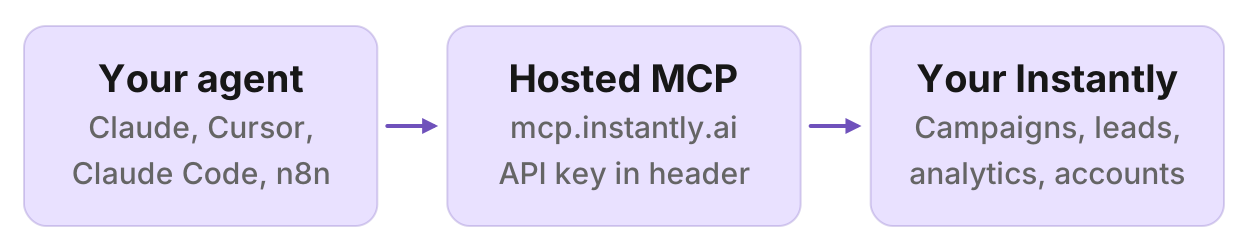
Instantly hosts an MCP server at mcp.instantly.ai. This guide covers the API key, setup in Claude, Cursor, Claude Code and n8n, what the tools can do, prompts that work, and the community package on GitHub.


How do I connect Instantly to Claude?
Instantly hosts an MCP server at https://mcp.instantly.ai/mcp. It connects Claude, Cursor, Claude Code, n8n and other MCP clients to your Instantly workspace, so the agent can create campaigns, manage leads, pull analytics, reply in the inbox and manage sending accounts. Instantly documents it as Streamable HTTP. You send an API key in the Authorization header, or in the URL path if the client cannot set custom headers.
Two things get mixed up. The help center and Instantly's course cover this hosted server. A February 2026 Instantly blog post walks through a community Python package you run locally. Use the hosted server unless you need the key to stay on your machine or want to change the code.
By the end you will have a working connector, a test that lists your accounts, prompts you can paste, and a short note on the local package.
Before you start
You need three things:
- An Instantly account with API access. Instantly says the MCP server is free with your subscription, and that you just need an account with API access. The February 2026 blog post says API access is included on the Growth plan and above. Check your plan before you spend time on the client.
- An Instantly API key. Instantly's help center: open Instantly, go to Integrations, then API Keys, then Create API Key. Copy the key and store it like a password. The course shows the same place as Settings, then Integrations, then API Keys, with a name and scope of All.
- An MCP client. Instantly documents Claude Desktop, Cursor and n8n, plus any client that can send Streamable HTTP with an
Authorizationheader. Claude Code is not in Instantly's article; the command below is the usual Claude Code syntax.
Instantly's own AI inside the app is Copilot. It uses Instantly credits and needs no setup. MCP is the bring-your-own-AI path: Claude, Cursor or another client you already use, talking to the same Instantly workspace.
The hosted server also advertises OAuth sign-in, so a client that supports MCP OAuth may show an Instantly sign-in instead of asking for a key. Instantly's help center documents the API key, and this guide follows that.
Set it up in Claude
Instantly's help center and course both use Claude's custom connector. The help center uses the key-in-path URL:
- Open Claude (claude.ai or the Claude Desktop app).
- Go to Settings, then Connectors, then Add custom connector.
- Paste
https://mcp.instantly.ai/mcp/YOUR_API_KEY, with your key in place ofYOUR_API_KEY. - Click Add. Instantly says no restart is needed.
The course names the connector (for example "Instantly MCP") before you paste the URL. After it connects, Claude's Configure view lists read, write and delete tools. You can leave those on a prompt-by-prompt confirm while you get used to the connector.
A key in a URL ends up in config files and logs. Prefer the header form below when the client supports it. Never share a config file that contains the key.
Instantly does not document a ChatGPT setup. On a paid ChatGPT plan you can add a remote MCP server at chatgpt.com/plugins: choose Add, then Create custom MCP server, and paste the URL. For Claude itself, the Claude client docs cover how Claude talks to a remote MCP server.
Set it up in Claude Desktop with a config file
If you would rather edit the file, Instantly documents this under Settings, then Developer, then Edit Config:
{
  "mcpServers": {
    "instantly": {
      "url": "https://mcp.instantly.ai/mcp",
      "headers": {
        "Authorization": "PASTE_YOUR_API_KEY_HERE"
      }
    }
  }
}
Replace PASTE_YOUR_API_KEY_HERE with the key, save, and restart Claude Desktop. Instantly says you can then manage which actions Claude may run.
Set it up in Claude Code
Instantly does not document Claude Code. This is the standard Claude Code command for a remote HTTP server with a header, then /mcp to check the server:
claude mcp add --transport http instantly https://mcp.instantly.ai/mcp --header "Authorization: YOUR_API_KEY"Replace YOUR_API_KEY with the key. Start Claude Code, run /mcp, and confirm instantly is connected. Full Claude Code steps for remote servers are in the Claude Code client docs.
Set it up in Cursor
Instantly's Cursor snippet puts the key in the URL. Add it to ~/.cursor/mcp.json (or .cursor/mcp.json in a project):
{
  "mcpServers": {
    "instantly": {
      "url": "https://mcp.instantly.ai/mcp/YOUR_API_KEY"
    }
  }
}
A header form also works in Cursor's mcp.json. Prefer it so the key stays out of the URL:
{
  "mcpServers": {
    "instantly": {
      "url": "https://mcp.instantly.ai/mcp",
      "headers": {
        "Authorization": "PASTE_YOUR_API_KEY_HERE"
      }
    }
  }
}
Save and restart Cursor. Keep the key in your user config, not in a project file you commit. The Cursor client docs cover remote MCP servers in Cursor.
Set it up in n8n
From Instantly's help center:
- Add the MCP Client node to the workflow.
- Set the transport to Streamable HTTP.
- Enter
https://mcp.instantly.ai/mcp/YOUR_API_KEY. - Connect that node to your AI agent node.
Instantly suggests picking the tools the agent actually needs for each workflow, rather than exposing every category.
Other MCP clients
For any other client, Instantly documents:
URL: https://mcp.instantly.ai/mcp
Header: Authorization: YOUR_API_KEY
If the client cannot set custom headers, use https://mcp.instantly.ai/mcp/YOUR_API_KEY. Same caution: a key in a URL lands in logs.
Test the connection
Instantly's help center test for Claude is:
"List all my email accounts in Instantly."
A working connector calls list_accounts and returns the sending accounts in the workspace. Instantly also suggests:
"What campaigns do I have in Instantly?"
If you see your campaign list, the connector works. If you get a connection or unauthorized error, skip to troubleshooting.
What Instantly MCP can do
Instantly's help center lists 31 tools across 5 categories:
| Category | Tools | What Instantly says they do |
|---|---|---|
| Campaigns | 6 | Create, pause, update campaigns |
| Leads | 11 | Add, move, manage leads |
| 5 | View, reply, verify emails | |
| Analytics | 3 | Performance metrics |
| Accounts | 6 | Manage sending accounts, for example warmup and health |
The February 2026 blog post describes the community package as 38 tools across six categories, including blocklist and send-window controls. Counts differ because that package is not the hosted server.
Instantly says destructive actions such as delete are marked, and that the AI typically confirms before major actions. The server can still create, pause, change and reply. Review the proposed call before you approve a write. Start with analytics prompts until you trust the connector.
Prompts that work
These follow Instantly's own examples, grouped the way you would use them. They are prompts, not results. Do not expect the numbers in Instantly's sample replies to match your workspace.
Morning check-in
From the help center:
"Give me a quick summary of my outreach performance"
"Show me which campaigns have the best reply rates this week"
"Show daily breakdown for last 7 days"
"What are my reply rates this week?"
Ask for a date range and the metric you care about (reply rate, sends, bounces). A vague "how are we doing" leaves the agent to pick a window.
Find and pause weak campaigns
Instantly's example:
"Pause campaigns with less than 2% reply rates"
A version that shows you the list first:
"List active campaigns with a reply rate under 2% in the last 7 days. Show name, sends, replies and reply rate. Do not pause yet."
Then, if the list is right:
"Pause the campaigns we just listed. Ask me to confirm each one."
Reply triage
Instantly's examples:
"Show my recent replies"
"How many unread emails do I have?"
"Reply to the email from John at TechCo"
Keep replies in draft until you have read them. A useful follow-up:
"Show my unread replies from the last 24 hours. For each, give the campaign, the sender, a one-line summary, and a draft reply. Do not send."
Warmup and account health
Instantly's examples:
"List my email sending accounts"
"Enable warmup for my new account"
"Check account health status"
If you just added inboxes, list them first, then enable warmup on the new ones only.
Build a campaign draft
Instantly's examples:
"Create a 3-step email campaign targeting SaaS founders"
"Create a campaign for fintech companies, 3 emails, send weekdays 9-5 EST"
The help center's sample creates a draft. Still ask for a preview:
"Draft a 3-step campaign called SaaS Founders Q1, weekdays 9 to 5 Eastern. Show the name, schedule and steps. Do not activate it."
Approve the draft in Instantly before it sends.
Feed it a better list
Instantly's MCP works on campaigns and leads you already have. It does not replace a prospecting database. To build a target list in the same chat, connect a leads server as well, then hand the rows to Instantly.
Manifold is a hosted MCP server with people and company tools: leads_search_companies, leads_search_people, leads_get_email and leads_get_email_status. You pay per call with credits. Every workspace gets 250 free credits a month. There are no API keys of your own to manage. It is listed in the official MCP registry as com.manifoldmcp/manifold. For a side-by-side of prospecting servers, see the best lead generation MCP servers. For CRM write-back after Instantly, see the HubSpot MCP setup guide. Clay's own server is in the Clay MCP setup guide.
Example prompt with both connectors in one chat:
"Find B2B SaaS companies in the US with 50 to 200 employees. For each, find a VP of Sales, get a verified work email, check the address, then add those people to a draft Instantly campaign called Q1 SaaS Outreach. Show me the draft before you create it."
The agent uses Manifold for the list and Instantly for the campaign. Keep the Instantly step as a draft until you have checked the rows.
Hosted server vs community package
| Hosted Instantly MCP | Community package | |
|---|---|---|
| Where it runs | Instantly hosts https://mcp.instantly.ai/mcp | Your machine, stdio, bcharleson/Instantly-MCP |
| Setup | Paste a URL and a key | Python 3.10+, pip install -e ., env INSTANTLY_API_KEY |
| Auth | Authorization header, or key in the URL path | Local env var in the Claude Desktop config |
| Tools | Instantly lists 31 tools in 5 categories | Instantly's blog lists 38 tools in 6 categories |
| Use it when | You want Instantly to host the server | You want the key on your machine, or you need to change the code |
The blog post clone and install:
git clone https://github.com/bcharleson/Instantly-MCP.git
cd Instantly-MCP
pip install -e .
Then, in Claude Desktop's config, a command entry that runs python -m instantly_mcp.server with INSTANTLY_API_KEY set. Prefer the hosted server unless one of the local reasons applies.
Troubleshooting
From Instantly's help center table:
| Symptom | What Instantly says to do |
|---|---|
| Connection failed | Check the API key |
| Unauthorized | Regenerate the key in Instantly |
| No response | Restart the client |
| Server unavailable | Check the connection and try again |
A few extras the docs imply but do not put in that table:
The key is in a URL or a committed file. Rotate the key in Instantly and switch the client to the Authorization header. Never paste a config that contains the key into chat, email or git.
Rate limits. Instantly's blog post says API rate limits apply per workspace and are shared across every API key in that workspace. If you see a 429, wait for the reset. Batch work instead of one lead at a time.
Wrong product. Search results for "instantly mcp" sometimes mean Instant Reply, Instacart, or a Composio skill. The hosted Instantly.ai server is https://mcp.instantly.ai/mcp.
Writes you did not mean to approve. Instantly marks delete actions and says the AI typically confirms first. If a prompt would pause live campaigns or reply to a lead, ask for a list first, then confirm.
Run this in your agent
Connect Manifold to Claude, ChatGPT or Cursor, then paste this prompt.
Find B2B SaaS companies in the US with 50 to 200 employees. For each, find a VP of Sales, get a verified work email, check the address, then add those people to a draft Instantly campaign called Q1 SaaS Outreach. Show me the draft before you create it.