The best MCP servers for publishing to WordPress and other CMSs
WordPress and CMS publishing MCP servers let your agent draft, edit and publish posts to WordPress.com, self-hosted WordPress, Webflow, Contentful, Sanity, Strapi and other CMSs. Here is what each covers, how it installs, and which to pick.


How do I publish from Claude to WordPress?
Connect Claude, ChatGPT, or Cursor to WordPress and other CMSs
Publishing to WordPress and other CMSs from your AI agent means connecting the right MCP server: one server for WordPress.com sites, a different approach for self-hosted WordPress, and dedicated servers for Webflow, Contentful, Sanity, and others. The table below compares install methods, sign in, what your agent can do, and pricing checked October 2026. For the full workflow from research to brief to published post, see the best MCP servers for content marketing.
The servers, compared
| Server | Best for | CMS | How it installs | Sign in | Clients documented | What your agent can do | Price checked October 2026 |
|---|---|---|---|---|---|---|---|
| WordPress.com MCP | WordPress.com sites | WordPress.com | Hosted | OAuth | Claude, ChatGPT | Create, edit and publish posts and pages, manage comments and media, with confirmation before write operations | All paid plans, free sites for first 30 days |
| WordPress MCP Adapter | Self-hosted WordPress | WordPress 6.9+ | Plugin on your own site | Application passwords | WP-CLI stdio, HTTP | Depends on registered Abilities from core and plugins | Free, open source |
| Easy MCP AI | Self-hosted WordPress with page builders | WordPress | Plugin on your own site | OAuth 2.1, API tokens | Claude, ChatGPT, Cursor, VS Code | Draft, schedule and publish posts and pages, upload media, edit Gutenberg blocks, Yoast or Rank Math SEO fields, WooCommerce, optional Force Draft on Create | Free plugin |
| Royal MCP | Self-hosted WordPress with Elementor or Divi | WordPress | Plugin on your own site | OAuth, API key header | Claude, ChatGPT | Posts, pages, media, SEO meta, menus, revisions, WooCommerce, Elementor, Divi, drafts by default, undo for destructive writes | Free plugin |
| Webflow MCP | Webflow sites | Webflow | Hosted | OAuth | Claude, Claude Code, Cursor, others | CMS collections and items, pages, SEO fields, assets, some canvas actions need Designer with Bridge App | See Webflow pricing |
| Contentful MCP | Contentful CMS | Contentful | Local (npx) | Management API token | Any MCP client | Work with entries, assets and content types | See Contentful pricing |
| Sanity MCP | Sanity CMS | Sanity | Hosted | OAuth or API token | Claude, Claude Code, Cursor, others | Query, create, patch, publish documents, releases | See Sanity pricing |
| Strapi MCP | Strapi CMS | Strapi | Built into Strapi 5.47.0+, endpoint on your own site | Admin token as Bearer header | Any MCP client supporting Streamable HTTP | List, get, create, update, delete, publish and unpublish per content type, limited by token permissions | Free, self-hosted |
| Manifold | Research before you publish | No CMS connection | Hosted | OAuth | Claude, ChatGPT, Cursor, others | Keyword and SERP data, AI answer checks, Reddit threads, YouTube transcripts, Search Console and Bing (0 credits) | 250 free credits a month, Pro from $20/mo |
Which WordPress MCP server do you need?
WordPress.com site: Use WordPress.com MCP. It is hosted, works through OAuth, and is included on all paid WordPress.com plans. Free sites get it for the first 30 days. Your agent can create, edit and publish posts and pages, manage comments and media, and write operations wait for your confirmation.
Self-hosted WordPress site: Use the WordPress MCP Adapter, WordPress's official adapter for self-hosted sites. It runs as a plugin and exposes Abilities (WordPress's unit of functionality) as MCP tools. Connect through WP-CLI or over HTTP at /wp-json/mcp/mcp-adapter-default-server on your site, using application passwords. It is free and open source.
Page builder or WooCommerce site: If your self-hosted site uses Gutenberg blocks, Elementor, Divi, WooCommerce, or SEO plugins such as Yoast or Rank Math, use Easy MCP AI or Royal MCP. Both are free plugins with tools for page builders, SEO fields, and e-commerce. Easy MCP AI uses OAuth 2.1 for Claude and ChatGPT, and API tokens for other clients, with a Force Draft on Create setting. Royal MCP uses OAuth for Claude and ChatGPT, and API key headers for others, and new posts start as drafts.
WordPress.com MCP
WordPress.com MCP is WordPress.com's built-in hosted server at https://public-api.wordpress.com/wpcom/v2/mcp/v1. Enable MCP in your WordPress.com account settings, then connect and approve access in your browser with OAuth. One connection reaches every site on your account. Self-hosted sites connected through Jetpack with a Jetpack AI or Jetpack Complete plan use the same server.
Your agent can create, edit and publish posts and pages, manage comments and media. Write operations need your confirmation. Site-level and account-level tool controls let you decide which tools each site can use.
MCP access is included on all WordPress.com paid plans. A free site gets it for its first 30 days, checked October 2026.
Setup: Enable MCP in your WordPress.com account settings, then add WordPress.com from Claude's Connectors page or install the WordPress.com plugin in ChatGPT's Plugins panel and approve access. For Claude, ChatGPT, Claude Code, Cursor and others, see WordPress.com's client guides.
Best for: Publishing to WordPress.com sites, with site-level and account-level tool controls.
Limits: WordPress.com and Jetpack sites only. For self-hosted WordPress without Jetpack, use the WordPress MCP Adapter or a WordPress plugin.
WordPress MCP Adapter
WordPress MCP Adapter is WordPress's official adapter for self-hosted sites. It runs as a plugin on your own site and bridges the Abilities API (WordPress 6.9+) to MCP. What your agent can do depends on which abilities are registered by core and your plugins.
Connect through WP-CLI stdio for local development, or over HTTP at /wp-json/mcp/mcp-adapter-default-server on your site with application passwords for authentication. See the CLI usage guide for client setup examples.
The adapter is free and open source under the GPL.
Setup: Install the WordPress MCP Adapter plugin on your WordPress site. For WP-CLI stdio, run wp mcp start and follow the prompts. For HTTP, add your site's endpoint to your MCP client with application passwords. See the adapter's docs for Claude and ChatGPT setup.
Best for: Publishing to self-hosted WordPress sites, for teams that manage their own WordPress install.
Limits: Requires WordPress 6.9+ and a site you control. For WordPress.com, use WordPress.com MCP.
Easy MCP AI
Easy MCP AI is a free plugin for self-hosted WordPress from Themeisle. The MCP server runs on your own site with no hosted relay. Connect with OAuth 2.1 for Claude and ChatGPT, or API tokens for other clients. Your agent can draft, schedule and publish posts and pages, upload media, edit Gutenberg blocks, edit Yoast or Rank Math SEO fields, and manage WooCommerce products.
The plugin includes per-token tool choices, an audit log, change history, and an optional Force Draft on Create setting that saves new posts as drafts even when the agent requests publishing. It also pulls Search Console, GA4 and SEO tool data with your own API keys.
Setup: Install the Easy MCP AI plugin from the WordPress plugin directory, activate it, and follow the plugin's setup guide to connect Claude, ChatGPT, Cursor, or VS Code. For OAuth clients, approve access in your browser. For other clients, generate an API token in the plugin settings.
Best for: Self-hosted WordPress sites with Gutenberg, SEO plugins, and WooCommerce, with optional Force Draft on Create and Search Console data.
Limits: Self-hosted WordPress only. For WordPress.com, use WordPress.com MCP.
Royal MCP
Royal MCP is a free plugin for self-hosted WordPress from Royal Plugins. The endpoint runs on your own site. Connect with OAuth for Claude and ChatGPT, or API key headers for other clients. Your agent can manage posts, pages, media, SEO meta, menus, revisions, WooCommerce products, and Elementor and Divi layouts.
New posts start as drafts by default, and the plugin includes undo for destructive writes.
Setup: Install the Royal MCP plugin from the WordPress plugin directory, activate it, and follow the plugin's setup guide. For OAuth clients such as Claude and ChatGPT, approve access in your browser. For other clients, generate an API key in the plugin settings.
Best for: Self-hosted WordPress sites with Elementor, Divi, or WooCommerce, with drafts by default and undo for destructive writes.
Limits: Self-hosted WordPress only. For WordPress.com, use WordPress.com MCP.
Webflow MCP
Webflow MCP is Webflow's hosted server. Your agent can manage CMS collections and items, pages, SEO meta titles and descriptions, assets, styles, components and custom code, and read traffic if you have the Webflow Analyze add-on. It works within your existing Webflow roles, and each authorization covers one Workspace. A few canvas actions need the Webflow Designer open with the Bridge App connected.
Setup: Add Webflow from Claude's Connectors page, or add the Webflow MCP endpoint to your MCP client and sign in with OAuth. See Webflow's MCP getting started guide for setup steps.
Best for: Publishing to Webflow sites, with canvas actions when the Designer is open.
Limits: Some canvas actions need the Webflow Designer open with the Bridge App. Check Webflow's MCP tool reference for which tools need the Designer.
Contentful MCP
Contentful MCP is Contentful's official server. It runs locally with npx -y @contentful/mcp-server and a Contentful Management API personal access token, plus your space and environment IDs. Your agent can work with entries, assets and content types in your space.
Setup: Generate a Contentful Management API personal access token from your Contentful account settings, then run npx -y @contentful/mcp-server with environment variables CONTENTFUL_ACCESS_TOKEN, CONTENTFUL_SPACE_ID, and CONTENTFUL_ENVIRONMENT_ID. See Contentful's MCP server docs for full setup instructions.
Best for: Publishing to Contentful CMS, with read and write across content and content models.
Limits: Runs locally and needs your own Contentful Management API token, space ID, and environment ID. For a hosted server, use Webflow or Sanity MCP.
Sanity MCP
Sanity MCP is hosted at https://mcp.sanity.io and lets your agent query, create, patch, publish, and manage Sanity content, schemas, releases, and projects. Connect with OAuth, or with an API token in the Authorization header. Set it up automatically with npx sanity@latest mcp configure, or add the HTTP endpoint manually.
You need a Sanity account. Most tools are standard API calls, and only the image generation tools use Sanity AI credits.
Setup: Run npx sanity@latest mcp configure to set up Sanity MCP automatically, or add https://mcp.sanity.io to your MCP client and sign in with OAuth. See Sanity's MCP server docs for full setup instructions.
Best for: Publishing to Sanity CMS, with migrations and bulk edits.
Limits: Requires a Sanity account. Image generation tools use Sanity AI credits.
Strapi MCP
Strapi MCP is built into Strapi 5.47.0+, generally available in 5.49.0. It is off by default. Enable it in config/server.ts with mcp: { enabled: true }. The endpoint is /mcp on your Strapi server over Streamable HTTP with an Admin token as a Bearer header. Your agent gets tools per content type to list, get, create, update, delete, publish and unpublish, limited by the token's permissions.
Strapi MCP is free and self-hosted.
Setup: Upgrade to Strapi 5.47.0 or later, enable MCP in config/server.ts with mcp: { enabled: true }, generate an Admin API token from your Strapi admin panel, then add your Strapi server's /mcp endpoint to your MCP client with the token as a Bearer header. See Strapi's MCP server docs and the Strapi MCP release post for full setup instructions.
Best for: Self-hosted Strapi CMS, with per-content-type tools limited by the token's permissions.
Limits: Requires Strapi 5.47.0+ and an Admin API token. Self-hosted only.
Other CMSs
Storyblok MCP: Storyblok MCP is hosted at https://mcp.storyblok.com/mcp. Connect with OAuth (recommended) or a personal access token. Your agent works through the Management API, and delete operations need explicit confirmation. Add it from Claude's connector directory or as a custom connector.
Wix MCP: Wix MCP has a built-in connector in Claude and a remote server for Claude Code, Cursor and others. Your agent can create and publish blog posts on a Wix site, per Wix's sample prompts page.
HubSpot MCP: HubSpot MCP is a remote server, generally available since April 2026. Your agent can create, edit and publish blog posts, landing pages and website pages on HubSpot CMS, using the connected user's HubSpot permissions.
Ghost: There is no official Ghost MCP server. Community servers exist, such as MFYDev/ghost-mcp, which runs locally with npx ghost-mcp and needs environment variables GHOST_API_URL, GHOST_ADMIN_API_KEY, and GHOST_API_VERSION.
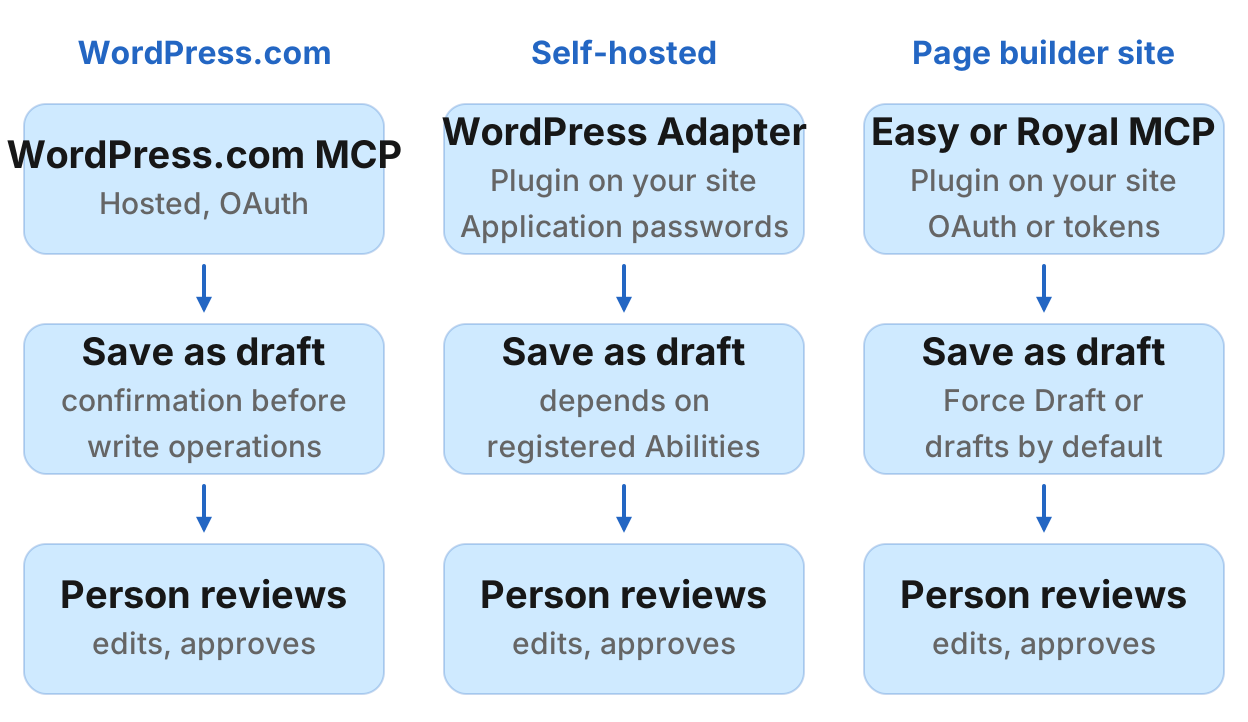
Publish as a draft first
When your agent saves a post, have it save as a draft and review it before publishing. This is standard editorial practice: a person checks the draft for accuracy, tone, and completeness before it goes live.
Several servers support this workflow. Easy MCP AI has a Force Draft on Create setting that saves new posts as drafts even when the agent requests publishing. Royal MCP saves new posts as drafts by default. WordPress.com MCP waits for your confirmation before write operations. For other servers, tell your agent in the prompt: "Save this as a draft, do not publish."
Manifold MCP
Manifold MCP is a hosted MCP server for research data across SEO, AI visibility, social, Reddit, ads, and leads. Manifold MCP does not connect to a CMS. Pair it with one of the servers above.
For content marketing, it covers the research stage: keyword research, SERP data, backlinks, technical crawl, your own Search Console and Bing (at 0 credits), the prompts people ask AI engines and what those engines answer and cite, Reddit threads where your audience talks, YouTube transcripts and comments, and verified work emails for outreach.
Manifold is pay per call, with 250 free credits a month and Pro from $20/mo. Search Console and Bing tools cost 0 credits because the data comes from your own connected accounts. SEO, AI visibility, social, Reddit, YouTube, ads, and leads tools are per call. See SEO tools, AI visibility tools, Reddit tools, YouTube tools, and Search Console tools for what each covers.
Your agent uses Manifold to check what to write before it drafts: keyword and SERP data, AI answer checks for prompts people ask and which brands the engines name and cite, Reddit threads and YouTube comments for the questions real people ask, and your own Search Console and Bing data for pages to refresh. The same server also covers social, ads and leads data.
Setup: Add Manifold from Claude's Connectors page, or add https://mcp.manifoldmcp.com/mcp to ChatGPT at chatgpt.com/plugins > Add > Create custom MCP server, then sign in with OAuth. For Claude Code, Cursor, and other clients, see Manifold's setup guides and ChatGPT setup.
Best for: Hosted research across SEO, AI answers, social, and Reddit, with no SEO subscription or Reddit API app.
Limits: Manifold MCP does not connect to a CMS. It looks things up, it does not publish. Pair it with one of the CMS servers above. For the full workflow from research to brief to published post, see the best MCP servers for content marketing.
Example prompts
These prompts show how to pair research with publishing. Your agent calls the servers it needs for each step.
Write from Reddit research and save as a draft
"Find the top Reddit threads about cold brew coffee from the last month, summarize the questions people ask and the advice they give, draft a guide that answers those questions, and save it as a draft on my WordPress.com site with the category Guides."
Your agent uses Manifold's Reddit tools for research, then a WordPress MCP server to save the draft.
Check what AI engines say, then write and publish
"Check what ChatGPT and Gemini say when people ask about the best project management tool, see which brands they name, draft a comparison post that covers those brands plus ours, and save it as a draft in Contentful."
Your agent uses Manifold's AI visibility tools for research, then Contentful MCP to save the draft.
Refresh an underperforming post from Search Console data
"Find the pages on my site losing clicks in the last 90 days from Search Console, pick the one with the biggest drop, check what the top 5 results cover now, suggest what to add or change, and save the updated draft to Webflow."
Your agent uses Manifold's Search Console tools and SEO tools for the drop and SERP analysis, then Webflow MCP for publishing.
Write from keyword and YouTube research
"Find the most-watched YouTube videos about pour-over coffee from the last 6 months, read the top comments on each, group the questions people ask, check which of those questions have search volume, draft an FAQ section covering the top 5 questions by volume, and add it to the draft in Sanity."
Your agent uses Manifold's YouTube tools and SEO tools for research, then Sanity MCP to save the draft.
Check AI answers and save the report
"Check whether ChatGPT, Claude, Gemini, and Perplexity recommend my brand when someone asks for the best CRM, log which competitors they name and which sources they cite, and save the report to WordPress with the tag AI Visibility."
Your agent uses Manifold's AI visibility tools for the check, then a WordPress MCP server to save the report.
Run this in your agent
Connect Manifold to Claude, ChatGPT or Cursor, then paste this prompt.
Find the top Reddit threads about cold brew coffee from the last month, summarize the questions people ask, draft a guide that answers those questions, and save it as a draft on my WordPress.com site with the category Guides.