Similarweb MCP: how to set it up in Claude, ChatGPT and Cursor
Similarweb's official MCP server brings traffic estimates, audience data and competitor intelligence into Claude, ChatGPT and Cursor. This guide covers which plans include it, connecting each client, common problems, and example prompts.

How do I connect Similarweb to Claude?
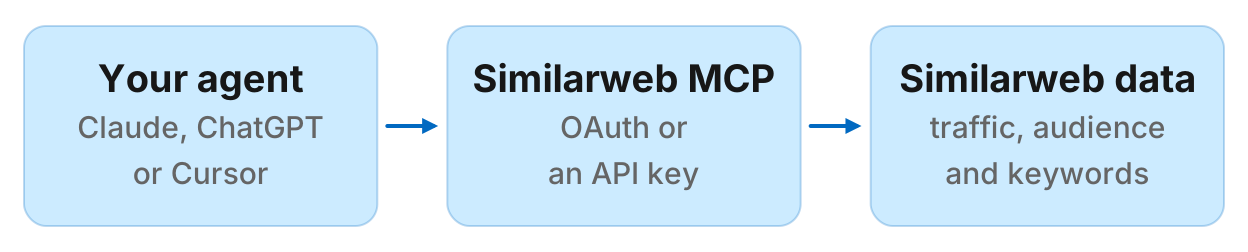
Similarweb MCP is Similarweb's official MCP server at https://mcp.similarweb.com. It connects AI agents such as Claude, ChatGPT and Cursor to Similarweb's digital intelligence data: website traffic and engagement, traffic sources and channels, audience demographics, keyword rankings, app performance and Amazon shopper intelligence. The server is hosted by Similarweb and signs you in with your Similarweb login or API key. You need a Similarweb subscription with API access, and every request spends data credits from it.
This guide covers which plans include Similarweb MCP, how to connect it in Claude, ChatGPT and Cursor, the problems people hit with API access and data coverage, and example prompts.
What is Similarweb MCP?
Similarweb MCP is the bridge between your agent and Similarweb's data. You ask a question in plain language, and the agent picks the Similarweb tools to call. According to Similarweb's MCP documentation, the server provides access to data endpoints across these categories:
Website traffic and engagement: Monthly visits, unique visitors, bounce rate, session duration, pages per visit, new users and returning users for any domain.
Traffic sources: Breakdown by marketing channel (direct, organic search, paid search, social, referrals, email, display ads), with engagement metrics per channel.
Website rank and competitors: Country and category rank over time, similar websites by audience and traffic patterns, and referral sources.
Audience data: Demographics (age and gender distribution), geography (traffic by country with engagement metrics), and audience interests (also-visited websites, audience overlap between domains).
Keyword and search data: Top organic keywords driving clicks to a domain, SERP players (top sites for a keyword), and keyword overview metrics such as search volume and click distribution.
App intelligence: App install penetration (percentage of devices with the app installed), app store rank trends on Android and iOS, and app details (title, publisher, price, category, rating).
Amazon shopper intelligence: Product-level click share and brand performance in Amazon categories.
Other metrics: Leading folders and popular pages on a website, PPC spend estimates, ad networks, technologies a domain uses, and segment-level traffic data.
Who Similarweb MCP is for
Similarweb MCP fits when:
- You already pay for a Similarweb subscription with API access and want that data in conversation with your agent
- Your team uses Similarweb daily for competitive intelligence and wants consistent metrics across the app and your agent
- You are comfortable watching your data credit balance and query scope
It may not fit when:
- You do not have a Similarweb subscription and do not want to start one just for MCP
- You only need traffic estimates or competitor data now and then
- Your plan lacks API access
Which Similarweb plans include MCP
According to Similarweb's MCP setup documentation, Similarweb MCP is available on subscriptions with API access. This includes:
- Business and Enterprise plans: API access is included as part of your plan
- API-only standalone packages: Full connector access is included
Data access through the MCP server mirrors your existing Similarweb subscription. Access is scoped to the specific datasets, regions and historical ranges included in your plan. Coverage depends on traffic volume: low-traffic or niche sites may have limited data.
In October 2026, Similarweb's pricing page did not list specific Business and Enterprise plan prices, directing interested teams to contact sales. The page notes that API access can be purchased standalone or as part of a full platform subscription. There is no extra fee for the MCP server itself, but each query spends data credits from your Similarweb subscription.
To see what you have, log in to the Similarweb platform and check User Settings. If you do not see an API key, your plan may not include API access. Contact your account manager to discuss upgrading.
How to connect Similarweb MCP to Claude
Similarweb is an official connector in Claude's directory:
- In Claude, click the plus button in the lower left corner of the chat interface, or open Settings and select Connectors
- Click Browse connectors and search for Similarweb
- Click the Similarweb connector card and then click Connect
- Enter your Similarweb API key when prompted and click Connect
- The connector status will update to Active
- In a chat, click the plus button and toggle on Similarweb to activate it for that conversation
According to Similarweb's Claude integration guide, the connector must be toggled on per conversation. If you start a new chat, re-enable Similarweb before querying data.
Where to find your API key: Log in to the Similarweb platform, open User Settings and then API Access to copy your key. If you do not see an API key, your plan may not include API access.
Keep your API key confidential. If a key is compromised, regenerate it from User Settings in the Similarweb platform, then reconnect the connector with the new key.
How to connect Similarweb MCP to ChatGPT
Similarweb is an official app in ChatGPT, available across all paid ChatGPT plans (Plus, Pro, Business and Enterprise). According to Similarweb's ChatGPT integration guide, setup is:
- Open ChatGPT in your web browser or launch the ChatGPT desktop application
- In the left sidebar, click Apps
- Search for Similarweb and click the Similarweb card
- Click Connect, then Continue
- A browser tab will open. If you are already signed in to Similarweb, just approve the connection. If not, sign in with your Similarweb account first
- Once approved, the connector status will show as Connected
Once connected, ChatGPT can call the Similarweb app whenever your question requires digital intelligence data. You can ask explicitly (mention Similarweb in your prompt) or in context (ChatGPT will detect when your question needs traffic or competitive data and activate the connector automatically).
Similarweb MCP in Cursor
In Settings, open Cursor Settings, then Tools & MCP, and add this to your MCP configuration:
{
  "mcpServers": {
    "similarweb-traffic-mcp": {
      "command": "npx",
      "args": [
        "-y",
        "mcp-remote@latest",
        "https://mcp.similarweb.com",
        "--header",
        "api-key:YOUR_API_KEY"
      ]
    }
  }
}
Replace YOUR_API_KEY with your Similarweb API key from User Settings and then API Access in the Similarweb platform. Save the configuration and restart Cursor. Confirm the MCP server appears as connected in settings.
According to Similarweb's Cursor integration guide, you can verify the MCP is working by checking that the server is turned on and the tools are enabled.
Do not share your API key with anyone. Store the API key in your global config, not in git. Monitor your API usage in the Similarweb platform to detect any unauthorized access.
Common problems and fixes
Your plan does not include API access
Symptom: Sign-in or requests fail, or you do not see an API key in User Settings.
Fix: Confirm your subscription includes API access. Similarweb MCP needs Business, Enterprise or an API-only standalone plan. Starter and Professional plans may not include API access unless they have an API add-on. Contact your account manager to discuss upgrading.
API key is correct but the connector won't authenticate
Symptom: The connector shows an error when you enter the API key.
Fix: Check for extra spaces or line breaks in the pasted key. Confirm your subscription includes API access. If the key was recently generated, wait a few minutes before retrying. Contact Similarweb support if the issue persists.
Credits run out faster than expected
Symptom: Your credit balance drops quickly.
Cause: Credit consumption varies based on the volume of data returned. More complex queries that pull multiple data types, broader date ranges, or finer granularity (daily vs monthly) consume more credits accordingly.
Fix:
- Be specific. Ask for "the top 50 keywords for example.com in the US" rather than "all keywords"
- Always set a result count, a country filter and date ranges
- Avoid daily granularity unless you need it; monthly data consumes fewer credits
- Keep related questions in one chat so the agent can reuse what it already fetched
- Check your usage under User Settings in the Similarweb platform, open API Access and then Usage
No data for a domain you queried
Symptom: The agent says there is no data for the domain you asked about.
Cause: Similarweb coverage depends on traffic volume. Low-traffic or niche sites may have limited data.
Fix: Try broadening the date range or switching the country filter to worldwide. If a query returns no results for several domains, check that your subscription covers the regions and date ranges you are querying.
Connector is active but Claude or ChatGPT is not returning Similarweb data
Symptom: The connector shows as connected, but the agent does not return Similarweb data.
Fix: In Claude, confirm the Similarweb connector is toggled on in the current conversation. In ChatGPT, mention Similarweb explicitly in your prompt to force the app to activate. If it still does not work, disconnect and reconnect the connector, then re-enter your API key.
Example prompts
Here are prompts you can try once Similarweb MCP is connected.
Traffic and growth trends
"What was Nike's global web traffic over the last three months? Show visits, unique visitors and average session duration."
Channel mix and acquisition
"Show me Spotify's desktop traffic channel breakdown for the most recent month. Which channel drives the highest engagement?"
Competitor discovery
"Who are HubSpot's top organic search competitors? What's the keyword overlap score between them?"
Audience demographics
"What's the age and gender breakdown of Amazon's global web audience for the last month?"
App performance
"How many monthly active users does the Spotify Android app have in the US? Show the trend over the last three months."
Amazon shopper intelligence
"Compare Adidas and Nike's click share in the Athletic Shoes category on Amazon.com over the last three months."
Keyword and SEO analysis
"Show me the top 20 keywords driving organic traffic to Shopify.com. Include search volume, position and traffic share."
Geography and market breakdown
"Where does most of Airbnb's traffic come from? Show the top 10 countries by share, with visits and engagement metrics for each."
Run this in your agent
Connect Manifold to Claude, ChatGPT or Cursor, then paste this prompt.
Show me estimated organic search traffic for shopify.com versus woocommerce.com and bigcommerce.com over the last six months. Then list the top 20 keywords each site ranks for in the US.
If you do not pay for Similarweb
Similarweb MCP is the natural choice when you already pay for Similarweb. If you do not, you have two paths:
For competitor SEO (keywords, backlinks, rankings, domain metrics), use an SEO MCP server. Ahrefs, Semrush, SE Ranking and DataForSEO all run official MCP servers. Manifold is a hosted option that charges per call and needs no API keys of your own.
For traffic estimates, Similarweb is built for traffic and channel estimates. Semrush also provides traffic and market estimates through its Trends API, covered in our Semrush MCP setup guide. Ahrefs, DataForSEO and Manifold estimate search traffic only, not visits or channel mix.
The numbers will not match across sources, because each runs its own panel and models. Traffic estimates are modeled, not a competitor's private analytics. Pick one source and stick with it when you track trends.
To compare every competitor research server, including traffic, SEO, ad libraries and social, read the best MCP servers for competitor research.