Amazon Ads MCP: how to set it up in Claude, ChatGPT and Claude Code
Amazon's official Amazon Ads MCP Server (open beta since February 2026) connects your agent to your Amazon advertising accounts for campaign management, reporting and budgets. This guide covers setup for Claude, ChatGPT and Claude Code, what you can ask, and research outside your accounts.


How do I connect Amazon Ads to Claude?
Amazon hosts an official Amazon Ads MCP Server (open beta since February 2026) at regional endpoints such as https://advertising-ai.amazon.com/mcp. It connects Claude, Claude Code, ChatGPT and other MCP clients to your Amazon advertising accounts, letting your agent report on campaign performance, adjust budgets, create campaigns, and review billing. You need an Amazon Developer account with approved Ads API access and a Login with Amazon security profile. This guide covers setup for each client, what you can ask, and what the server does not do.
What is Amazon Ads MCP?
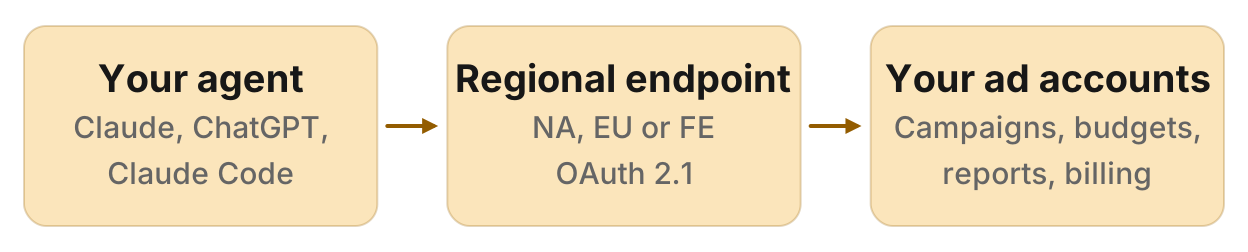
Amazon's Amazon Ads MCP Server translates natural-language prompts into Amazon Ads API calls. Announced on 2 February 2026 and available globally in open beta to Amazon Ads partners with active API credentials, it lets your agent manage your own advertising accounts, not research the market. It works with Claude, ChatGPT, Amazon Kiro, Amazon Bedrock, Amazon AgentCore and other MCP clients. Amazon does not own or operate the LLMs; it hosts the server at three regional endpoints and you bring your own client.
The server offers tools and skills. Tools are deterministic API calls such as updating a budget or pulling a campaign report. Skills are pre-defined prompts Amazon wrote for common workflows. One expert tool, the AMC SQL Generator, is in closed beta; you can apply for access if you use Amazon Marketing Cloud.
What it can do
Amazon's news post and overview list these capabilities:
- Creating, updating or deleting campaigns: including Sponsored Products, Sponsored Brands and Sponsored Display campaigns
- Performance and reporting queries: spend, impressions, clicks, conversions, ACOS, ROAS by campaign, ad group or ad
- Account-level settings: access your advertising accounts and their settings
- Billing and financial data: invoices and payment status
- Pre-built workflows: the end-to-end Sponsored Products campaign creation tool builds a campaign, ad groups and ads in one call; the country expansion tool copies a campaign to another marketplace
Example prompts from Amazon's documentation include "Show me campaign performance for October 2025 on [account_id]", "Show me a list of all of my advertising accounts", "Show me my recent invoices on [account_id]", "Create a Campaign report for [account_id]", and "Increase my campaign budget to $500 on [campaign_id]".
What you need before you start
Amazon's OAuth guide lists the prerequisites:
- An active Amazon Developer account at developer.amazon.com
- An approved application with Amazon Ads API access (apply at advertising.amazon.com/API)
- A Login with Amazon security profile with a Client ID and, optionally, a Client Secret
- An MCP client (Claude, Claude Code, ChatGPT, Amazon Kiro, Amazon Bedrock, or another client)
Regional endpoints
Amazon Ads MCP runs at three endpoints, not one global URL:
- North America:
https://advertising-ai.amazon.com/mcp - Europe:
https://advertising-ai-eu.amazon.com/mcp - Far East:
https://advertising-ai-fe.amazon.com/mcp
Pick the endpoint for the region where your advertising accounts live. A mismatch between the endpoint region and your account region may cause authentication or account access errors.
Public vs private client
Amazon's OAuth flow supports two modes:
| Mode | Credentials | Token lifespan | Best for |
|---|---|---|---|
| Public client | Client ID only | Access token expires after 1 hour | Quick tests, single-session use |
| Private client | Client ID and Client Secret | Refresh token stored in keychain, auto-refreshes | Daily workflows, persistent connections |
Public clients prompt you to re-authenticate in the browser every hour. Private clients store a refresh token and renew it automatically, so you stay connected across sessions. For regular use, set up a private client.
Step 1: Add the callback URL in your Login with Amazon security profile
Each MCP client has its own OAuth callback URL. Open your Login with Amazon security profile, go to Web Settings, and add the callback for your client to Allowed Return URLs. If the callback is missing, you will see a redirect URI mismatch error during authentication.
| Client | Callback URL |
|---|---|
| Claude Desktop | https://claude.ai/api/mcp/auth_callback |
| Claude Code | http://localhost:<PORT>/callback (set port with --callback-port) |
| ChatGPT | https://chatgpt.com/connector/oauth/<APP_ID> (APP_ID shown in ChatGPT's MCP config) |
| Amazon Kiro CLI | http://localhost:<PORT>/oauth/callback |
For custom agents, you can skip OAuth and use the token method: pass headers Amazon-Ads-ClientId and Authorization: Bearer <access_token> with your requests.
Step 2: Connect the server in your MCP client
Claude Code
Run this command with your Client ID and a callback port:
claude mcp add --transport http amzn-ads-mcp https://advertising-ai.amazon.com/mcp --client-id <your-client-id> --callback-port <your-callback-port>For a private client, add --client-secret and you will be prompted for it. The command creates an entry in ~/.claude.json. Start Claude Code with claude, type /mcp, choose amzn-ads-mcp, and click Authenticate. A browser opens where you sign in with the Amazon account that has access to your advertising accounts, then click Allow.
Claude Desktop
In Claude Desktop, open Customize > Connectors > + > Add custom connector. Enter a name (such as "Amazon Ads"), paste the regional endpoint URL (https://advertising-ai.amazon.com/mcp), and under Advanced settings, enter your Client ID. For a private client, also enter your Client Secret. Click Add, then Authorize when prompted.
ChatGPT
On a paid ChatGPT plan (Plus, Pro, Business, Enterprise or Edu), open chatgpt.com/plugins and click Add, then Create custom MCP server (some accounts show Create MCP app). Paste the regional endpoint URL. In Advanced OAuth settings, find the Client registration panel and switch to User-Defined OAuth client. ChatGPT shows you a callback URL in the format https://chatgpt.com/connector/oauth/<APP_ID>. Copy that callback and add it to Allowed Return URLs in your Login with Amazon security profile, as in Step 1. Then enter your Client ID (and optionally your Client Secret for a private client) and click Create. ChatGPT opens a browser where you sign in to Amazon and grant permissions.
Custom MCP servers in ChatGPT require a paid plan.
Amazon Kiro CLI and custom agents
Amazon Kiro CLI and custom agents connect with the same OAuth flow. For token-based authentication without OAuth, pass these headers with each request:
{
  "Amazon-Ads-ClientId": "<your-client-id>",
  "Authorization": "Bearer <access_token>"
}
This is useful for scripts and custom agents that do not support OAuth. The access token lasts one hour; request a new one when it expires.
Step 3: Authenticate and test the connection
After adding the server, your client prompts you to authenticate. A browser opens at Amazon's Login with Amazon page. Sign in with the Amazon account you use for Amazon Ads, review the permissions, and click Allow. Your client confirms the connection and the tools become available.
Test it with this prompt:
"Show me my advertising accounts."
Your agent calls the account management query tool and lists the advertising accounts you have access to, with profile IDs, marketplace IDs and account names. If you see the list, the connection works.
Account context: dynamic vs fixed
Amazon Ads MCP supports two ways to specify which account or profile to work on:
- Dynamic (default): Your agent asks you for the
profileId,managerAccountIdoradvertiserAccountIdon each call. Use the account query tool first to see which IDs are available. If you advertise in multiple marketplaces, pick the marketplace first, then the profile. - Fixed: Set headers
Amazon-Ads-AI-Account-Selection-Mode: FIXEDplusAmazon-Advertising-API-Scope,Amazon-Ads-AccountIdorAmazon-Ads-Manager-AccountIdso every tool call defaults to that account. Not all tools work at manager account scope; check Amazon's get started guide for limits.
Dynamic mode suits multi-account workflows, because your agent asks which account to use each time. Fixed mode is faster when all your prompts target one account or profile.
Regular vs Lite
Amazon offers a Lite endpoint at /mcp/lite with the same capabilities but a smaller context footprint. The Lite server exposes three meta-tools:
amazon_ads_mcp-search_tools: find tools by keywordamazon_ads_mcp-describe_tools: get a tool's signature and parametersamazon_ads_mcp-invoke_tool: call a tool by name with arguments
Lite is useful for models with smaller context windows or sessions where you only need a few tools at a time. Regular mode (/mcp) exposes every tool directly. Use Regular unless your client hits context limits.
Prompts that work
Here are prompts you can ask once Amazon Ads MCP is connected. Replace [profile_id], [account_id] and [campaign_id] with the IDs from your account query.
Campaign performance with ACOS flagging
"Compare ACOS by campaign for the last 30 days on profile [profile_id] and flag anything over 40%."
What it does: Pulls campaign-level performance with ACOS and highlights campaigns above your threshold.
What you get: A table of campaigns sorted by ACOS, with the ones over 40% called out, so you can decide which to pause or adjust.
Budget increase draft
"Draft a budget increase to $50 daily for campaign [campaign_id]. Show me the change before you apply it."
What it does: Proposes a new budget and waits for your approval.
What you get: A summary of the current and proposed budgets, then a confirmation prompt. Say yes, and the server updates the campaign.
High-spend, no-sale search terms
"Which search terms spent over $20 with no sales in the last 14 days on profile [profile_id]?"
What it does: Queries your search term report and filters for spend with zero conversions.
What you get: A list of search terms to add as negative keywords or pause.
Sponsored Products campaign creation
"Create a Sponsored Products campaign for ASIN B08XYZ1234 with a $50 daily budget, targeting auto. Show me the structure before you create it."
What it does: Uses the end-to-end Sponsored Products tool to draft a campaign, ad groups and ads in one step.
What you get: A campaign plan with targeting, budget and ad details. Approve it, and the server creates everything at once.
Campaign report generation
"Create a campaign performance report for account [account_id] covering the last 7 days."
What it does: Calls the campaign report tool and pulls metrics for all campaigns in that account.
What you get: A report with spend, impressions, clicks, sales and ACOS, by campaign.
Country expansion
"Copy campaign [campaign_id] to the UK marketplace with the same settings."
What it does: Uses the country expansion workflow to replicate a campaign in another marketplace.
What you get: A new campaign in the UK marketplace with the same structure, ready to activate.
AMC SQL example (closed beta)
"Generate an AMC SQL query to find customers who saw my ads three times and then bought within 7 days."
What it does: If you have access to the AMC SQL Generator expert tool, your agent drafts an Amazon Marketing Cloud query for that audience.
What you get: A SQL query you can run in AMC to build the segment.
Limits and gotchas
Regional endpoint mismatch: If your advertising accounts are in Europe but you connect to the North America endpoint, you may see authentication or account access errors. Check that the endpoint region matches your accounts.
Redirect URI mismatch: This error means the callback URL in your Login with Amazon security profile does not match the one your client uses. Add the exact callback from the table in Step 1.
Public client token expiry: Public clients expire after one hour. If a tool call fails with an authentication error, re-authenticate. Switch to a private client with a Client Secret to avoid re-auth prompts.
Beta changes: Amazon says the server is in open beta and features may change. If a prompt that worked last month fails now, check Amazon's changelog for API updates.
Writes and deletes: The server can pause campaigns, adjust budgets and delete ads. Some clients (Amazon Kiro CLI) support a disabledTools config to block delete tools. Always review proposed changes before approving them, especially for live campaigns.
Manager account scope limits: Not all tools work when you set a manager account ID in fixed account mode. Amazon's documentation says to use profile-level or advertiser-level IDs for most operations.
Seller Central is separate: Amazon Seller Central (inventory, listings, fulfillment) uses the SP-API, not the Ads API. This server only manages advertising.
Research outside your own accounts
Amazon Ads MCP works on the advertising accounts you manage. It does not show what shoppers search on Amazon outside your campaigns, who holds the sponsored spots for a search, a competitor's listings, or their sellers and keywords. For public catalog research, use the Amazon MCP server with Manifold's Amazon tools. They cover:
- Search results: organic and sponsored products for any search, in order, with rank and price
- Product listings: one product by ASIN, with title, images, price, ratings, attributes, sellers and the Buy Box
- Sellers and keywords: every seller and the Buy Box winner for an ASIN; the Amazon searches a product ranks for with monthly search volume
- Competitors and keyword ideas: competing products and related Amazon searches with volume
Location picks the marketplace (for example, United Kingdom reads amazon.co.uk). No seller account or Amazon API keys required; Manifold calls Amazon's catalog on your behalf and you pay per call with credits. Every workspace gets 250 free credits a month, and Pro starts at $20/mo. Reviews are not available.
Workflow: Research keywords and competitors with the Amazon MCP server, then build or adjust campaigns with Amazon Ads MCP (with your approval).
Run this in your agent
Connect Manifold to Claude, ChatGPT or Cursor, then paste this prompt.
Find Amazon keyword ideas around 'standing desk' with search volume, then show who holds the sponsored spots for the top 5.