Meta Ads MCP: how to set it up in Claude, ChatGPT and Cursor
Meta's official Ads MCP server connects Claude, ChatGPT and Cursor to your Facebook and Instagram ad accounts. This guide covers setup, permissions, prompts that work well, and when to use an ad library server instead.

How do I connect Meta Ads to Claude?
Meta's official Ads MCP server, hosted at https://mcp.facebook.com/ads, connects Claude, ChatGPT and Cursor to the Meta (Facebook and Instagram) ad accounts you manage. Your agent can report on campaign performance, create and edit campaigns, audit audiences, check pixel health, run A/B tests and review activity logs, all within your account's permissions. If you want to research competitors' ads instead, see the best ad library MCP servers.
This guide covers setup in Claude, ChatGPT and Cursor, what you can ask once connected, when to use a different server, and common permission issues.
What is Meta Ads MCP?
Meta Ads MCP is a hosted MCP server that bridges your AI agent and the Meta Marketing API. You sign in with the Facebook account you use for Ads Manager, grant permissions, and your agent can then read and act on the ad accounts that Facebook user can see. Meta introduces the server in its Ads MCP server overview and Business Help Center, and announced it in a business news post about AI connectors.
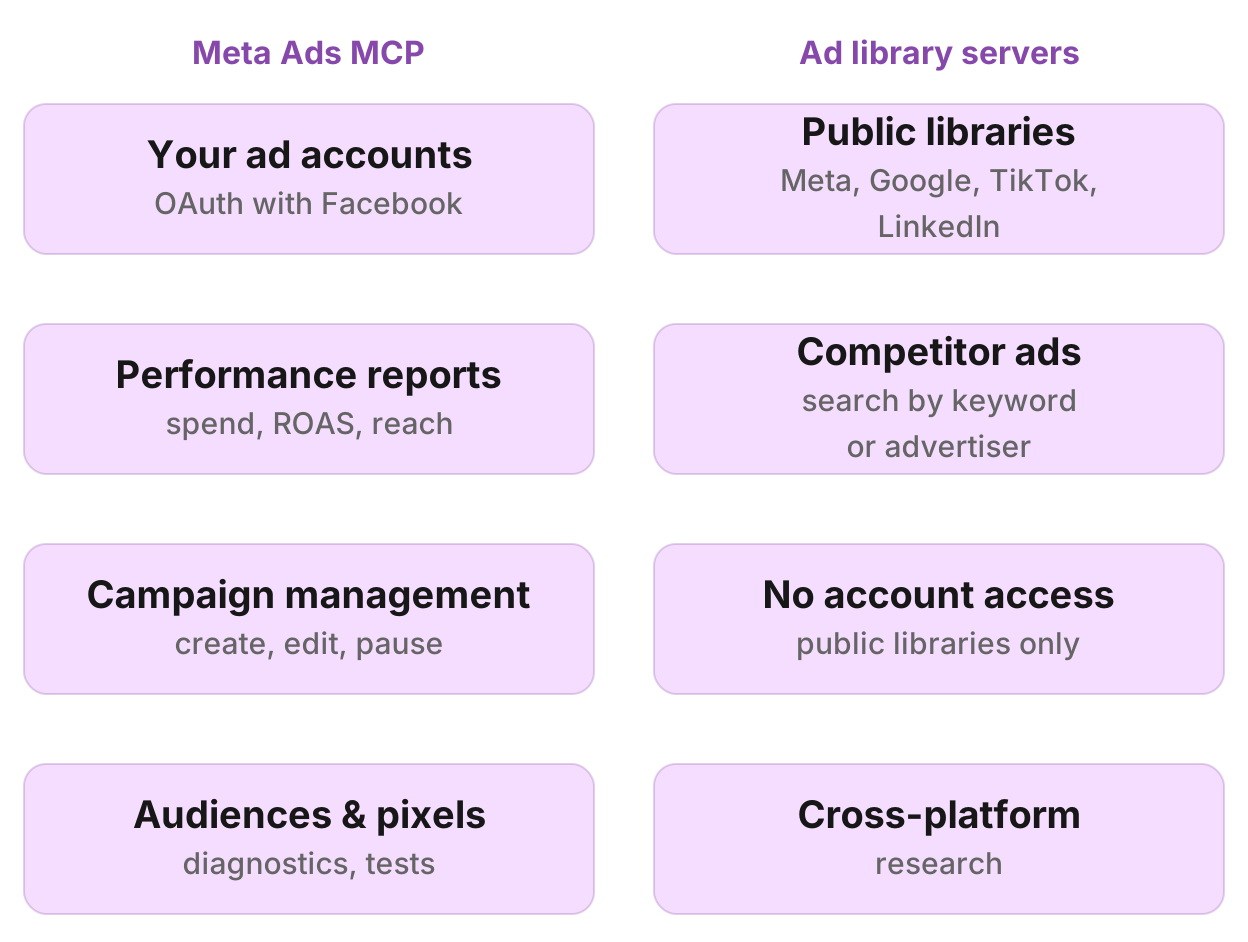
Meta's server does a different job from ad library MCP servers. The official server manages your own ad accounts: performance reporting, campaign creation, budgets, creatives, audiences, catalog sync, and test setup. Ad library MCP servers read the public libraries of Meta, Google, TikTok and LinkedIn, so you can see what competitors run. Neither does the other's job.
The server is rolling out gradually. Meta's Business Help article says not all ad accounts can see it yet. If your ad account does not have access, Meta suggests checking back later.
What it can do
Meta's developer documentation lists the server's capabilities:
- Performance reporting: spend, reach, impressions, clicks, conversions, ROAS by campaign, ad set and ad
- Campaign, ad set and ad management: create, edit, pause, activate, adjust budgets and bids
- Audiences: build and update custom and lookalike audiences
- Catalogs: sync product feeds and troubleshoot catalog errors
- Pixel and Conversions API diagnostics: check event setup and data flow
- A/B tests and lift studies: set up experiments and read results
- Activity logs: see who changed what and when
The tools are write-capable. Your agent can pause an underperformer, increase a budget or update an audience, within the permissions you set. Meta's documentation emphasizes that you control what the server can do through permissions in Business Settings.
How to set up Meta Ads MCP
1. Check access
Open Ads Manager with the Facebook account you use for ads. Meta says the feature is rolling out, so if you don't see AI connectors or MCP settings in Business Settings, your account may not have access yet.
2. Add the server in Claude
Open Settings > MCP servers in Claude Desktop (macOS, Windows or Linux). Click Add server, choose Remote server, and paste https://mcp.facebook.com/ads as the URL. Click Add, then Authorize. Claude opens a browser where you sign in with Facebook and grant permissions.
Once connected, the server appears in your MCP servers list. In a new Claude chat, the Meta Ads MCP tools are available alongside any other MCP servers you've added.
3. Add the server in ChatGPT
On a paid ChatGPT plan (Plus, Pro, Business, Enterprise or Edu), open chatgpt.com/plugins, click Add, then Create custom MCP server (called Create MCP app on some accounts). Paste https://mcp.facebook.com/ads as the server URL, leave Authentication on OAuth, accept the warning, then click Create. ChatGPT opens a browser where you sign in with Facebook and grant permissions.
The server persists across chats. Once added, any new ChatGPT conversation can call its tools.
For more on adding MCP servers to ChatGPT, including plan requirements and workspace permissions, see ChatGPT for SEO: workflows and setup.
4. Add the server in Cursor
Open Cursor's MCP settings. The location varies by operating system:
- macOS:
~/.cursor/mcp.json - Windows:
%APPDATA%\Cursor\mcp.json - Linux:
~/.config/cursor/mcp.json
Add an entry for Meta Ads MCP as a remote server:
{
  "mcpServers": {
    "meta-ads": {
      "url": "https://mcp.facebook.com/ads",
      "transport": "http"
    }
  }
}
Save the file and restart Cursor. When you first use a Meta Ads MCP tool, Cursor prompts you to authorize the server through Facebook.
5. Set permissions in Meta Business Settings
Meta's Business Help article says you control what the MCP server can do in Business Settings > Integrations > Ads MCP server. The article suggests setting permission rails for campaigns, audiences, catalogs, and whether the server can create or only read.
If you cannot find that settings path, Meta's rollout may not have reached your account yet.
What to ask once it's connected
Here are prompts for common Meta ads tasks. They work with the official server in any of the clients above.
Spend and ROAS by campaign
"Show spend, conversions and ROAS for all campaigns in ad account 123456789, last 30 days versus the prior 30 days."
What it does: Pulls performance for every campaign with two date ranges, so you can see which grew and which dropped.
What you get: A table with current and previous spend, conversions and ROAS per campaign, sorted by spend or ROAS.
Campaign performance over time
"Chart daily spend, impressions and link clicks for campaign ID 23842345678, last 14 days."
What it does: Pulls the time series with breakdown by day.
What you get: A chart or table showing the trend, so you can spot spikes, drops or weekday patterns.
Creative fatigue check
"List all active ads in campaign 23842345678 with their frequency and CTR. Flag any with frequency over 3 and CTR under 1%."
What it does: Pulls active ads with delivery metrics, and your agent identifies the ones whose creative may be worn out.
What you get: A ranked list of ads that may need a refresh.
Pause underperformers with approval
"Find all ad sets in account 123456789 with spend over $100 and ROAS under 1.5 in the last 7 days. Suggest which to pause, and wait for my approval before you change anything."
What it does: Pulls ad sets and their performance, identifies the ones below your threshold, and waits for you to confirm before pausing.
What you get: A list of candidates with reasoning, then a confirmation step, then the server pauses them if you agree.
Audience overlap audit
"Check audience overlap between the three lookalike audiences in ad account 123456789."
What it does: Reads the audiences and checks how much they overlap.
What you get: A report on which audiences share users, so you can decide whether to consolidate or adjust targeting.
Pixel event health
"Check pixel events for account 123456789 over the last 7 days. Are all expected events firing? Any setup issues?"
What it does: Reads pixel diagnostics through the Conversions API tools.
What you get: A summary of which events are firing, event counts, and any warnings about missing parameters or deduplication issues.
Campaign budget reallocation
"Reallocate budget across the four active campaigns in account 123456789. Move budget from the two with ROAS under 2 to the two with ROAS over 4. Show me the new budgets before you apply them."
What it does: Calculates new budgets based on performance and shows you the changes before committing.
What you get: A proposed budget split, then a confirmation step, then the server updates the campaigns if you agree.
Cross-account campaign summary
"I manage three ad accounts: 111111111, 222222222, 333333333. Show total spend, impressions, and conversions across all three, last 28 days."
What it does: Pulls performance from each account and aggregates it.
What you get: A single summary table with totals across accounts, useful for agency reporting.
New campaign draft
"Draft a new campaign for ad account 123456789 targeting women aged 25 to 40 in California, promoting our new athleisure line, with a $50 daily budget. Do not create it yet, just show me the setup."
What it does: Your agent structures the campaign, ad set and audience settings, and shows you the draft.
What you get: A configuration you can review, adjust and then ask the agent to create.
A/B test setup
"Set up an A/B test in account 123456789 comparing two ad creatives for campaign 23842345678. Split traffic 50/50, run for 7 days, optimize for link clicks."
What it does: Creates the test structure through Meta's experiments API.
What you get: A running test, and your agent can check results once the test completes.
Limits and gotchas
Write tools and approval
Meta's server can create, edit and pause campaigns. Always review changes before your agent applies them, especially budget and status changes. Pausing the wrong campaign during a launch can be expensive.
Rollout gaps
Meta's Business Help says the feature is rolling out gradually. If your ad account does not show AI connector settings in Business Settings, you cannot connect yet. Meta suggests checking back in a few weeks.
Permissions
You control what the server can do in Business Settings. If a tool fails with a permission error, check the Ads MCP server settings under Integrations in Business Settings, or ask a Business Manager admin to review them.
Instagram and Facebook assets
Some prompts need clarity on whether you mean an Instagram account or a Facebook page. When your agent asks, specify which platform the asset belongs to.
Not for competitor ad libraries
Meta Ads MCP connects to your own ad accounts only. It does not search the Meta Ad Library for competitors' ads. For that, see the best ad library MCP servers.
Hosted and community options
Several community servers read Meta's Marketing API or Ad Library, and some agencies have built their own integrations. Here is how they compare to Meta's official server.
| Server | Hosted or self-run | What it does | What you need | Best for |
|---|---|---|---|---|
| Meta's official Ads MCP | Hosted by Meta | Manage your own Meta ad accounts: reporting, campaign creation, audiences, pixel diagnostics, tests | Facebook account with ad account access | Teams managing their own Meta campaigns |
| byadsco/meta-ads-mcp | Self-hosted (Docker or Cloud Run) | Manage client Meta ad accounts (140+ tools), plus competitor ad library research via a scraping service | A Meta app or access token, plus a scraping API token | Agencies managing many client ad accounts |
| Ad library MCP servers | Varies (hosted or local) | Read the public Meta Ad Library only, no account management | Varies by server | Competitor ad research, not account management |
Prices and features were checked in October 2026. For a full comparison of ad library servers covering Meta, Google, TikTok and LinkedIn, see the best ad library MCP servers.
byadsco/meta-ads-mcp
byadsco/meta-ads-mcp is an open-source (MIT), self-hosted server built for agencies managing many client ad accounts. It has over 140 tools covering campaigns, ad sets, creatives, audiences, reporting, comments, billing and WhatsApp Business, plus ad library tools that read the public Meta Ad Library through a third-party scraping service.
Deploy it with Docker or Google Cloud Run, or run it locally. Each user signs in with Facebook Login through a Meta app you set up, or you pass an access token.
Best for: Agencies that manage client Meta accounts and want ad library research in the same server. If you only need account management, Meta's official server is simpler. If you only need ad library research, see the servers in the best ad library MCP servers.
Ad library servers
Several MCP servers read the public Meta Ad Library, which shows ads from any advertiser. They do not connect to your ad accounts and cannot manage campaigns. Examples include InsightfulPipe (hosted, covers Meta and three other platforms), SociaVault (hosted or local, covers Meta, TikTok, Google and LinkedIn), and community servers like at-dan/ad-library-mcp and facebook-ads-library-mcp. All of them are compared in the best ad library MCP servers.
Use an ad library server when: You want to see what competitors run on Meta, Google, TikTok or LinkedIn, and you do not need to manage your own campaigns.
When you need something else
Public ad library research
Meta Ads MCP manages your own ad accounts. To see what competitors run on Meta, Google, TikTok or LinkedIn, use an ad library MCP server. Manifold hosts ad library tools for Meta, TikTok, LinkedIn and Google alongside SEO, AI visibility, social and leads data. Every workspace gets 250 free credits, then Pro starts at $20/mo. See the ad library tools documentation for what each tool returns.
Manifold limits: It reads public ad libraries for competitor research. It does not connect to your ad accounts and cannot create or edit campaigns.
Google Ads account management
For Google Ads reporting and queries, use Google's Google Ads MCP server. It runs locally through pipx and pulls data from the Google Ads API. For setup, see the best MCP servers for marketing.
Cross-channel marketing research
For SEO, AI visibility, social, Reddit, ad libraries and leads in one server, see Manifold's marketing MCP. It covers SEO (keywords, backlinks, audits, rankings), your own Search Console and Google Analytics data, AI visibility (prompts across ChatGPT, Claude, Gemini, Perplexity), social (TikTok, Instagram, Facebook, YouTube, LinkedIn, Twitter), Reddit (search, threads, subreddits), ad libraries (Meta, TikTok, LinkedIn, Google), and leads (companies, people, verified work emails). It is pay per call with no API keys of your own.
Run this in your agent
Connect Manifold to Claude, ChatGPT or Cursor, then paste this prompt.
Show spend, conversions and ROAS for all campaigns in ad account 123456789, last 30 days versus the prior 30 days. Flag campaigns with ROAS under 2.