SerpApi MCP: how to set it up in Claude, Claude Code and Cursor
SerpApi's official MCP server brings search results from Google, Bing, YouTube, Amazon and many other engines into your agent. This guide covers each client, authentication, pricing, common problems and example prompts.

How do I connect SerpApi MCP to Claude?
SerpApi MCP is SerpApi's official MCP server at https://mcp.serpapi.com. It connects AI agents such as Claude, Claude Code, Cursor and Codex to SerpApi's search results from Google, Bing, Yahoo, DuckDuckGo, YouTube, Amazon, eBay, Google Scholar and many other engines. The server is hosted by SerpApi and signs you in with your SerpApi API key. Every search counts against your SerpApi plan.
This guide covers how SerpApi MCP works, how to connect it in Claude Desktop, Claude Code and Cursor, the authentication options, example prompts, and the gotchas to watch out for.
What is SerpApi MCP?
SerpApi MCP is the bridge between your agent and SerpApi's search result parsers. You ask a question in plain language, and the agent picks the SerpApi tools to call. The search tool works with any SerpApi engine. SerpApi's API list includes:
Google: Search, News, Scholar, Shopping, Jobs, Images, Videos, Maps, Flights, Hotels, Trends and more.
Other search engines: Bing, Yahoo, DuckDuckGo, Baidu, Yandex and Naver.
Shopping and marketplaces: Amazon, eBay, Walmart, Home Depot and Apple App Store.
Video: YouTube search, channels, videos and transcripts.
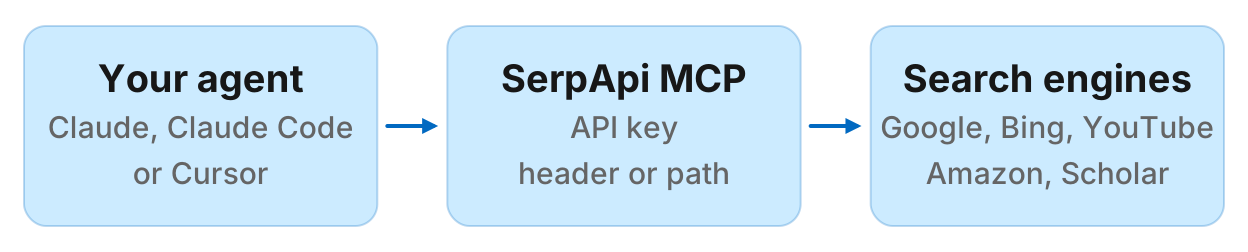
The main tool is search, which takes an engine name (the default is google_light) and that engine's parameters. Results come back as JSON by default, with compact and complete modes. Setting output to "md" returns Markdown, which SerpApi says cuts token usage by 50% on average. Per-engine parameter schemas are exposed as MCP resources at serpapi://engines.
When your MCP host supports MCP Apps, two opt-in tools, search_table and search_dashboard, show results as an interactive table or dashboard.
Who SerpApi MCP is for
SerpApi MCP fits when:
- You need structured search results from multiple engines in your agent
- You want parsed SERP features such as knowledge panels, shopping results, news boxes, or local packs
- Your workflow requires cross-engine comparison or engine-specific data such as YouTube video metadata or Amazon product details
- You are comfortable managing a SerpApi API key and watching your monthly searches
It may not fit when:
- You only need Google SERP data and already have a dedicated SEO MCP server
- You want raw HTML instead of parsed JSON
- You need more than the free plan's 250 searches a month but do not want another subscription
SerpApi MCP authentication
SerpApi MCP supports two authentication methods:
Header authentication (recommended): Pass your API key in the Authorization: Bearer YOUR_API_KEY header. This keeps your key out of URLs and server logs. SerpApi's README recommends it.
Path-based authentication: Embed your API key in the URL as https://mcp.serpapi.com/YOUR_SERPAPI_API_KEY/mcp. SerpApi offers it for clients that cannot set headers. The key ends up in your config and in URLs.
Get your API key from serpapi.com/manage-api-key. SerpApi's free plan includes 250 searches a month.
No key is needed to connect, list tools or read resources. search and the MCP Apps tools need one and return an error without it.
How to connect SerpApi MCP to Claude Desktop
SerpApi's README shows this config for the hosted server. Open Claude Desktop, go to Settings, then Developer, then Edit Config, and add it to claude_desktop_config.json:
{
  "mcpServers": {
    "serpapi": {
      "type": "http",
      "url": "https://mcp.serpapi.com/YOUR_SERPAPI_API_KEY/mcp"
    }
  }
}
Replace YOUR_SERPAPI_API_KEY with your key, save the file and restart Claude Desktop. This uses path authentication, so the key sits in the config file.
Alternative: the Claude Desktop extension
SerpApi also ships a .mcpb bundle that runs the server locally over stdio:
- Download the
.mcpbfile from the latest serpapi-mcp release - Open it with Claude Desktop, or drop it onto Settings, then Extensions
- Enter your SerpApi API key when Claude Desktop asks for it
Claude Desktop stores the key as a sensitive setting, so it stays out of the URL. Searches still go to SerpApi and count against your plan.
How to connect SerpApi MCP to Claude Code
From SerpApi's README, run:
claude mcp add --transport http serpapi https://mcp.serpapi.com/mcp --header "Authorization: Bearer YOUR_SERPAPI_API_KEY"Replace YOUR_SERPAPI_API_KEY with your key, then check the server with claude mcp list.
How to connect SerpApi MCP to Cursor
SerpApi's README has an Install in Cursor button. To add it by hand, open Settings, then Cursor Settings, then Tools & MCP, and add:
{
  "mcpServers": {
    "serpapi": {
      "type": "http",
      "url": "https://mcp.serpapi.com/mcp",
      "headers": {
        "Authorization": "Bearer YOUR_SERPAPI_API_KEY"
      }
    }
  }
}
Keep the key in your global Cursor config, not in a project file you commit to git.
Other clients
The README also lists commands for Codex (codex mcp add serpapi --url https://mcp.serpapi.com/mcp --bearer-token-env-var SERPAPI_API_KEY, which reads the key from your shell), OpenClaw and Hermes, plus an Install in VS Code button. Any client that can connect to a remote HTTP MCP server can use the header or path URL above.
SerpApi MCP pricing
The MCP server has no separate fee. Each successful search counts against your SerpApi plan. Checked October 2026 on SerpApi's pricing page:
| Plan | Price | Searches per month |
|---|---|---|
| Free | $0 | 250 |
| Starter | $25/month | 1,000 |
| Developer | $75/month | 5,000 |
| Production | $150/month | 15,000 |
| Big Data | $275/month | 30,000 |
SerpApi says only successful searches count. Cached, errored and failed searches do not, and the number of results in a response does not change the count. Each plan also has an hourly throughput limit.
Example prompts
Here are prompts you can try once SerpApi MCP is connected.
Google Search results
"Get the Google search results for best coffee grinders and show me the top 5 organic results."
News search
"Search Google News for articles about electric vehicles from the last 7 days."
YouTube video search
"Find the top 10 YouTube videos about sourdough bread and give me their titles, views and upload dates."
Google Scholar lookup
"Search Google Scholar for papers about machine learning in healthcare published since 2024."
Amazon product search
"Find the top-rated espresso machines on Amazon under $500 and show me their prices and review counts."
Markdown output for efficiency
"Search Google for react best practices and return the results in Markdown format to save tokens."
Cross-engine comparison
"Compare the top 5 results for headphones on Google Shopping and Amazon."
Local search
"Find the top-rated coffee shops in San Francisco using Google Maps."
Run this in your agent
Connect Manifold to Claude, ChatGPT or Cursor, then paste this prompt.
Show me the top 10 Google results for best espresso machines and the SERP features on the page.
Common problems and fixes
Authentication errors
Symptom: search returns an error while listing tools works.
Fix: Listing tools needs no key, so this points at the key itself. Copy it again from serpapi.com/manage-api-key and check for stray spaces. With header auth, the value must be Bearer followed by the key.
Searches run out faster than expected
Cause: Every successful search counts, and agents often run several searches per question.
Fix: Check usage in your SerpApi dashboard. Ask the agent for fewer, more targeted searches.
Missing required parameters
Cause: Engines need different parameters. Google uses q, YouTube uses search_query, and Amazon uses k. Google Flights needs airports and dates.
Fix: Clients that support form elicitation get a form for the missing fields. Other clients get an error listing them, so the agent can ask you. The SerpApi API reference lists each engine's parameters.
Results use too many tokens
Fix: Ask for Markdown output (output: "md") or compact mode.
Requests slow down or fail at volume
Cause: Each plan has an hourly throughput limit, from 50 searches an hour on the free plan.
Fix: Spread searches out, or move to a larger plan on SerpApi's pricing page.
If you only need SEO data
SerpApi MCP covers far more engines than most SEO work needs. If you only need Google SERP checks, keyword metrics, rankings and backlinks, a dedicated SEO MCP server may fit better. Manifold is a hosted option with no API keys of your own, paid per call, with 250 free credits per workspace and Pro from $20/mo.
For a full comparison of SEO MCP servers, including DataForSEO, Ahrefs, Semrush and SE Ranking, read the best SEO MCP servers. To compare every marketing server, including competitor research and social data, read the best MCP servers for marketing.